
I recreated Instagram’s trending Lofi Dusk aesthetic: Here is how you can do it too
 Follow Us

Instagram often brings new ways to make photos look fresh and eye-catching. One of the Instagram trends that are going viral nowadays is to convert normal images to Lofi Dusk style. The effect gives your image a calm evening feel while keeping the originality intact. You need not to worry about having a paid subscription to an AI tool, as you can simply do it for free using the default Instagram feature. In this article, I’ll walk you through the simple steps on how to convert your normal image to Instagram-viral Lofi Dusk images.
 Survey
How to add Lofi Dusk effect to your Instagram stories
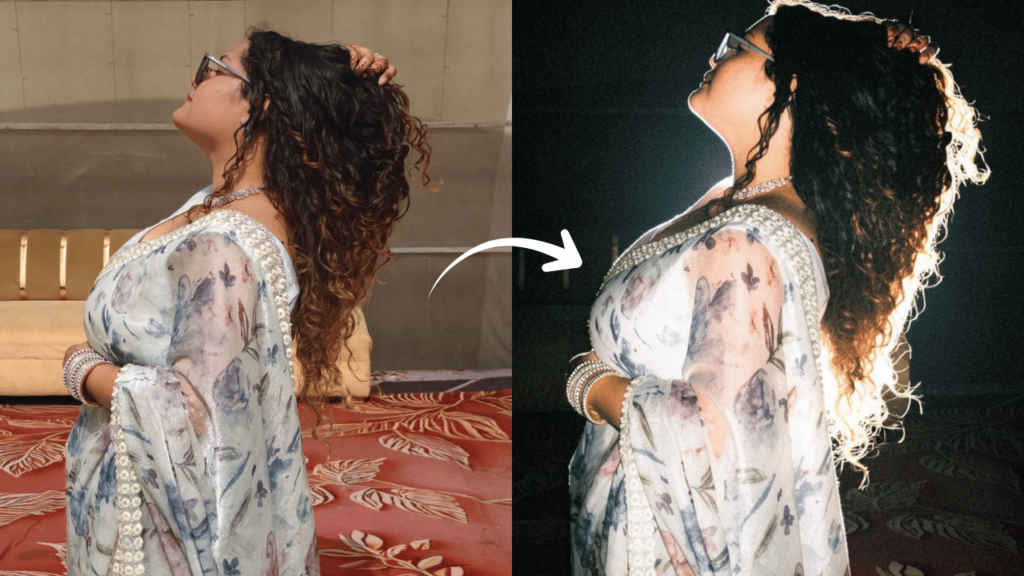
Follow the simple steps below to use the Lofi Dusk effect on your existing image:
1. Open the Instagram app on your Android or iOS device.
2. Now, you need to swipe right on the home feed so that you can open the Story section.
3. Upload the image you wish to add the Lofi effect to.
4. Tap the Restyle icon from the list in the top right side of the screen.
5. Look for the Lofi Dusk backdrop at the bottom of the screen and tap it.
Now, you need to wait for some time as the Lofi filter comes to life.
Also read: Perplexity AI users say advanced AI limits are running out faster, company blames promo code abuse
What does the Lofi Dusk filter actually do?
The Lofi Dusk filter changes an image by giving it a soft, cinematic low-light look. It doesn’t just make the photo brighter or darker; it changes how light, shadows, and depth appear, so the whole picture feels more balanced and atmospheric.
It turns normal or flat lighting in the image to something that looks similar to the warm sunset light. As a result of that, your normal-looking image gets a cosy, film-like mood.
Also read: Moto G37 Power and G37 launched in India: Check price and specs
Moreover, it also adds a gentle glow around the edges of people and objects, which helps subjects stand out more. In portraits or selfies, this makes faces look clearer and softly lit.


