 E-Magazine
HP HyperX OMEN 15-ga0028TX review: strong foundations, but pricey
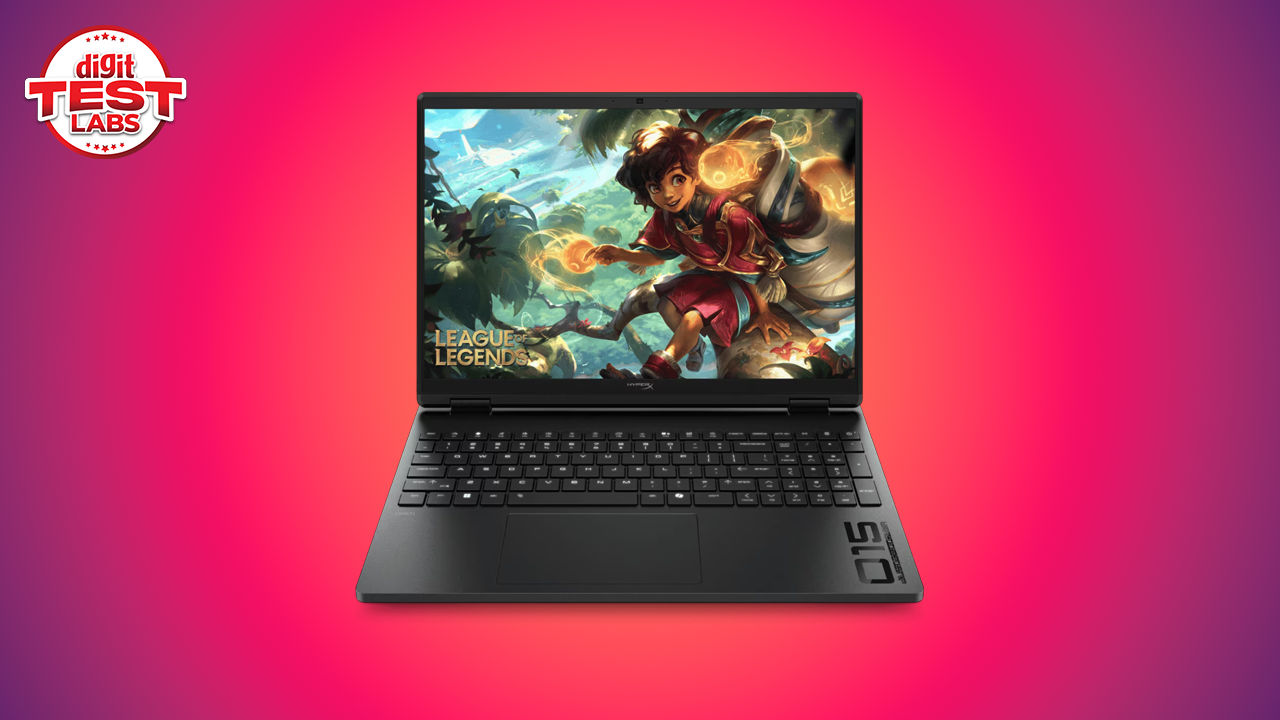
Surprised by the name? Well, the HyperX OMEN 15 marks a fairly substantial shift for HP’s gaming laptop portfolio. OMEN has long been the company’s recognisable gaming PC brand, while HyperX has largely been associated with peripherals, even before HP acquired it from Kingston. The HyperX OMEN 15 brings the two identities together, placing the better-known gaming accessory name directly on the laptop itself. The model reviewed here is the HyperX OMEN 15-ga0028TX, powered by an Intel Core i7-14650HX processor and an NVIDIA GeForce RTX 5050 Laptop GPU. It also includes 24 GB of DDR5 memory, a 1 TB PCIe Gen 4 SSD and a 15.3-inch 2560 × 1600 IPS display with a 180 Hz refresh rate.
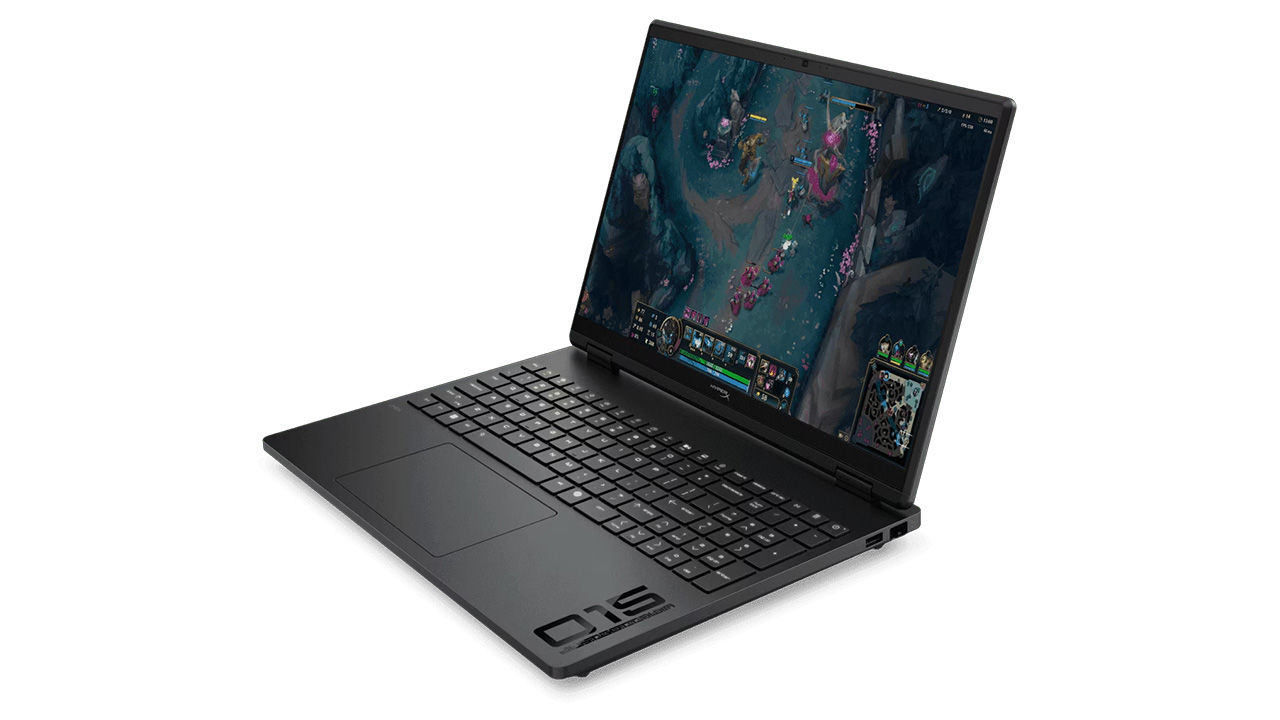
Prima facie, this is a sensible entry-level gaming configuration. The Core i7-14650HX remains a capable processor, the display is sharper and brighter than what many gaming laptops in this price range provide, and the 115 W TGP RTX 5050 gives the GPU enough room to operate close to its intended limits. The problem is pricing and that’s an industry-wide concern thanks to the memory shortage issues. This configuration carries an MRP of around ₹1,80,000 and is available online for approximately ₹1,59,990. An RTX 5060 version with the same Core i7 processor costs roughly ₹10,000 more. That small jump places considerable pressure on the RTX 5050 model, particularly when buyers are already spending well above ₹1.5 lakh.
HP HyperX OMEN 15-ga0028TX Specifications
| Processor | Intel Core i7-14650HX |
| CPU configuration | 16 cores, 24 threads |
| Maximum CPU boost clock | Up to 5.2 GHz |
| Graphics | NVIDIA GeForce RTX 5050 Laptop GPU |
| Graphics memory | 8 GB |
| Maximum graphics power | 115 W |
| Integrated graphics | Intel UHD Graphics |
| Memory | 24 GB DDR5-5600 |
| Storage | 1 TB Kioxia PCIe Gen 4 NVMe SSD |
| Display | 15.3-inch IPS |
| Resolution | 2560 × 1600 |
| Refresh rate | 180 Hz |
| Wireless connectivity | Wi-Fi 6, Bluetooth 5.4 |
| Wired networking | Gigabit Ethernet |
| Webcam | 1080p with HDR auto switch |
| Keyboard | Full-size, four-zone RGB |
| Battery | 70 Wh |
| Power adapter | 230 W |
| Dimensions | 34.3 × 25.3 × 2.25 cm |
| Weight | Approx 2.4 kg |
| Operating system | Windows 11 Home |
| Launch price | Rs 1,49,990 |
The Intel Core i7-14650HX combines eight Performance cores with eight Efficient cores, producing a total of 16 cores and 24 processing threads. It includes 30 MB of L3 cache and is built for high-power gaming laptops rather than light machines. And to go with that, we have the RTX 5050 Laptop GPU has 8 GB of dedicated graphics memory and runs at a maximum graphics power of 115 W in this configuration. That power allocation is something you should never ignoore because laptop GPUs carrying the same name can perform differently depending on how much power the manufacturer permits them to draw. The 24 GB memory capacity provides more headroom than the more common 16 GB configuration, particularly for content creation, larger games and multitasking.
Features
The HyperX OMEN 15 is managed primarily through the OMEN Gaming Hub. The application brings performance profiles, cooling controls, lighting options and system monitoring into one interface. HP also promotes an Unleashed Mode designed to expose additional performance controls. It gives users more freedom to tune system behaviour, although the exact options available can depend on the hardware configuration and firmware.
Then there’s a tab for OMEN AI which is intended to automate game optimisation. HP claims that it can adjust operating system, hardware and supported game settings to improve frame rates without requiring the user to manually test every combination. As with any automated optimiser, the results are likely to vary between games, but the concept is useful for less experienced users who do not want to spend time adjusting individual settings. You already have NVIDIA’s own add-on software to help here.
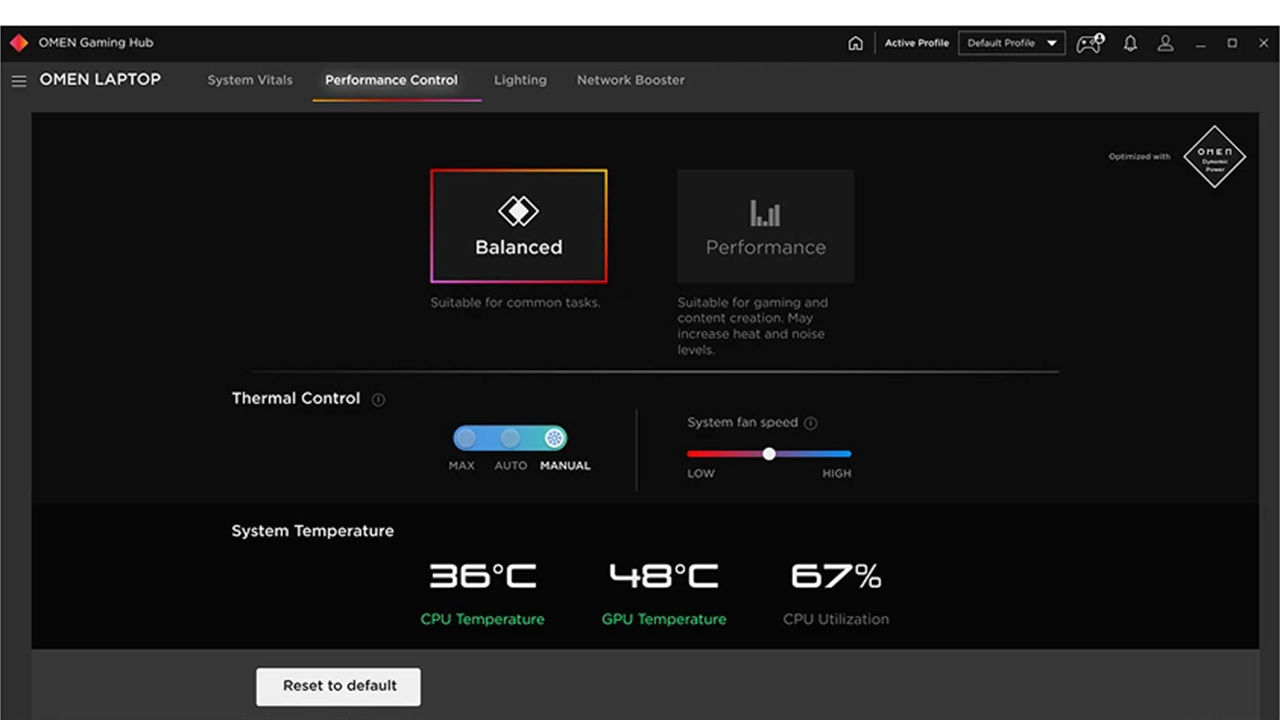
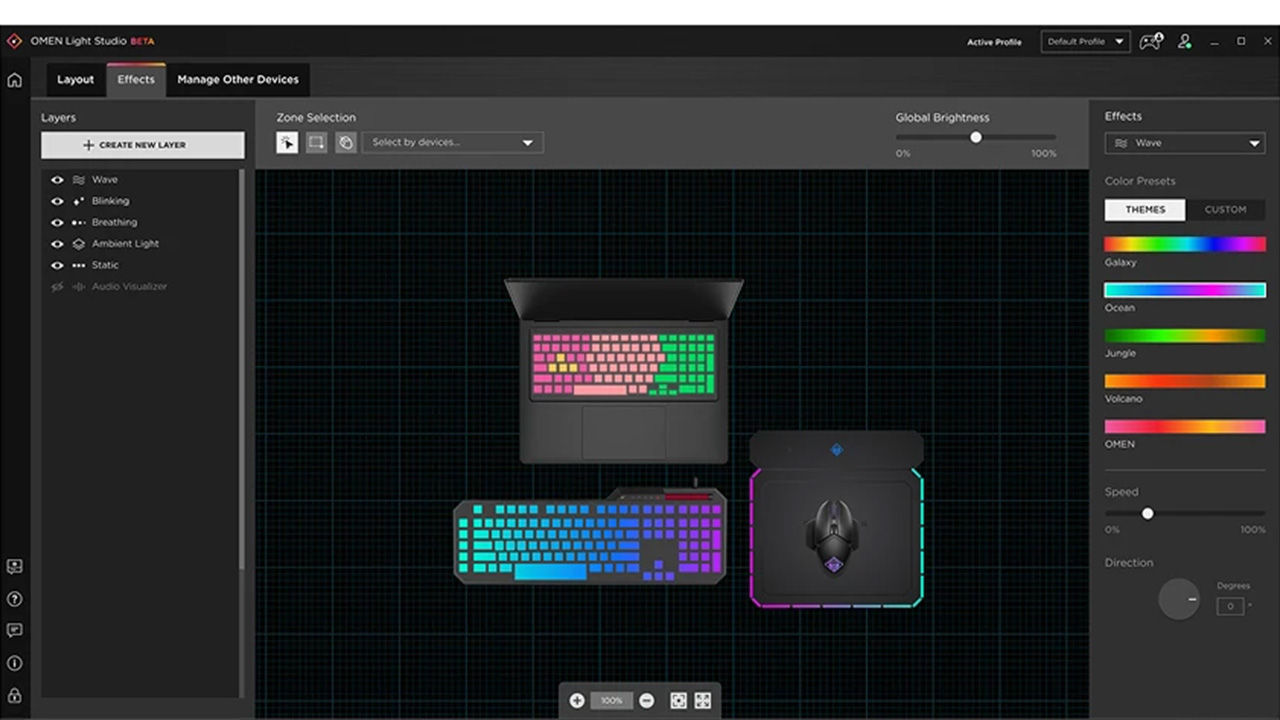
The cooling system includes a dust-cleaning function that reverses fan airflow to help move accumulated dust away from the internal components. This can be controlled through the gaming utility. The feature does not eliminate the need for eventual maintenance, but it may reduce dust buildup over time. The laptop also supports configurable four-zone RGB keyboard lighting. The implementation is less elaborate than per-key RGB, but it provides enough control to set different colour zones without turning the keyboard into an overly bright display piece.
Audio is handled by a pair of bottom-mounted speakers with HyperX tuning, DTS:X Ultra and HP Audio Boost. The speakers can become reasonably loud, although the output is otherwise typical of a gaming laptop. External speakers or a headset remain preferable for games, films and music.
Build quality
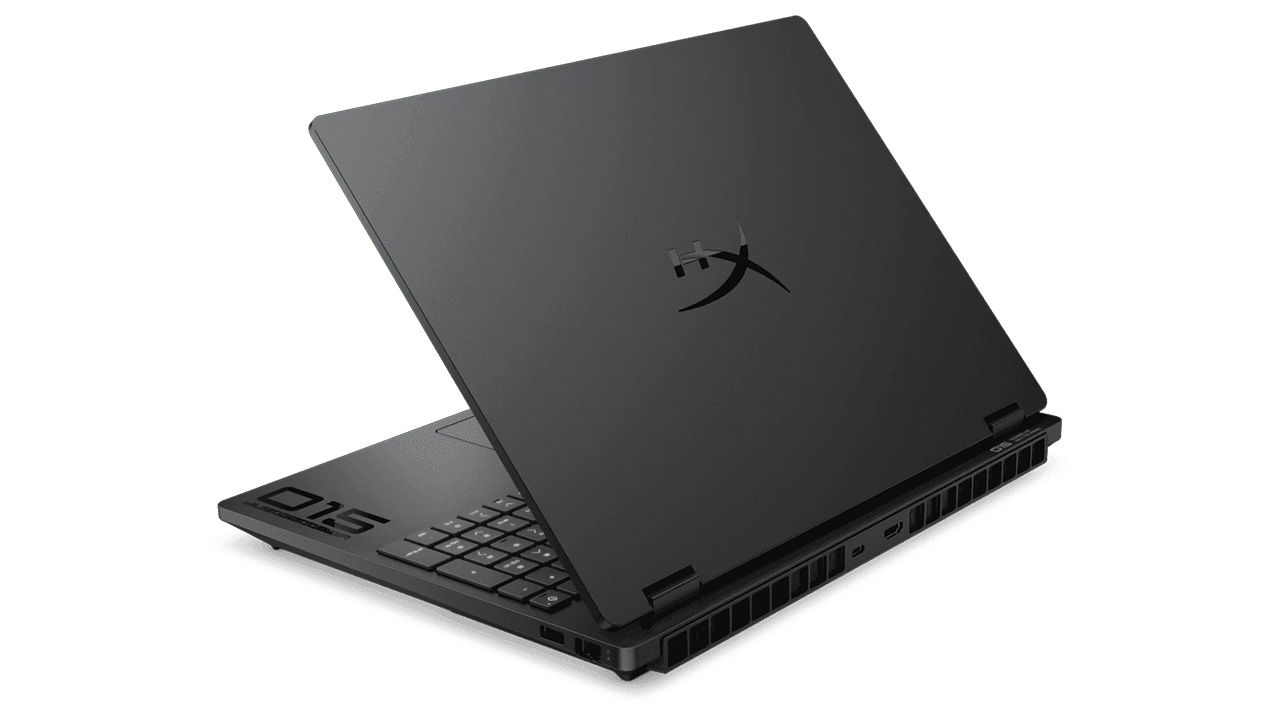
The HyperX OMEN 15 uses a Shadow Black finish with a relatively restrained design. The top lid has a smooth matte coating with a large HyperX logo positioned at the centre. The branding is bold, but the rest of the chassis avoids overly aggressive gamer styling. The C-surface carries subtle decals that add some visual character without becoming distracting. The edges are sharp and clearly defined, giving the laptop a slightly angular appearance. Structural rigidity is good. The chassis does not feel flimsy, and the keyboard deck remains reasonably firm during typing. The lid also feels secure enough for regular travel, though the laptop is clearly better suited to a backpack than frequent one-handed carrying. A long rubber foot spans much of the bottom panel. It raises the chassis slightly and gives the underside vents enough clearance to draw in cooler air. The large intake areas are covered by a double mesh layer, although the internal components remain visually exposed enough to give the underside a somewhat unfinished appearance.
At slightly over 2.4 kg, the HyperX OMEN 15 is not a lightweight notebook. The 230 W power adapter adds further bulk but the weight is reasonable for a performance-oriented 15-inch gaming laptop, particularly one with an HX-series processor and a substantial cooling system. It is still better treated as a machine that occasionally moves between locations rather than one carried around throughout the day.
Connectivity and I/O
The port selection covers the essentials, but placement is a mixed bag. The rear contains the HDMI 2.1 output and USB Type-C port. Positioning display and docking connections at the back helps keep cables away from the mouse area. However, both ports sit close to the exhaust vents. Plugging or unplugging a cable while the laptop is under load can warm up your hands nicely. The right side houses Gigabit Ethernet and one USB Type-A 10 Gbps port. The left side contains a second USB Type-A 10 Gbps port, the power connector and a combined headphone and microphone jack.
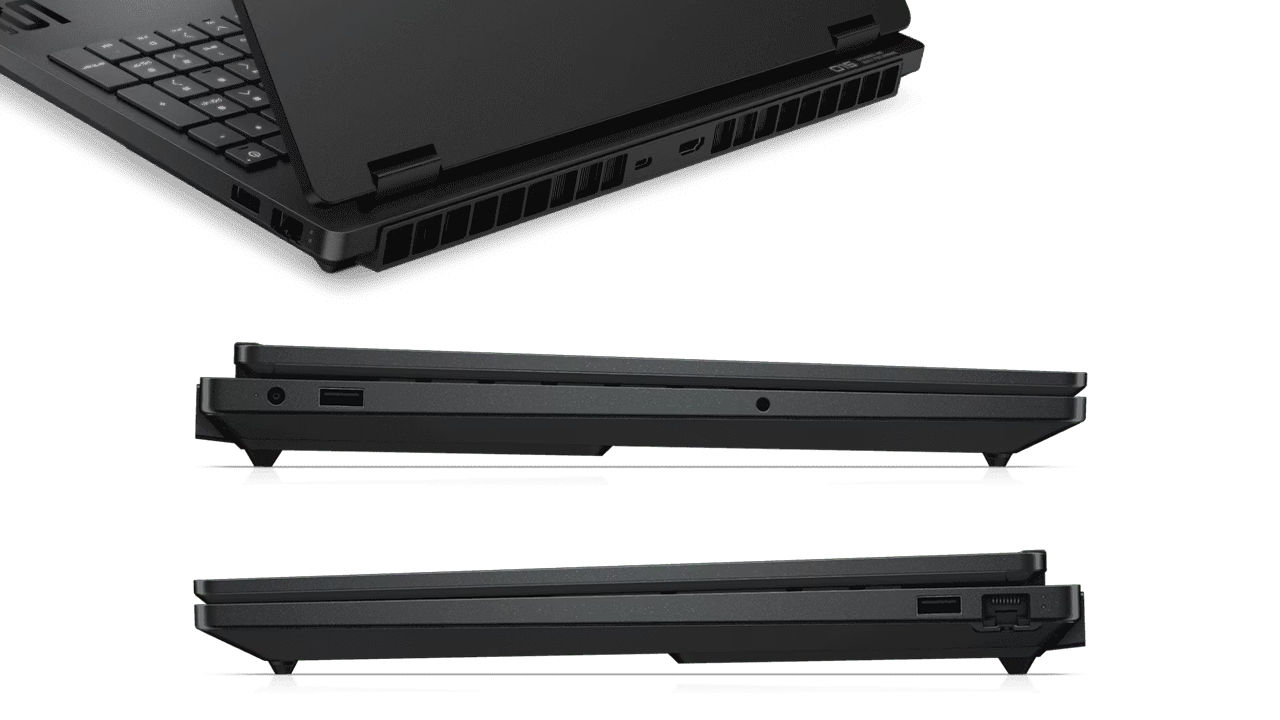
The USB Type-C connection supports a 10 Gbps signalling rate, DisplayPort 1.4, USB Power Delivery and HP Sleep and Charge. Two Type-A ports are sufficient for a mouse and another peripheral, but an additional Type-A connector would have been useful on a gaming laptop. Many users will connect a mouse, keyboard, external drive, controller or headset dongle at the same time.
Webcam
The 1080p webcam produces decent image quality for calls, classes and streaming previews. It supports automatic HDR switching and temporal noise reduction. The image is not comparable to a dedicated external webcam, but it is clearer than the 720p cameras still found on many gaming machines. The dual-array microphones are also effective at retaining voice quality during calls, making an external microphone unnecessary for routine communication.
Keyboard and mouse
The full-sized keyboard includes a number pad and full-sized arrow keys. Its layout is comfortable for both gaming and productivity, and the keys remain pleasant to use during longer typing sessions. Travel and feedback are adequate rather than mechanical-keyboard-like, but the keyboard does not feel shallow or vague. Anti-ghosting support also helps when several keys are pressed simultaneously during games. The default lighting is red, while the four-zone RGB system can be customised through OMEN Gaming Hub. Four-zone lighting offers less precision than per-key control, but it is sufficient for creating a consistent colour scheme. HP says that this is one of the few laptops that has a keyboard with a high polling rate. Typically, you have a 1000 Hz polling rate by default which is quite high but there will be folks who might see a benefit if they’re extremely competitive. Most folks can rarely outtype 1000 Hz, so the benefit is limited to fast-typing individuals.
Coming to the trackpad, it is sensibly sized, extending roughly from beneath the C key to the full-stop key. Its matte surface feels smooth, and pointer movement is accurate. The placement is slightly left of centre due to the number pad. Palm rejection works properly during typing, while the integrated click mechanism is usable across most of the surface. Gaming will still require an external mouse, but the trackpad is comfortable enough for general navigation and productivity work.
Removing the bottom panel is relatively straightforward. A series of screws around the edges secure the cover, and there are no unusually complicated internal clips. Inside, the cooling system uses two fans connected to a shared heatpipe assembly. The RAM modules are positioned near the centre of the board, with the occupied SSD slot located immediately to the left. A second vacant M.2 slot sits on the right side, allowing storage to be expanded without replacing the original drive.
The battery occupies most of the lower half of the chassis, while the speakers sit along the bottom edge. The memory, SSD and battery are all reasonably accessible. Replacing or upgrading these components should be manageable for an experienced user or technician.
Performance
CPU performance
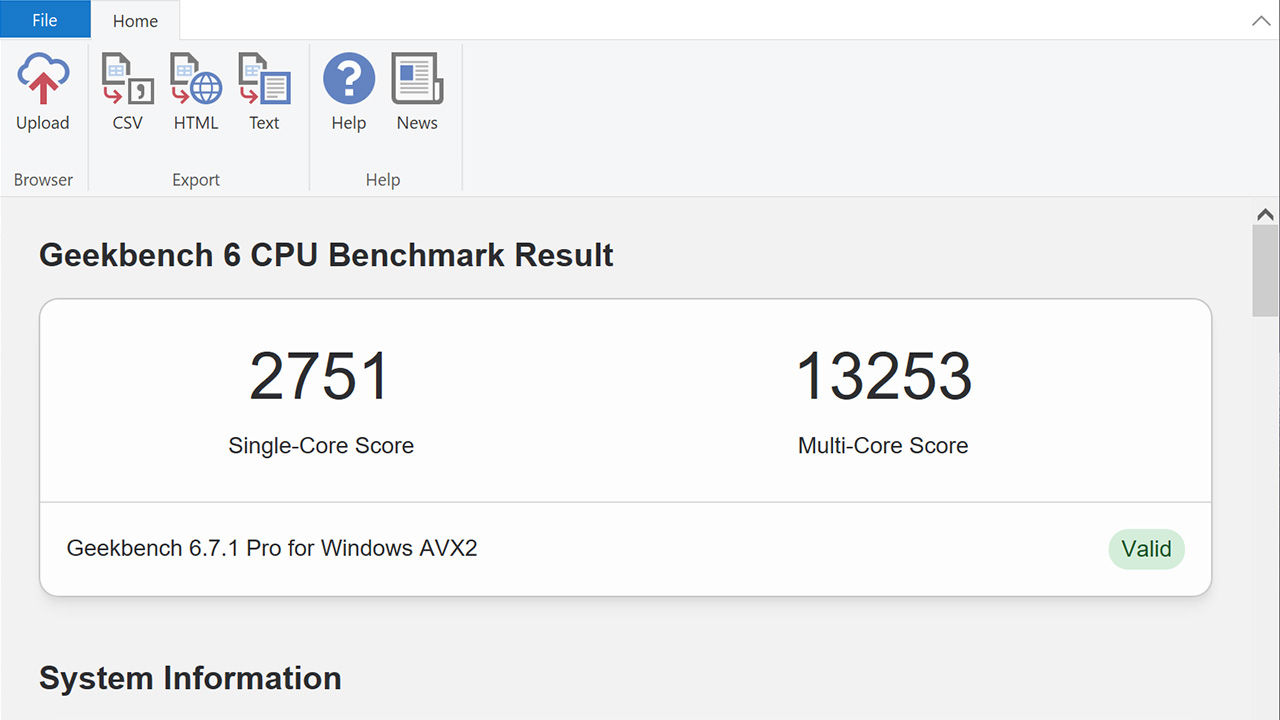
The Intel Core i7-14650HX remains a capable high-performance mobile processor. Its combination of eight Performance cores and eight Efficient cores gives it enough processing resources for gaming, content creation and demanding multitasking. The Geekbench 6 single-core score of 2,751 reflects strong everyday responsiveness. Applications launch quickly, web browsing remains fluid with numerous tabs open, and routine office workloads do not challenge the processor. The multi-core result of 13,253 shows that the laptop is also well suited to heavier workloads. Video encoding, software compilation, 3D rendering and batch processing can make use of the additional cores.
Cinebench 2026 results tell a similar story with single-core scores at 600 and multicore scores at 3350. The processor is not among the latest generation of high-end mobile chips, but it continues to provide more than enough CPU performance for a system built around an RTX 5050. Suffice to say, gaming workloads are unlikely to be limited by the processor in most situations. The graphics card will generally become the bottleneck first, particularly at higher settings and resolutions.
Sustained performance was assessed through a repeated Cinebench loop. No significant throttling was observed across the test. The cooling system allowed the processor to maintain consistent performance rather than producing a strong initial score followed by a sharp decline. That matters more than a short burst benchmark because gaming and rendering workloads often run for extended periods. The CPU still operates at relatively high temperatures, but there was no evidence of those temperatures causing a substantial reduction in sustained benchmark performance.
GPU performance
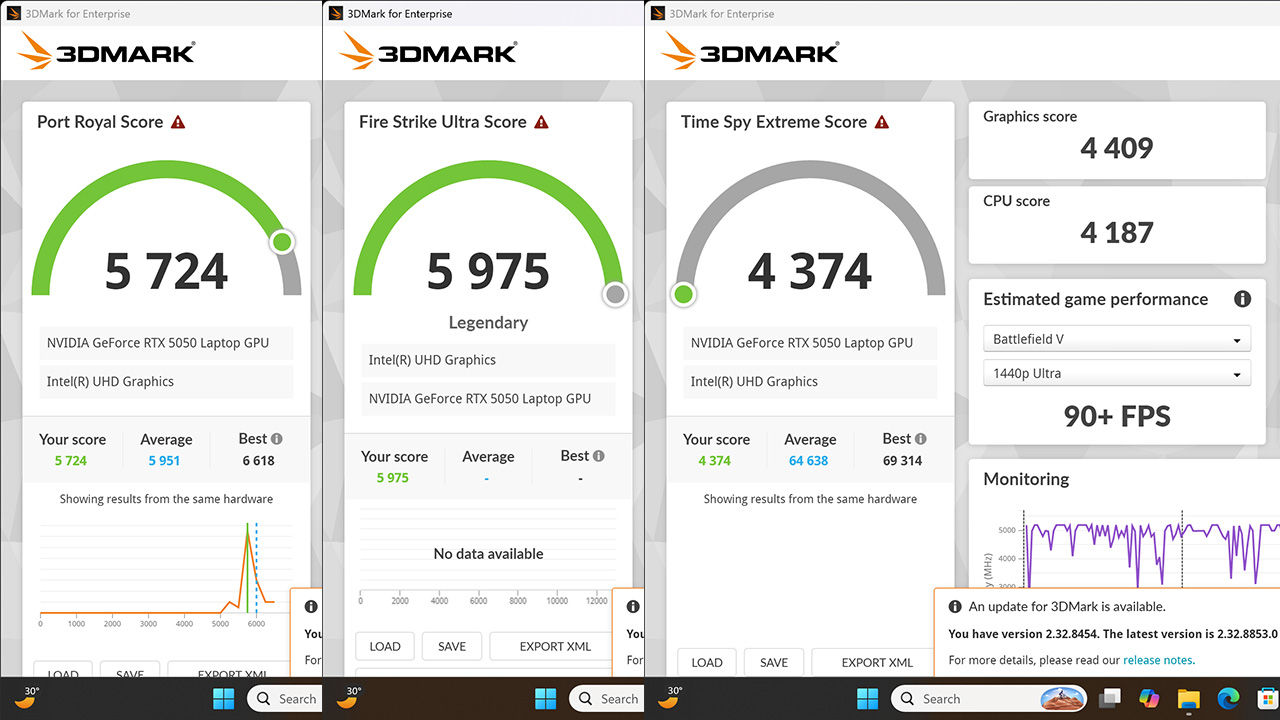
The RTX 5050 Laptop GPU is configured at a maximum graphics power of 115 W, which gives it a relatively generous power budget for this GPU class. A Time Spy score of 8,861 positions the system as a capable Full HD gaming machine. It can also handle some games at 2560 × 1600, although demanding titles will require reduced settings, upscaling or frame generation. The Port Royal score of 5,724 illustrates the GPU’s ray-tracing capability, but ray tracing places substantial pressure on this class of hardware. Turning on intensive ray-traced effects without DLSS is unlikely to produce comfortable frame rates in newer AAA games.
The RTX 5050’s main advantage comes from NVIDIA’s software stack. DLSS upscaling can render the game at a lower internal resolution before reconstructing it to the target output, while frame generation inserts additional generated frames between traditionally rendered ones. These technologies can produce a significant increase in displayed frame rate, although generated frames do not remove the underlying rendering latency. A game displaying 120 fps through frame generation will not necessarily feel identical to one rendering 120 native frames each second.
The Procyon AI Computer Vision score of 102 indicates that the GPU can accelerate compatible local AI workloads. It is suitable for experimentation, image processing and AI-assisted applications, but the RTX 5050 is not intended for heavier professional AI training or large local models.
RAM performance
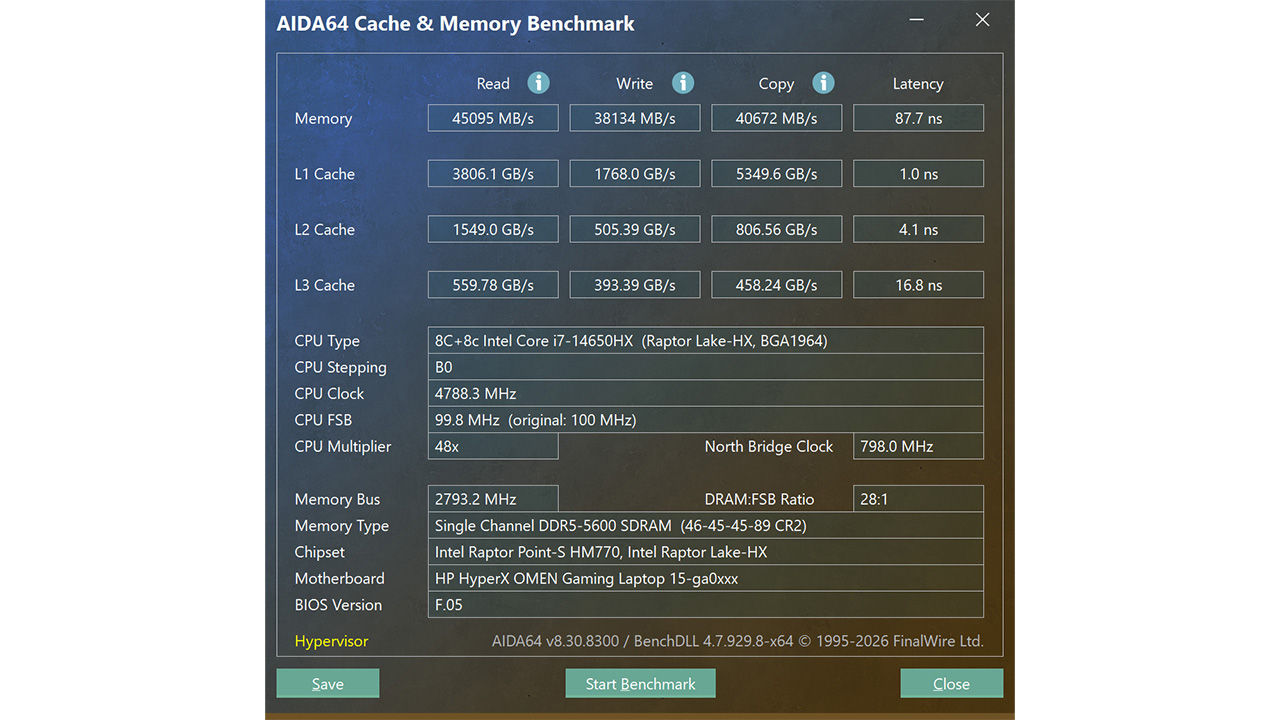
The laptop uses a single 24 GB Samsung DDR5-5600 module. In AIDA64, the read result of 45,095 MB/s is close to the theoretical bandwidth of a single 64-bit DDR5-5600 channel. Write and copy performance are a bit lower, while the 87.7 ns latency is relatively higher than typical levels. This is primarily due to the memory configuration. The 24 GB capacity is useful, but using only one module limits available bandwidth. Adding a second compatible module should improve memory performance and may help in CPU-limited games and productivity workloads. The laptop remains responsive in its standard configuration, and 24 GB is enough for most gaming use.
Storage performance
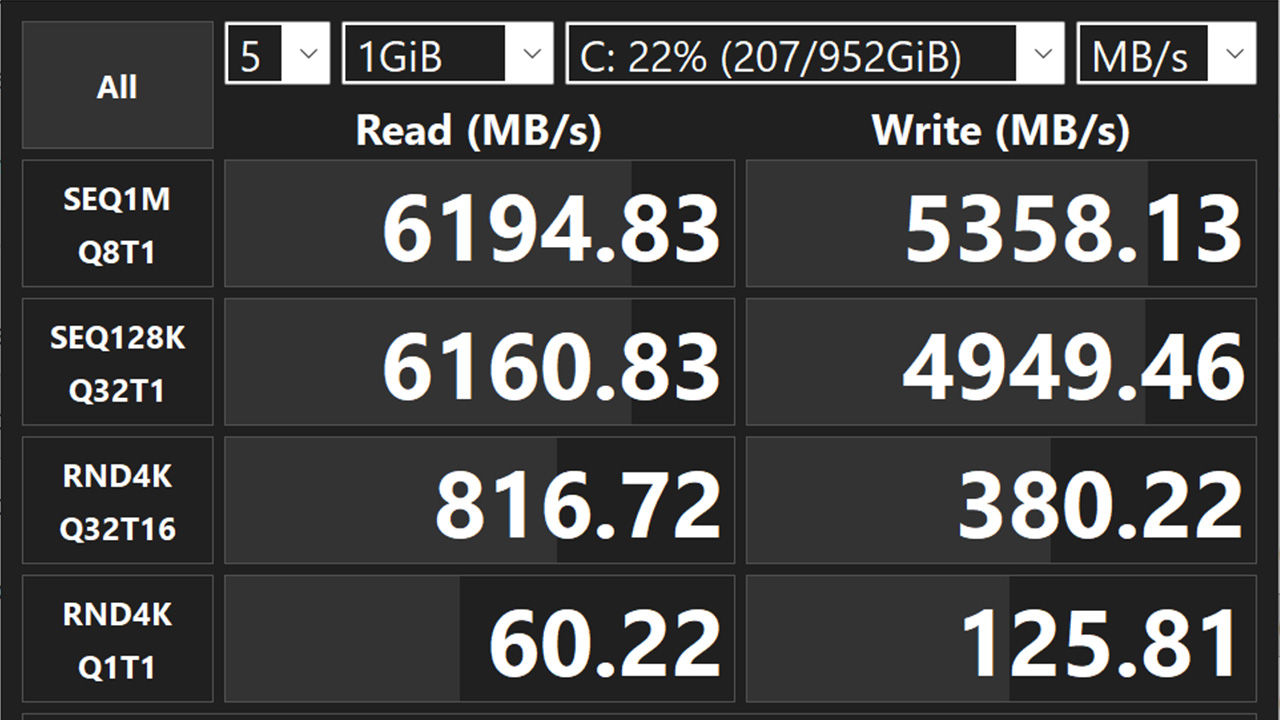
The 1 TB Kioxia KBG60ZNV1T02 PCIe Gen 4 SSD delivered strong sequential performance. Sequential read speeds of over 6,100 MB/s are strong for an OEM laptop SSD. Large applications and games load quickly, while file transfers involving large assets benefit from write speeds exceeding 5,300 MB/s in the highest queue-depth test. The 4K Q1T1 result is more representative of everyday operating system responsiveness.
Display
The 15.3-inch display has a native resolution of 2560 × 1600 and a 16:10 aspect ratio. The additional vertical space is useful outside gaming, particularly for web pages, documents and editing timelines. The panel reached approximately 486 nits in testing, close to HP’s 500-nit claim. This is brighter than many gaming laptops in the same segment and makes the screen usable in well-lit indoor environments. Colour coverage reached the claimed 100 per cent sRGB range, while the measured Delta E of 1.9 indicates good colour accuracy. A Delta E below 2 is generally suitable for content creation that does not require a specialised reference display.
The 180 Hz refresh rate produces smooth motion in competitive games and during general desktop use. The high refresh rate is especially useful in lighter esports games, where the RTX 5050 can generate enough frames to take advantage of it. At the native resolution, the display is sharp, but 2560 × 1600 is demanding for an RTX 5050. Users will frequently need to rely on DLSS or reduce the output resolution to 1920 × 1200 or Full HD in demanding games. The anti-glare coating helps control reflections, while viewing angles are consistent with a good IPS panel. Overall, the display is one of the HyperX OMEN 15’s stronger components.
Networking
Wireless connectivity is handled by the Realtek 8852BE-VT Wi-Fi 6 adapter. Gigabit Ethernet is available for users who prefer a stable wired connection. The inclusion of an RJ-45 socket remains valuable for competitive gaming, large downloads and local network transfers. Lastly, there’s Bluetooth 5.4 support for wireless controllers, headsets, keyboards and other accessories.
Gaming
Cyberpunk 2077 is among the more demanding games used to assess modern laptop GPUs. With ray tracing, DLSS and frame generation enabled at Full HD, the HyperX OMEN 15 produced approximately 130 fps. That is a high frame rate, but it relies on every major performance-assistance feature available to the RTX 5050. So you need to have DLSS and Frame Generation turned on. Dropping the output resolution to Full HD is the quickest way to improve performance in newer games. This creates an unusual relationship between the laptop and its display. The 2560 × 1600 panel looks sharp for desktop work and less demanding titles, but the RTX 5050 is better matched to Full HD for modern AAA gaming.
Competitive games should run comfortably at high frame rates, allowing the 180 Hz panel to be used more fully. More demanding releases will require a combination of medium or high settings, DLSS and, where supported, frame generation. The GPU is, therefore, workable but it does not leave much performance headroom. You should note that the RTX 5060 configuration is available for only around ₹10,000 more.
Noise and temps
The HyperX OMEN 15 remained surprisingly restrained during testing. Fan noise was barely noticeable under lighter workloads and did not become intrusive during gaming. There was no coil whine or other unusual electrical noise. The lack of distracting acoustic behaviour improves the overall experience, particularly during non-gaming use. The cooling system does still push warm air through the rear vents, and users may notice the exhaust when connecting cables near the HDMI and USB Type-C ports. Acoustically, however, the laptop performs well for an HX-series gaming machine.
The Core i7-14650HX reached approximately 86 to 88°C during heavy gaming. These temperatures are high but not unusual for an HX-series mobile processor operating inside a compact gaming chassis. The RTX 5050 recorded a lower peak of around 78°C. This is a reasonable result for a 115 W laptop GPU and leaves some margin below typical thermal limits. We did not notice any significant throttling during an extended Cinebench loop so the temperatures are being managed effectively. The laptop runs hot internally, but not to the point where performance collapses under sustained load.
Battery life
The 70 Wh battery lasted 2 hours and 52 minutes in the PCMark video playback test. That is a common expectation with gaming laptops. Gaming on battery power will reduce runtime further and also limit performance. The laptop is at its best when connected to the power adapter. The 180 Hz display, HX-series processor and discrete GPU all contribute to the relatively short endurance. Switching the screen to 60 Hz and using a quieter power profile may extend runtime, but those adjustments are unlikely to transform it into a long-lasting portable machine. HP claims that the battery supports fast charging to approximately 50 per cent in 30 minutes and we did see it easily charge the battery fast. So that’s a nice way to compensate for the lower battery life that these gaming laptops have.
Verdict
The HP HyperX OMEN 15-ga0028TX gets many of the fundamentals right. It has a sturdy chassis, a comfortable keyboard, a useful selection of ports, straightforward internal access and a cooling system that maintains performance without producing excessive fan noise. Its display is particularly good and CPU performance is another strength. The Core i7-14650HX handles modern games and multi-threaded productivity workloads comfortably. But when you look at the RTX 5050, it can produce smooth gameplay, but demanding titles require DLSS, frame generation and lower output resolutions.
At approximately ₹1,59,990, the configuration is difficult to recommend, especially considering that the RTX 5060 version with the same Core i7-14650HX costs around ₹10,000 more and offers a more appropriate level of graphics performance for this price category and the laptop’s 2560 × 1600 display. There are competing laptops with the RTX 5060 at the same price point such as the Acer NITRO V15 or the Lenovo LOQ 2025 which cost significantly lesser but you’ll see a bit less memory or an older 13th Gen CPU on those units. From a purely-FPS perspective, those laptops do better in most games but there will be times when you’d have wished for a better CPU. So it’s a choice, either you can compromise on the GPU and get the HyperX OMEN or compromise on the memory and get the competing units. But if you really want an HP laptop, then the RTX 5060 variant is a better buy.

Mithun Mohandas
Latest Reviews

 Exclusive Stories
- Build Your Dream PC
- Shop Safely Online
- Top Podcasters
- DITAA 2026
- Unlock Your AI
- Digit's 25th Anniversary