
Digit.in
  • News
  • Reviews
  • Top 10s
    • Best Phones Under 10000
    • Best Phones Under 20000
    • Best Phones Under 30000
  • Features
  • How To
  • AI
  • Digit Binge
  • Mobile Recharge Plans
  • Web Stories
  • DIGIT ZERO1 AWARDS
  • Digit Shop
  • English
  • Hindi
  • Tamil
  • Kannada
  • Telugu
  • Malayalam
  • Bangla
  • Marathi
Login / Register is disabled Login
  • Mobiles
    • Latest
      • realme P4R 5G
      • Motorola Edge 70 Pro+
      • Xiaomi 17T
      • Oppo F33 Pro
    • Popular
      • Apple iPhone 17 Pro
      • OnePlus 15 5G
      • iQOO 15
      • Oppo Find X9 Pro
    • News
      • Samsung Galaxy A35 price drops by over Rs 14000 on Flipkart: Should you buy
      • Apple iPhone 18 Pro and iPhone Ultra design leaked again: Check expected specs, launch timeline and price
      • Installed One UI 8.5 on your Samsung Galaxy S23? Watch out for this display issue
      • Google June Pixel Drop is here: New AI features, how to download and more
    • Reviews
      • Xiaomi 17 Ultra long-term review: This is what ultra should mean
      • Realme P4R review: The most practical phone under Rs 20000?
      • Oppo F33 Pro review: Big on style, mixed on substance
      • Xiaomi 17T Review: The return of fan-favourite formula
  • Laptops
    • Latest
      • IdeaPad Slim 5 Gen 10 (AMD Ryzen 5 7535HS, Windows 11 Home)
      • ThinkPad X13 Gen 5 (Intel Core Ultra 7, 16 GB RAM, 1TB SSD, Win 11 Pro)
      • Lenovo Ideapad Slim 3 Gen 8 (AMD R7, 512 GB SSD)
      • Lenovo IdeaPad Slim 3i Gen 11 (83UR009QIN)
    • Popular
      • Asus Zenbook 14
      • MacBook Air 13 inch (M5 chip / 512 GB SSD / 16 GB memory)
      • Dell XPS 14 Laptop (2026)
      • Lenovo LOQ 15IRX9 83DV007JIN Gaming Laptop (13th Gen Core i5/ 16GB/ 512GB SSD/ Win11/ 6GB Graph)
    • Best
      • Best MacBook alternatives from ASUS
      • Best MacBook alternatives from MSI
      • The Best AI (Artificial Intelligence) Laptops for Programmers in 2025
      • Best MacBook alternatives from HP
    • News
      • MacBook Neo can be yours for under Rs 40,000: Here is how to get it
      • Computex 2026: Microsoft Surface Laptop Ultra launched, check specs and features
      • Asus ROG Zephyrus Duo to launch in India soon? Here is what we know
      • You can get the MacBook Neo for under Rs 50,000: How the deal works
    • Reviews
      • HP Omnibook 5 review: Light as a feather, lasts like a brick
      • Lenovo IdeaPad Slim 3i Gen 11 review: Debuting with Intel Pather Lake
      • Lenovo LOQ 15IRX10 review: The end of the budget gaming laptop?
      • Samsung Galaxy Book 6 Ultra review: The Jack of all trades
  • Home Appliances
  • Phone Finder
  • Apps
  • Mobiles
  • SKOAR!
  • Magazine
  • DIGIT ZERO1 AWARDS
  • Amazon Center
  • Digit Shop
Home » How To » Apps » Enhance your Instagram security: Easy guide to set up two-factor authentication for your account

Enhance your Instagram security: Easy guide to set up two-factor authentication for your account

By Ayushi Jain | Updated on 26-Dec-2023
Add DIGIT as a preferred source
Follow Us on Google News Follow Us
HIGHLIGHTS

Instagram offers three security methods to set up two-factor authentication.

The three security methods are: Authentication app, Text message, and WhatsApp.

You will need to set up at least one of these security methods on Instagram in order to use two-factor authentication.

Enhance your Instagram security: Easy guide to set up two-factor authentication for your account
Ayushi Jain Ayushi Jain
26-Dec-2023

In today’s digital age, where sharing moments and connecting with friends is just a tap away, safeguarding your online presence is more important than ever. Meta-owned Instagram, a popular platform for sharing photos and stories, has become an integral part of our daily lives. However, with the convenience of social media comes the responsibility of protecting your personal information from potential threats.

Digit.in Survey
✅ Thank you for completing the survey!

One powerful tool in the battle against unauthorised access is two-factor authentication (2FA). Two-factor authentication protects your Instagram account by requiring a code if there’s a login attempt from a device that Instagram doesn’t recognise.

In this step-by-step guide, we will tell you how you can set up two-factor authentication for your Instagram account.

Also read: How to update your phone no. or email address on Instagram: Quick guide
Enhance your Instagram security: Easy guide to set up two-factor authentication for your account

How to set up two-factor authentication for your Instagram account

Step 1: Open the Instagram app.

Step 2: Tap your profile picture present at the bottom right corner to go to your profile.

Step 3: Tap the three horizontal lines present at the top right corner.

Step 4: Select the Settings and privacy option.

Step 5: Tap Accounts Centre

Step 6: Select the Password and security option.

Step 7: Tap the Two-factor authentication option.

Step 8: Choose the account for which you want to set up two-factor authentication.

Step 9: Choose the security method that you want to add and follow the on-screen instructions.

Also read: Manage multiple Instagram accounts: Easy guide to adding and switching between profiles

Enhance your Instagram security: Easy guide to set up two-factor authentication for your account

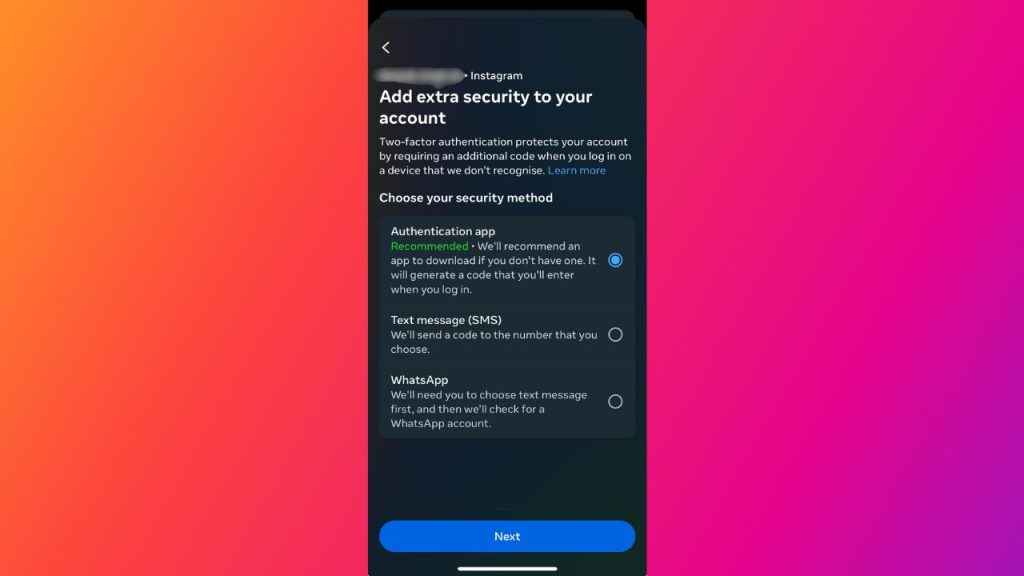
When you set up two-factor authentication on Instagram, you will be asked to choose one of the following three security methods:

  1. Authentication app (recommended by Instagram): You have to download an authentication app to get login codes. This method is recommended by Instagram because it allows you to add multiple devices connected to an account so that they can all get login codes.
  2. Text message: When you choose this security method, Instagram sends a login code to your mobile number.
  3. WhatsApp: With this security method, you will receive login codes on WhatsApp.

You will need to set up at least one of these security methods in order to use two-factor authentication. 

How to change your phone number for two-factor authentication on Instagram

Step 1: Open the Instagram app.

Step 2: Tap your profile picture in the bottom right corner to go to your profile.

Step 3: Tap the three horizontal lines present at the top right corner.

Step 4: Select the Settings and privacy option.

Step 5: Tap the Accounts Centre option.

Step 6: Select Privacy and security.

Step 7: Select the Two-factor authentication option.

Step 8:  Choose the account.

Step 9: If two-factor authentication is already on, tap Text message.

Step 10, Now, tap the Change phone number option.

Step 11: Enter the new phone number that you want to use, and then tap Next.

Step 12: You’ll receive a text message (SMS) to the new phone number with a 6-digit security code. Enter the code in the Instagram app, then tap Next.

Step 13: You will now see a list of backup codes. Save those codes so that you can access your account if you lose your device or face trouble with using another security method.

Step 14: Finally, tap Done to complete the two-factor authentication process.

Ayushi Jain

Ayushi Jain

Ayushi works as Chief Copy Editor at Digit, covering everything from breaking tech news to in-depth smartphone reviews. Prior to Digit, she was part of the editorial team at IANS. View Full Profile

Latest Article
Microsoft Copilot security flaw may expose your private data, here is how to stay safe Microsoft Copilot security flaw may expose your private data, here is how to stay safe
This new Samsung AI feature can spot signs of illness in your dog or cat This new Samsung AI feature can spot signs of illness in your dog or cat
Samsung Galaxy A35 price drops by over Rs 14000 on Flipkart: Should you buy Samsung Galaxy A35 price drops by over Rs 14000 on Flipkart: Should you buy
Avatar: The Last Airbender season 2: When and where to watch Aang’s journey to the Earth Kingdom Avatar: The Last Airbender season 2: When and where to watch Aang’s journey to the Earth Kingdom
Pati Patni Aur Woh Do digital premiere soon? Check OTT release timeline, streaming platform and other details Pati Patni Aur Woh Do digital premiere soon? Check OTT release timeline, streaming platform and other details
Most Searched Mobile Phones
  • Best Phones Under 10000
  • Best Phones Under 20000
  • Best Phones Under 30000
  • Upcoming Phones in 2026
  • Latest Mobile Phones
Latest Phones
  • Motorola Edge 70 Pro+
  • Xiaomi 17T
  • Oppo F33 Pro
  • Oppo Find X9 Ultra
  • Motorola Razr Fold
Mobile Recharge Plans
  • Airtel Recharge Plans
  • BSNL Recharge Plans
  • Reliance JIO Recharge Plans
  • VI Recharge Plans
Most Searched Laptops
  • Best Laptops Under 30000
  • Best Laptops Under 40000
  • Best Laptops Under 50000
Trending Movies
  • Bharat Bhhagya Viddhaata
  • Governor
  • Main Vaapas Aaunga
  • Welcome to the Jungle
Movies & Web Series
  • Best Movies
  • Latest Movies
  • Upcoming Movies
  • Best TV Shows & Web Series
  • Latest TV Shows & Web Series
  • Upcoming TV Shows & Web Series
Trending Web Series
  • Thukra Ke Mera Pyaar Season 2
  • Made In India: A Titan Story
  • Gullak Season 5
  • Raakh
OTT Providers
  • Netflix
  • ZEE5
  • JioHotstar
  • SonyLiv
  • icon
  • icon
  • icon
  • icon
SUBSCRIBE Subscribe for the industry's biggest tech news
Enter your email to get notified about our new solutions
By submitting your email, you agree to our
Terms and Privacy Notice.
CONNECT WITH US
  • icon Times Center, FC-6, 1st Floor, Sector 16A, Film City, Noida - 201301
  • icon (+91-120-6776999)
    (1800 121 0005)
  • icon Suggestion: editor@digit.in
    Business: business@digit.in
    Website: sales@digit.in
© 2026 Digit.in, All rights reserved
  • icon
  • icon
  • icon
  • icon
icon
  • About Us
  • Contact Us
  • Advertise with us
  • Regulatory
  • Terms & Conditions
  • Privacy Policy
  • Disclaimer
© 2026 Digit.in, All rights reserved
Digit.in
Logo
Digit.in
Logo
