
Colorful iGame X870E VULCAN OC V14 motherboard review: A serious overclocking motherboard
 Follow Us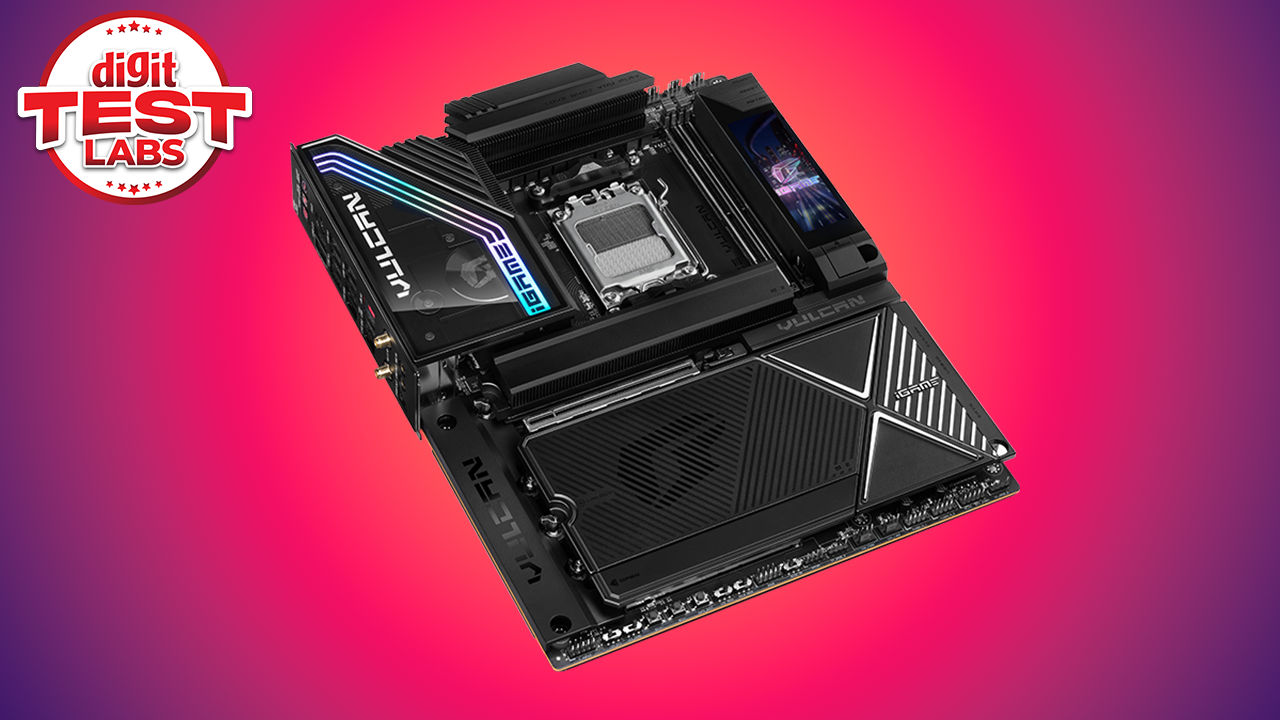

Colorful has built a substantial presence in the graphics card market, particularly across Asian markets, we even reviewed their laptops as they’d introduced them to the Indian market. However, its motherboards have generally remained less visible than competing products from ASUS, ASRock, Gigabyte and MSI. The iGame X870E VULCAN OC V14 is an attempt to change that perception. Rather than producing another broadly equipped X870E gaming motherboard, Colorful has developed a platform with a clear emphasis on competitive overclocking, DDR5 memory tuning while targeting AMD’s Ryzen X3D processors.
The fact that this is a top-tier premium model is immediately apparent from the hardware. The board uses just two DDR5 DIMM slots, reducing the electrical load placed on the memory controller and improving signal integrity at very high data rates. It also provides an external clock generator, physical base-clock adjustment buttons, onboard voltage measurement points, Safe Boot and Retry buttons, LN2 and Slow Mode switches, dual BIOS chips and an unusually substantial 18+2+2-phase power-delivery system. While the above mentioned features do position the iGame X870E VULCAN OC V14 as an open-bench overclocking board, it’s got a lot of connectivity options to broaden its appeal. Five M.2 slots, three of which support PCIe 5.0 x4 drives, sit beneath extensive aluminium cooling plates. Networking is propped up by 5GbE and Wi-Fi 7 options, while the rear panel includes two USB4 ports. A configurable onboard LCD, 60W front-panel USB-C charging support and an ALC1220 audio implementation with an ESS DAC further broaden its appeal.
This combination makes the VULCAN OC unusual as it attempts to retain the specialist hardware of boards such as the Gigabyte X870 AORUS Tachyon ICE and ASRock X870E Taichi OCF while looking and functioning more like a conventional flagship gaming motherboard. With a retail price standing at approximately Rs 1,23,000 in India, the board sits among, and to some extent above, some very well-established alternatives. Its value, therefore, depends less on basic Ryzen performance and more on whether its combination of memory overclocking, physical tuning controls, ample storage expansion and integrated display will prove their worth.
Packaging and contents
The packaging reflects the board’s flagship status. The large outer box uses the black and red visual language associated with Colorful’s iGame products, with angular artwork and prominent VULCAN branding rather than a conventional photograph of the motherboard. The presentation is more elaborate than the packaging accompanying most mainstream X870E boards, including an internal pop-up mechanism that reveals the board as the box is opened.
The VULCAN OC is a particularly heavy ATX board. Its large VRM heatsinks, M.2 armour, integrated display, backplate and numerous metal covers place considerably more stress on the PCB than a conventional motherboard design. The rigid packaging keeps the board from moving during transit and helps protect the LCD assembly.
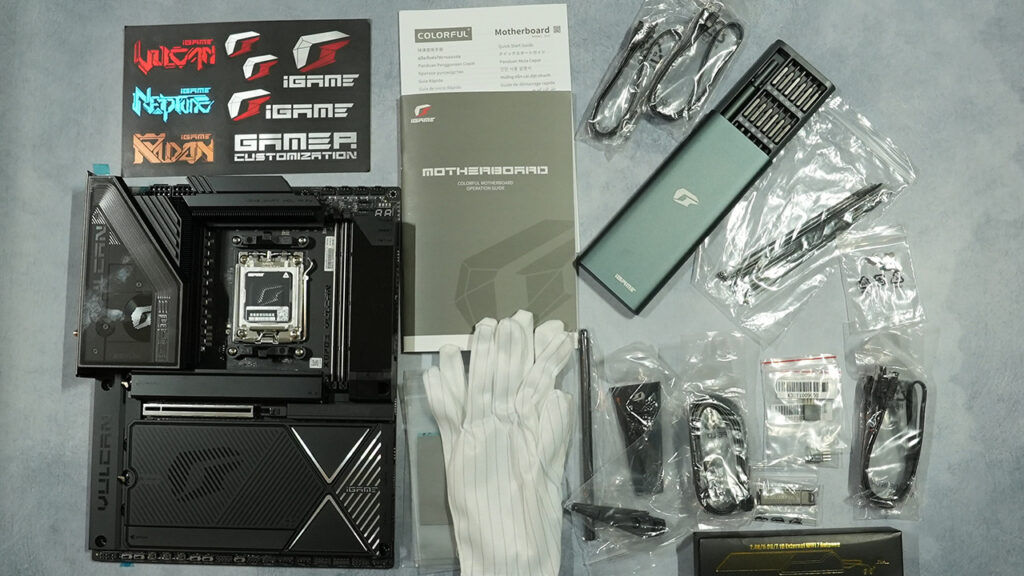
Colorful has also supplied a comprehensive accessory bundle. It includes a USB flash drive containing drivers, operating manual and quick-start guides, stickers, a pair of gloves, a screwdriver kit, a Wi-Fi antenna and a graphics card support strut. Storage accessories include four SATA cables, additional thermal pads for the M.2 sockets, four M.2 standoffs and screws, and cable ties. Two three-pin ARGB extension cables are included for lighting installations, while two quick-connect front-panel adapters simplify the connection of a case’s power, reset and indicator cables. The front-panel adapters are especially useful because several onboard controls and headers are partially surrounded by the motherboard’s armour.
The gloves and screwdriver kit are not essential, but they fit the nature of the product. Much of the board is covered by dark metal, smoked plastic and semi-gloss surfaces that collect fingerprints quickly. There is no M.2 expansion card, external fan controller or separate RGB controller in the box. Given that five M.2 slots, eight fan headers and four addressable RGB headers are already integrated into the board, their absence is nothing serious to be talked about.
Board layout
The iGame X870E VULCAN OC V14 uses a standard ATX footprint measuring approximately 305 x 245mm. It should consequently fit most modern mid-tower cases, although the thickness of the heatsinks, integrated backplate and right-side LCD assembly make it worth checking clearance around tightly positioned cable-routing cut-outs. A 10-layer black PCB forms the foundation of the board. Colorful says it uses a server-grade construction and an electroless silvering process intended to improve signal integrity. Only small sections of the PCB remain visible once the heatsinks and armour are installed. The result is a remarkably cohesive appearance, with the upper VRM assembly, lower M.2 covers, chipset heatsink and audio shroud forming an almost continuous black surface.
CPU socket and power connectors
The AM5 socket occupies the upper central section and supports compatible Ryzen 7000, Ryzen 8000 and Ryzen 9000 processors. Cooling compatibility is broadly identical to other AM5 motherboards, although large air coolers may partially conceal the upper heatsinks and make some of the nearby fan connectors harder to reach.
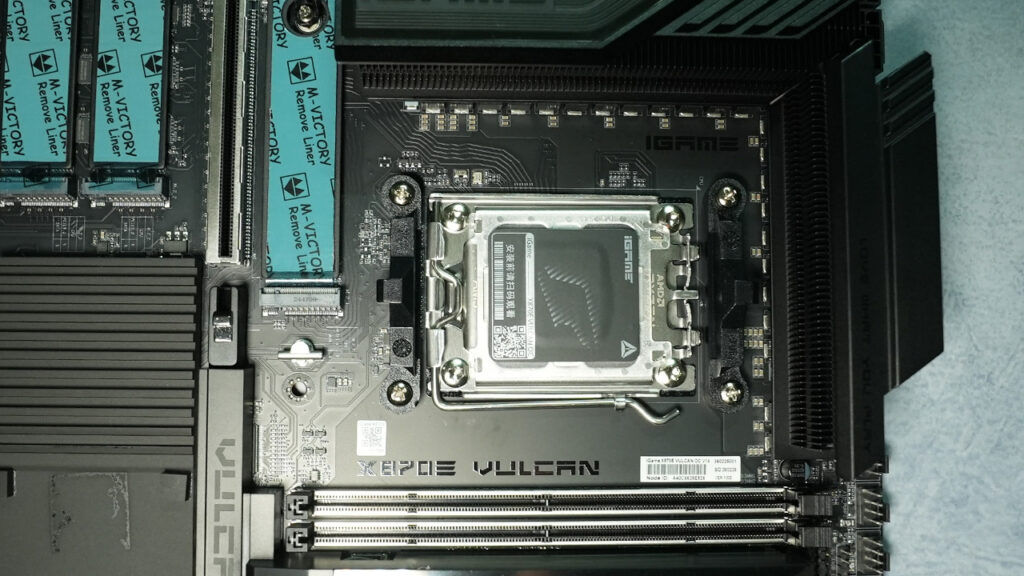
Two eight-pin EPS connectors are positioned along the upper-left edge. Only one is required for normal operation, while the second provides additional current capacity for heavily overclocked processors and sub-ambient benchmark configurations. Their location is conventional, but connecting both cables after the motherboard has been mounted in a compact case may be awkward. However, someone who’d likely spend Rs 1,23,000 on a motherboard would have put down an equally absurd amount for a versatile chassis that allows easy access from the top.
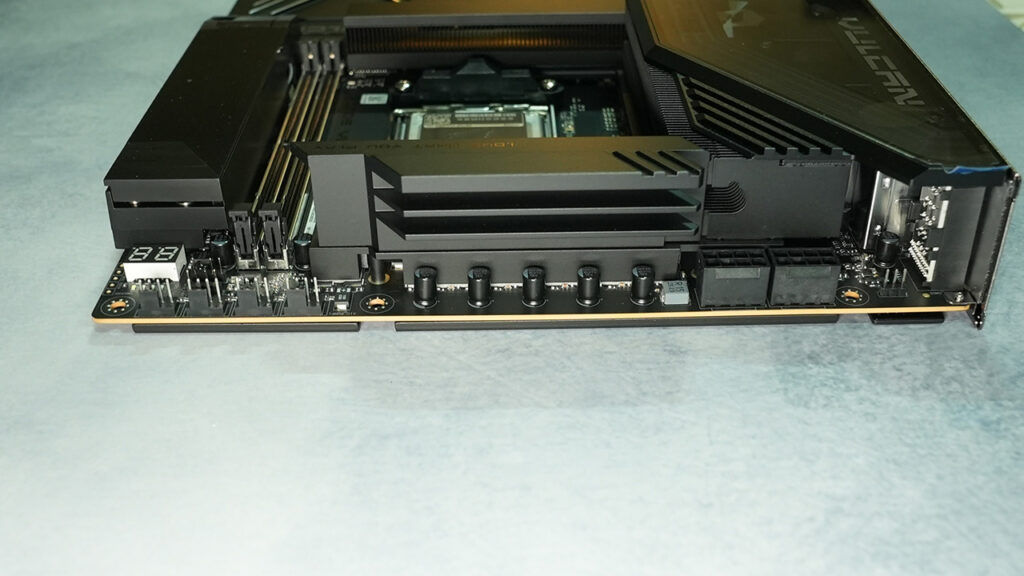
A massive finned VRM heatsink surrounds the top and left sides of the socket. The two sections are linked by a heatpipe and covered by a smoked decorative shroud. Thin RGB strips follow the shape of the upper assembly, providing restrained accent lighting rather than illuminating the entire board.
Memory area
Only two DDR5 DIMM slots are fitted. They support up to 128 GB using two 64 GB modules, along with both AMD EXPO and Intel XMP memory profiles. Official memory limits vary by processor architecture. Colorful lists speeds beyond DDR5-8600 for Ryzen 9000 desktop processors, with considerably higher speeds possible when using Ryzen 8000 APUs and their stronger integrated memory controllers. The company has advertised support reaching DDR5-10000 and, under specific configurations, DDR5-10400.
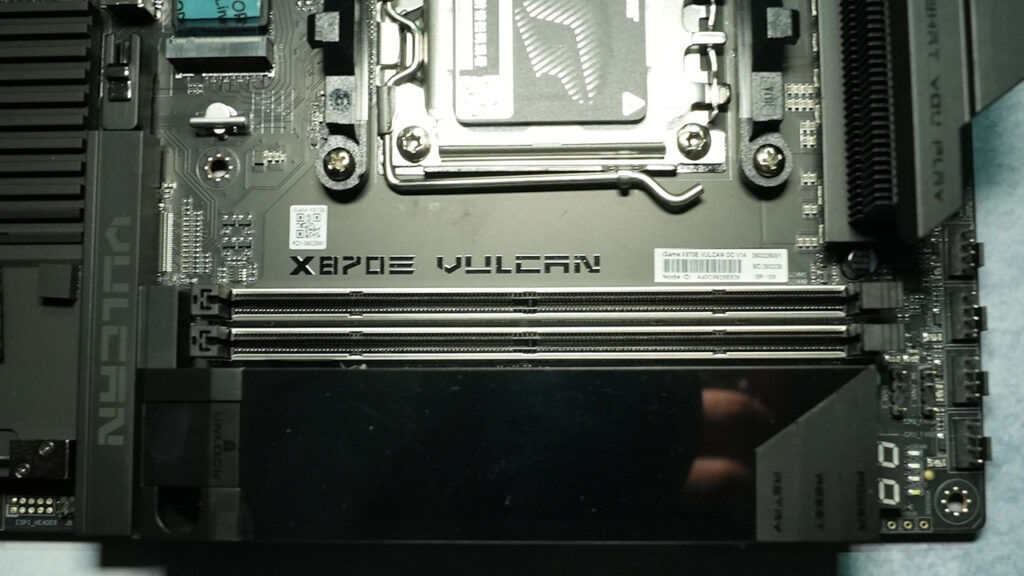
The two-slot topology is a deliberate engineering decision rather than cost cutting. Each populated memory channel adds electrical load and routing complexity. Removing the second slot from each channel permits shorter, cleaner traces and makes it easier to tune memory at extreme frequencies. The compromise is reduced maximum capacity compared with four-slot X870E boards that can accept 192GB or 256GB.
The slots are reinforced and use single-sided locking tabs. The upper latches remain accessible when a graphics card is installed, although the lower ends of the modules sit close to the primary PCIe slot.
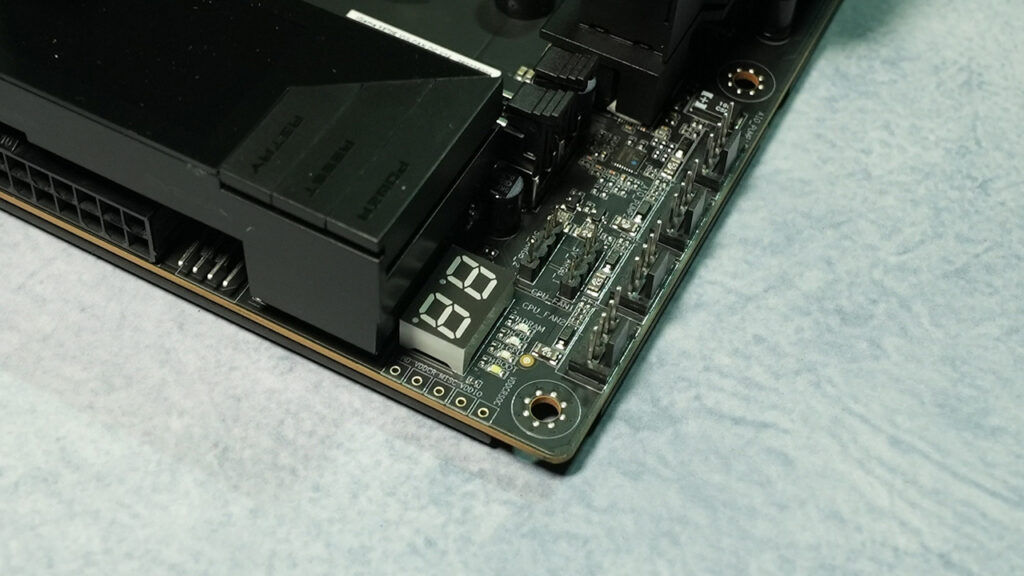
Surrounding the memory slots are several overclocking and diagnostic features. These include voltage measurement points for VDDCR, VDDIO, SoC and miscellaneous rails, four diagnostic LEDs and a two-character POST-code display. The LEDs provide a quick indication of whether a boot failure is related to the CPU, memory, graphics card or storage device, while the numerical display provides more precise diagnostic information.
Vulcan Smart Screen and onboard controls
The Vulcan Smart Screen is mounted vertically along the right side of the board, next to the memory slots and 24-pin power connector. It can display temperatures, frequencies, monitoring data, static graphics and animated content configured through iGame Center. Without a profile, it shows a splash screen during startup and may subsequently switch off rather than defaulting to a basic CPU temperature or clock-speed readout. This makes the initial experience less polished than it could have been.
Power, Reset and Retry buttons are integrated around the display assembly. They are clearly labelled and easy to reach on an open test bench. A graphics card release mechanism, called VGA Snap-fit, is also positioned in this area. It mechanically disengages the latch on the primary PCIe slot, reducing the need to reach underneath a large graphics card with a screwdriver.
The 24-pin ATX connector and an additional PCIe power connector sit beneath or beside the screen assembly. The additional connector is used to provide enough power for the internal USB-C header’s 60W Power Delivery function. Without it, the front USB-C connection remains usable for data but cannot necessarily deliver its full charging output.
Expansion slots and lane sharing
The primary expansion slot is reinforced and it supports PCIe 5.0 x16 operation with a conventional single-GPU configuration. A second full-length slot is attached to the chipset and electrically operates at PCIe 4.0 x4. The primary slot can be divided into an x8/x4/x4 arrangement. This permits CPU-connected lanes to be allocated to the two additional PCIe 5.0 M.2 sockets. Installing a drive in M.2_2 or M.2_3 reduces the graphics slot to PCIe 5.0 x8. That still provides bandwidth equivalent to PCIe 4.0 x16 and should not materially restrict current graphics cards in most workloads, but it is important for buyers expecting simultaneous x16 graphics and three fully connected Gen 5 SSDs. The secondary PCIe 4.0 x4 slot is suitable for capture cards, additional network adapters and storage controllers. Its position beneath the primary slot means it may be blocked by a graphics card using a four-slot or larger cooler.
Storage layout
Five M.2 sockets are distributed across the board. M.2_1, M.2_2 and M.2_3 support PCIe 5.0 x4 drives and connect to the processor. M.2_1 accepts drives up to 110 mm long, while the other two CPU-connected slots support the more common 80 mm format. The remaining M.2_4 and M.2_5 sockets operate at PCIe 4.0 x4 through the X870E chipset. Four SATA 6Gbps ports are also provided for conventional SSDs, hard drives and optical drives. RAID support varies by processor but includes the usual RAID 0, 1, 5 and 10 configurations where supported.
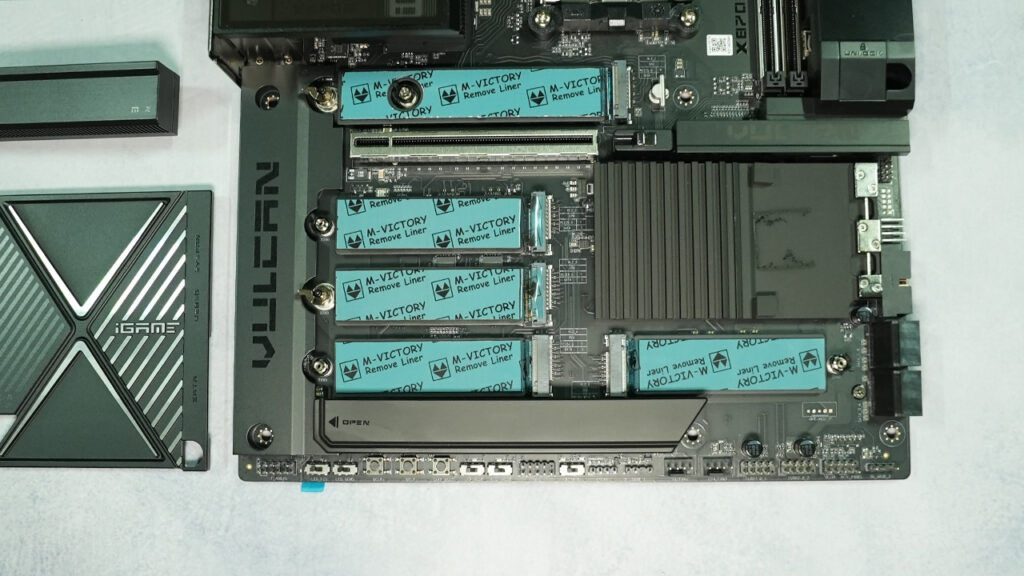
All five M.2 positions are covered by aluminium heatsinks. The primary drive has its own removable plate, while the lower sockets sit beneath larger sections of Colorful’s Vulcan Thermal Armor. The extensive coverage produces a clean appearance and spreads heat across a larger area, although accessing a lower SSD requires removing a comparatively large panel. The primary heatsink is not as thick as some dedicated vapour-chamber or tower-style Gen 5 SSD coolers. It should be adequate for most drives under normal desktop workloads, but sustained transfers from a high-power PCIe 5.0 SSD may still benefit from good case airflow.
Internal connectivity
The board includes eight four-pin fan or pump headers, supporting both PWM and DC control. Four addressable three-pin RGB headers are also present. Their distribution allows a case to be wired without relying entirely on external hubs, although some of the lower headers become harder to access after the graphics card and M.2 armour are installed. Internal USB connectivity consists of a USB 3.2 Gen 2×2 Type-C header capable of 20Gbps transfers and up to 60W charging, a USB 3.2 Gen 1 header and two USB 2.0 headers. The latter remain useful for liquid-cooler controllers, power-supply interfaces, lighting hubs and other internal devices.
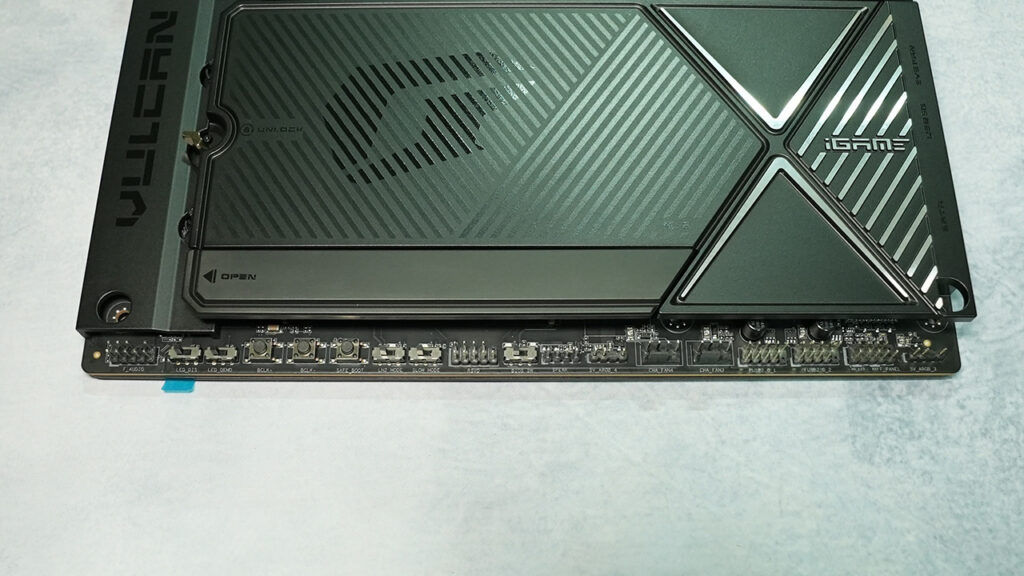
Additional controls along the lower edge include Safe Boot, BCLK increase and decrease buttons, BIOS selection, LN2 Mode, Slow Mode and lighting switches. Their placement makes sense for an open test bench but is less convenient once the motherboard is installed inside a conventional case with a graphics card covering part of the lower section.
Rear I/O
Rear connectivity is led by two USB4 Type-C ports operating at up to 40 Gbps. Both support DisplayPort Alternate Mode and can output up to 4K at 60 Hz when paired with a processor carrying integrated graphics. There is no dedicated HDMI or full-size DisplayPort connector, which may inconvenience troubleshooting situations where only a conventional monitor cable is available. The panel also provides four USB 3.2 Gen 2 Type-A ports, four USB 3.2 Gen 1 Type-A ports and two USB 2.0 connections. A legacy PS/2 connector is included for keyboards or mice, particularly those used in competitive benchmarking environments where USB behaviour can occasionally become unpredictable at extreme settings.
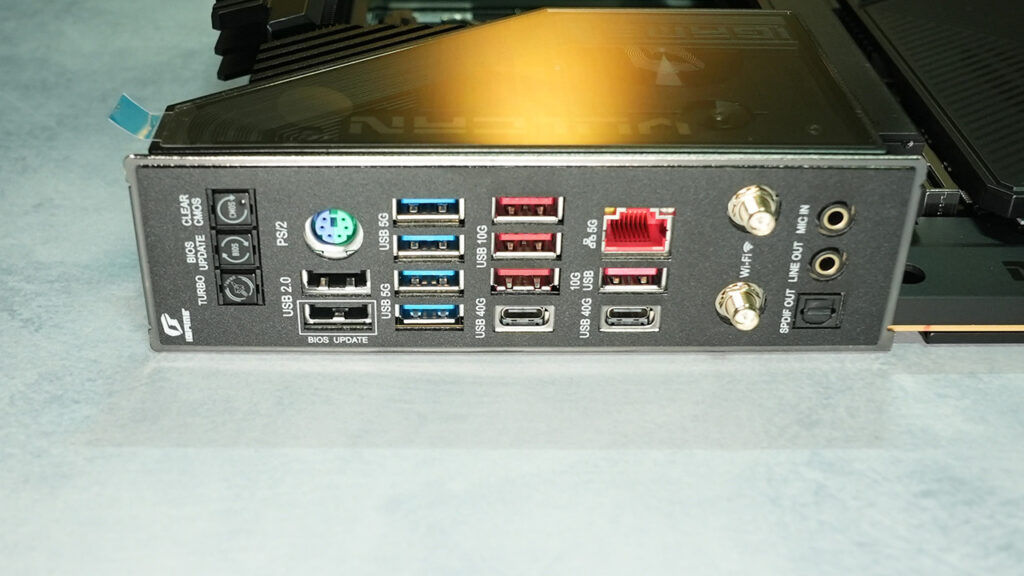
Networking consists of a Realtek RTL8126 5GbE controller and a MediaTek Wi-Fi 7 module with Bluetooth 5.4. The Wi-Fi system supports the 6 GHz band and 320 MHz channels where regional regulations and the connected router permit them.Audio output is handled through analogue connections and an optical S/PDIF output. Clear CMOS, BIOS Flashback and X3D tuning controls are also accessible from the rear, allowing several recovery and optimisation functions to be used without opening the case.
VRM details
The VULCAN OC V14 uses an 18+2+2-phase power topology. Eighteen phases are assigned to the processor cores, with the remaining stages serving the SoC and supporting voltage rails. At the centre of the design is a Renesas RAA229521 PWM controller. The Vcore phases use Renesas RAA2209004 smart power stages rated at 110A each. Multiplying the stage rating by the 18 Vcore phases produces a theoretical combined capacity of 1,980 A.
That number should not be interpreted as an amount of current that the CPU will actually consume. Power-stage ratings are measured under defined laboratory conditions and do not directly represent continuous motherboard output once temperature, efficiency, PCB resistance and cooling are considered. Even after those practical limitations are taken into account, however, the VRM has considerably more capacity than any mainstream AM5 processor requires under ambient cooling.
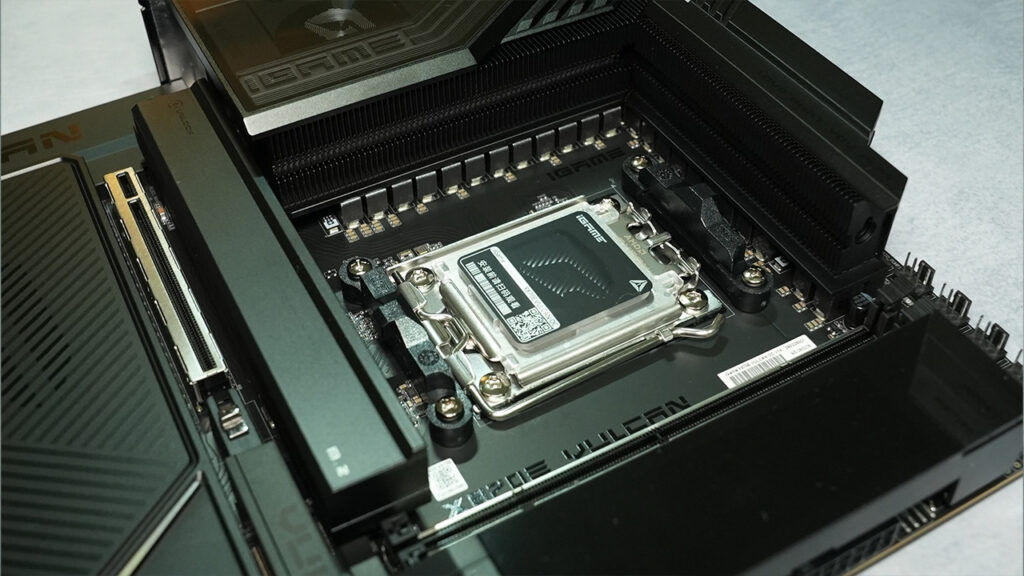
Power enters through the dual eight-pin EPS connectors and is distributed across the 10-layer PCB. The large number of layers assists current distribution while also allowing Colorful to separate high-speed memory and PCIe traces more effectively. The Vcore stages are cooled by two sizeable finned aluminium heatsinks connected by a heatpipe. Finned heatsinks provide more surface area than simple solid blocks, improving heat transfer when air moves through the upper part of the case. Thermal pads create contact between the stages, chokes and heatsink assembly.
We recorded VRM temperatures of approximately 59 degrees Celsius from the internal sensor and 53 degrees Celsius using an external measurement. These numbers are dependent on the kind of CPU you’ve got installed but they indicate that the VRM cooling system has ample thermal headroom for normal Precision Boost Overdrive tuning.
For an ordinary gaming system, the VRM is excessive. For the kind of open-bench tuning that the VULCAN OC is intended to support, it is appropriately specified and paired with a cooling design capable of using that capacity.
BIOS overview
Colorful’s UEFI opens in an Easy Mode interface with a black background, red highlights and white text. The presentation is readable and consistent with the physical board, although the layout and graphical elements look less refined than the current firmware interfaces used by ASUS, Gigabyte and MSI. Easy Mode presents the core information required during setup, including processor and memory detection, temperatures, fan behaviour, storage devices and boot order. A visual Main Panel shows an illustration of the motherboard and indicates which sockets or interfaces are populated. This provides a useful way to identify a missing drive or incorrectly seated component without manually checking every menu. Advanced Mode exposes the voltage, timing, frequency and platform settings required for detailed tuning. A hardware monitor remains visible alongside the main controls, allowing temperatures and fan speeds to be checked while adjustments are made.
The BIOS includes standard AMD functions such as Precision Boost Overdrive, Curve Optimiser, memory timing controls, Infinity Fabric settings and load-line calibration. It also exposes the board’s external clock-generator controls and High-V mode for configurations requiring unusually high memory or processor voltages. The most prominent processor-specific feature is X3D A.I Turbo. When a supported Ryzen X3D processor is installed, the BIOS presents several automatic tuning profiles. There are Turbo modes 1 through 4, along with additional profiles that combine the second or third tuning mode with BCLK adjustment. The profiles range from relatively conventional PBO-style optimisation to more aggressive base-clock changes. There also an X3D High Frame Rate Mode that adjusts parameters such as the base clock and PBO behaviour. These options lower the barrier to experimenting with X3D tuning, but they do not remove the need to test stability. Raising the base clock can influence multiple buses and devices, depending on how the external clock generator and BIOS dividers are configured.
The physical BCLK increase and decrease buttons allow the base clock to be adjusted while a benchmark is running. This is particularly useful for competitive testing, where a system may only remain stable at its highest frequency for the duration of a light workload or final validation run. Safe Boot attempts to start the system using conservative settings without permanently erasing the saved configuration. Retry triggers another boot attempt, which is useful when memory training fails intermittently. Slow Mode reduces the processor frequency to help the system remain stable between benchmark runs, while LN2 Mode adjusts boot behaviour for operation at sub-zero temperatures.
Dual BIOS chips add a further layer of protection. A failed firmware update or unusable tuning configuration can be recovered by switching to the secondary chip. Each firmware chip has a 256-megabit capacity, equivalent to 32 MB. That is sufficient for current AM5 support, but it provides less room than the 64 MB chips appearing on some newer high-end motherboards.
Fan control is available through the hardware-monitor section, with support for PWM and voltage-controlled devices. The controls are functional, though not presented with the same degree of visual clarity or guided configuration found on some established competitors. The BIOS therefore contains the functionality expected from an overclocking platform. Its weakness is presentation rather than depth. Experienced tuners should be able to locate the necessary options, but less experienced users may find the terminology and menu hierarchy less approachable than the automated interfaces available elsewhere.
Board software
Colorful’s principal Windows utility is iGame Center. It combines hardware monitoring, RGB control, device information and configuration of the Vulcan Smart Screen. The monitoring pages display processor, graphics, memory and system information, along with available temperature, utilisation and clock-speed readings. The software can also manage compatible Colorful graphics cards and other iGame components, allowing lighting effects to be synchronised across a system.
Lighting control covers both the motherboard’s integrated RGB strips and devices connected to its four ARGB headers. Effects, brightness and synchronisation can be adjusted without returning to the BIOS. The Smart Screen configuration tool is the most important motherboard-specific part of the application. It can place temperatures, frequencies and other monitoring values on the display, while also supporting static images and animated graphics. Custom screen layouts can be assembled by combining multiple graphical elements. The implementation is flexible, but it is not particularly intuitive. Setting up a useful monitoring display requires more manual arrangement than expected, and the screen does not present a practical system-information layout by default. Some downloadable graphics and functions may also require an iGame account.
A gaming section attempts to estimate frame rates at 1080p, 1440p and 4K based on the detected hardware. The software also contains an AI section centred around animated pets and avatars rather than hardware optimisation. We don’t see the appeal here but there might be certain markets where this is a welcome feature. The software covers the essential monitoring, lighting and LCD functions, but it feels just as lacking as the software from all the other motherboard manufacturers..
Overclocking
The iGame X870E VULCAN OC V14 is built around overclocking in a way that most premium gaming motherboards are not. Its external clock generator, two-slot memory layout, physical tuning controls and recovery features provide tools that are difficult to justify on a mainstream system but valuable during competitive benchmarking. For daily operation, Precision Boost Overdrive and Curve Optimiser remain the most practical methods of extracting additional Ryzen performance. PBO raises the current and power limits available to the processor, while Curve Optimiser adjusts the voltage-frequency behaviour of individual cores or the entire CPU.
A negative Curve Optimiser value can reduce the voltage needed at a given frequency. This may lower temperature and allow the processor to sustain higher boost clocks within the same thermal and power envelope. Stability must be verified thoroughly, as an unstable curve may only produce errors during light, single-threaded or idle transitions rather than during an obvious all-core stress test. The board’s VRM does not meaningfully constrain this form of tuning. Cooling and processor quality will become limiting factors long before the 18 Vcore stages approach their rated capacity. The external clock generator provides another route. Increasing BCLK raises frequencies derived from the base clock and can offer additional performance on processors with limited multiplier adjustment. The rear X3D tuning button, BIOS profiles and onboard BCLK controls are particularly relevant to Ryzen X3D models, whose manual multiplier options have historically been more restricted than those of conventional Ryzen processors.
Colorful’s X3D A.I Turbo profiles provide several levels of automatic adjustment. Some rely primarily on PBO-style behaviour, while others combine the profile with base-clock increases. They offer a convenient starting point, although the most aggressive profile will not necessarily be stable with every processor, memory kit and cooling system. The board has demonstrated its credentials under extreme cooling. In March this year, an overclocker by the name “Takukou” used the VULCAN OC V14 to validate a Ryzen 7 9850X3D at approximately 7.410 GHz. He still retains the top position for the 9850X3D at 7.5 GHz but with an ASUS ROG Crosshair X870E Apex. Merely the fact that this board managed to achieve such a high score and stand among established peers is commendable.
Memory overclocking is arguably the board’s more useful strength. The two-slot layout reduces trace complexity, while High-V mode, extensive timing controls and direct voltage measurement support detailed tuning. Safe Boot and Retry become valuable during memory tuning because failed training is common when timings or voltages are close to the edge. Safe Boot can recover the system without immediately discarding every saved value, while Retry allows another training attempt without cycling the power manually. And as mentioned previously, Dual BIOS support reduces the risk associated with experimental firmware or heavily modified settings. A stable firmware version can be retained on one chip while the other is used for newer releases or benchmark-oriented configurations. LN2 Mode and Slow Mode are irrelevant to ordinary cooling but demonstrate that the board was designed with input from competitive overclocking use cases. Slow Mode allows the processor to operate at a reduced frequency between test runs, helping a system remain stable while a benchmark is prepared. LN2 Mode modifies low-temperature boot behaviour and related protections.
The VULCAN OC therefore offers considerably more overclocking infrastructure than a typical premium X870E motherboard and it provides the controls, recovery mechanisms and electrical foundation needed to explore the limits of those components.
Value for money
Value is the most difficult aspect of the iGame X870E VULCAN OC V14. We could not find any listings for this motherboard but some estimates put it over USD 600 in international markets. In India, it’s going for an eye-watering Rs 1,23,000. At that level, buyers can consider models such as the Gigabyte X870 AORUS Tachyon ICE, ASRock X870E Taichi OCF and ASUS ROG Crosshair X870E Dark Hero. The Gigabyte and ASRock boards have similarly clear overclocking identities, while ASUS offers a more polished firmware and software ecosystem alongside extensive premium connectivity.
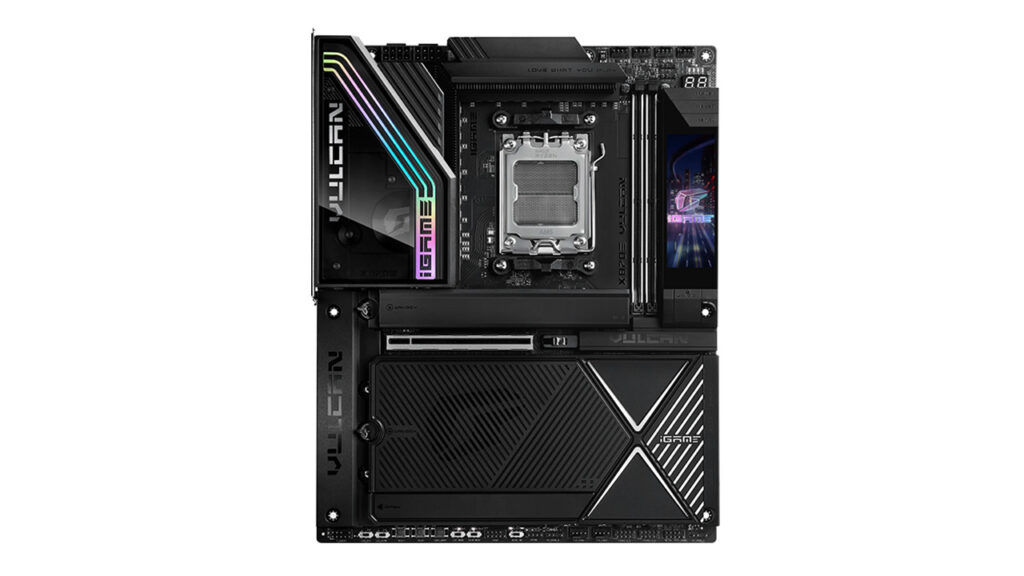
The board makes the strongest financial case when its specialist features are genuinely required. A user buying it specifically for high-frequency memory, BCLK tuning, X3D experimentation, multiple Gen 5 drives or competitive overclocking receives a substantial amount of relevant hardware. For a stock Ryzen gaming system with one graphics card and one or two SSDs, it is difficult to justify. Less expensive X870E and B850 motherboards can deliver virtually identical application and gaming performance, often with four memory slots and simpler software. It should therefore be judged as a specialist tool rather than a universal flagship. Its value is high for a narrow audience and comparatively poor for buyers who will leave most of its physical controls untouched.
Verdict
The Colorful iGame X870E VULCAN OC V14 is a convincing piece of motherboard engineering. Its 18+2+2-phase power system, Renesas 110A stages, 10-layer PCB, extensive VRM cooling and dual eight-pin CPU inputs give it enough electrical headroom for any current AM5 processor. The two-DIMM topology and detailed memory controls also make it a credible platform for pushing DDR5 well beyond normal Ryzen operating speeds. Colorful has avoided turning it into a single-purpose benchmark board. Five M.2 slots, USB4, 5GbE, Wi-Fi 7, 60W front USB-C charging, eight fan headers and a well-equipped audio section make it practical enough for a high-end gaming PC or workstation. The physical design is generally excellent and the accessory package includes most of the items required for a premium build.
Its weaknesses are concentrated around refinement and price. For competitive overclockers, memory enthusiasts and builders seeking an unusual black flagship with an integrated display, the iGame X870E VULCAN OC V14 is a capable and technically interesting choice. It has the hardware required to compete with established overclocking motherboards and has already shown that it can operate at extreme CPU and memory frequencies. For everyone else, it is more motherboard than the system is likely to need. Its performance at stock settings is appropriately strong, but not fundamentally different from a well-built board costing far less. The VULCAN OC earns its place through specialised tuning hardware, not through ordinary gaming benchmark scores. Nevertheless, Colorful has succeeded in producing a serious flagship motherboard. The remaining task is to bring its BIOS, Windows software, international availability and pricing up to the standard set by the physical board.


