
Lenovo IdeaPad Slim 3i Gen 11 review: Debuting with Intel Pather Lake
 Follow Us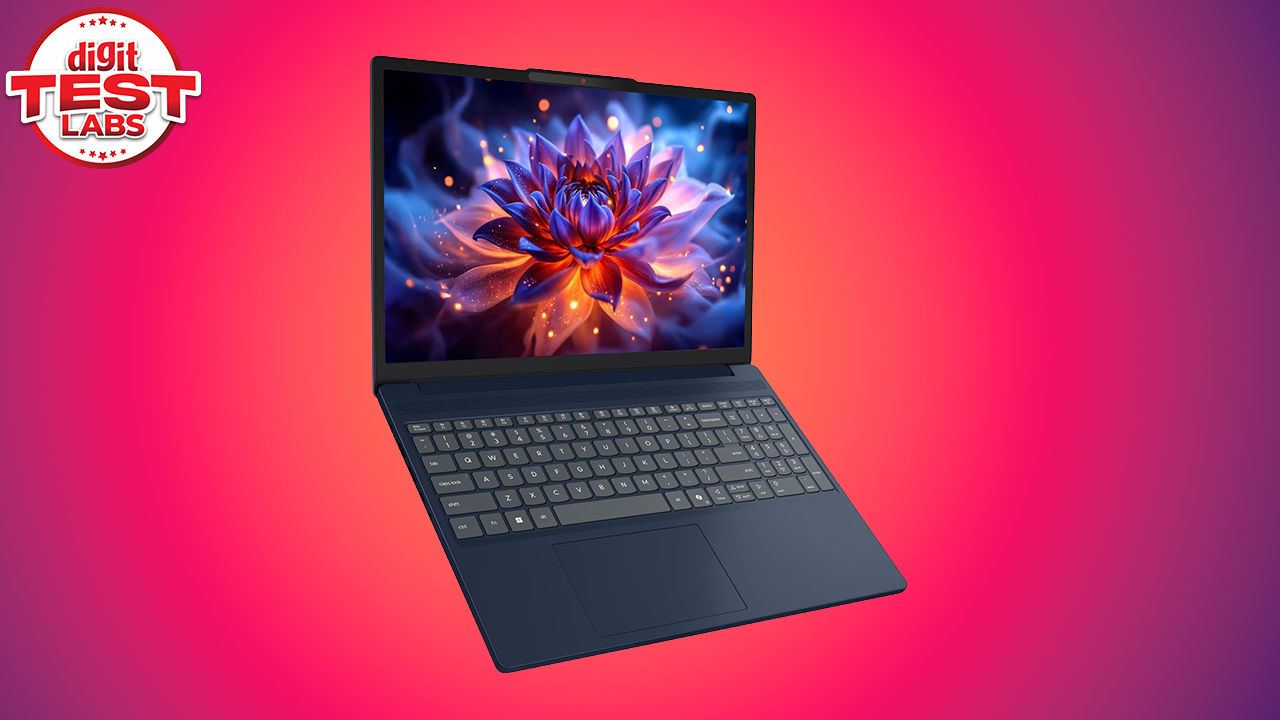

Lenovo IdeaPad Slim 3i Gen 11 (15IPH11), comes in as one of Lenovo’s entry-level, budget-friendly workhorses. It sits below the Yoga, Legion and LOQ series but within the IdeaPad series, it’s more in the middle of the lot. That being said, this particular model is a little special, at its core is Intel’s new Core Ultra 5 322, a Panther Lake-H chip with a 2P+4E core layout, paired with 16 GB DDR5 memory, a 512 GB PCIe SSD and integrated Intel Graphics. Intel unveiled Panther Lake at CES 2026 making it the third family of processors to have the ‘Core Ultra’ branding. The above hardware combination effectively positions the laptop as a machine for office work, web-heavy multitasking, online classes, streaming, light creative work and casual productivity rather than gaming or workstation workloads. It’s currently retailing for Rs.1,09,990 which might seem a little high for the positioning of the laptop, but you can blame the memory pricing crisis for that.
Lenovo’s positions the IdeaPad Slim line around portability, clean design, long battery life, rapid charging, collaboration features and AI-oriented everyday usage. This range is also part of Lenovo’s Make in India push, which is worth noting for the Indian market.
Lenovo IdeaPad Slim 3i Gen 11 Specifications
If you’re looking for the exact model that we’re reviewing today then look for the Lenovo IdeaPad Slim 3i Gen 11 with the 15IPH11 2 product tag and the model number 83UR009QIN. It runs Windows 11 Home and our unit was tested with Lenovo BIOS TTCN19WW dated 9 March 2026. Like we mentioned previously, the processor is the Intel Core Ultra 5 322, based on Intel Panther Lake. It is a 2P+4E processor, with a peak clock of 4.3 GHz in the tested configuration. The CPU has 12 MB of L3 cache and a typical power rating of 25 W, which is in line with its positioning inside a thin-and-light productivity notebook.
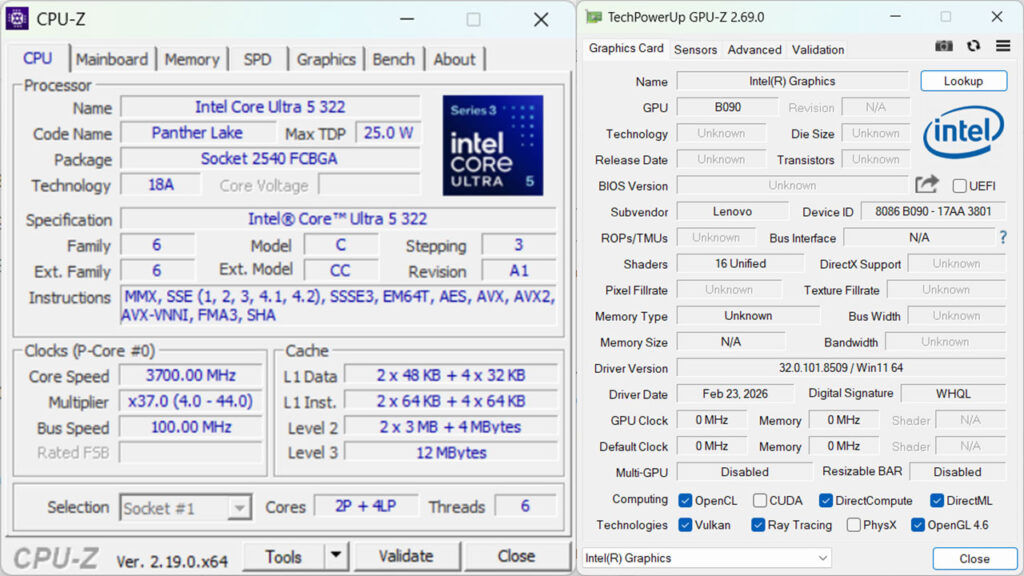
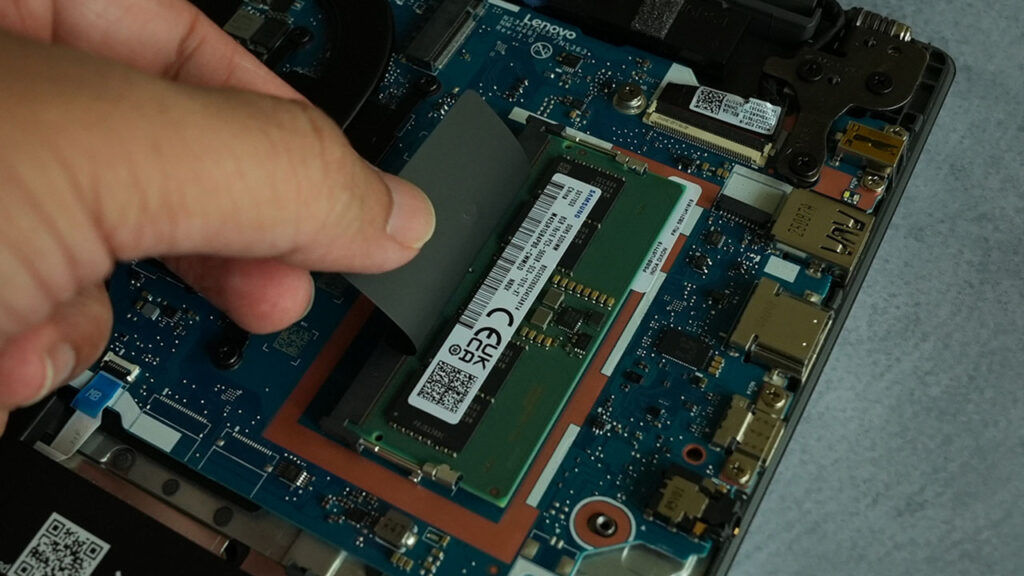
On the memory front, the unit comes with 16 GB DDR5-5600 RAM in dual-channel mode as do all DDR5 DIMMs. When we opened the unit, we saw just one 8 GB Samsung DDR5 DIMM suggesting that the other 8 GB or RAM was soldered onto the mainboard. The reported maximum memory capacity is 40 GB, which is useful for buyers who want a mainstream laptop that does not become immediately restrictive after a couple of years.
Storage is handled by a 512 GB SanDisk SN5100S NVMe SSD. That leaves you 476 GB of usable space after the metric-to-byte conversion and over-provisioning. The integrated graphics solution is the Intel Panther Lake-H GT2, which shows up as ‘Intel Graphics’ with dynamic memory allocation ranging between 512 MB to 2 GB, available as needed.
The display on the review unit is a 15.3-inch Lenovo LEN153WUXGA panel with a 1920 x 1200 resolution, 16:10 aspect ratio and 60 Hz refresh rate. It’s rated for up to 400 nits brightness and comes with TÜV Low Blue Light certification.
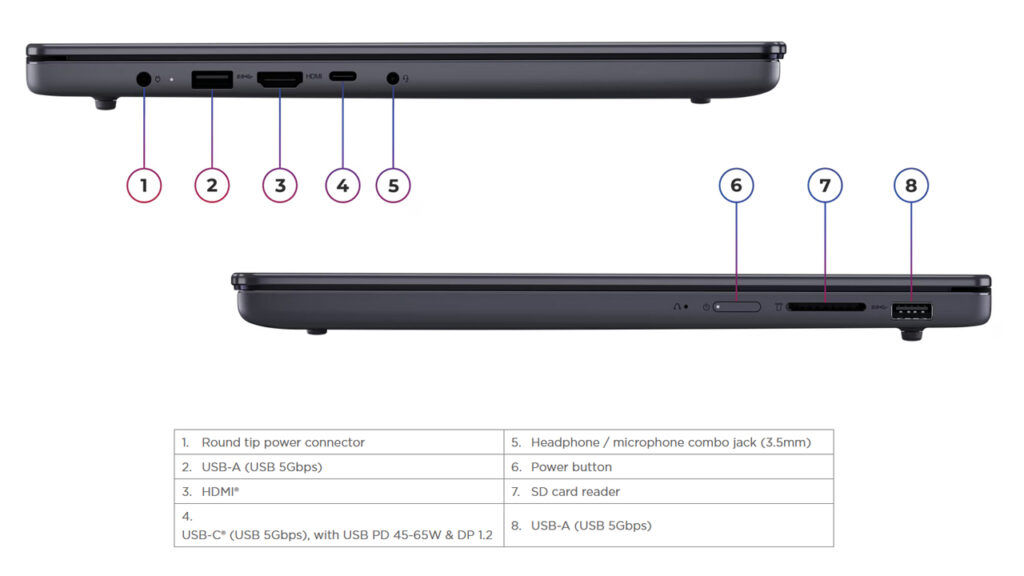
Connectivity includes Wi-Fi 6 and Bluetooth 5.3 through a MediaTek MT7920 wireless card. Although, technically, it can handle LMP 13 features so it can be called a Bluetooth 5.4 device if certified as such. The port selection includes USB Type-A, USB Type-C with DisplayPort and Power Delivery, HDMI 1.4, an SD card reader and a 3.5 mm audio combo jack. The system also includes a 60 Wh battery with Rapid Charge Boost support, with Lenovo claiming up to two hours of use from a 15-minute charge on the 60 Wh model. You can check out the full list of specifications below:
| Lenovo IdeaPad Slim 3i Gen 11 Specifications | |
|---|---|
| Processor | Intel Core Ultra 5 322 |
| CPU configuration | 2 Performance cores + 4 Efficiency cores |
| Peak CPU clock | Up to 4.4 GHz |
| Chipset/platform | Intel Panther Lake-H |
| Graphics | Intel Graphics (Integrated) 2 Cores |
| System memory | 16 GB DDR5 (8 GB onboard + 8 GB Samsung DDR5-5600) |
| Maximum supported memory | Up to 40 GB |
| Storage | 512GB SanDisk PC SN5100S NVMe SSD |
| Display | 15.3-inch WUXGA panel |
| Resolution | 1920 x 1200 |
| Aspect ratio | 16:10 |
| Refresh rate | 60 Hz |
| Audio | 2x 2 Watt speakers with Dolby Audio |
| Webcam | FHD IR camera |
| Privacy | Physical camera privacy shutter |
| Wireless | MediaTek Wi-Fi 6 MT7920 |
| Bluetooth | Bluetooth 5.3 |
| Ports | USB Type-A (USB 5Gbps), USB Type-C (USB 5Gbps) with DisplayPort and Power Delivery, HDMI 1.4, SD card reader, 3.5 mm audio jack |
| Memory card reader | SD card reader |
| Keyboard | 1.3 mm key travel, backlit |
| Touchpad | 120mm x 75mm |
| Battery | 60 Wh |
| Fast charging | Rapid Charge Boost, up to 2 hours usage from 15 minutes charging |
| Colour | Luna Grey |
| Build | ABS Plastic + Aluminium |
| Operating system | Windows 11 Home Single Language |
| Launch price | ₹1,09,990 |
Features
The IdeaPad Slim 3i Gen 11 follows Lenovo’s recent mainstream laptop playbook featuring a cleaner chassis, a taller 16:10 screen, improved conferencing hardware and enough performance for hybrid work and study. It is not trying to be a Yoga or a Legion. This is meant for students, office users, home users and anyone who wants a reasonably modern laptop without stepping into premium ultrabook territory.
The FHD IR camera is one of the more useful additions. It allows faster Windows Hello login and is paired with a physical privacy shutter, which is still the simplest webcam privacy feature that actually matters. It also packs dual microphones, smart noise cancellation and Dolby Audio speakers, all of which are aimed at online classes, video meetings and casual media consumption. Lenovo is also leaning on AI messaging with this generation. There’s the typical Copilot+ PC experiences, real-time translations, intelligent captions, smarter search and Lenovo Smart features baked in.
Coming to the included software, Lenovo Vantage, which has been a mainstay on all Lenovo laptops for some time has evolved into one of the more useful software additions because it pulls together several utility functions that would otherwise be scattered across Windows settings, driver tools, audio apps, display utilities and support pages. The app shows device identity, warranty status, battery health, charge cycles, BIOS version and installed hardware in one place, which makes it friendlier for regular users who may not want to dig through Device Manager or system information menus.
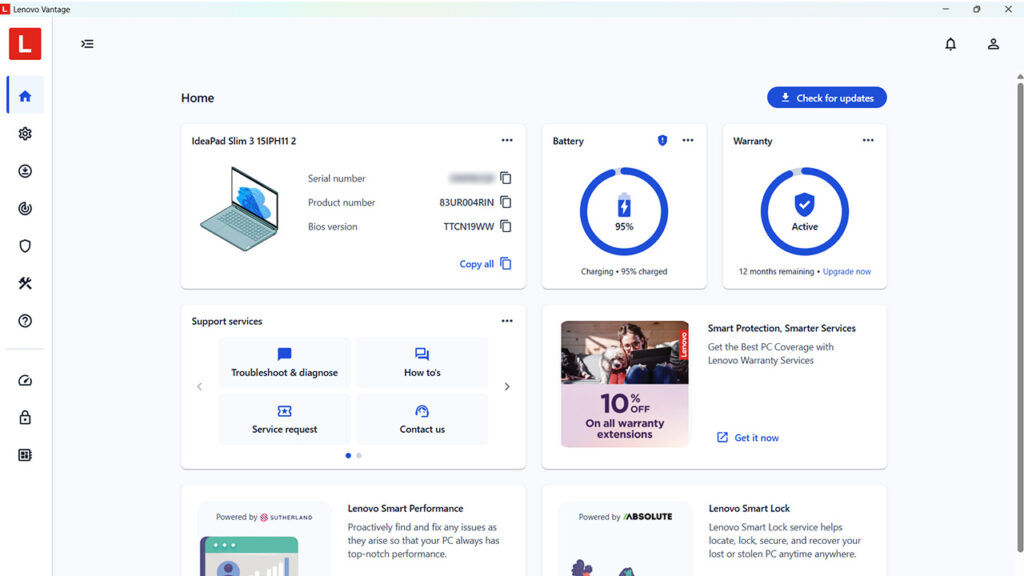
The power section is particularly useful, with battery capacity, current charge, battery temperature and warranty details clearly shown. Display controls are also neatly integrated, including eye care mode, colour effects, super resolution for video playback, and presence detection features such as zero-touch login, lock and video playback. Audio and conferencing controls are similarly useful, with Dolby Atmos profiles, speaker noise cancelling, microphone noise reduction, smart meeting assistant, mute detection alerts and gesture-based microphone control for Teams.
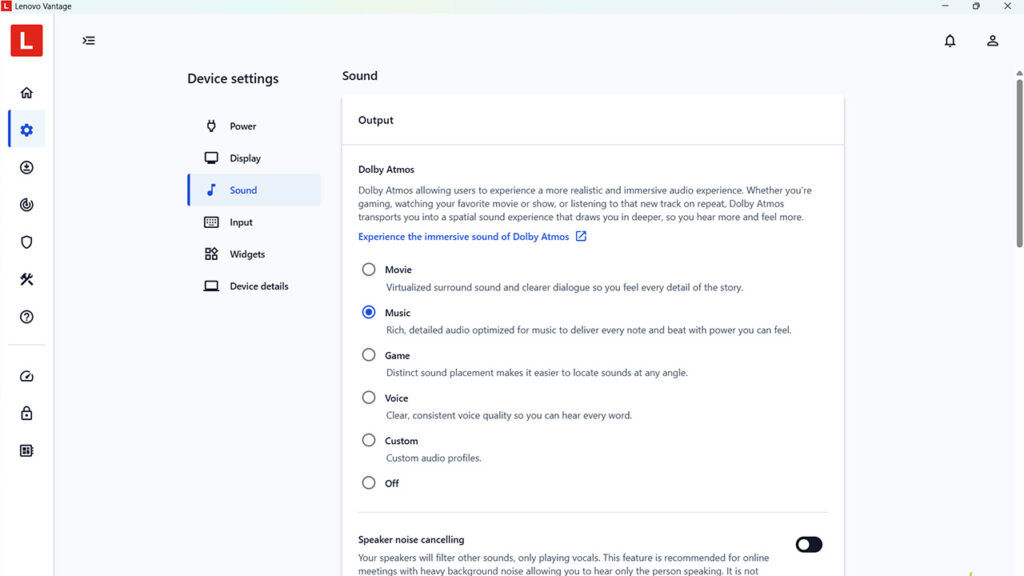
Vantage also handles system updates, BIOS and firmware update scheduling, hardware diagnostics, system insights and real-time thermal monitoring. The result is a utility suite that feels less like preloaded bloatware and more like a practical control centre. For a mainstream laptop, this kind of consolidation makes ownership easier and reduces the friction of maintaining the device.
Build quality
The IdeaPad Slim 3i Gen 11 follows the same design language as the previous Gen 10. It’s primarily built using ABS plastic for all the parts that are user-facing but on the inside, we can see a rigid metal chassis, presumably aluminium. The Luna Grey finish fits the understated IdeaPad identity. The chassis has a very clean and sleek look, but it doesn’t appear to be chasing the ultra-premium thinness of Yoga models, but that works in its favour if the aim is daily dependability rather than flash and pizzaz.
For a 15-inch notebook, the taller 16:10 panel makes the machine feel more useful for documents, spreadsheets and web pages. The slim bezels also help keep the design modern. Lenovo claims up to around 90 per cent active screen area ratio for the family of laptops. The review unit we received uses a 1920 x 1200 60 Hz panel, so it is clearly more of a productivity display than a high-refresh or colour-critical panel.
Connectivity options are decent. The inclusion of USB Type-A, USB Type-C with charging and display output, HDMI 1.4, SD card reader and a headphone jack means users should not need a dock or dongles for basic everyday usage. The SD card reader is particularly welcome, especially for students, creators and journalists who still move files from cameras or audio recorders. What would have been better is if Lenovo has switched to using a USB Type-C connector for the charger but it seems to be left out for the more premium models.
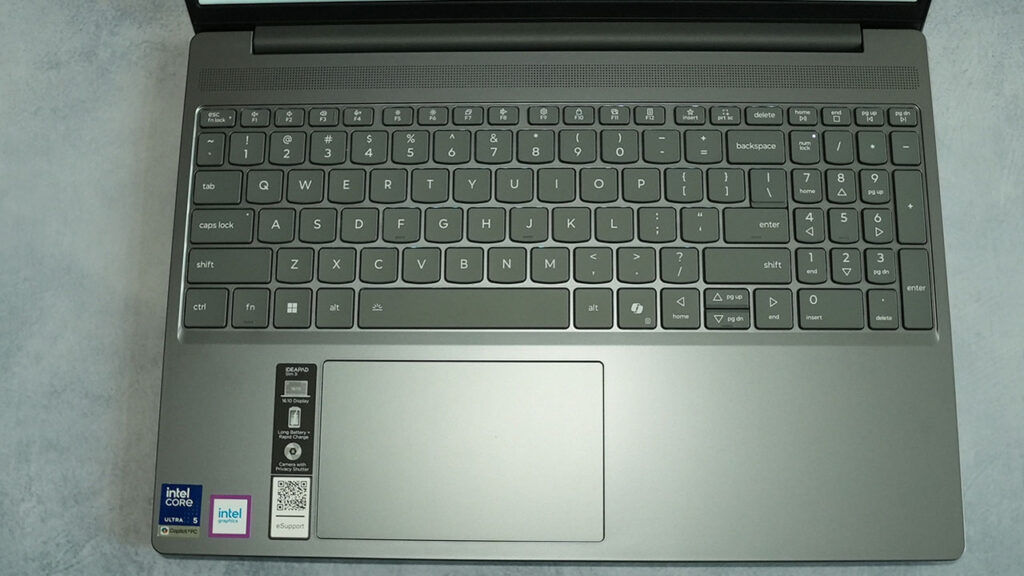
The keyboard has a 1.3 mm key travel, and comes with optional backlighting depending on the configuration. The model we reviewed had a backlit keyboard. The trackpad is quite large with about 120 x 75 mm in area and that’s good for folks who rely on gestures for navigation.
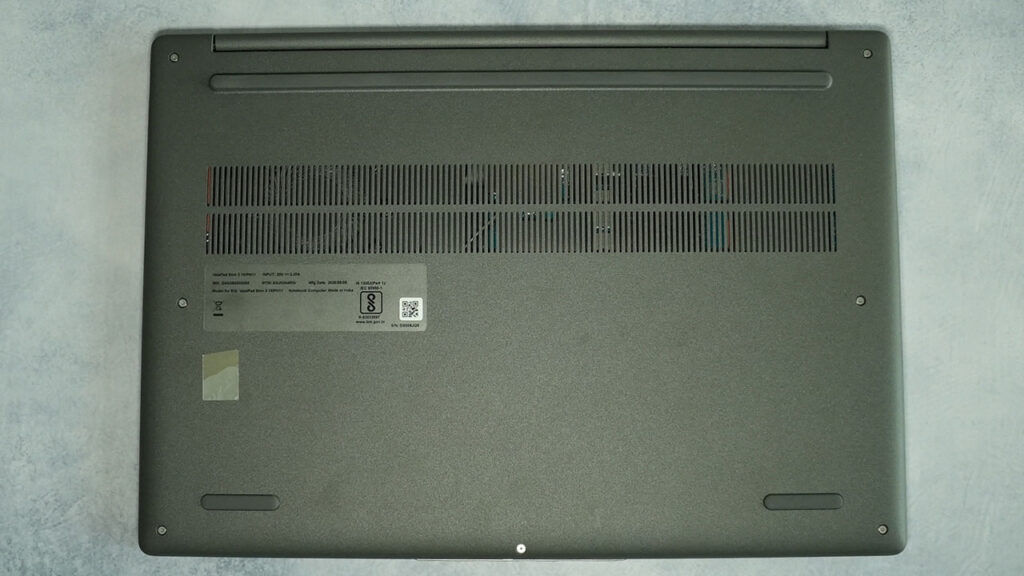
The internal configuration is interesting. We’ve already spoken about the mix of soldered and swappable memory. We also spotted a protective cage on the inside of the bottom cover for the memory, its edges touch the clean copper rectangle that you see around the memory. The plastic bottom cover often flexes and without the protective cage, the cover could bump into the memory DIMM and potentially damage the module. So the protective cage helps with that.
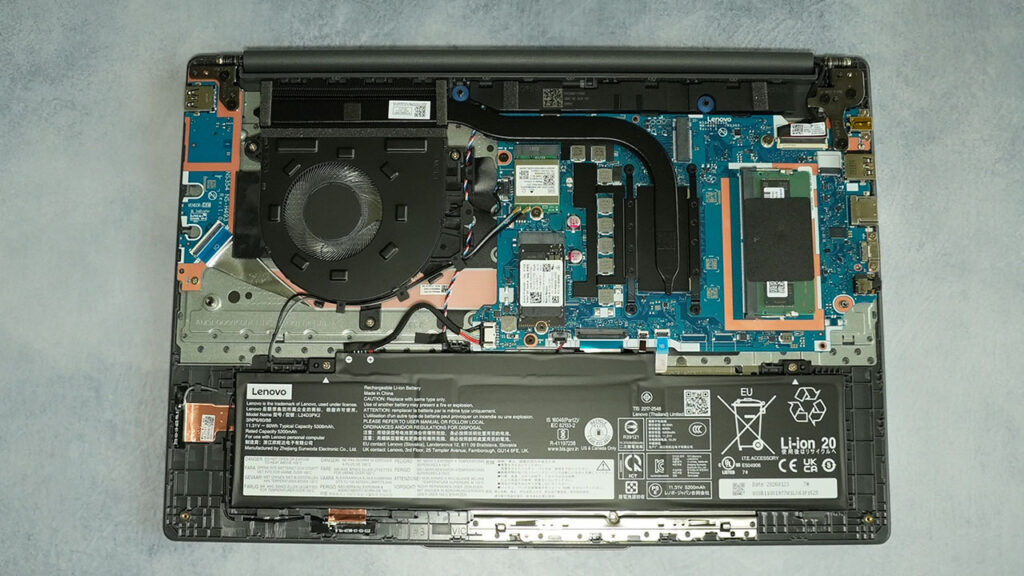
The cooler uses a simple single blower configuration since there’s no discrete GPU and the CPU is set to 25 Watts, so there isn’t a lot to cool in the chassis. There’s an empty M.2 slot in case you want to add more storage. Looking at the I/O ports, we can see that the fixtures are reinforced with metal brackets which is always a good thing to see. We’ve also seen other configurations wherein the ports are on a daughter board with a little bit of play so that accidental bumps don’t end up damaging the entire board.
We didn’t spot any downward firing speakers or any additional ones near the bottom. Instead, we found the antennae for the Wi-Fi and Bluetooth modules in the spot where the additional speakers are generally seen. Overall, the design is very typical of most mainstream laptops.
Performance
The Core Ultra 5 322 is the most interesting part of this laptop. It is not a high-core-count processor, but the test results show strong single-threaded performance and competent multi-threaded output for a mainstream thin-and-light notebook.
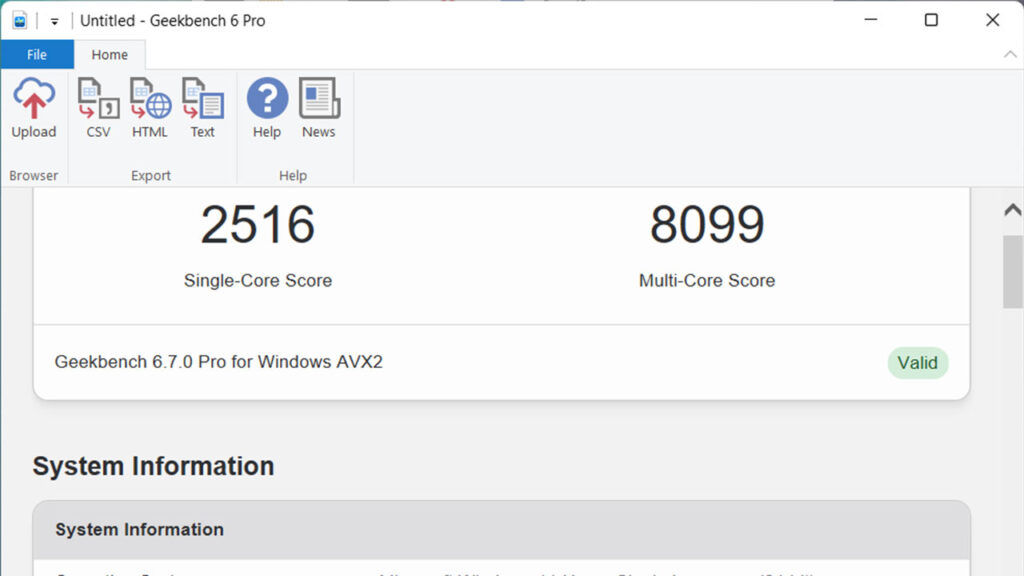
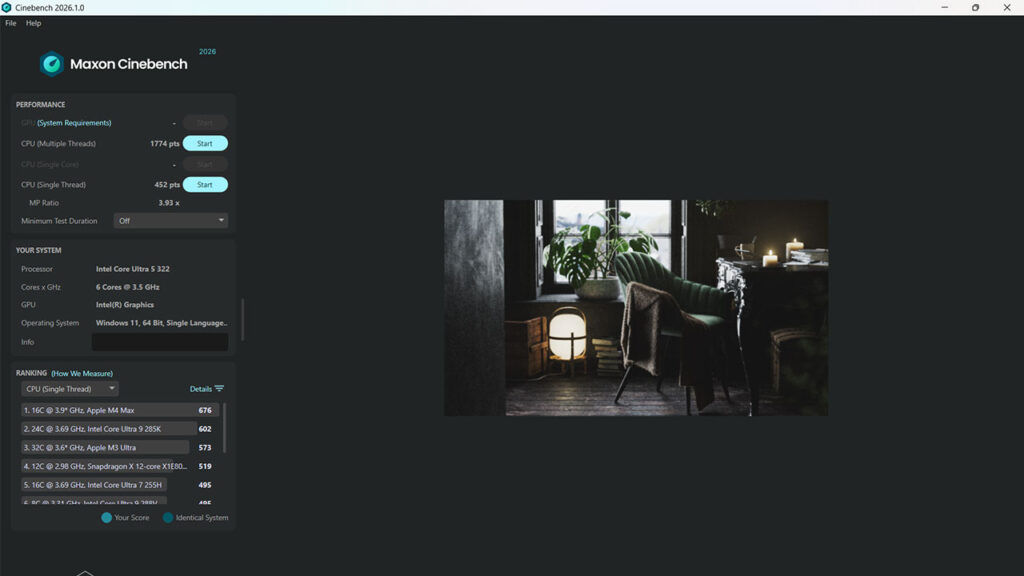
In Geekbench 6, the IdeaPad Slim 3i Gen 11 scored 2,516 in single-core and 8,099 in multi-core. Cinebench R23 produced 1,819 points in single-core and 7,492 points in multi-core, with a multi-core ratio of 4.12x. Even the Cinbench 2026 single core benchmark numbers put it in same league as the Apple M1 or the AMD Ryzen AI 9 365. On the multithreaded front, it is still comparable to the Apple M1, Intel Core i7-1260U and the AMD Ryzen 5 5600H. These are healthy numbers for the segment and suggest that the laptop should feel quick in common workloads such as browser multitasking, Microsoft Office, content management systems, photo resizing, light coding and compressed file handling.
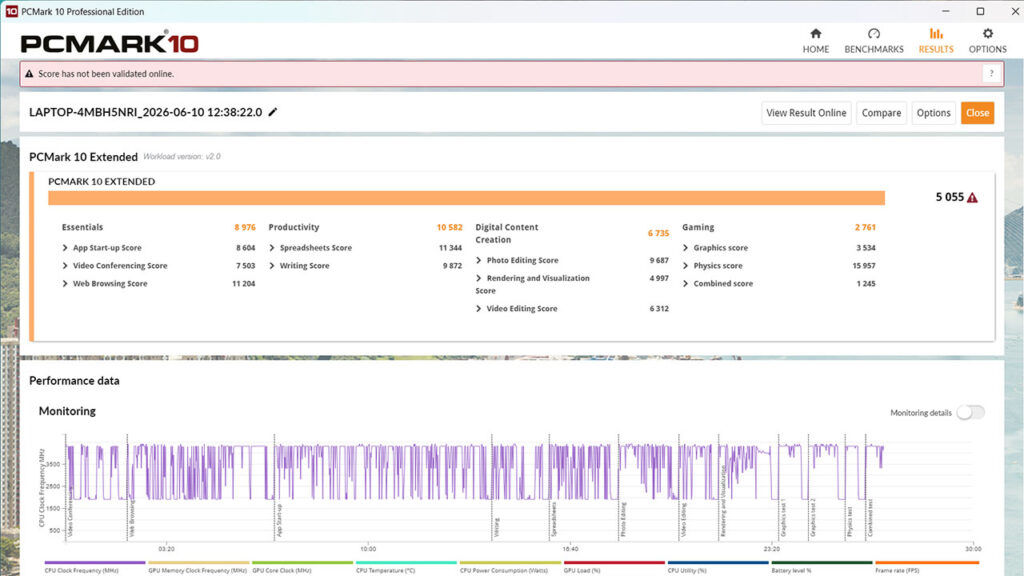
The PCMark 10 Extended score of 5,055 paints a similar picture. The laptop scored 8,976 in Essentials and 10,582 in Productivity, which are the two areas most relevant to the device. Digital Content Creation came in at 6,735, while Gaming stood at 2,761. That split is exactly what one would expect: strong everyday responsiveness, decent light creative headroom, and limited gaming capability.
In compression and decompression workloads, the results are respectable. The 7-Zip benchmark produced a total rating of 37.713 GIPS, while WinRAR reported 5,820KB/s. Blender is clearly outside the laptop’s comfort zone, but it still completed the benchmark with 35.28 samples per minute in Monster, 25.71 in Junkshop and 19.77 in Classroom. These results are fine for occasional CPU-based rendering tests, but not for anyone who regularly works in 3D.
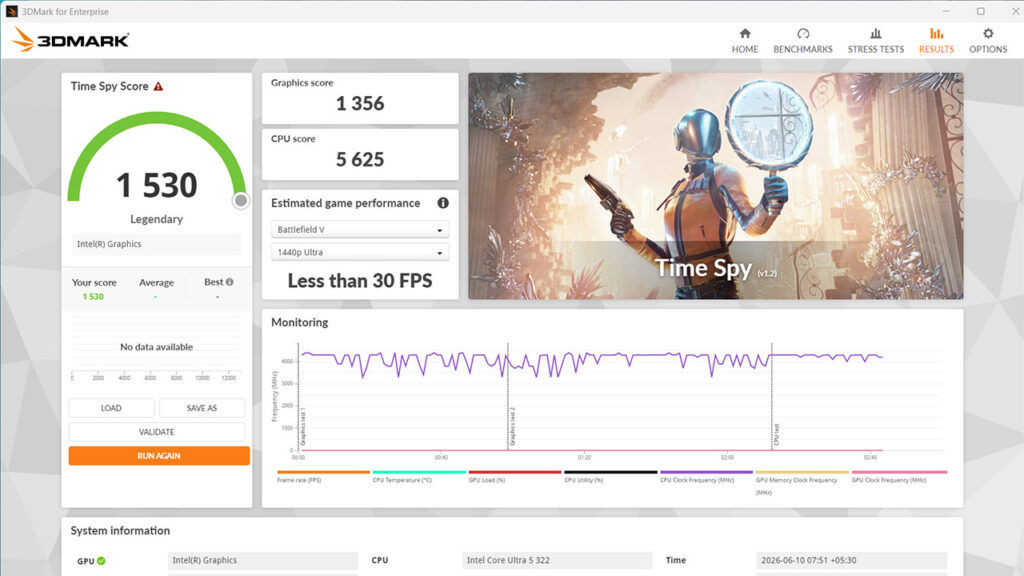
The integrated Intel Graphics is functional rather than ambitious. In 3DMark Steel Nomad, the laptop scored 232 with a graphics test result of 2.32 FPS. That is a clear signal that modern heavy gaming is not the focus here. The GPU can handle display acceleration, video playback, light creative acceleration and older or lightweight games at modest settings, but this is not a laptop for gaming. Even casual gaming expectations should be set around older titles, esports games at reduced settings and cloud gaming rather than native high-fidelity play.
Memory performance is good. AIDA64 Cache & Memory Benchmark recorded 43,709 MB/s read, 71,687 MB/s write and 66,791 MB/s copy bandwidth, with memory latency at 120.5 ns. The write and copy figures are solid for DDR5-5600 in a mainstream system, though the latency is not especially tight. In real-world usage, the key advantage is dual-channel memory, which helps both CPU responsiveness and integrated graphics performance.
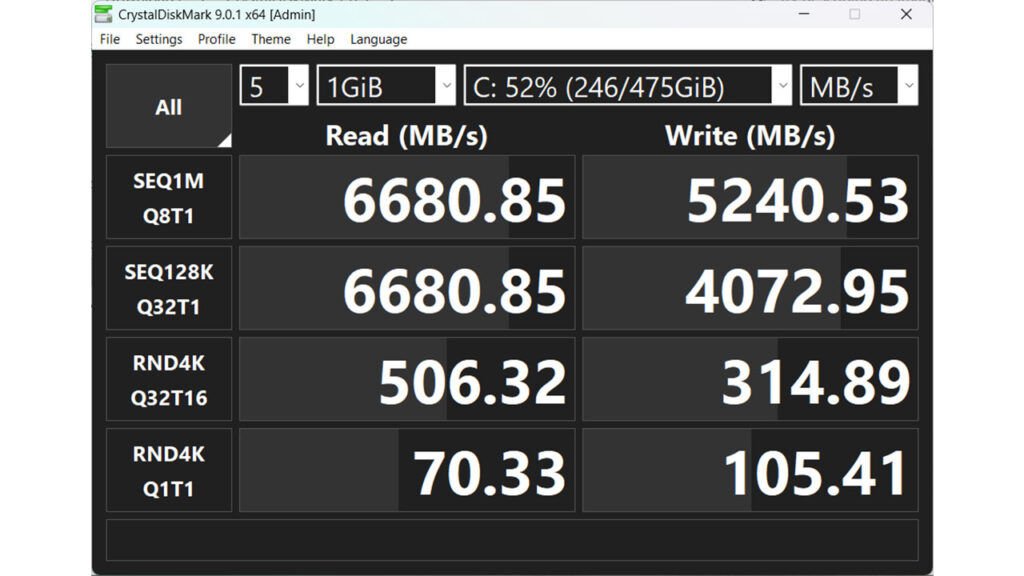
Storage performance is strong in CrystalDiskMark, with sequential read speeds of 6,680 MB/s and sequential writes of 5,240 MB/s in the SEQ1M Q8T1 test. Random 4K Q32T16 results came in at 506 MB/s read and 314 MB/s write, while Q1T1 random results were 70 MB/s read and 105 MB/s write. Those are good figures for fast boot times, app launches and large file transfers. PCMark’s Quick System Drive Benchmark was less flattering, with a score of 1,827, bandwidth of 219.78 MB/s and average access time of 69 microseconds, but the overall storage experience should still feel snappy.
Networking is handled by the MediaTek Wi-Fi 6 MT7920 card. With 1,201 Mbps link speed on the test network with 160 MHz channel width, we managed to get about 722 Mbps downstream which is more than enough for fast downloads, cloud backups, video calls and local NAS transfers, assuming the router and network conditions are up to the job.
We didn’t see any significant throttling with the Intel Core Ultra 5 322. Even with a sustained load for over 10 minutes, we only saw the Cinebench multi-threaded scores dip by 40 points. That being said, it should be noted that the Ultra 5 322 has very low core and thread count and is clocked quite moderately, so there isn’t much scope for a lot of throttling. We typically see throttling where the headrooms aren’t are large and that’s usually with the Ultra 7 or higher SKUs.
Power consumption and battery life
The IdeaPad Slim 3i Gen 11 comes with a Sunwoda 60 Wh battery which gives it more headroom than the smaller packs often found in budget 15-inch notebooks, and that should help when the laptop is used for mixed productivity rather than heavy sustained workloads.
The Sunwoda battery has a designed capacity of 60,000 mWh, a fully charged capacity of 63,000mWh. In our battery test, we managed to get 13 hours and 59 minutes out of the battery. Lenovo claims Rapid Charge Boost support on the 60 Wh model, with up to two hours of usage from a 15-minute charge which was easily achieved. As always, these claims depend heavily on brightness, workload, wireless usage and power mode, but rapid charging is genuinely useful in this class of laptop.
The included charger is slim and has a narrow barrel connector making it easy to carry around. Like we mentioned previously, a USB Type-C Connector would have been excellent.
Verdict
The Lenovo IdeaPad Slim 3i Gen 11 (15IPH11) comes across as a very sensible mainstream laptop built around the right upgrades. Panther Lake-H debuts in Lenovo’s portfolio with Intel Core Ultra 5 322 delivering great single-core scores and competent multi-core performance for a six-core thin-and-light laptop. The limitations are equally clear. The integrated Intel Graphics is not built for demanding gaming. The display is practical, but not enough to make this a creator-grade machine unless a higher-end OLED configuration is available. We’d say that the IdeaPad Slim 3i Gen 11 works best as a modern everyday laptop for students, office users and home productivity buyers who want a clean design, good responsiveness, upgrade potential and a practical feature set. It is not exciting in the gaming or creator sense, but it gets the mainstream fundamentals right, and that is exactly where the IdeaPad Slim line needs to land.


