
Lenovo Yoga Pro 7i Aura Edition review: Stylish, smart and built for creators
 Follow Us

Deadlines don’t wait and ideas don’t pause. In today’s always-on world, the last thing anyone needs is lag, washed-out colours or a dying battery cutting their flow short. After all, creativity demands performance, precision and reliability working together in perfect sync. That’s where Lenovo’s Yoga Pro 7i Aura Edition steps in, promising to be the kind of laptop that doesn’t just keep up but pushes you to do more.
Even though my work doesn’t involve heavy video editing, it does rely heavily on visuals, editing images, curating content and ensuring every piece looks just right on the website. And with a to-do list that never seems to end, what I need is something light, portable and powerful enough to handle everything without breaking stride. The Yoga Pro 7i Aura Edition checks most of those boxes.
I have been using the laptop for the last few days and have genuinely enjoyed the overall experience. But should you spend close to a lakh on this machine? Let’s find out.
Design and Display
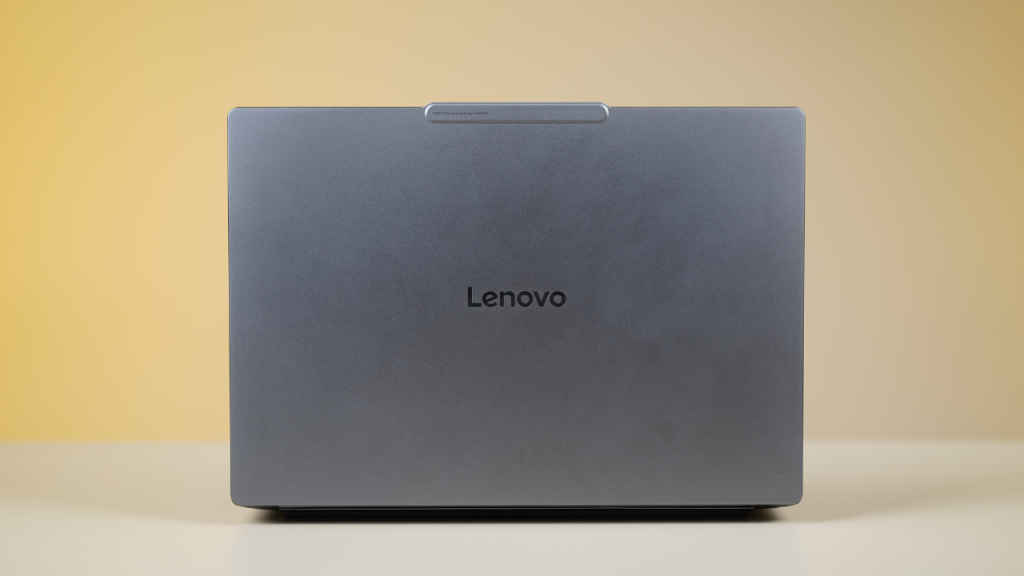
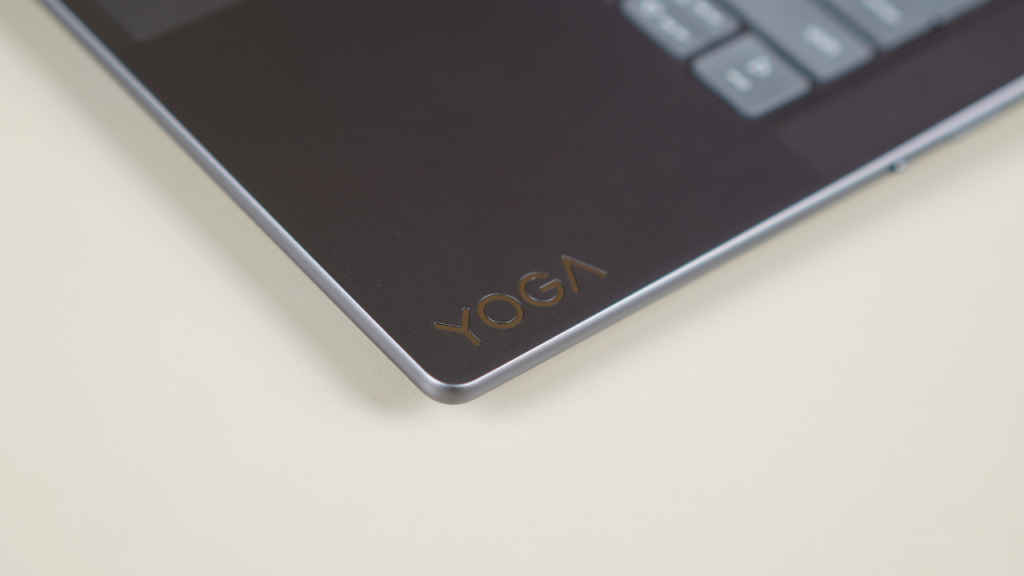
Minimalism is clearly the design language here. The Lenovo Yoga Pro 7i Aura Edition comes in a refined Luna Grey colour that instantly gives off a professional vibe. The branding at the back is subtle, and the overall design feels like it means business. There’s no flashy finish or unnecessary accents, and that simplicity works in its favour.
The laptop feels sturdy and compact and can be carried around without effort. At 1.5 kg, it strikes a nice balance between portability and presence, so it doesn’t feel flimsy in hand or heavy in a backpack. It’s built for professionals who move a lot during their day, and after several commutes with it tucked into my bag, I can confirm it’s kind on the shoulders. That said, those who prefer bold or vibrant colour options might find the design a little understated.
The hinge opens up to 180 degrees, which makes it flexible enough for most work setups. There’s a very slight wobble if you open the lid too quickly, but it’s nothing alarming. Otherwise, the hinge feels strong and stable.
Now let’s talk about the display, which is easily one of the biggest highlights here. You get a 14.5-inch OLED panel with 3K (3000×1876) resolution and a 120 Hz refresh rate. The screen looks stunning, with deep blacks, vivid colours and an overall sharpness that brings every image to life. During our internal testing, it showed 100 percent sRGB accuracy, which is exactly what creators need when colour precision matters.
In real-world use, the experience is excellent. I watched Netflix, scrolled through YouTube videos and edited images for work, and everything looked crisp and true to tone. The display is slightly reflective, which is common with OLEDs, but a small angle adjustment in a bright office space fixed that quickly. It’s also a touchscreen, which makes it convenient when you’re feeling too lazy to reach for the keyboard or just want to doodle in MS Paint.
Keyboard and Connectivity
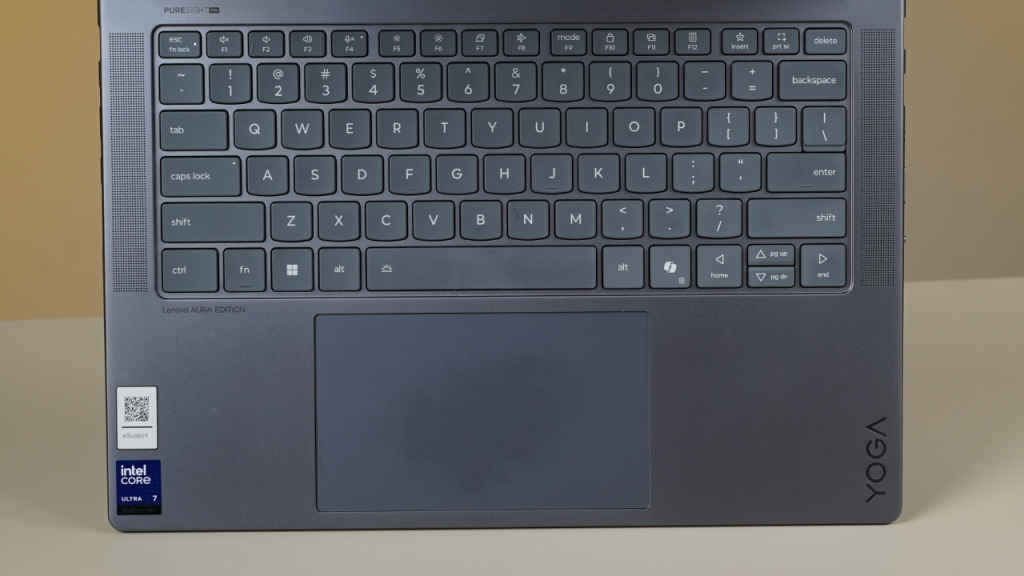
The first thing you notice when you open the laptop is the clean, evenly spaced keyboard. I usually use a MacBook Air as my daily driver, but switching to this one felt effortless. The keys are responsive and satisfying to type on, offering tactile feedback that makes long writing sessions comfortable. There are plenty of shortcut keys integrated into the function row, and there’s even a dedicated Copilot key that brings Microsoft’s AI assistant to life instantly.
The touchpad is large and smooth, responding well to taps and gestures. It has a premium finish, though it does tend to collect fingerprints after a few days of use, so keeping a microfibre cloth nearby isn’t a bad idea.
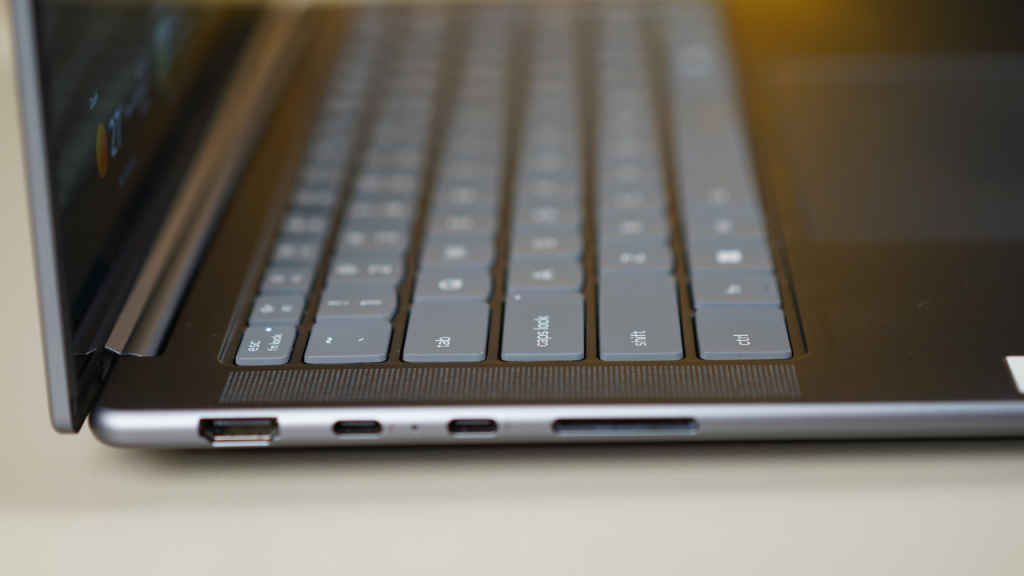
In terms of connectivity, Lenovo has done a great job. On the left, there are two Type-C ports, a card reader and an HDMI port, which makes connecting external displays or transferring photos from a camera quick and simple.
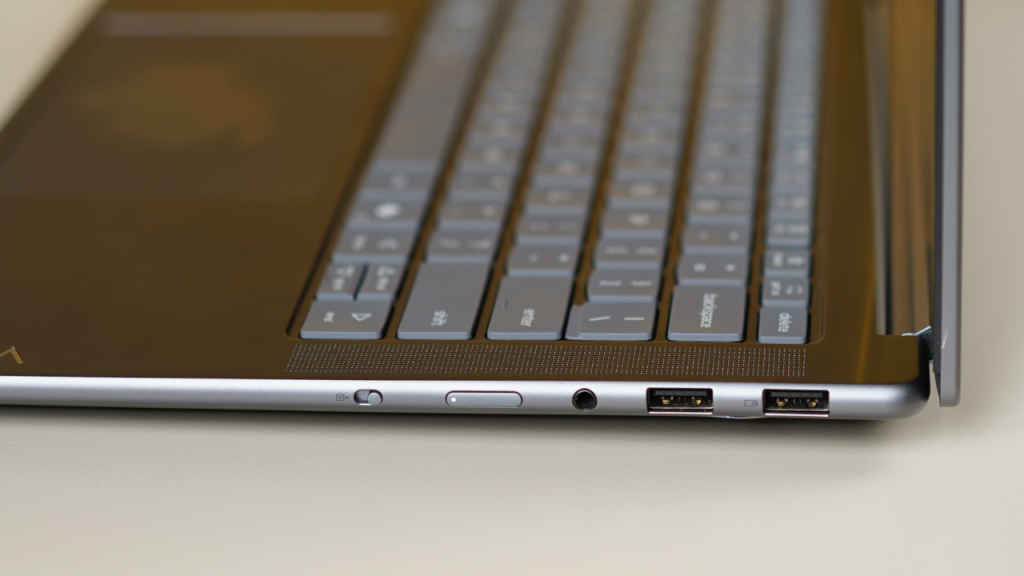
On the right side, you get two USB Type-A ports, a headphone jack and the power button. One thing worth mentioning is that the placement of the power button on the side, instead of the keyboard deck, took me a few moments to spot. But once I got used to it, it felt quite convenient.
Performance, benchmarks and battery
Performance-wise, the Lenovo Yoga Pro 7i Aura Edition impresses. It runs smoothly even with multiple Chrome tabs open, image editing software running in the background and music streaming at the same time. It’s powered by Intel’s Core Ultra processors, which are designed to balance performance with efficiency. For content creators who mostly deal with images, video edits or multitasking between productivity apps, this laptop feels more than capable.
The speakers, however, are a bit of a letdown. The volume is noticeably low, and even at maximum level, I had to lean closer during a YouTube video to catch what was being said. This was in a large office room, and while it performs better in a quieter space, it doesn’t deliver the immersive audio experience you’d expect from a premium laptop. If you plan to watch movies or listen to music often, a good pair of headphones will make a big difference.
The front camera, on the other hand, is sharp and clear, making it reliable for video calls and virtual meetings. The AI-backed noise reduction also keeps visuals clean even in lower lighting conditions.
As for benchmarks, the laptop posted solid numbers across common performance tests, reflecting its balanced performance profile.
In 3DMark benchmark, which tests GPU performance, the Yoga Pro 7i scored 4,437 in Time Spy and 9,733 in Fire Strike, signalling solid mid-tier graphics performance. While it’s not built as a gaming machine, the results show it can comfortably handle creative workloads, light 3D rendering, and casual gaming sessions without breaking a sweat.
Moving to PCMark 10 benchmark test, which replicates everyday usage, the Yoga Pro 7i notched an impressive overall score of 7,697. In the Essentials category, it scored 10,811, with a particularly strong App Start-up score of 13,316, meaning apps launch almost instantly. Video conferencing and web browsing scores were equally high, suggesting the laptop can handle multitasking easily.
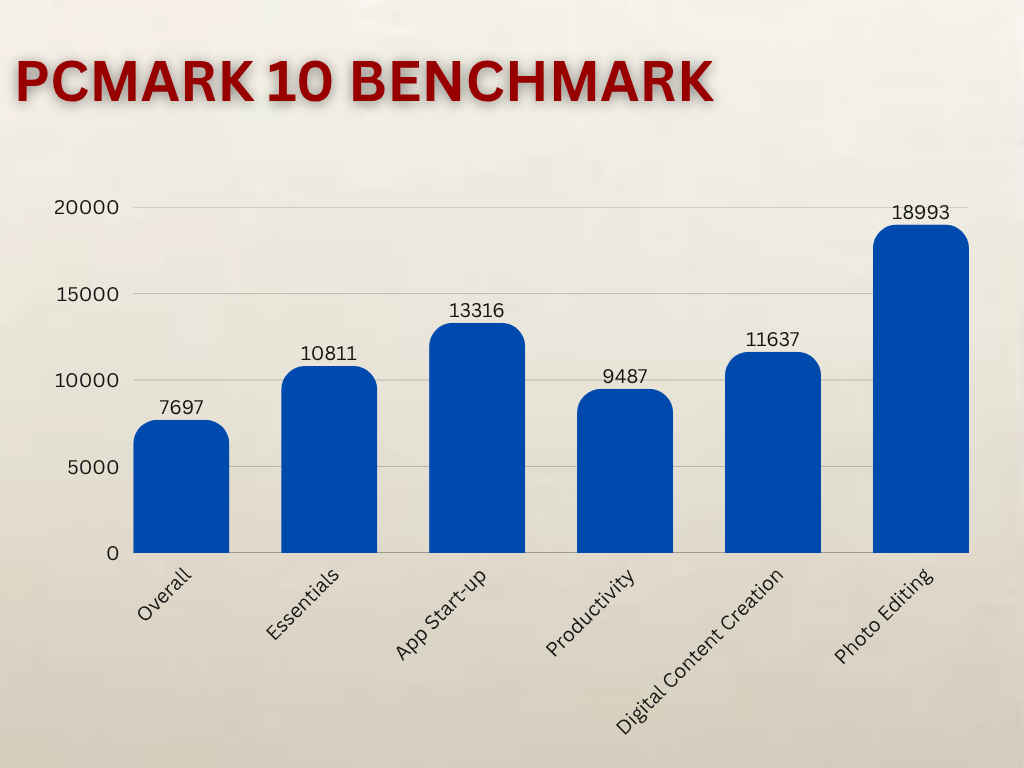
When it comes to productivity score in PC Mark 10 benchmark, the device shined again with a 9,487 score, backed by robust spreadsheet and writing capabilities. Coming to Digital Content Creation, the laptop scored 11,637, and in the Photo Editing benchmark test, it scored 18,993 points. Hence, the laptop is ideal for creators who work in Lightroom, Photoshop, or similar software. Even Rendering and Visualisation (9,747) and Video Editing (8,514) results show that it can handle demanding creative projects smoothly.
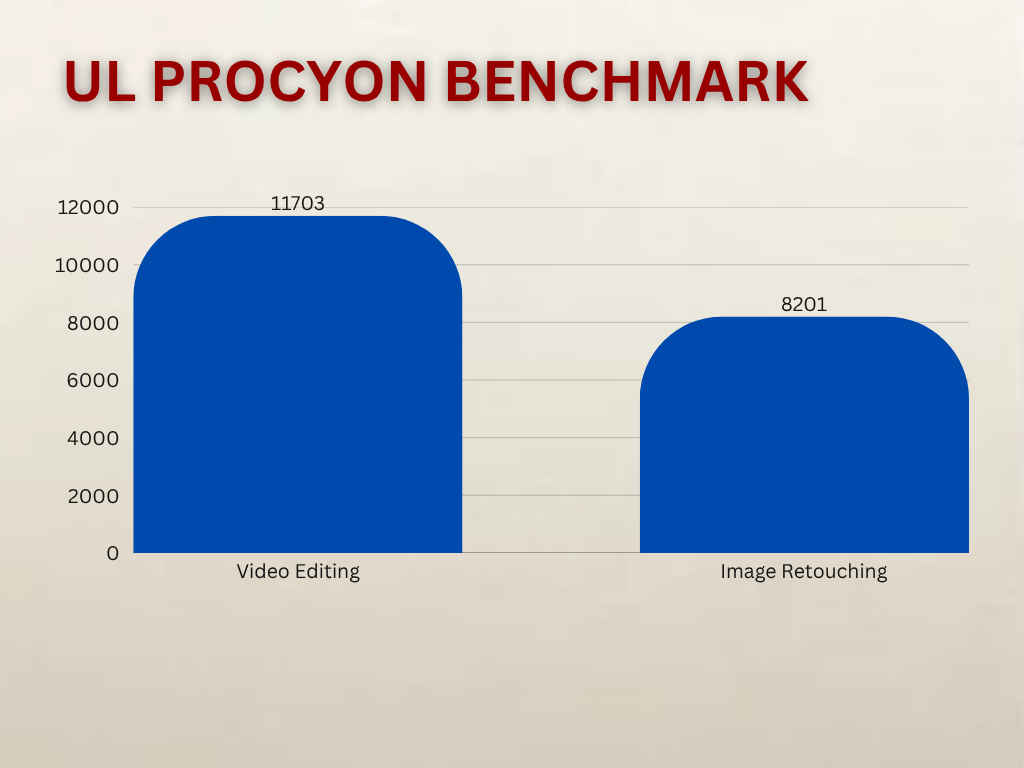
The UL Procyon benchmark also reinforced this, with video editing scores of 11,703 and image retouching scores of 8,201, both impressive figures for a laptop in this segment. These results translate into real-world speed with faster exports, smoother previews, and reduced lag during heavy multitasking.
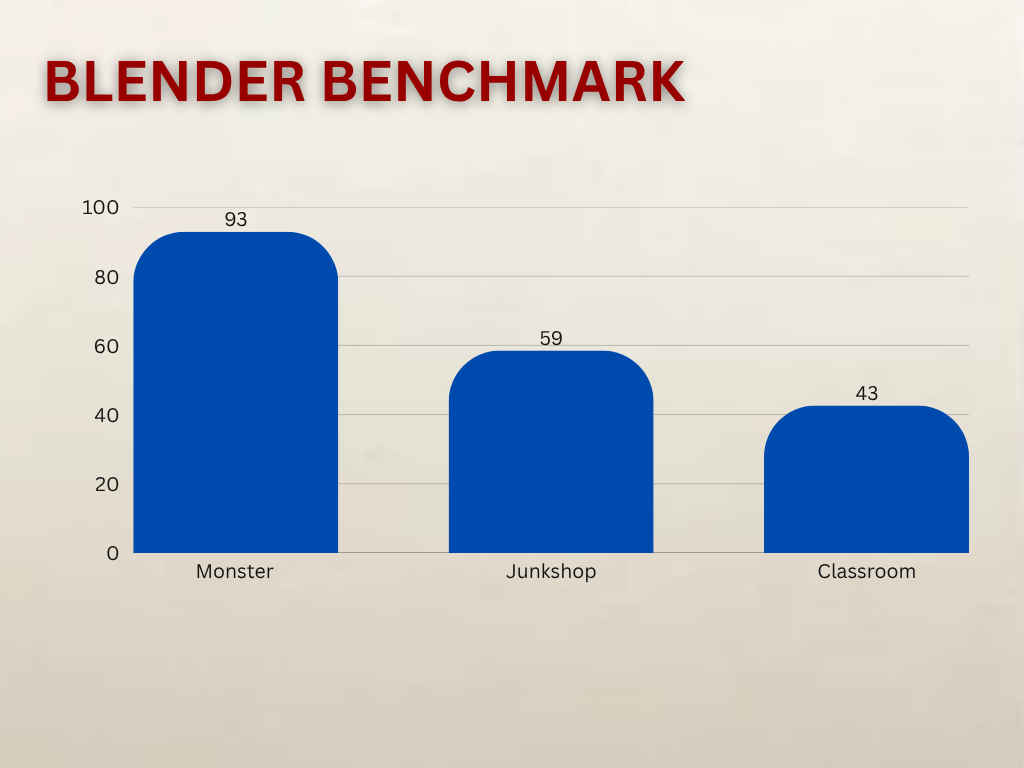
In Blender, which tests 3D rendering capability, the Yoga Pro 7i managed 92.9 samples per minute in the Monster scene, 58.5 in Junkshop, and 42.6 in Classroom, confirming that the laptop is capable of handling professional workloads in apps like Blender.
Lastly, the Cinebench R23 test showed the power of its CPU, with 1,845 in single-thread and 13,718 in multi-thread performance.
But numbers aside, what really stood out to me was the consistency – no lags, no overheating and no fan noise even during heavy multitasking.
Battery life is decent but not the strongest part of the package. In PCMark’s battery test, it lasted around 8 hours, which is average for its segment. In real-world use, I logged in at 8 AM and by 11:30 AM, the battery had dropped to around 30 percent after heavy Chrome use and typing on Google Docs.
It is worth mentioning that I had kept the laptop on the “Best Performance” mode, which naturally drains more power. The good news is that it charges very quickly, jumping from nearly empty to 100 percent in about an hour while I continued working.
Should you buy it?
If you’re a content creator or a working professional who wants a laptop that delivers reliable performance, excellent display quality and a solid typing experience, the Lenovo Yoga Pro 7i Aura Edition is a great pick. It looks premium, feels portable and handles creative workflows effortlessly.
The battery life and speaker quality could have been better, but those are minor trade-offs considering how well it performs in almost every other department. Around the Rs 1 lakh mark, it’s a laptop that feels genuinely built for creators who want power and precision in a form they can carry anywhere.
Also read: Dell 14 Plus 2-in-1 review: Strong performance in a folding convertible
Lenovo Yoga Pro 7i Gen 10 Aura Edition Key Specs, Price and Launch Date
| Release Date: | |
| Market Status: | Launched |


