
Dell 14 Plus 2-in-1 review: Strong performance in a folding convertible
 Follow Us

As a journalist, my day is full of multitasking. One moment, I am juggling several Google Chrome tabs, and the next, I am hurriedly doodling something before I forget it. Add meetings, interviews, and impromptu calls to the mix, and you have a schedule that’s nothing short of chaotic. In such a world, finding a machine that can keep up isn’t easy, as it needs to be ultra-portable, powerful, and versatile. And when I received the Dell 14 Plus 2-in-1 laptop, I decided to try it out as my daily driver, a decision that has worked wonders.
Housed in a sleek 14-inch frame, the Dell 14 Plus 2-in-1 immediately strikes you with its premium look. At a glance, you might even mistake it for a MacBook. Priced around Rs 1 lakh, this laptop is clearly aimed at professionals seeking a reliable, all-round companion that adapts to their dynamic work style. But does it deliver as expected? Let’s dive in and find out.
Also read: Microsoft’s new Start Menu for Windows 11 is packed with new features, all details
Design and keyboard
As mentioned already, Dell has kept things minimal, compact, and practical when it comes to the design. The laptop comes in a sleek and ultra-portable form factor. It has 12.36 inches of width, 0.65-inch height and 8.9 inch depth. It weighs 1.6 kg and can be easily carried around in a single hand.

The unit I received is a gorgeous dark blue colour, and it looks very similar to that of a M3 MacBook Air Midnight colourway. During my usage, I noticed some smudges developing on the chassis, but those can be easily wiped away. The chassis has a metallic look which enhances its overall appeal. However, the build is plastic.
The highlight is the 360-degree hinge that instantly transforms the laptop into a tablet. And thanks to its compact form factor, you can easily use the laptop as a tablet with one hand without having to worry about it falling out of your hands. With that being said, the hinge appears to be fragile, as when I opened the laptop for the first time, I had to put a bit of extra force to lift the lid. Also, when you press on the lid, you will notice a minor flex.
On the right, there is a USB Type A port along with a headphone jack. On the left, there are two Type C ports (one for charging) and an HDMI port. With only one extra Type-C port available besides the charging slot, I had to rely on a hub to connect my wireless keyboard and mouse. It’s not a dealbreaker, but for those who aren’t keen on investing in a separate hub, the limited port options might feel a bit restrictive.
Then there is a compact keyboard and a decent-sized trackpad with a smooth texture. It does its job well, most of the time. It did struggle a bit to register button presses and multifinger gestures at times. But this was occasional.
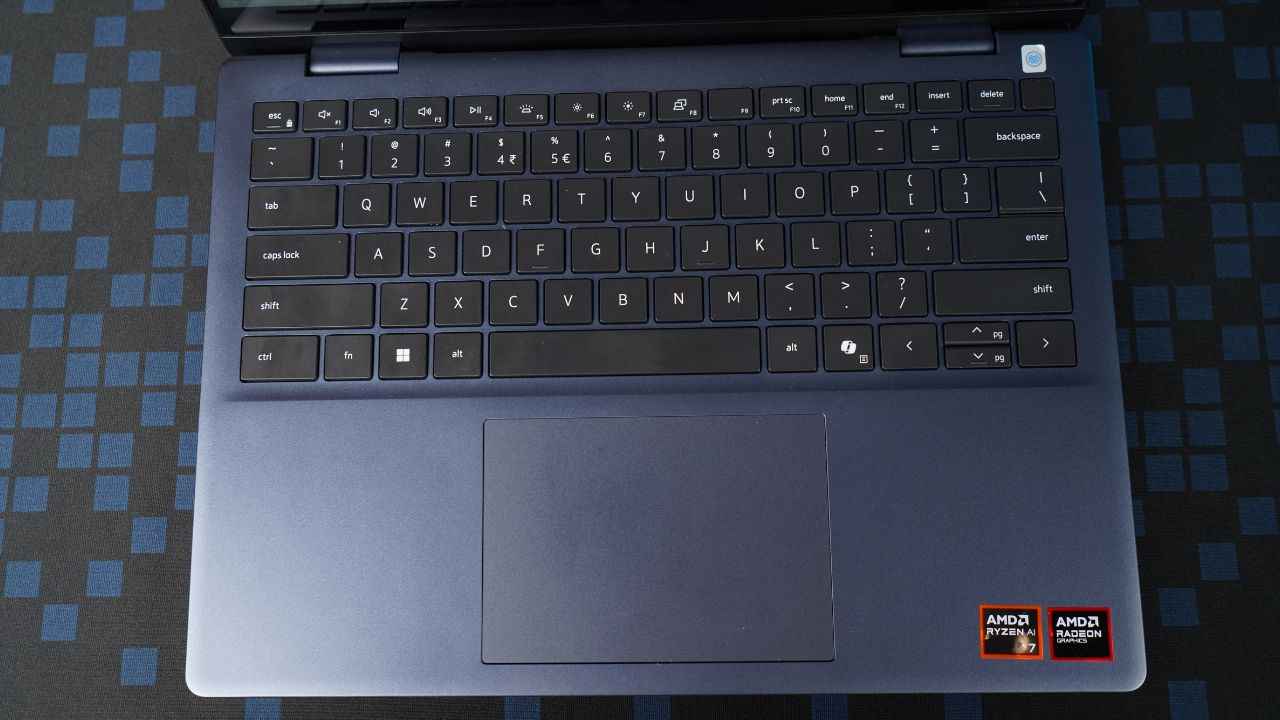
Coming to the keyboard, the laptop has evenly spread out keys that are super satisfying to type on. The keyboard is backlit and lets you work uninterrupted even in the dark. There is also a dedicated Copilot key that brings Microsoft’s AI assistant to life instantly. Combined with the function keys are several shortcut keys to control volume, brightness, external displays and so on. The power button is located on the top right of the screen, right next to the delete button. This proved a bit of a challenge for me, as I at times mistakenly pressed the power button while pressing the delete button. Again, not a dealbreaker, but a minor inconvenience that eventually went away as I got used to the keyboard.
Display and speakers
Coming to the display, it is sharp, and super immersive thanks to the slim bezels. However, during our testing via Calman, we noticed slight issues with colour accuracy. Now this won’t be much noticeable if you are just casually watching content on the device. However, it might matter to professional artists who want 100 percent colour accuracy.
Speaking in technical terms, the display is a 14-inch WVA (Wide Viewing Angle) screen with 60 Hz refresh rate and 300 nits brightness. The display also sports 2K resolution which makes it just right for binge-watching.

I enjoyed hours of binge-watching Netflix on the device along with some YouTube videos and loved the overall experience. The brightness was just right even in a well-lit office environment and the colours seemed to pop without being oversaturated.
Now about the speakers, they are clear enough to attend video calls. However, if you want to watch content in all its glory, the speakers might be a let-down. It is better to either plug your headphones in or go for an external speaker system.
Performance and benchmarks
In terms of performance and benchmarks, the Dell Plus 14 2-in-1 displayed plenty of muscle. I used the laptop for attending virtual meetings, browsing endless tabs in Chrome, doodling in tablet mode, and so on. Not once did the laptop flinch, showed signs of slowing down, or hung up on me. Apps loaded instantly and allowed me to multitask, the in-built webcam worked wonderfully allowing me to look my best during virtual meetings and the Dell Pen glided through the surface during those doodling sessions on MS Paint. We’ll speak more about doodling in a while. Let’s first take a quick look at some performance benchmarks that I ran on the laptop.
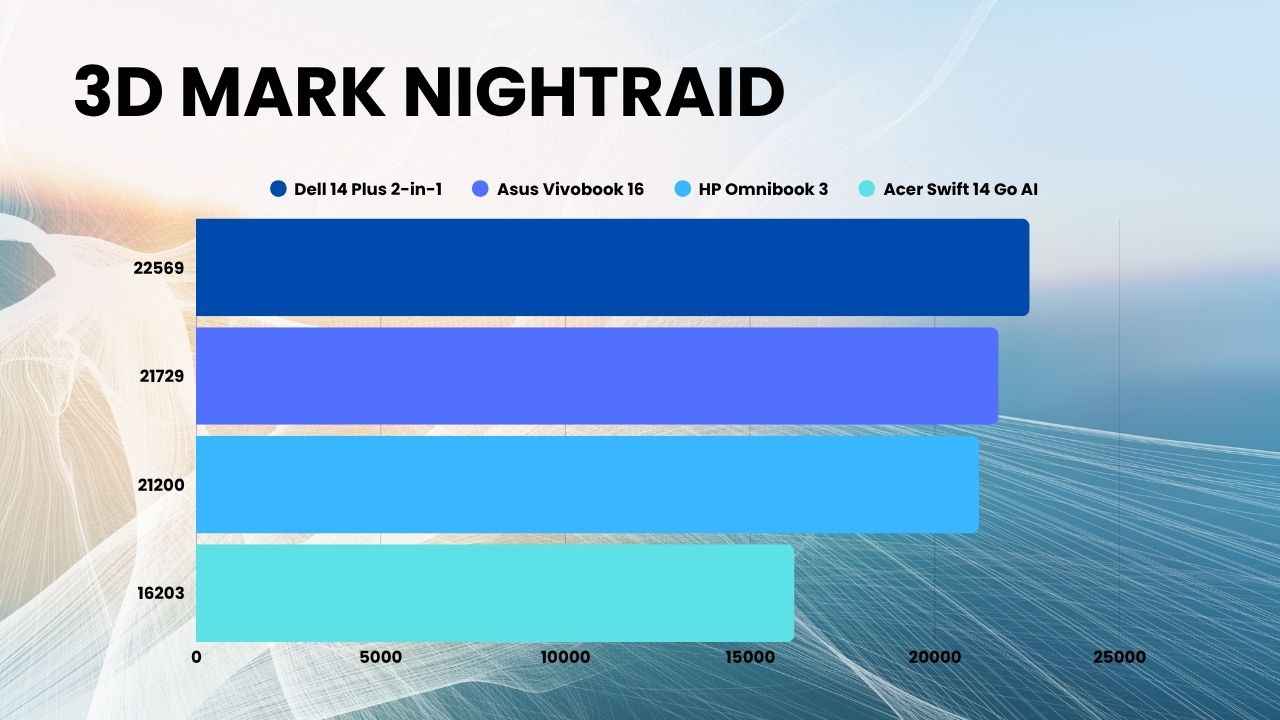
In the 3D Mark Nightraid benchmark test, the laptop scored 22,569 points which puts it comfortably ahead of the likes of Asus Vivobook 16 (21719), HP Omnibook 3 (21200) and Acer Swift 14 Go AI (16203).
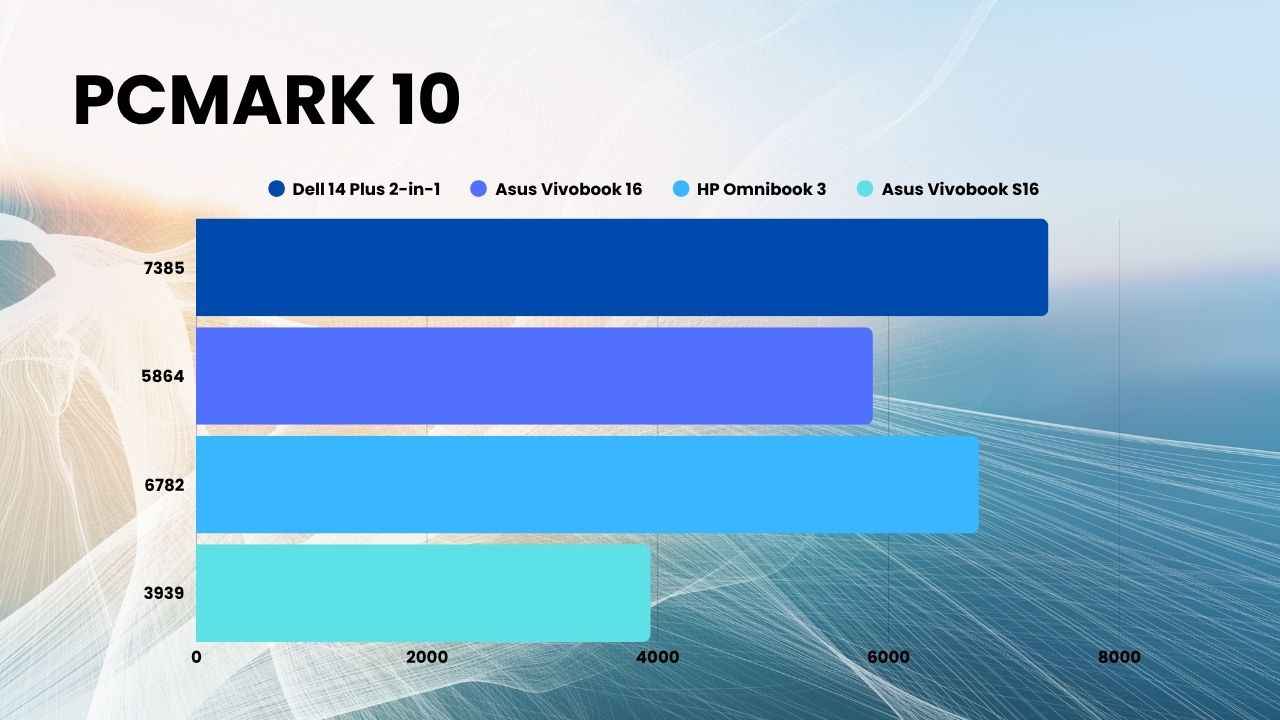
In PCMark 10 benchmark too, the laptop scored 7385 points, which is more than that of Asus Vivobook 16, HP Omnibook 3, Asus Vivobook S16 and Acer Swift 14 Go AI.
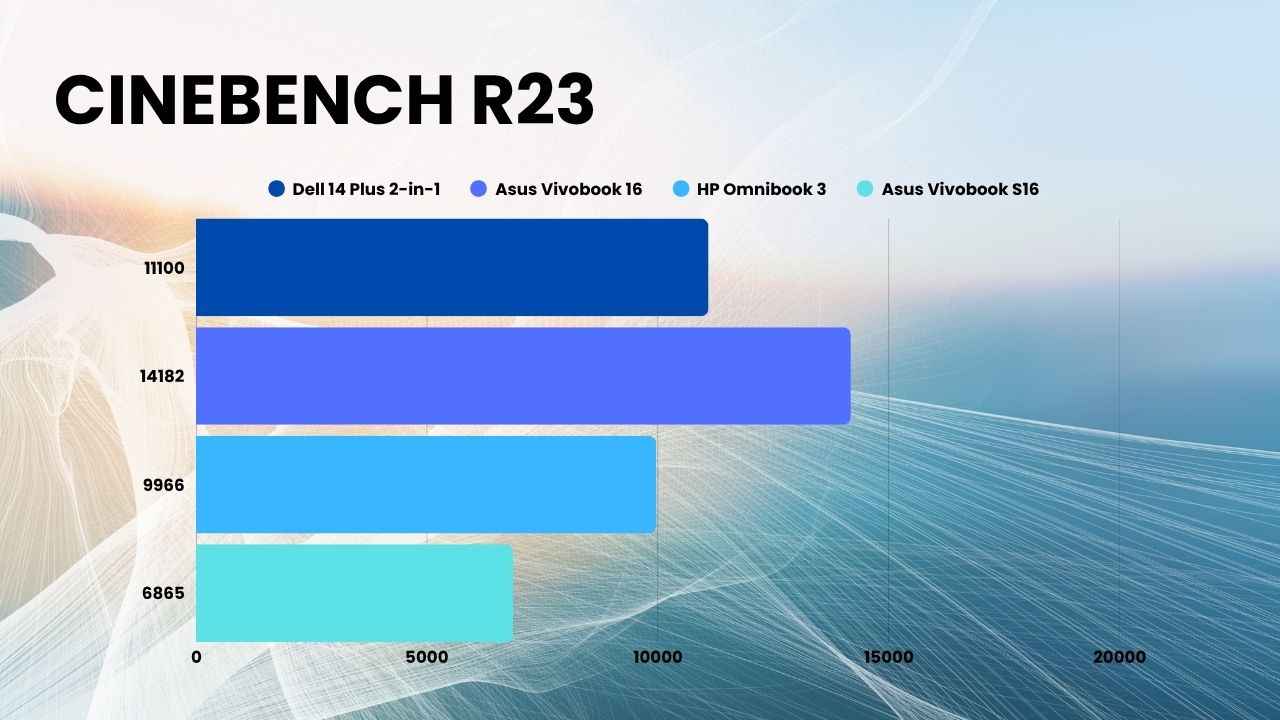
In the Cinebench R23 benchmark test, the laptop’s score was 11,100, which is higher than that of HP Omnibook 3, Asus Vivobook S16 and Acer Swift 14 Go AI but lower than Asus Vivobook 16 (14,182).
In Geekbench 6 benchmark, the laptop once again shined and scored ahead of most in this price segment. With 2821 points, the laptop is ahead of Asus Vivobook 16, HP Omnibook 3, Asus Vivobook S16 and Acer Swift 14 Go AI.
To test the SSD speed, I ran the PC Mark full SSD benchmark test on the device and it impressed yet again with a score of 2226. This is a decent score which puts the laptop ahead of Asus Vivobook S16, Asus Vivobook 16, Acer Swift 14 AI and Dell Latitude 2-in-1. The HP Omnibook 3, with a score of 2362, was a couple of points ahead in this benchmark.
These scores reflect the laptop’s strong processing power and efficient multitasking capabilities. I can confidently say that the Dell Plus 2-in1 can handle demanding workloads and creative tasks with ease, while maintaining stability and responsiveness. Even in SSD performance, the results suggest fast data handling and quick app load times, making it reliable for productivity and casual use.
Tablet mode and Dell Pen experience
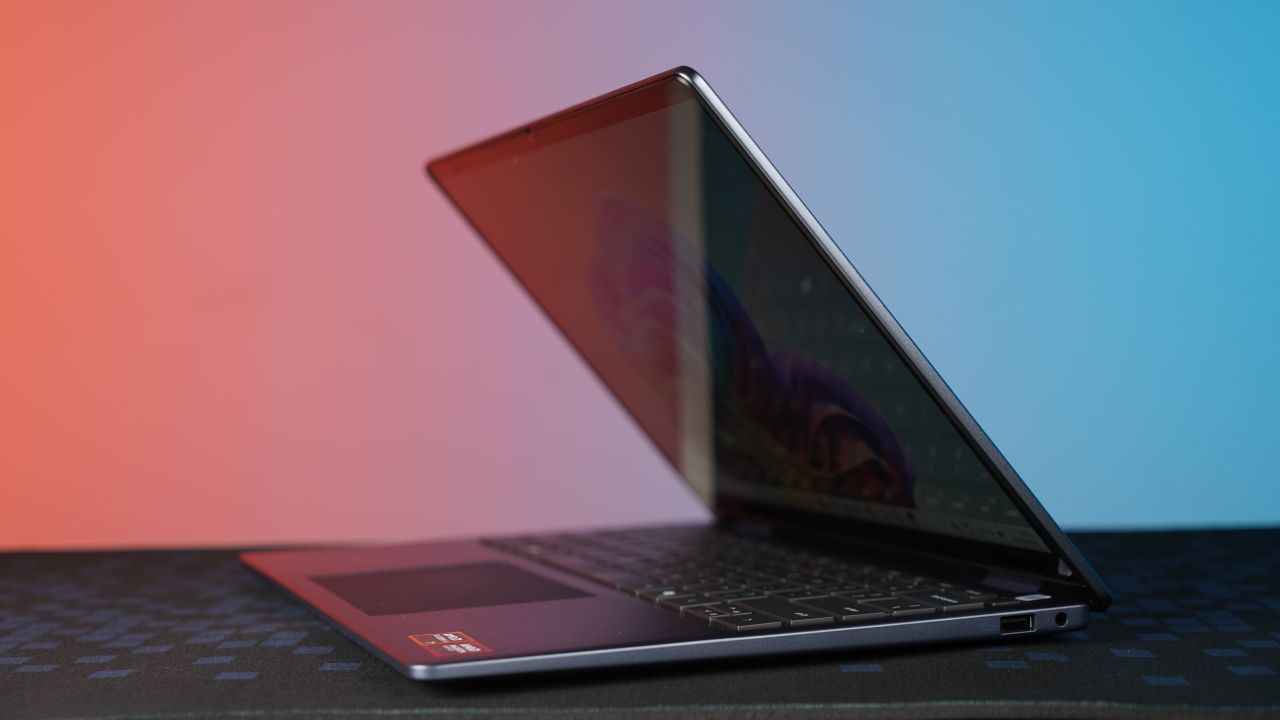
One of the biggest highlights of the Dell 14 Plus 2-in-1 is its versatility. With the 360-degree hinge, it easily transforms from a traditional laptop into a tablet within seconds. The transition feels smooth, and the compact size makes it comfortable to hold and use in tablet mode for extended periods. To truly test this, I handed the device over to my sister, who’s a digital artist, and she spent about an hour sketching on it using the bundled Dell Pen.
The Dell Pen experience was a pleasant surprise. You just have to pop in a battery, connect it via Bluetooth, and it’s instantly ready to use. The pairing process is quick and seamless – no unnecessary setup screens or complicated pairing steps. Once connected, the pen feels incredibly responsive. Each stroke is registered accurately, with no noticeable lag or jitter, even when sketching finer details. My sister particularly appreciated how natural the pressure sensitivity felt on MS Paint, allowing her to draw with control and precision.

She ended up creating an entire digital sketch in under an hour, which speaks volumes about how capable this 2-in-1 setup is for artists, students, and anyone who loves to doodle or take handwritten notes.
Whether it’s jotting down quick thoughts during a meeting or illustrating on the go, the Dell 14 Plus 2-in-1 handles it effortlessly, living up to its ‘Plus’ moniker in every sense.
Battery and thermals
The Dell 14 Plus 2-in-1 will easily sail through a full workday. I logged in around 9 AM and still had about 30 percent battery left by 5 PM. This was with consistent use involving typing, browsing multiple tabs, attending meetings, and the occasional YouTube break. I did leave the screen idle during lunch, but overall, the performance was steady and impressive.
Coming to thermals, they are also well-managed. On the surface, the laptop runs cool under regular workloads, and even after long sessions, it only gets mildly warm in the WASD region. The chassis and trackpad, however, remain cool to the touch, ensuring comfortable use throughout the day.
During a 30-minute Cinebench stress test, the temperature in the WASD area peaked at 38.7°C, while the IJKL region stayed around 33.7°C and the touchpad remained cooler at 27.5°C. This suggests Dell has done a commendable job with thermal management without compromising on performance or comfort.
Should you buy?

The Dell 14 Plus 2-in-1 is a reliable companion for those who value portability, performance, and versatility in equal measure. It delivers strong everyday performance, a gorgeous display, and the flexibility of a convertible design, making it ideal for those who switch between work, creativity, and entertainment on the go. While the port selection could have been better and the speakers aren’t the loudest, these are small trade-offs for what is otherwise a solid all-rounder.
If you’re a student, creative professional, or writer who needs a laptop that can adapt to different workflows without lagging, the Dell 14 Plus 2-in-1 is an excellent pick.
Also read: Best thin and light gaming laptops in 2025 from MSI, Asus, and Lenovo


