
HP Omnibook 3 Review: A Reliable Everyday AI Laptop with Thoughtful Touches
 Follow Us

There’s something reassuring about a laptop that doesn’t try to be flashy, but quietly nails the essentials. The HP Omnibook 3 is one of those machines. It’s not chasing RGB gimmicks or wafer-thin design awards. Instead, it’s built for students, remote workers, and anyone who just wants a machine that works when it matters. And thanks to AMD’s Ryzen AI platform and a surprisingly polished build, the Omnibook 3 feels like a smart upgrade from your typical mid-range laptop.
But is it refined enough to stand out in the crowd of AI-labelled laptops flooding the market? I’ve been using the HP Omnibook 3 for a week now, and here’s what stood out.
Also read: HP launches AI-powered OmniBook 5 and 3 laptops in India, starting at ₹69,999
HP Omnibook 3 Review: Design, Build Quality, Keyboard & I/O
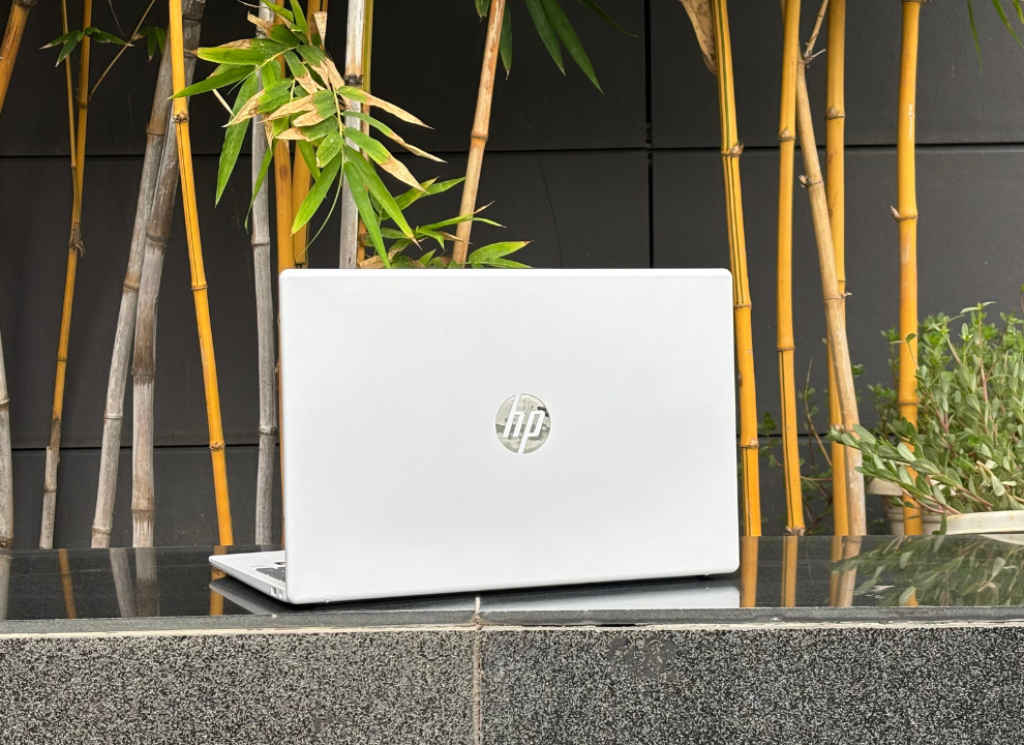
Visually, the Omnibook 3 sticks to a conservative but clean look. The Glacier Silver matte finish is fingerprint-resistant and minimalistic, more executive chic than gamer flash. There’s no flex on the keyboard deck, the hinge is smooth without being floppy, and the overall footprint (1.86 cm thin and 1.7 kg) makes it easy to sling into a backpack.
HP has managed to strike a nice balance here. The lid opens with one hand, the build doesn’t creak, and everything from the palm rest to the hinge feels mature, something often missing in laptops at this price point. It’s not magnesium or aluminium, but the plastic here doesn’t feel cheap.
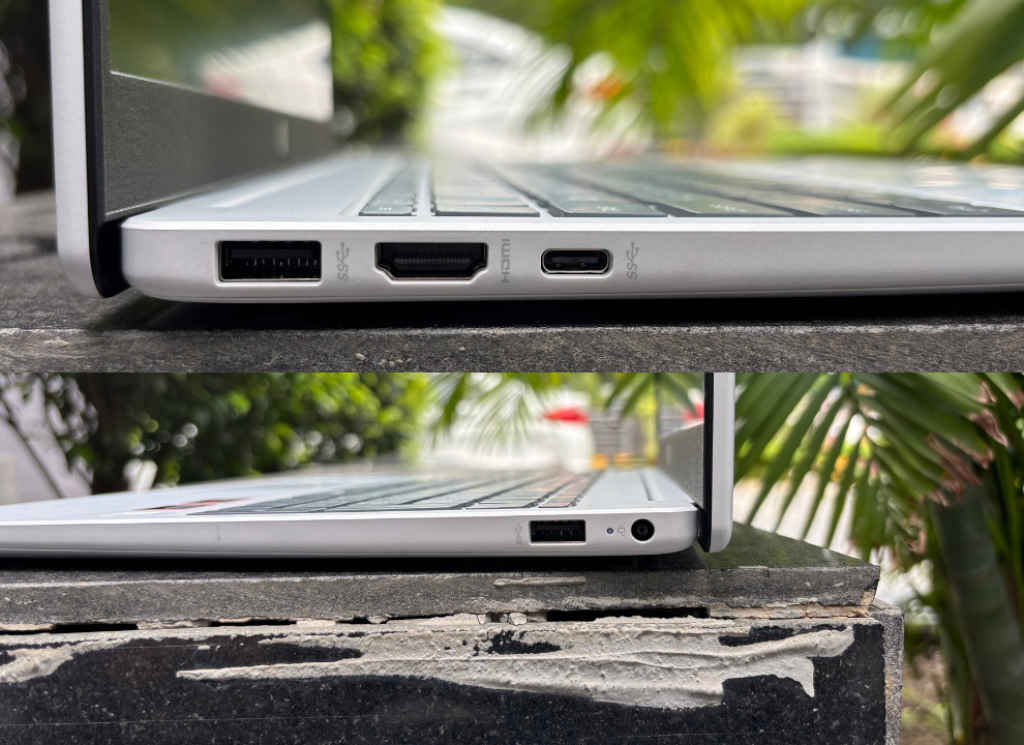
The port selection is generous and well-distributed. You get:
- 1x USB-C (10Gbps, DisplayPort 1.4, Power Delivery)
- 2x USB-A (5Gbps)
- 1x HDMI 1.4b
- 1x headphone/mic combo
- 1x AC smart pin
It covers most daily use-cases, though a second USB-C would’ve made future-proofing sweeter.
The keyboard is full-size, backlit, and comes with a number pad, which makes Excel warriors and late-night typists equally happy. Travel is adequate, and the soft-grey keycap finish adds a touch of sophistication. The integrated fingerprint scanner on the deck is responsive and Windows Hello-ready. As for the touchpad, it is smooth, accurate, and responsive. Nothing fancy, but no complaints.
HP Omnibook 3 Review: Display & Webcam
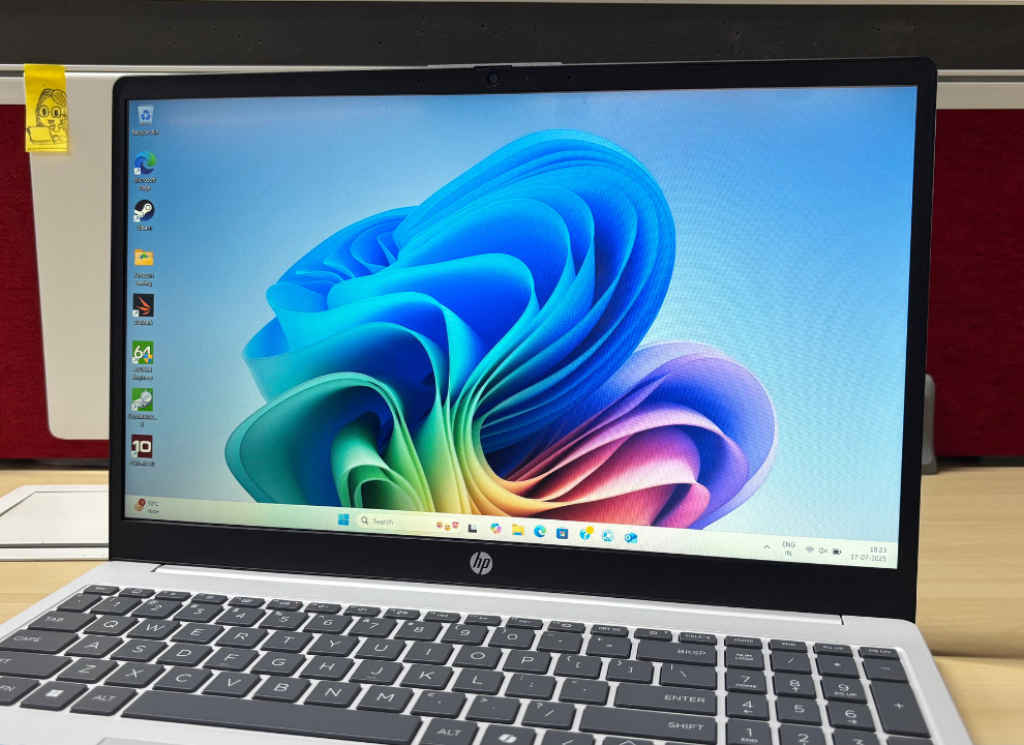
The Omnibook 3’s 15.6-inch FHD display doesn’t try to dazzle, but it gets the job done. It’s an anti-glare IPS panel with a standard 250 nits brightness and 62.5% sRGB colour gamut. Indoors, it’s crisp enough for Netflix and Docs. Outdoors, you’ll struggle under direct sunlight. That said, viewing angles could be better, and colours, while not punchy, are serviceable across the panel.
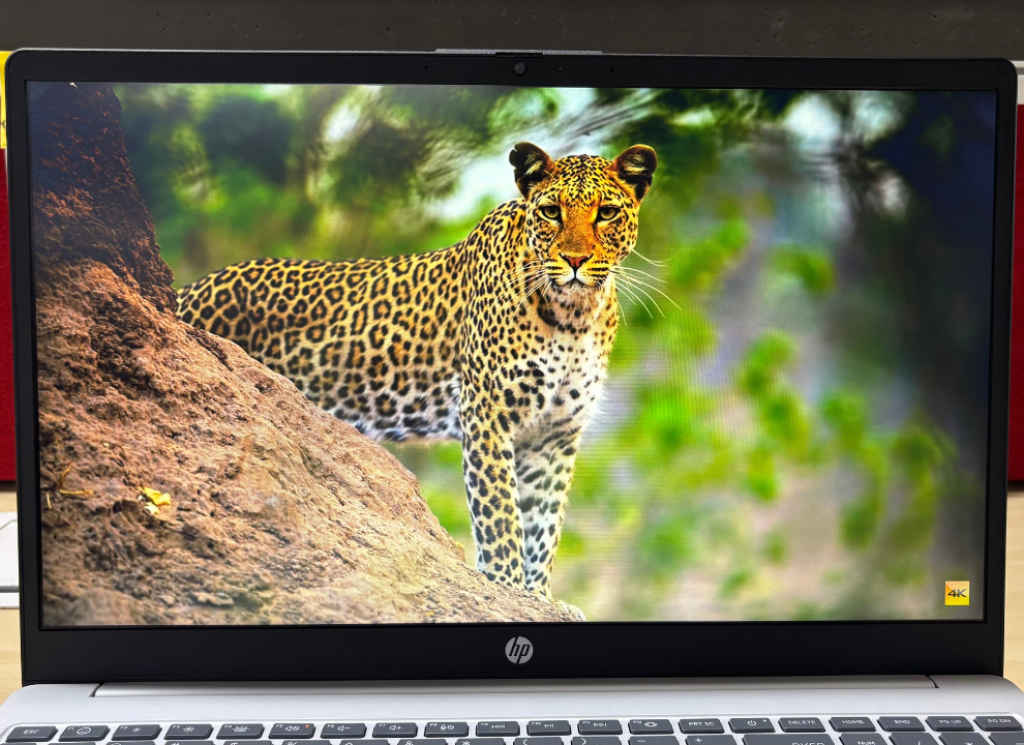
You’re not buying this for colour grading or HDR video editing, but for everyday use, it’s a comfortable, flicker-free experience, thanks to DC Dimming. Above the screen, HP has packed a 1080p True Vision camera with temporal noise reduction, dual microphones, and a physical privacy shutter. On Zoom and Google Meet, video looked crisp and lighting didn’t blow out the highlights, even in mixed indoor lighting. Great webcam for its class.
HP Omnibook 3 Review: Audio
HP went with a dual-speaker setup, and it sounds…fine. There’s decent clarity in mids, and vocals sound clean in calls and YouTube videos. But don’t expect deep bass or immersive soundscapes here. It’s not tinny, just very flat. If you’re someone who listens to music while working, you’ll want a pair of earbuds or external speakers.
HP Omnibook 3 Review: Battery Performance
One area where the Omnibook quietly wins is battery efficiency. The 3-cell 41Wh battery supports fast charging, topping up 50% in about 45 minutes. While the actual battery life will depend on usage, expect around 6–7 hours in balanced mode, enough for a lecture day or a work shift.
Also read: 11 Windows Tips and Tricks to Unlock Your PC’s Full Potential
HP Omnibook 3 Review: Performance & Benchmarks
In terms of 3DMark Time Spy and Fire Strike benchmarks, the ASUS Vivobook S14 with the Intel Core Ultra 7 255H stands out as the top performer overall. It scores the highest in Time Spy with 2733 points and maintains a solid lead in Fire Strike with 4750 points, highlighting the efficiency of Intel’s new integrated Arc graphics on Meteor Lake.
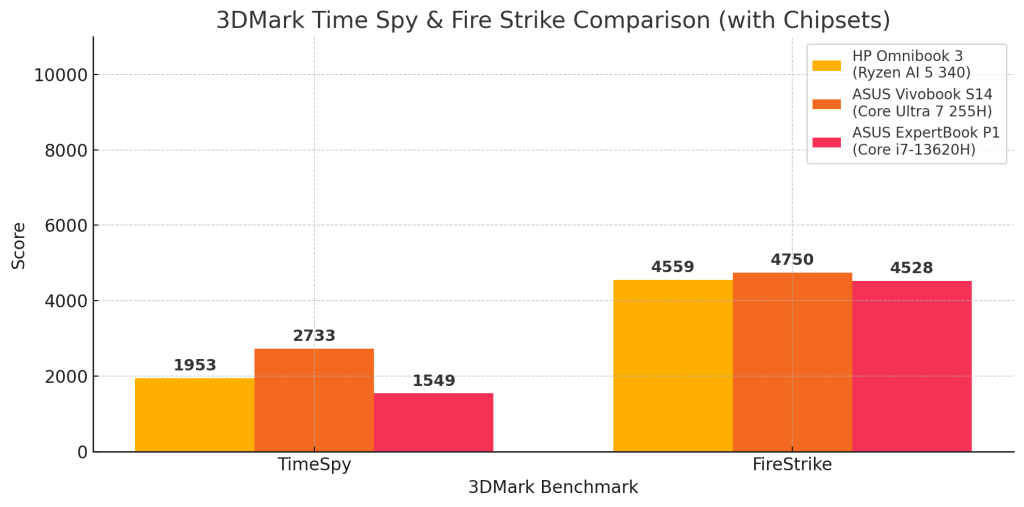
The HP Omnibook 3, powered by AMD’s Ryzen AI 5 340, lands in the middle of the pack. With 1953 in Time Spy and 4559 in Fire Strike, it comfortably beats the ASUS ExpertBook P1 in Time Spy and closely trails it in Fire Strike. This suggests that AMD’s RDNA3-based integrated GPU is slightly more balanced in graphics-heavy workloads.
Meanwhile, the ASUS ExpertBook P1, featuring the older Intel Core i7-13620H, lags in Time Spy with just 1549 points, reflecting the limitations of its UHD integrated graphics in modern GPU-bound tasks. However, it performs slightly better in Fire Strike with a score of 4528, possibly due to its higher sustained CPU power delivery during older DirectX 11 workloads.
Overall, the Vivobook S14 leads this synthetic graphics battle, while the Omnibook 3 offers a good middle ground, especially for those seeking solid performance with strong AI and battery efficiency baked in.
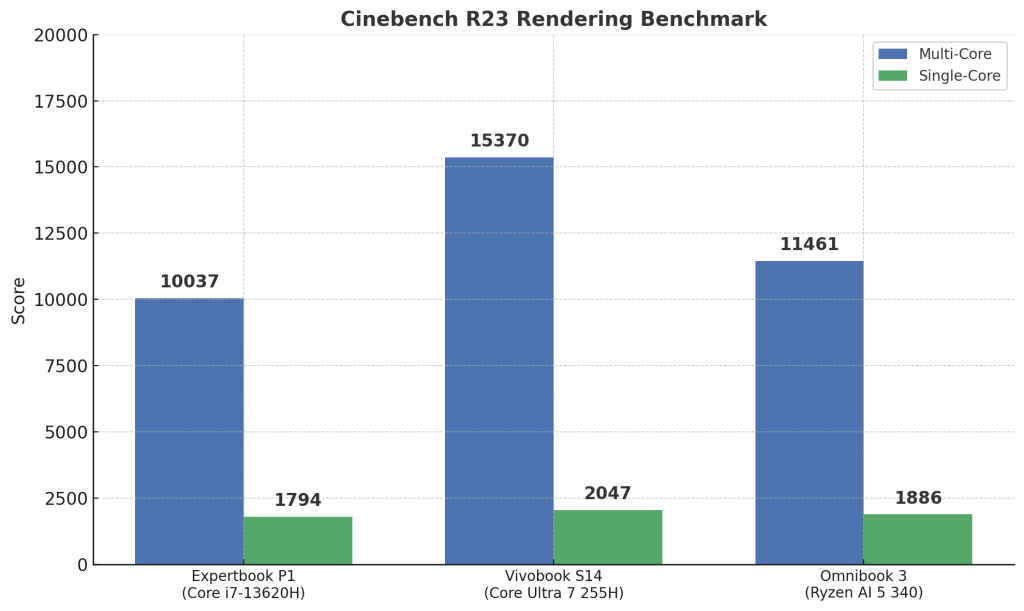
The ASUS Vivobook S14 (Intel Core Ultra 7 255H) leads the pack in both tests. It scores 15,370 in the multi-core (n-Thread) test, showcasing excellent parallel processing capabilities, ideal for tasks like video editing or 3D rendering. Its single-thread score of 2,047 also reflects strong performance in lightly threaded workloads, such as web browsing and document editing.
Next up is the HP Omnibook 3 (AMD Ryzen AI 5 340), which delivers a respectable 11,461 in multi-core performance, better than most 13th Gen Intel H-series CPUs, and a solid 1,886 in single-thread performance. This positions the Omnibook 3 as a well-balanced performer, especially for productivity tasks.
The ASUS Expertbook P1 (Intel Core i7-13620H), despite its “i7” badge, lags behind with a multi-core score of 10,037 and single-core score of 1,794. This is likely due to fewer efficiency cores and lower sustained performance compared to the other two processors.
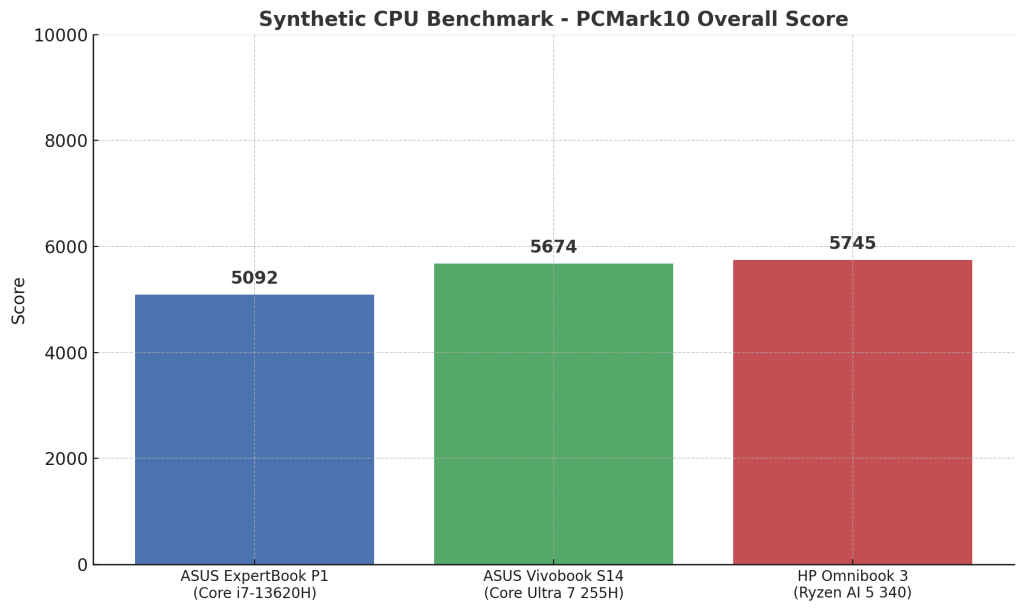
In PC Mark 10 Extended, despite being equipped with the least hyped chip of the three, the HP Omnibook 3 takes the lead, scoring 5745, which is slightly ahead of the Vivobook S14’s 5674, powered by the newer Core Ultra 7 255H. Interestingly, the ExpertBook P1, despite its higher-tier 13th Gen H-series processor (i7-13620H), lags behind with a score of 5092.
This result reflects how newer architecture (Ryzen 8000 series “Hawk Point” and Intel Core Ultra “Meteor Lake”) can deliver better all-round system performance, even if clock speeds or raw specs suggest otherwise. It also highlights the strong efficiency and AI-acceleration capabilities of the Ryzen AI 5 340, especially in productivity-heavy tasks benchmarked by PCMark10.
In summary, if rendering power or multitasking efficiency is your top priority, the Vivobook S14 comes out on top. But the Omnibook 3 offers a great middle ground with strong all-round performance and better value in many cases.
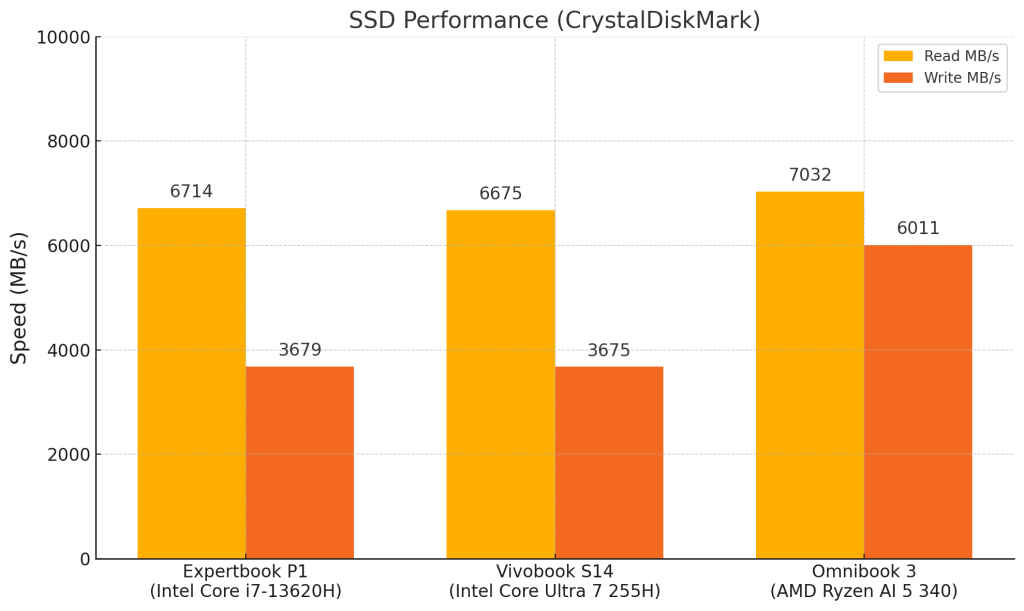
The HP Omnibook 3 leads in storage performance, hitting 7032 MB/s read and 6010.96 MB/s write speeds, significantly faster than both ASUS machines, which hover around 6700 MB/s read and 3675 MB/s write. This gives the HP a clear edge in tasks like file transfers, app launches, and system responsiveness.
What ultimately wins you over with the Omnibook 3 is how quiet and cool it stays even after long hours of use. It doesn’t scream performance, but it’s the kind of laptop that quietly delivers, every single day.
HP Omnibook 3 Review: Verdict
The HP Omnibook 3 isn’t here to dazzle you with marketing buzzwords or flashy RGB. Instead, it quietly focuses on what truly matters: reliable performance, solid build, and a well-balanced user experience. With AMD’s Ryzen AI 5 340 under the hood, it delivers impressive performance for everyday productivity, outclassing many 13th Gen Intel machines and even edging out pricier rivals in benchmarks like PCMark10 and SSD speeds. It’s not the best laptop for creators or gamers, but for students, professionals, and anyone seeking a dependable workhorse that runs cool, quiet, and efficiently, the Omnibook 3 is a smart pick. It nails the essentials and does so with quiet confidence.
Also read: 5 Free AI-Powered Windows Apps Every AI Laptop Should Have


