
How to create PDFs on your iPhone using these simple steps
 Follow Us
If you want to create a PDF of files such as Word, Doc, etc, go to Files.
Furthermore, if you want to create a PDF of images, go to Photos first.
There are various reasons why I don't want you to use third-party apps or websites to create PDFs.

Apple iPhones come at an expensive price but let me tell you it is worth every penny of it. This is because Apple focuses on the smallest of things that we don’t even think of, but we need it so badly. For example, I recently needed to upload my address proof and relationship declaration with the landlord for KYC. I had to create a PDF of two images, and that’s when I learned that you can also create a PDF on your iPhone, that too without using third-party apps or websites. Let me tell you how you can also do that.
 Survey
How to create a PDF on an iPhone?
If you want to create a PDF of files such as Word, Doc, etc, follow these steps:
Step 1: Go to ‘Files.’
Step 2: Tap on three dots in the top right corner.
Step 3: Tap on ‘Select.’
Step 4: Select the files that you want to make a PDF of.
Step 5: Again tap on three dots, now in the bottom right corner.
Step 6: Select ‘Create PDF’ and you are done.
Also read: 10 interesting iOS 17 features all iPhone users should look forward to trying
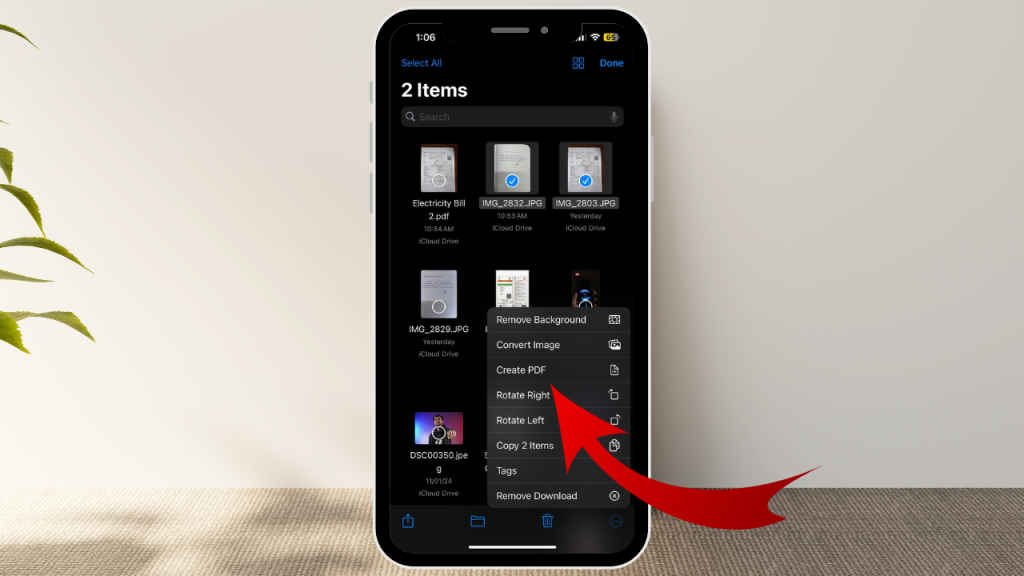
Furthermore, if you want to create a PDF of images, here’s how you can do it.
Step 1: Go to ‘Photos.’
Step 2: Tap on ‘Select.’
Step 3: Select the images that you want in a PDF.
Step 4: Now tap the Share button in the bottom left corner.
Step 5: Scroll down and select ‘Save to Files.’
Step 6: Close Photo and go to ‘Files.’
Step 7: Find the uploaded pictures in Files and select them.
Step 8: After you have selected them, tap the three dots.
Step 9: Select ‘Create PDF’ and voila!
That is how you can easily create a PDF on your iPhone without using any third-party app or website. Now why you should not rely on these third-party services? Let me tell you.
Also read: Do you clear your Facebook watch history? Here’s how you can do
Why you should avoid third-party apps or websites?
There are various reasons why I don’t want you to use third-party apps or websites to create PDFs.
- The first reason is that they take up space and leave a lot of cache in your smartphone. So, why bother when you already have this feature on your smartphone?
- Next, these providers are riddled with adware, which I don’t think anyone would like.
- Third is the biggest concern, the Malware. So, you have to download PDFs after uploading your files and those PDFs could contain viruses.


