
ChatGPT Atlas launched but do we really need a new browser in 2025?
 Follow Us
ChatGPT Atlas brings AI straight into your browser.
Agent mode and browser memory make it feel smarter.
It’s promising, but privacy and trust will decide its future.


OpenAI now has its own web browser called ChatGPT Atlas, which immediately became the talk of the town right after its launch. Atlas is built around the same conversational AI that powers ChatGPT. The company says it’s not just another browser but a rethink of how people use the web. Atlas is now available globally on macOS, with versions for Windows, iOS and Android coming soon. In simple terms, Atlas brings ChatGPT directly into your browsing window, meaning you can ask questions, automate tasks, or get help while surfing the web without having to switch between tabs. It’s designed to act less like a search engine and more like an assistant that can understand your context and help you get work done seamlessly.
 Survey
Also read: OpenAI launches ChatGPT backed Atlas browser to rival Google Chrome: Features, how to use and more
What makes ChatGPT Atlas different
At its core, Atlas combines a regular browser with ChatGPT’s intelligence. The standout feature is ‘agent mode’, which allows ChatGPT to take action on your behalf, such as researching topics, planning events, or even booking appointments. You can, for instance, tell it to find the best hotel options for a trip, and it can browse and compile the results for you. Another big addition is ‘browser memory’, where ChatGPT can remember what you’ve viewed and bring that context back later. For example, it can recall job listings you checked last week and create a summary of industry trends for your next interview.
Atlas also lets you control how much ChatGPT can see or remember. You can delete browsing history, clear specific pages, or open an incognito window to temporarily log out of ChatGPT. Memories are private to your account, and OpenAI says they’re not used to train its models unless you explicitly allow it. There are also parental controls that let parents disable features like browser memory or agent mode, which shows OpenAI is trying to address privacy and safety concerns from the start.
How it compares to Chrome or Safari
In everyday use, Atlas should feel familiar because you can import your bookmarks, passwords and history from Chrome or Safari, which makes it easier to get started. Once you’re in, ChatGPT sits right in the tab, ready to assist with whatever you’re doing.
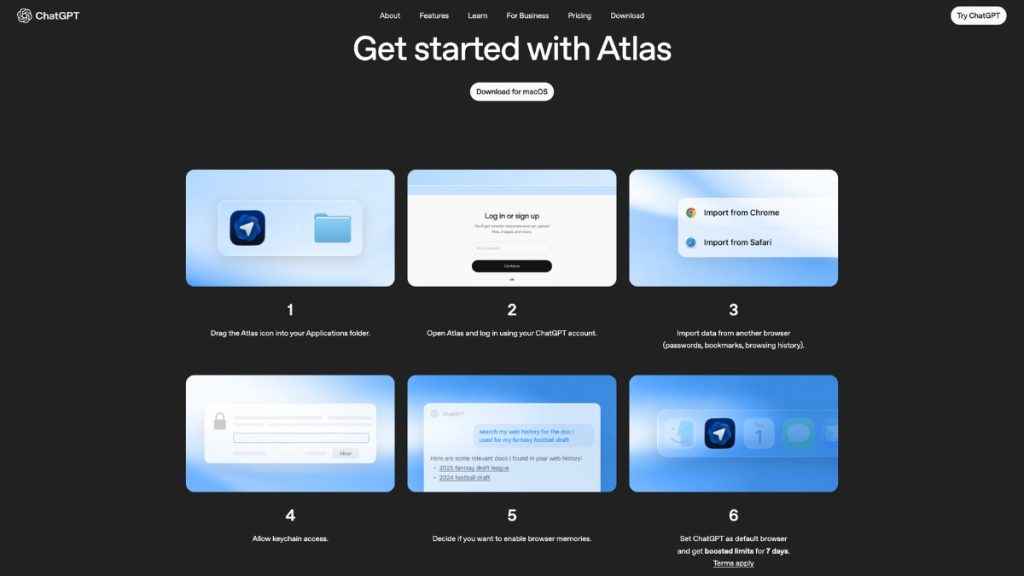
The advantages are clear if you spend a lot of time researching, writing, or multitasking online. Instead of manually opening several tabs or copying and pasting information into ChatGPT, you can just ask Atlas to summarise, analyse or perform actions directly within the page. It saves time and cuts down on distractions like ads and pop-ups that clutter traditional browsing.
However, it’s not without trade-offs. Atlas doesn’t yet support browser extensions or the kind of advanced media playback you get on Chrome or Safari. Watching Netflix, for example, or using complex web apps might still work better elsewhere. And while the idea of ChatGPT reading and acting on your browsing context is convenient, it also raises questions about how much data users are comfortable sharing, even with OpenAI’s assurances that controls are in place.
Do we really need another web browser?
That’s the real question, isn’t it? For years, browsers have evolved in small ways: faster tabs, better design, privacy modes, but none have truly changed how we interact with the web. Atlas is one of the first serious attempts to move from browsing to doing. It’s trying to make your browser not just a window to the internet, but a workspace where an AI assistant helps you get things done.
From my experience using Atlas on macOS, it feels surprisingly polished for a first release. My passwords, bookmarks and browsing data carried over from Chrome without issues, and ChatGPT being built into the window is genuinely useful. It feels like Chrome with an extra layer of intelligence sitting on top. The real test, however, will be how it performs over time; whether it remains stable, secure, and genuinely helpful beyond novelty.
So, do we need another browser in 2025? Probably not another ordinary one. But Atlas isn’t just ordinary. It’s different, ambitious, and familiar enough that it doesn’t feel alien. Whether it replaces Chrome or Safari for most people is another matter altogether, but it’s certainly a step towards a future where your browser doesn’t just display the web, it understands it.
Also read: OpenAI’s ChatGPT-powered Atlas web browser is here: Here are top 5 features


