Nano Banana vs Nano Banana 2: What’s new and what has changed?
 Follow Us

When Google rolled out ‘Nano Banana’ in 2025, it signalled a shift in how mainstream users interact with artificial intelligence for visual content. It was built into Google’s Gemini app and offered high-speed text-to-image generation with conversational editing. This made AI image generation accessible to the masses without steep hardware requirements. Despite its success, the original Nano Banana model had limitations in terms of resolution, rendering and semantic understanding, which became apparent as users pushed it into more demanding creative use cases. So, now Google has released its successor called the Nano Banana 2, promising improved capability, design and use cases. Here, we will take a look at those differences and what has changed under the hood.
 Survey
What is Nano Banana 2
Nano Banana 2 is based on the Gemini 3.1 Flash Image model and claims to combine the advanced reasoning and production control of Nano Banana Pro with the high-speed performance of the new Flash Image model. In simple terms, Nano Banana 2 is Google’s attempt to remove the old trade-off between speed and quality in AI image generation.
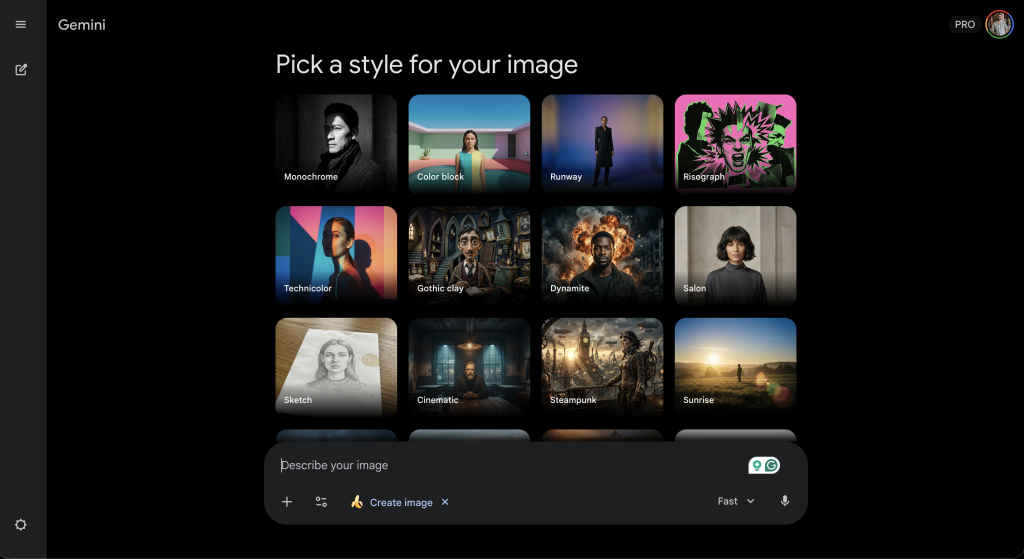
You can access it through the Gemini app (web included), Search, Flow, and AI Studio+. Essentially, it is now the default image engine across Google platforms. After this update, when you tap Create an Image tool inside Gemini or enter the prompt ‘create image…,’ you’ll see the option to ‘Pick a style for your image.’
What’s new in Nano Banana 2
With Nano Banana 2, Google says users get:
Advanced world knowledge
Nano Banana 2 pulls from Gemini’s broader knowledge base and is powered by real-time information and images from web search. That allows it to:
- Render specific, contemporary subjects more accurately
- Create educational infographics
- Turn written notes into diagrams
- Generate structured data visualisations
High visual fidelity
Google says Nano Banana 2 delivers:
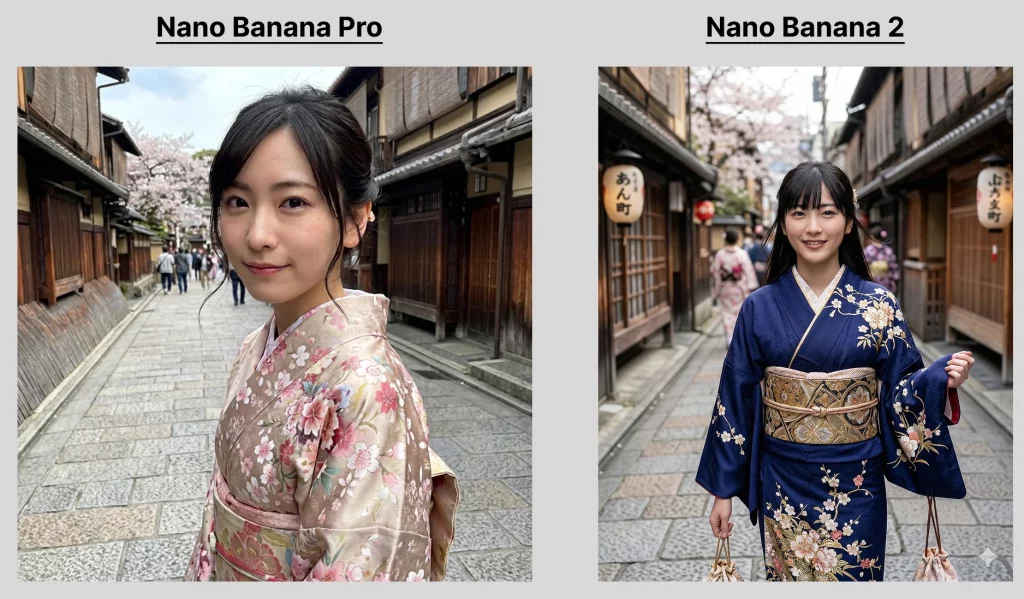
- Sharper edge detail with full control of various aspect ratios and resolutions from 512px to 4K
- Richer textures
- More vibrant lighting
- Photorealistic output at faster speeds
- You can pick a preset style for your image
Also Read: India AI Impact Summit 2026: Here are the biggest investment announcements by tech giants
Strong subject consistency
Google says the new model:
- Maintains resemblance for up to five characters
- Preserves the fidelity of up to 14 objects in one workflow
This could enable storyboard-style narrative building without characters changing appearance between frames.
Improved instruction following
Nano Banana 2 adheres more strictly to complex prompts. The model is engineered to capture nuance and reduce hallucinated elements. If you ask for a specific lighting setup, composition or object placement, it is more likely to deliver exactly that.
Practical uses of Nano Banana 2
For casual users, the improvements in Nano Banana 2 translate to visuals that look more natural and less ‘AI-ish’. Social media comparisons have shown clearer, more realistic outputs where even small details like skin texture and lighting feel more lifelike.
For creators, designers and enterprises, the shift in capabilities opens new workflows like presentations, marketing visuals, educational infographics and better integration options for developers.
If Nano Banana was about making AI imagery simple, easy to access and fun to use, Nano Banana 2 is about making it reliable, precise and suitable for real-world use cases.
| Feature | Nano Banana | Nano Banana 2 |
|---|---|---|
| Model architecture | Gemini 2.5 Flash Image | Gemini 3.1 Flash Image |
| Primary focus | Rapid, casual image generation and editing | High-fidelity generation with studio-like creative controls |
| Max output resolution | 1K | Native 2K, 1K and upscalable to 4K also |
| Text rendering | Basic, limited accuracy for embedded text | Improved clarity, legible text, multi-language support |
| Prompt reasoning | Standard prompt interpretation | Advanced multi-step reasoning, better adherence to complex prompts |
| Editing controls | Basic local edits and simple adjustments | Precise editing controls (lighting, camera angle, composition) |
| Multi-image conditioning | Supports modest multi-image blending | Supports up to 14 reference images for richer context |
| Character and scene consistency | Strong, but limited in complex scenarios | Enhanced consistency for characters, scene layout and objects |
| World knowledge integration | Good generative context | Stronger real-world grounding and scene logic |
Keep reading Digit.in for similar stories.
Also Read: India AI Impact Summit 2026: Top robots showcased at Bharat Mandapam


