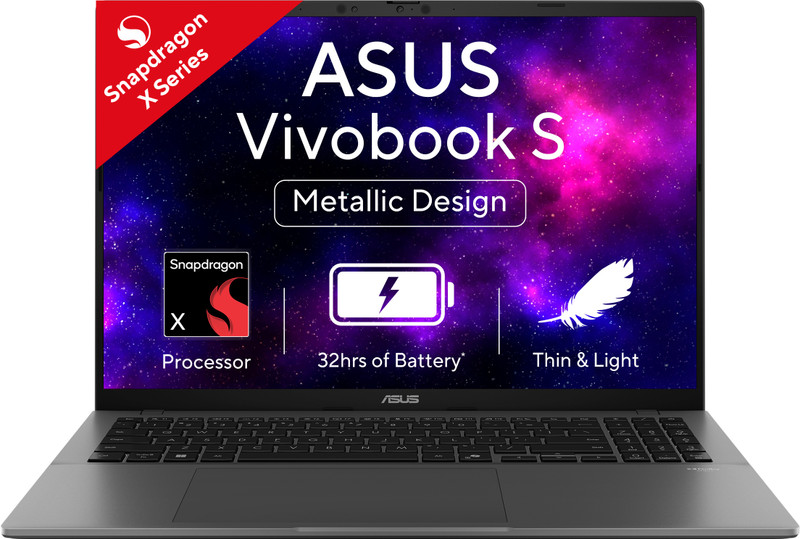
Asus Vivobook S16 review: Good things come in slim packages
 Follow Us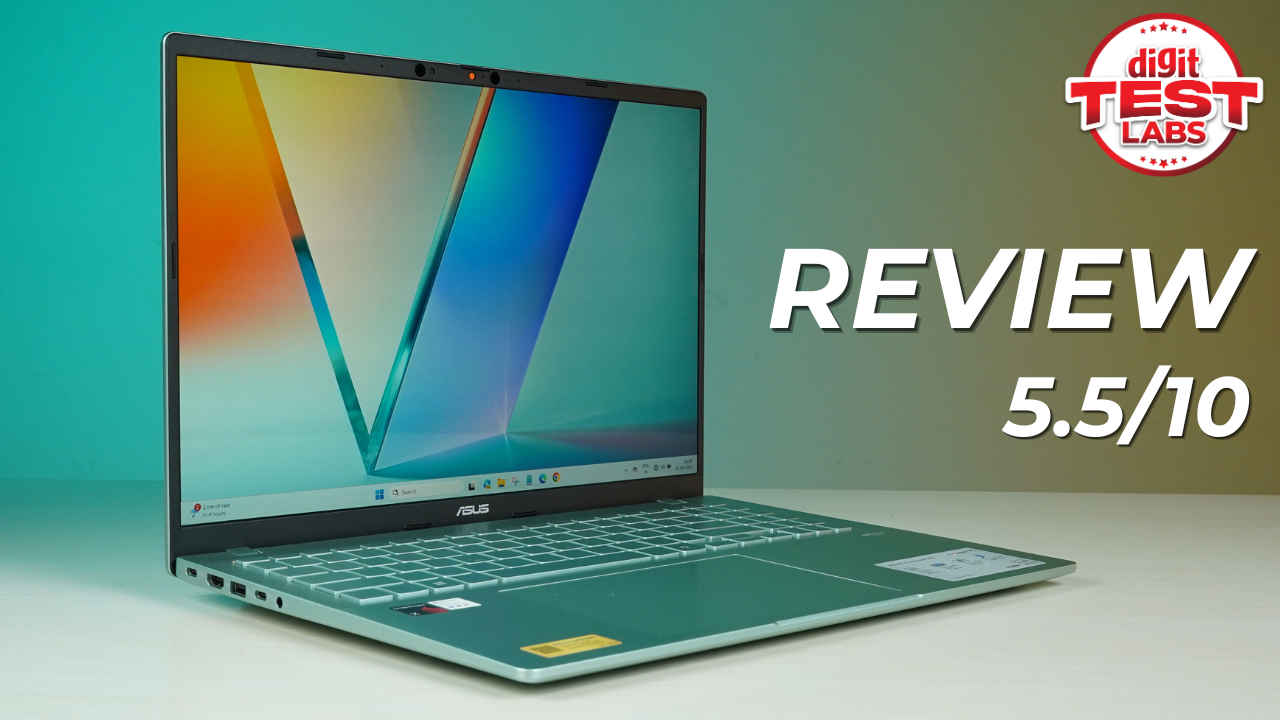

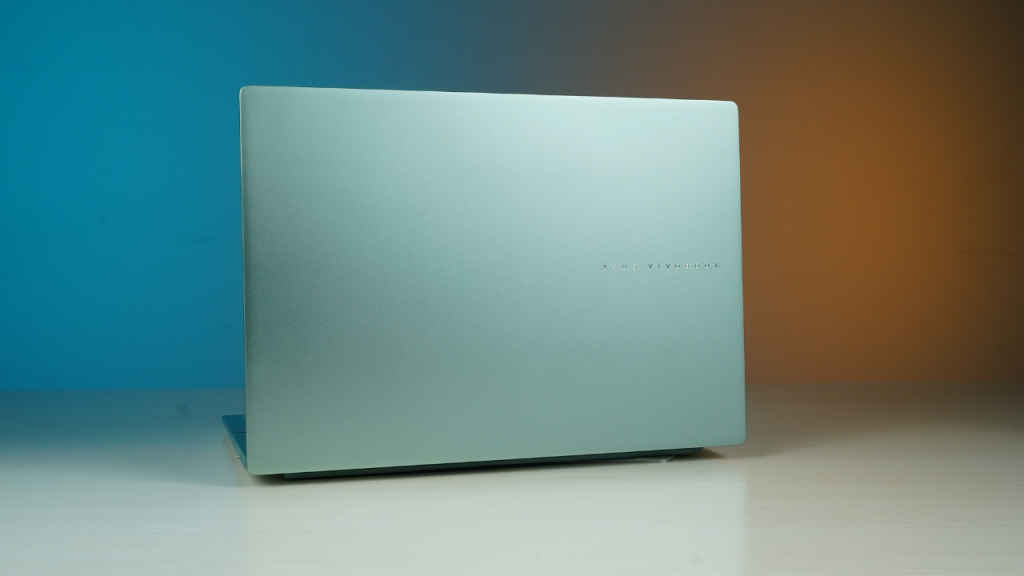
When I first laid eyes on the newly launched Asus Vivobook S16, powered by Qualcomm’s Snapdragon X processor, I paused for a moment just to admire how good it looks. While most laptops stick to predictable shades of black, grey, and silver, Asus has dared to try something different. The Vivobook S16 arrives in refreshing new colours – Salvia Green and BFF Peachy- and they instantly make the device feel modern, chic, and just plain desirable.
I received the Salvia Green variant for review and have been using it as my daily driver for nearly two weeks and I have been satisfied with the experience overall. The moment I pulled the laptop out of my bag on a Monday morning, I caught a few curious glances from colleagues. Now usually, laptops aren’t meant to be conversation starters, but this one might just be.
With an MRP of Rs 98,990, the laptop is available at a launch price of Rs 67,990. And it looks custom-made for working professionals, students and anybody who needs a good-looking and easy to carry around laptop that comes with an impressive battery life. But before we delve deeper in the review, let’s take a quick look at the top specifications of the device.
Asus Vivobook S16: Top specifications
| Processor | Snapdragon X (X1 26 100) Processor (30MB Cache, up to 2.97GHz, 8 cores, 8 Threads), Qualcomm Hexagon NPU up to 45TOPS |
| Display | 16-inch WUXGA (1920×1200) OLED, 16:10 aspect ratio, 0.2ms response time, 300 nits brightness, 60Hz refresh rate, 95% DCI-P3 color gamut |
| Operating System | Windows 11 Home with Microsoft Office Home 2024 (Lifetime) + Microsoft 365 Basic (1 Year Validity) |
| Main Memory | 16GB LPDDR5X on board 8448MHz RAM |
| Storage | 512 GB PCIe Gen 4 SSD |
| Connectivity | Wi-Fi 6E (802.11ax) (Triple band) 2×2 + Bluetooth 5.3 Wireless Card |
| Camera | FHD IR camera: ASUS AI camera with Windows Studio effects & privacy shutter |
| I/O Ports | 2 x USB4 Type-C (supports 4K UHD external displays and up to 40 Gbps data transfers), 2 x USB 3.2 Gen 1 Type-A, 1 x HDMI® 2.1 (TMDS), 1 x Audio jack |
| Battery | 70 WHr, fast charge, ASUS USB-C Easy Charge |
| AC Adapter | 65 W adapter (Output: 5V~20V, 65W | Input: 100~240 V AC, 50 / 60 Hz Universal) |
| Dimensions | 357.0 x 250.7 x 15.9~17.9 mm |
| Weight | Approx. 1.74 kg |
Design and build
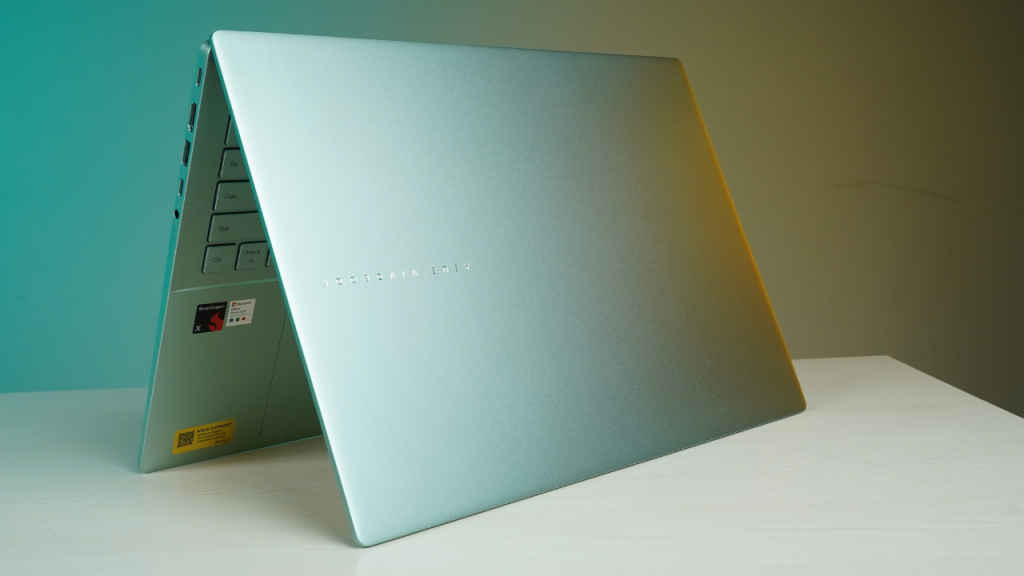
The Asus Vivobook S16’s design is one of its strongest points. Asus believes that customers today are looking for a colour pop when it comes to laptops which is why they decided to introduce two new colours in a segment that is “dominated by blacks and silvers.” And after spending a few days with the Vivobook S16, I feel that is true. Having a laptop in a colour that’s striking yet elegant feels refreshing.
The Salvia Green, in particular, has a calm, almost soothing vibe to it. Imagine looking out of your window on a rainy day and spotting lush greenery outside. That’s the kind of visual relief this colour brings in the middle of a busy workday. The finish is metallic and well-crafted too. It’s not flashy but definitely stylish enough to stand out in an office, a café, or even during a client meeting.
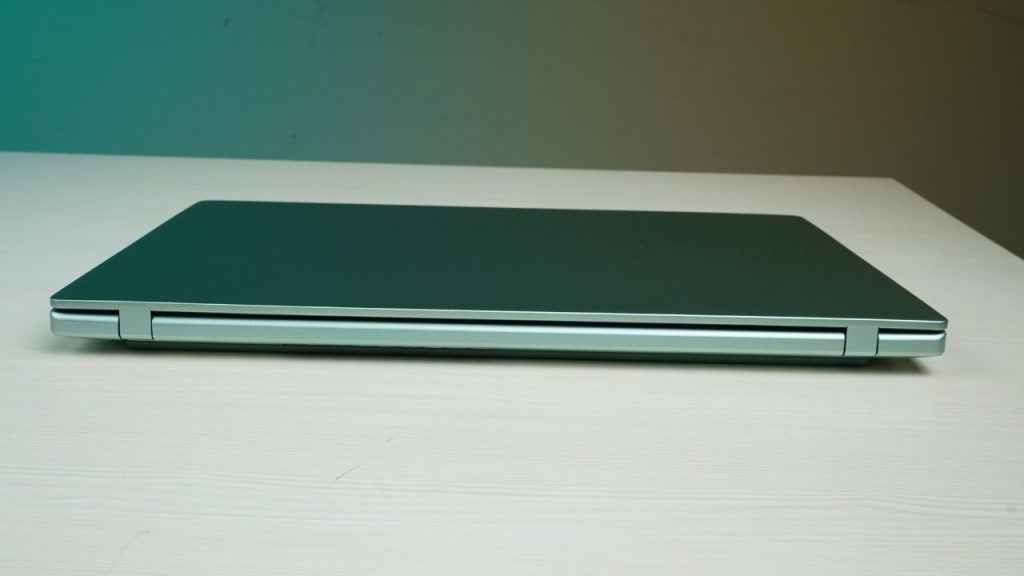
At just 15.9mm and weighing around 1.74 kg, the laptop easily slipped into my backpack and was easy to carry to work everyday. I have to travel a long distance to commute to work and carrying around the Vivobook S16 wasn’t a difficult task.
In terms of build quality, the laptop feels sturdy enough to handle daily wear and tear. During my usage, I didn’t really notice any fingerprints forming up on the keyboard, trackpad, or even the lid. When you put pressure on the chassis, there is minor flex but nothing that is concerning.
Keyboard and trackpad
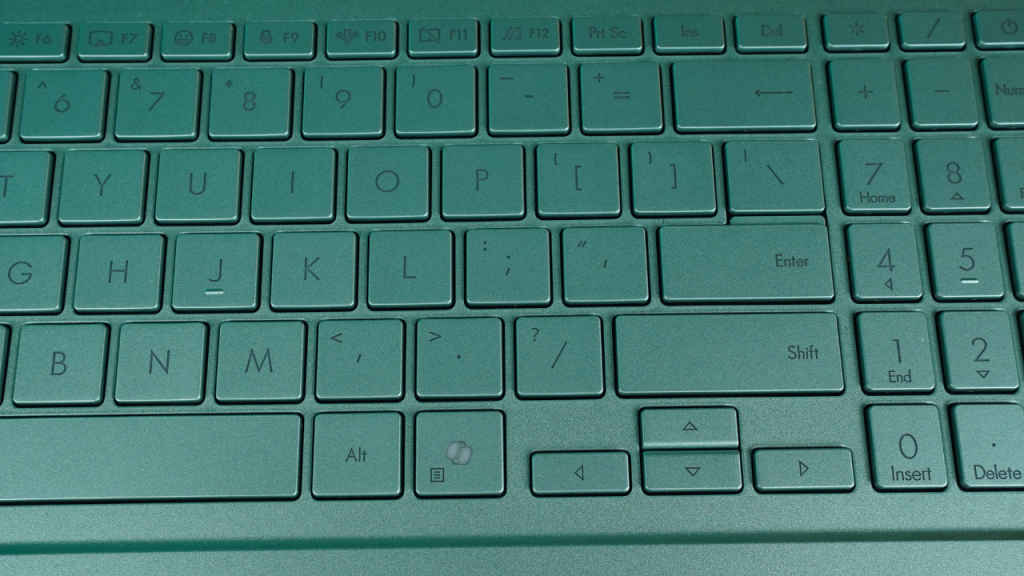
I type a lot. And I mean, a lot. So naturally, the keyboard experience is a big deal. So far, I haven’t faced any challenges in that area with the Vivobook S16. The layout of the keyboard follows Asus’s familiar Vivobook style, with evenly spaced keys and backlighting for those late-night typing sessions.
There is a numeric keypad on the right and on top of that is the power button which was a bit hard to find at a quick glance. There is also a dedicated Co-Pilot key near the space bar which springs Microsoft’s AI assistant to life instantly.
The keys are snappy, responsive, and well-spaced which make them an absolute delight during long typing sessions. A quick test even showed a 5ms latency. Apart from being super snappy, the keys are also quite silent. My colleagues didn’t seem to notice or be disturbed at all while I was typing continuously for hours.
Below the keyboard sits a generously sized touchpad that supports ASUS Smart Gestures. It’s smooth, precise, and responsive, whether you’re casually scrolling through social feeds or working across multiple windows. I also didn’t feel the need to plug in a mouse immediately, which says a lot about how good the trackpad is. There is also enough space to comfortably rest your wrists while typing on the device.
Display and speakers
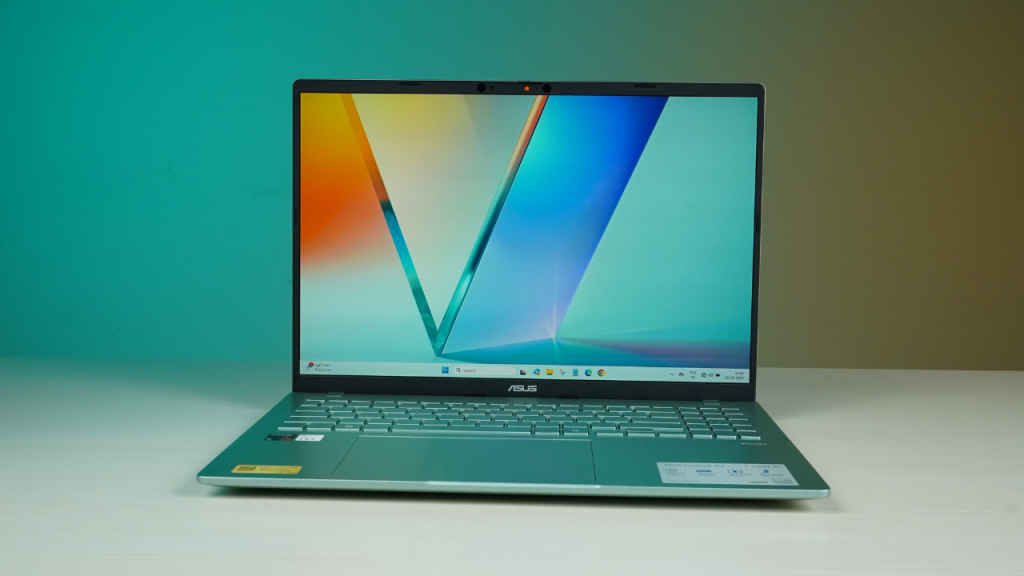
Display is another area where the Vivobook S16 holds its ground. Asus claims that the display comes with a 95% DCI-P3 color gamut. And that claim turned out to be true during our testing of the device.
On the colour accuracy front, the device showed an average DeltaE of 1.4 which is a strong result, putting it well within professional-grade territory where anything under 2 is considered excellent. Even in the worst-case scenario, the max DeltaE was 6.7, which isn’t something you’d notice while watching content or editing photos. Simply put, you can trust the laptop’s colour reproduction.
Talking about brightness, the Lux meter showed a peak brightness of 300 nits which makes the laptop more than adequate to be used comfortably outdoors. I used the laptop to work out of a cab while commuting to work on a rainy day and the display was bright enough. I actually had to turn the brightness down by two points to avoid straining my eyes too much.
With that being said, since this is an OLED display, it has a glossy finish. And in office lights, this can prove to be a bit of a challenge. I constantly had to adjust the positioning of my screen to avoid a strong glare from the lights behind me. The 60Hz refresh rate is another factor that might raise eyebrows. But if you are going to use the laptop majorly for work purposes, that won’t make much of a difference.
In terms of speakers too, the laptop offers a decent enough experience. The audio levels were loud enough to be heard clearly in an office environment. There isn’t a groundbreaking bass level here, but that’s something that you don’t even expect from a productivity device. It is, however, more than enough for casual content viewing. I mostly used laptop speakers to attend video calls, watch trailers of the recently-unveiled games, and catch livestreams of recently-launched gadgets.
Performance, connectivity and AI features
Powered by the Snapdragon X 126 100 processor, the Vivobook S16 is for those who want a device that is built to last on a busy work day. The apps launch at a lightning fast speed on the device, I could comfortably work with at least 20 tabs open, and didn’t experience any lags. The laptop also remained quite cool, even under sustained workloads.
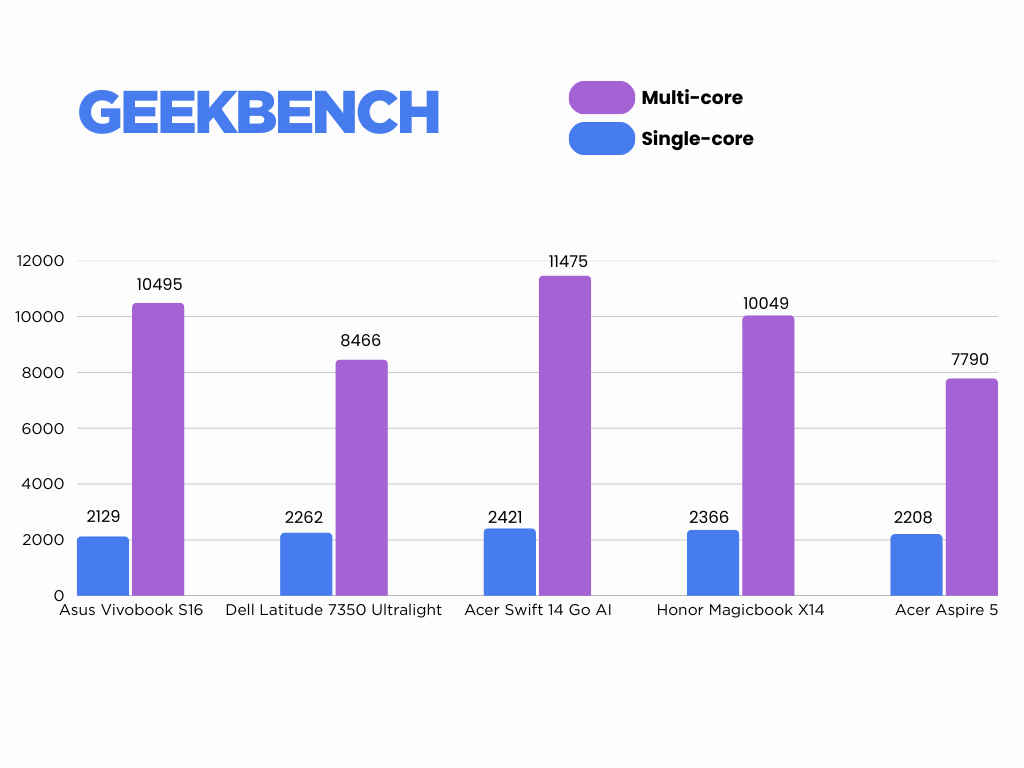
The performance is backed up with benchmark test scores, which aren’t the best in class but quite sufficient for a productivity-focused device.
In Geekbench 6, the laptop scored 2,129 in single-core and 10,495 in multi-core, numbers that put it comfortably ahead of the likes of Honor Magicbook X14, Acer Aspire 5, and Dell Latitude 7350 Ultralight.
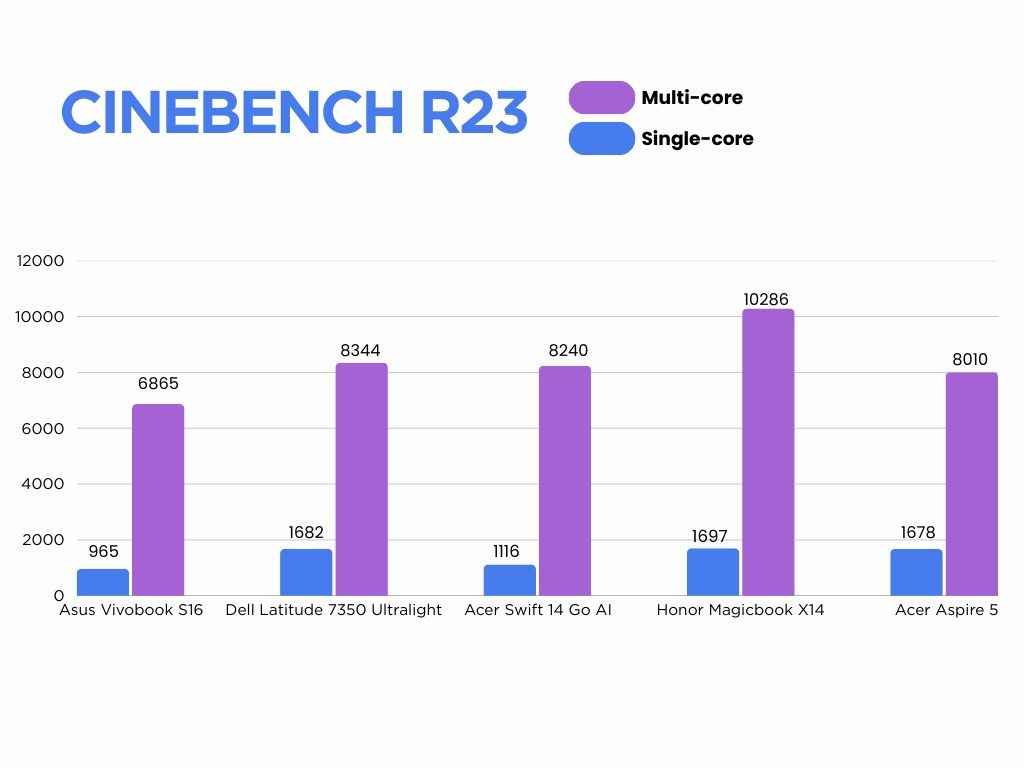
In Cinebench R23, the laptop scored 965 points in single-thread and 6,865 points in multi-thread test. These numbers aren’t groundbreaking but do show decent sustained CPU muscle for day-to-day multitasking.
We also ran PCMark 10 Applications test on the device which shows how it will fare in real-world office use. And when it comes to day-to-day productivity, the PCMark 10 Applications test painted a reassuring picture.
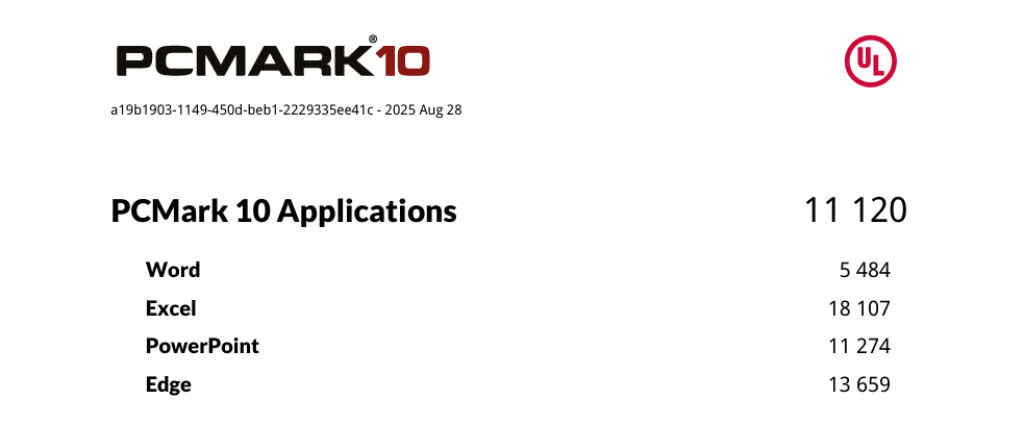
The laptop fetched an overall score of 11,120, which is comfortably high. Breaking it down further, Word came in at 5,484, showing reliable performance for writing and editing tasks. Excel impressed with a massive 18,107, reflecting how smoothly the system handles large spreadsheets and heavy calculations. PowerPoint scored 11,274, which means presentations with embedded media or transitions run without a hitch.
Edge got 13,659, pointing to fast and fluid web browsing, streaming, and online collaboration. In daily use, that translates into snappy multitasking across documents, presentations, and dozens of open tabs, making it an easy fit for students, office users, and hybrid workers alike.
Speaking of graphics, the integrated Adreno GPU did a decent job in GFXBench. The laptop managed 4,322 frames in Aztec Ruins High (DX11) and 6,800 frames in Aztec Ruins Normal (DX11).
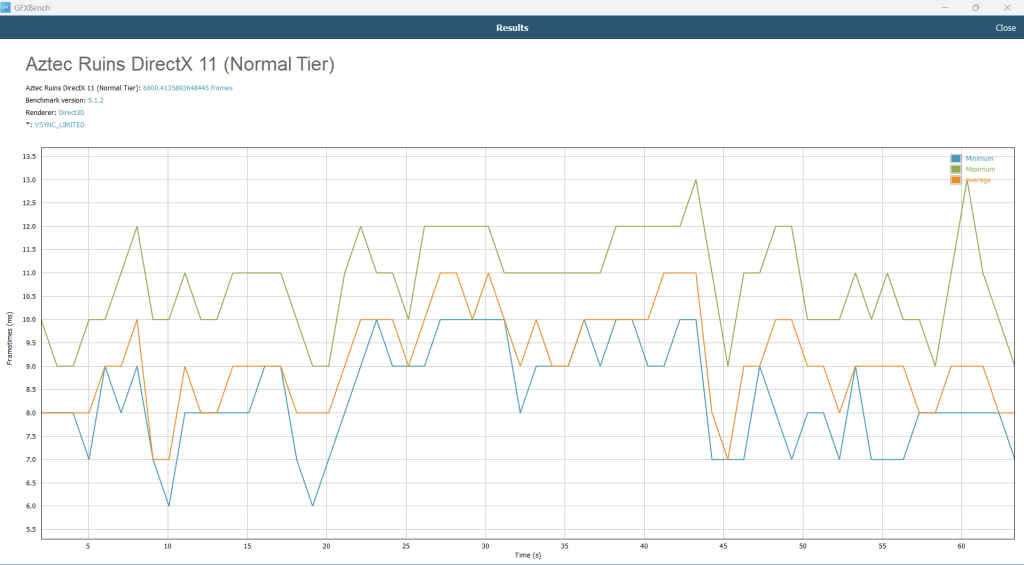
This is higher than some laptops in the same, or even higher price range. For instance, Vivobook 16, Acer Swift 14 AI, and Honor Magicbook X14.
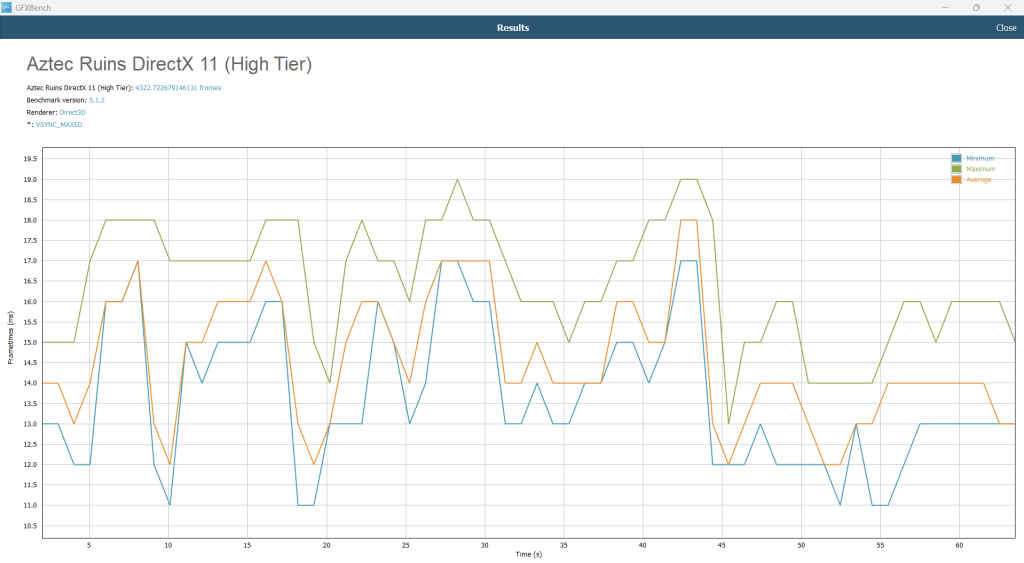
Memory performance was also impressive, with AIDA64 showing 118 GB/s read speeds (again higher than Acer Swift 14 AI, and Honor Magicbook X14), 46 GB/s write, and 60 GB/s copy, along with a low 7.5 ns latency. That snappiness translates to smooth multitasking and quick app switching.
SSD performance is another highlight. In CrystalDiskMark, the 512GB PCIe Gen 4 SSD posted 6,327 MB/s sequential read and 4,316 MB/s sequential write speeds, with great random read/write as well. This means that transferring large media files, installing applications, or booting Windows on this laptop is quite seamless.
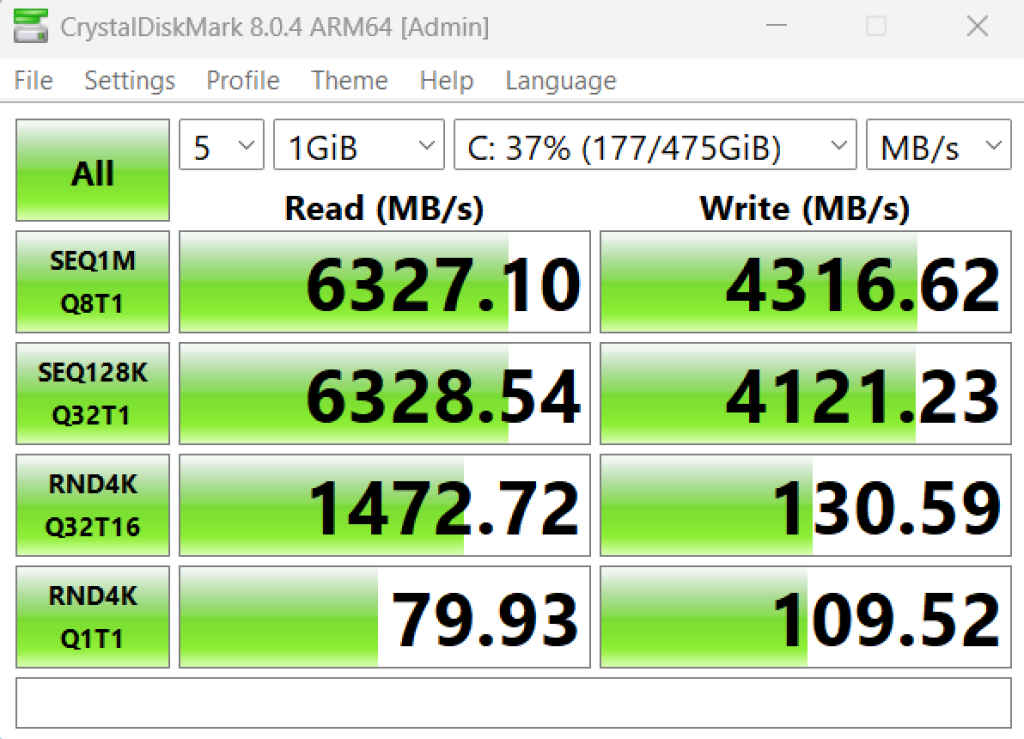
In addition to this, PCMark’s Full System Drive test, with a score of 1229, showed that this SSD keeps the system responsive under real-world loads.
Talking about AI features, the laptop comes with a dedicated NPU which is rated for 45 TOPS on paper, but what matters more is how it actually feels in use. The Copilot key instantly brings up the assistant without any lag, and the app itself is snappy and responsive when pulling up answers or helping with tasks.
The laptop also comes with ASUS AI camera with Studio Effects, promising to elevate the overall experience. The camera comes with a physical shutter, which is important to protect your privacy.
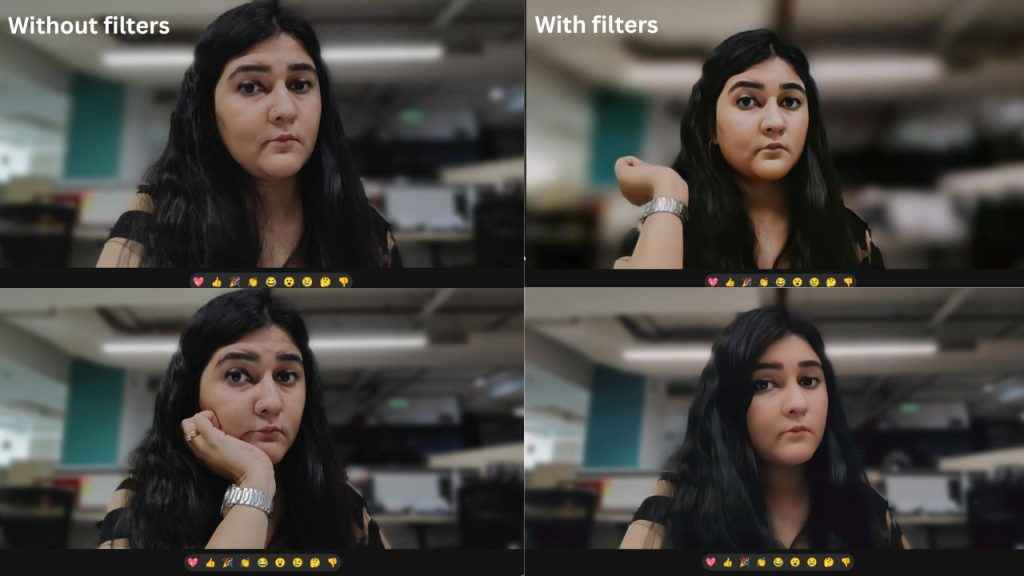
I tried the Studio Effects during a couple of calls, and they do make a difference. However, the video calls turned out just fine without them too. I tried switching on the background blur, auto-framing and eye contact correction before starting a meeting. While these features worked just fine, I personally don’t find them necessary. Playing around with different filters was also fun, though they lean more towards the cartoonish side and aren’t really suited for official video calls.
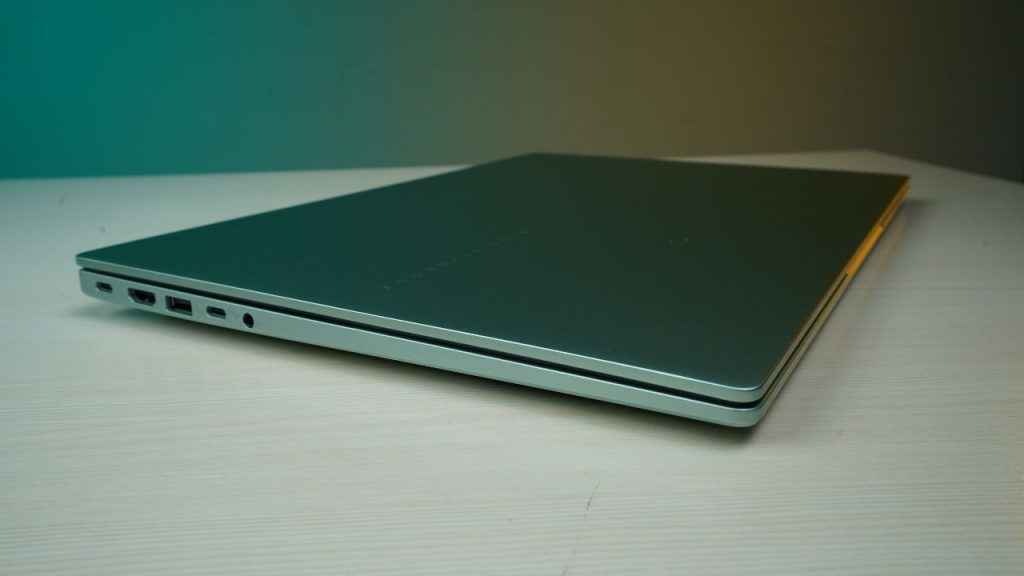
The laptop has many options in terms of connectivity and ports. There are dual USB4 Type-C ports that can handle blazing-fast data transfers and external 4K displays, along with HDMI 2.1 for easy monitor hookups. Add in two full-size USB-A ports and a headphone jack, and you’ve got everything you need for a full day at work. The port placement is also convenient (they are all on the sides of the laptop) and you won’t have to get up from your seat to find which port is where.
Thermals and battery
The Asus Vivobook S16 is a cool machine that is built to keep up with your pace on a long work day. Even while running stress tests, the laptop got slightly warm but never too hot. It showed a throttle difference of 18 pts in Cinebench R23 tests which means that it has the ability to remain cool in most situations.
During the Cinebench R23 stress test, the laptop’s surface temperature of the WASD zone reached a peak of 38° and the touchpad hovered around 25.7. This is cooler than many other laptops belonging to similar price segments like the Acer Swift 14 Go AI, Honor Magicbook X14, Acer Aspire 5 and the Asus Vivobook 16.
Finally, let’s talk about the strongest feature of the Vivobook S16 – battery life. The laptop simply refuses to power down and will comfortably last more than a full working day. Now, I majorly use Google Docs, Chrome (with atleast 10+ tabs open) and Canva during my working hours. And I can confidently say that even if you forget your charger at home for a day, there is nothing to worry about. I started my workday around 9 AM with the battery at 100 percent, brightness set to 50 percent, and the keyboard backlight turned off. With light productivity tasks like typing on Google Docs and a bit of browsing, the charge only dipped to 98 percent after the first hour. By late morning, after using Chrome more heavily, it had dropped to 90 percent, and by early afternoon, it was still holding steady at 85 percent even when left mostly idle.
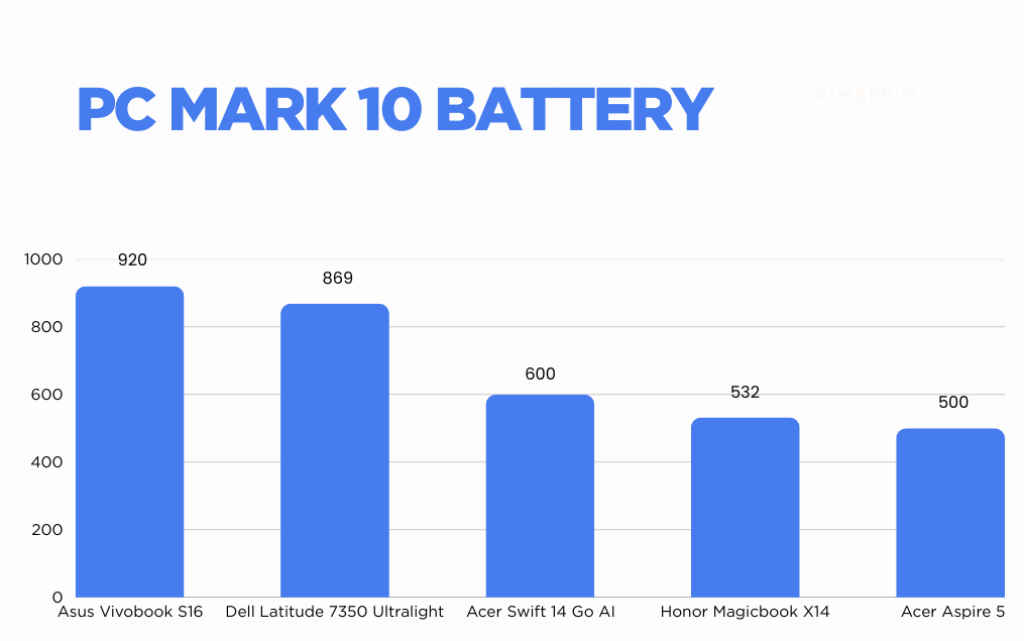
When I ran the PC Mark Applications battery test on the device, which tests a laptop’s battery by running MS Office on loop, the laptop gave around 15 hours and 20 mins of battery life which is excellent. This is at par with several premium laptops like the Yoga 7i 2-in-1, HP OmniBook Ultra, and Asus Zenbook S16.
Verdict and should you buy?
At a special launch price of Rs 67,990, the Asus Vivobook S16 OLED with a Snapdragon X processor makes a strong case for itself as an everyday workhorse. For professionals, it’s a sleek and reliable laptop with a great battery life that is capable of handling day to day tasks with ease. Students will also find plenty to love here, thanks to its lightweight design, refreshing colour options, and dependable battery life.
That said, this isn’t a machine built for gaming or high-refresh entertainment. The 60Hz refresh rate and integrated GPU limit its suitability for gamers or heavy video editors. So if this is your usecase, I would recommend looking at other options which might cost higher as well.
For everyone else, the Vivobook S16 checks all boxes: it’s stylish, portable, and practical, making it a worthy investment.
Also read: Asus launches new Vivobook 14 and Vivobook S14 in India, price starts from Rs 69,990
ASUS Vivobook S16 S3607QA Key Specs, Price and Launch Date
| Release Date: | |
| Market Status: | Launched |