Family Care enables remote monitoring through connected Bespoke AI appliances.
It supports alerts, reminders, location tracking, and inactivity detection.
It works with Samsung TVs, refrigerators, washers, dryers, ovens, cooktops, and robot vacuums connected to SmartThings.
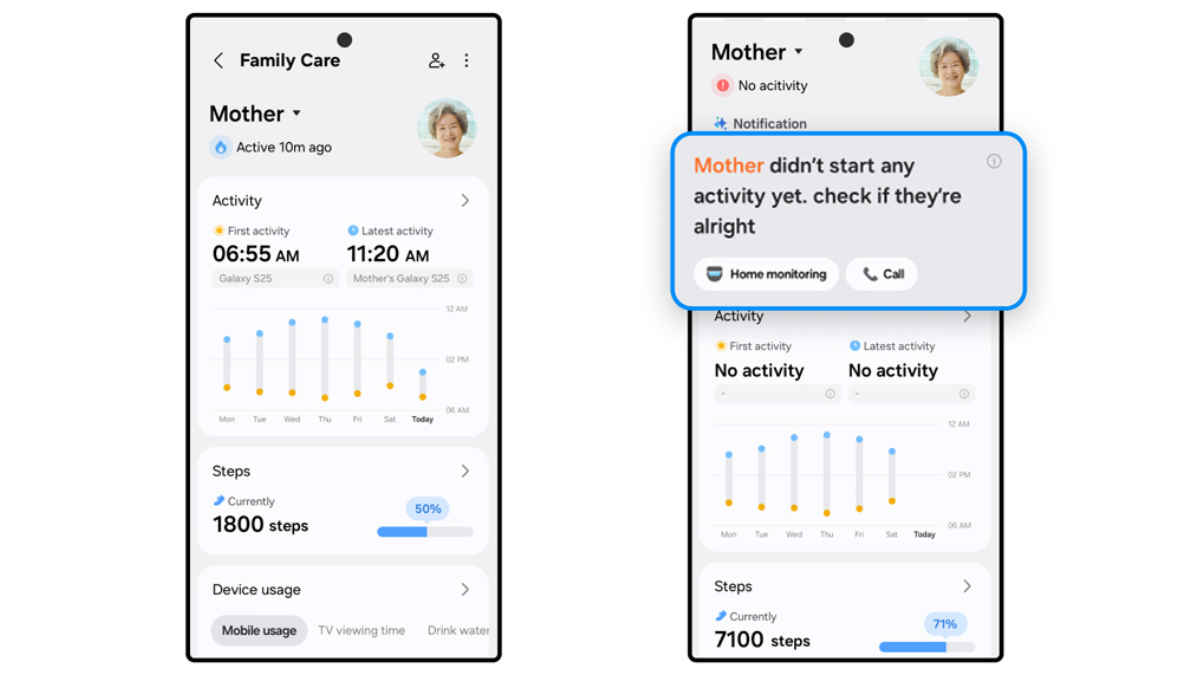
After introducing the feature globally last year, Samsung is bringing Family Care to its SmartThings smart home platform in India. It is a remote monitoring feature that will be available on the company’s Bespoke AI home appliances that have SmartThings. It is meant to help users keep track of elderly family members or dependents through connected devices, alerts, and activity insights. The update positions Samsung’s smart home ecosystem as not just convenience-focused, but also centred on safety and caregiving.
 Survey
Family Care in SmartThings: What is it, setup process
SmartThings Family Care uses connected appliances such as refrigerators, washing machines, TVs, and robot vacuum cleaners to track routine activity. By analysing usage patterns, the system builds a picture of daily behaviour and alerts you about any irregularities or mishaps.
The feature is accessible through the SmartThings app and works across compatible Samsung TVs and home appliances, including refrigerators, washers, dryers, ovens, cooktops, and robot vacuums.
Say you are the caregiver, and want to set it up for your parents. Here’s what you have to do:
Step 1: In the SmartThings app on your Samsung phone, go to the Family Care option and select who is it you are setting up the feature for.
Step 2: Then send the link that is generated to your family member(s). You can share it through a messaging app on your phone.
Step 3: The family member clicks the link and follows the simple guided steps for installation of SmartThings and Family Care.
Step 4: The family member has to tick some boxes to agree to the permissions sought by the service.
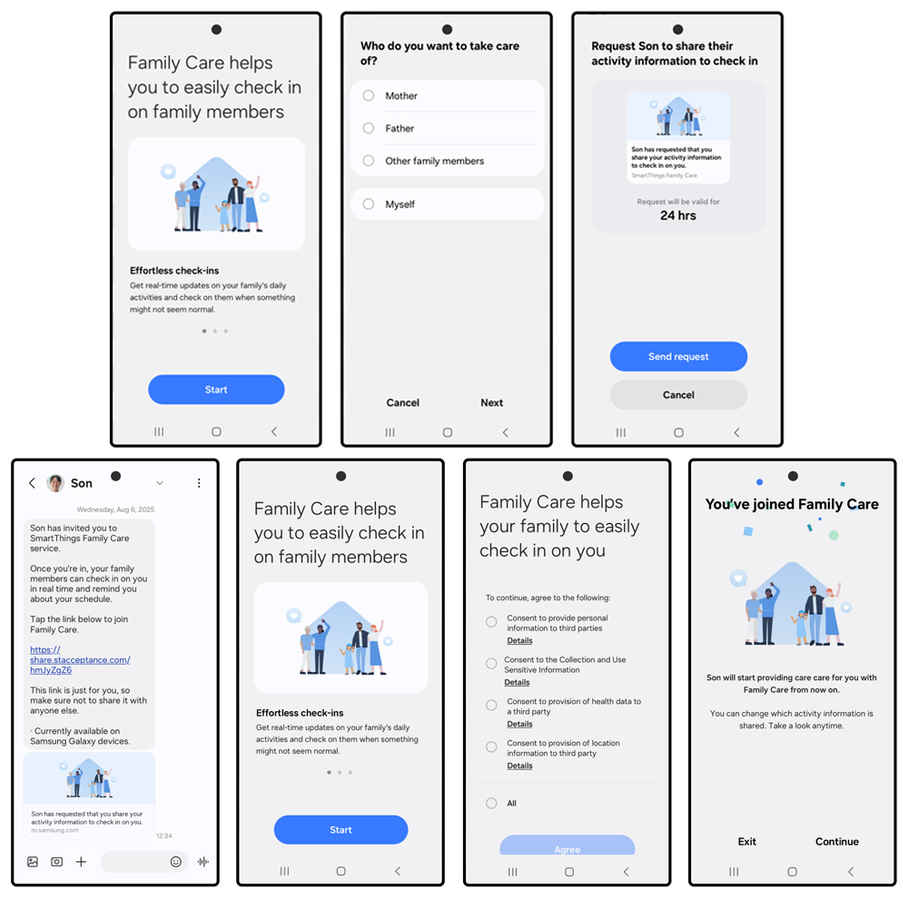
Once they do this, the family member will see: ‘You’ve joined Family Care’.
This should be easy to set up, and the care recipients can choose what data to share. They can choose to pause or stop sharing at any time.
Family Care: Activity monitoring and inactivity alerts
Once Family Care is set up, the caregiver can:
- Track appliance usage, such as refrigerator or TV activity, through SmartThings
- Receive alerts if no activity is detected for a set duration. If inactivity is detected, caregivers can respond immediately. This includes calling the user or remotely activating a compatible robot vacuum with a built-in camera to check the home environment. The caretaker can customise alert intervals.
- View the care recipient’s sleep and wake patterns and daily step count data, provided SmartThings is linked with the care recipient’s Samsung Health.
- Look up the recipient’s real-time location, location history, and register commonly visited areas like hospitals, pharmacies, and supermarkets as key locations.
- Get reminders for medication, appointments, and events. Such alerts are sent to both caregiver and care recipient so that important schedules are not missed.
So, for existing Samsung users with compatible hardware, SmartThings Family Care adds functional value. And for new buyers, Samsung ecosystem products could appear as tools for safety, monitoring, and family connectivity.
Keep reading Digit.in for similar stories.
Also Read: Samsung remains at top spot in global soundbar market for 12th year, teases new speakers
 Follow Us
G. S. Vasan
G.S. Vasan is the chief copy editor at Digit, where he leads coverage of TVs and audio. His work spans reviews, news, features, and maintaining key content pages. Before joining Digit, he worked with publications like Smartprix and 91mobiles, bringing over six years of experience in tech journalism. His articles reflect both his expertise and passion for technology. View Full Profile


