

How to use AI voice effects in your Instagram DM
 Follow Us
Instagram adds AI-tuned voice effects to Direct Messages via Meta AI.
Users can now send creative voice notes with eight unique sound filters.
The feature is rolling out globally for both iOS and Android devices.


Instagram has been silently adding a bunch of new features to its mobile application. Whether it be the new repost feature, the friend maps for locations, or the dedicated Friends tab in the reels section. But this time around, they’ve integrated something completely new. They’ve added a new feature that allows you to send voice notes, using multiple different effects that are tuned by Meta AI. Without wasting much time, let’s take a deep dive into the new feature and how you can use these new AI voice effects on your Instagram DMs.
 Survey
Also Read: Samsung Galaxy S25 Ultra gets huge price cut on Amazon: Should you buy it?
How does the new Instagram feature work?
If you’re wondering how the AI voice effect features actually work, it’s pretty simple. You don’t have to do anything special since the feature uses the default voice recorder available on Instagram chats. Additionally, recipients would be able to tap on the voice note to check and see what AI voice effect was used. They would even be able to reply using the different AI voice effects.
This feature has been added as part of Meta’s focus on making messaging more creative and personalised without much effort. By combining the AI voice effects with easy controls, the platform is aiming to make conversations more engaging.
The AI voice effects feature on Instagram is currently rolling out globally and is available on both iOS and Android devices. If you haven’t got the update yet, we would recommend updating to the latest version of Instagram on your devices.
How to use AI voice effects?
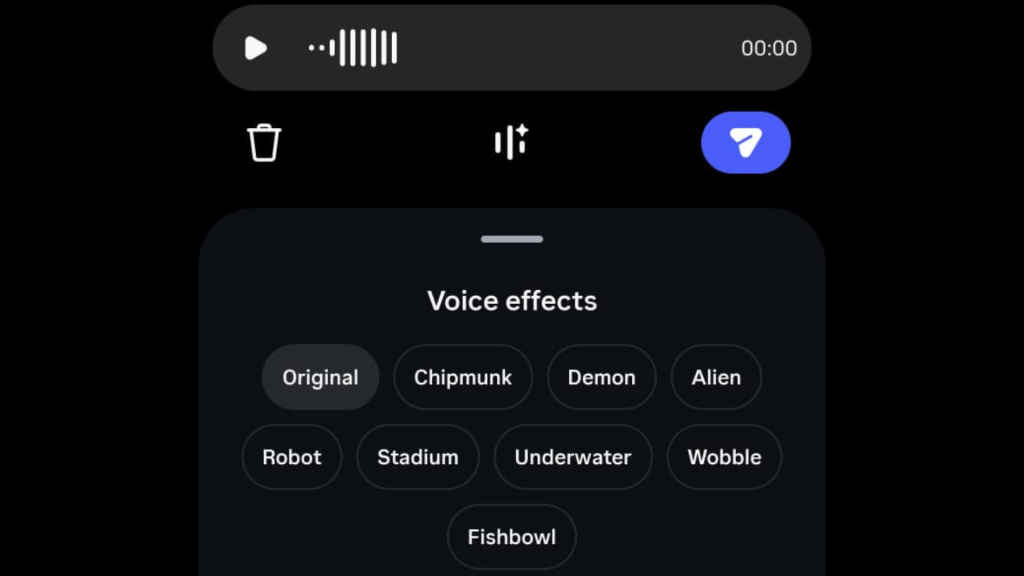
- First up, open any DMs on Instagram, whether they be personal or group conversations.
- Next up, beside the chat window, tap on the voice message record button.
- There you’ll see a new voice effects button; tap on it to browse through the different available options.
- Just hit record on the button and record your audio, then tap through the effects to preview how each one sounds.
- Once you’re happy with your selection, just click on the ‘send’ button.
The features add a bunch of new voice effects, which include options like Chipmunk, Demon, Alien, Robot, Stadium, Underwater, Wobble and Fishbowl.
Also Read: Samsung Galaxy S26 FE launch sooner than expected? Here’s what we know


