
How to opt out of Instagram ID tagging in Meta’s Muse Image AI model
 Follow Us
Meta’s Muse AI can use public Instagram photos as references for AI image creation.
Users can disable Instagram ID tagging to stop future content reuse in Meta AI features.
The opt-out option gives users more control over privacy and shared content.

Meta has recently launched the Muse image AI model, which is built into the Meta AI app, Instagram Stories, and WhatsApp. The AI tools let you create and edit images right inside these apps. What makes Muse different is that it can pull in publicly shared Instagram photos as references, simply by tagging a public account in your prompt. This can make results feel more personal and relevant, but it also means your public photos could be used without your direct say. If you’re not comfortable with that idea, don’t worry. In this article, I’ll walk you through simple steps on how to opt out of Instagram ID tagging in the Muse Image AI model.
 Survey
Prerequisites
Here are some things you should keep in mind before you opt out of Instagram ID tagging in the Muse:
- Make sure you are logged in to your Instagram account.
- Update Instagram to the latest version from your app store.
- Ensure you know your account password if you need to sign in again.
- The setting only affects future posts and media, not content already shared.
Also read: This feature phone is more expensive than an iPhone and supports satellite calls
How to opt out of Instagram ID tagging in Meta’s Muse
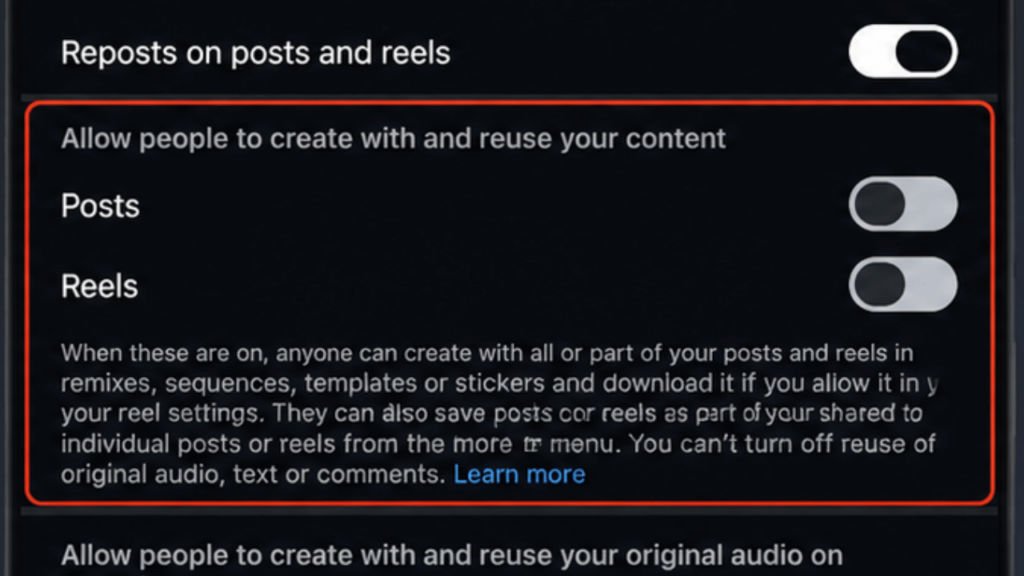
If you want to remove yourself from Instagram ID tagging on Meta’s Muse, all you have to do is launch your Instagram app > go to your profile section > tap on the three-line icon > scroll down and tap Sharing and Reuse > find Allow people to reuse your content section > toggle off the switch next to Posts and Reels > confirm the changes if prompted.
Once you’ve turned off the settings, the images and videos you’ll put up on your Instagram will no longer be available for reuse with Meta’s AI features. This also includes the image generation through Muse Image. Do note that if your Instagram account is private, then Meta AI does not allow others to use your uploaded photos as references for AI-generated images.
Also read: WhatsApp may soon remind you of your contacts’ birthdays: Here is how
Benefits
Meta has automatically opted in to the feature for all the public profiles. By opting out of that, you can keep your identity safe from AI. Here are some of the benefits you get:
- The setting lets you stop your future Instagram posts, including photos and reels, from being used as references for AI-generated images.
- It provides you with more control over AI-based content reuse on Instagram.
- If you ever want to roll back, then it’s quick, as you can simply enable the toggles.


