
Adding location on Snapchat: Learn how to tag location in your Snaps
 Follow Us
Imagine sharing your moments with friends on Snapchat and letting them know where those memories were made.
You can add a touch of personalisation to your Snaps with the location tagging feature.
There are two ways to add location on Snapchat.

Snapchat has become one of the most popular instant messaging platforms, particularly among Gen Zs and Millennials. This vibrant platform, known for its disappearing messages and filters, allows users to express themselves creatively and connect with friends in fun ways.
 Survey
Imagine sharing your moments with friends on Snapchat and letting them know where those memories were made. Well, Snapchat allows you to do so. You can add a touch of personalisation to your Snaps with the location tagging feature.
Whether you’re a new Snapchat user or a seasoned Snapchatter, knowing how to tag location is a game-changer.
In this article, we will tell you how you can tag location in your Snaps.
Also read: Tagging people on Snapchat: Learn how to mention someone in your Snaps
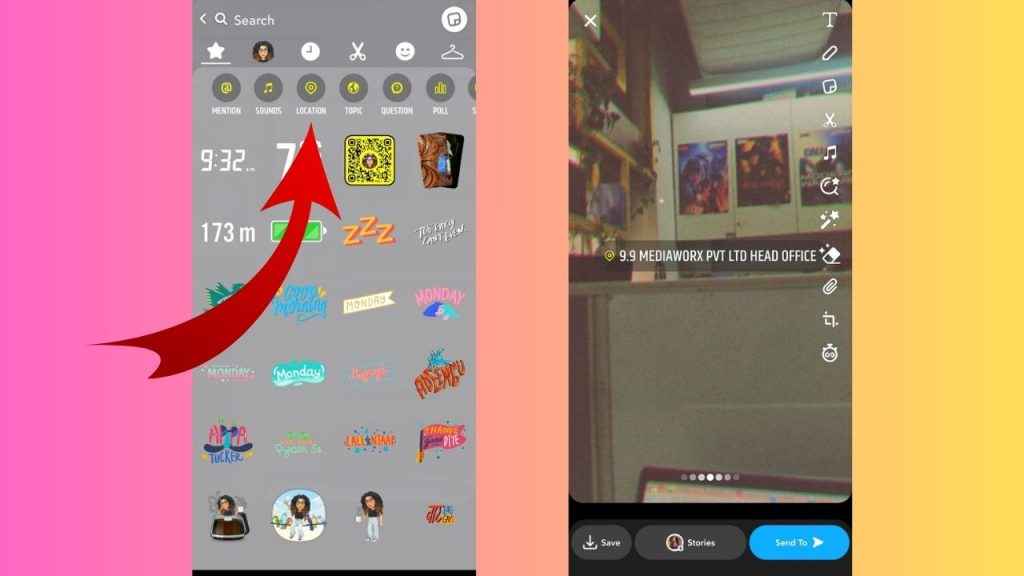
How to add location on Snapchat
There are two ways to add location on Snapchat.
First way
Step 1: Open the Snapchat app.
Step 2: Tap or record your Snap.
Step 3: From the vertical menu present on the right side, tap the “T” symbol.
Step 4: Tap the location pin icon present above your keyboard.
Step 5: Choose the place that you want to tag from the suggestions or type the name of the place.
Step 6: You can personalise the location tag by changing the font or colour.
Step 7: Now, share your Snap.
Also read: Enhance your Snapchat stories with sound: Learn how to add music to your Snaps

Second way
Step 1: Open the Snapchat app.
Step 2: Tap or record your Snap.
Step 3: From the vertical menu present on the right side, tap the stickers icon.
Step 4: Tap the Location option present at the top.
Step 5: Choose the location that you want to tag from the suggestions below or type the name of the place.
Step 6: Once done, share your Snap.
In our opinion, adding your location allows you to add a personal touch to your Snaps. It provides context to your photos or videos, giving your friends a glimpse into where you are. It allows them to feel more connected to your experiences and creates a more interactive social media presence.


