Apple darkens the background blur in iOS 26 beta 2 to fix visibility issues caused by the new liquid glass design.
Includes alert badges in Messages, revamped Safari tab view, new wallpapers, ringtones, and Apple Music widgets.
iOS 26 supports iPhone SE (2nd gen) and newer; users can download via the Apple Beta Software Program after backup.
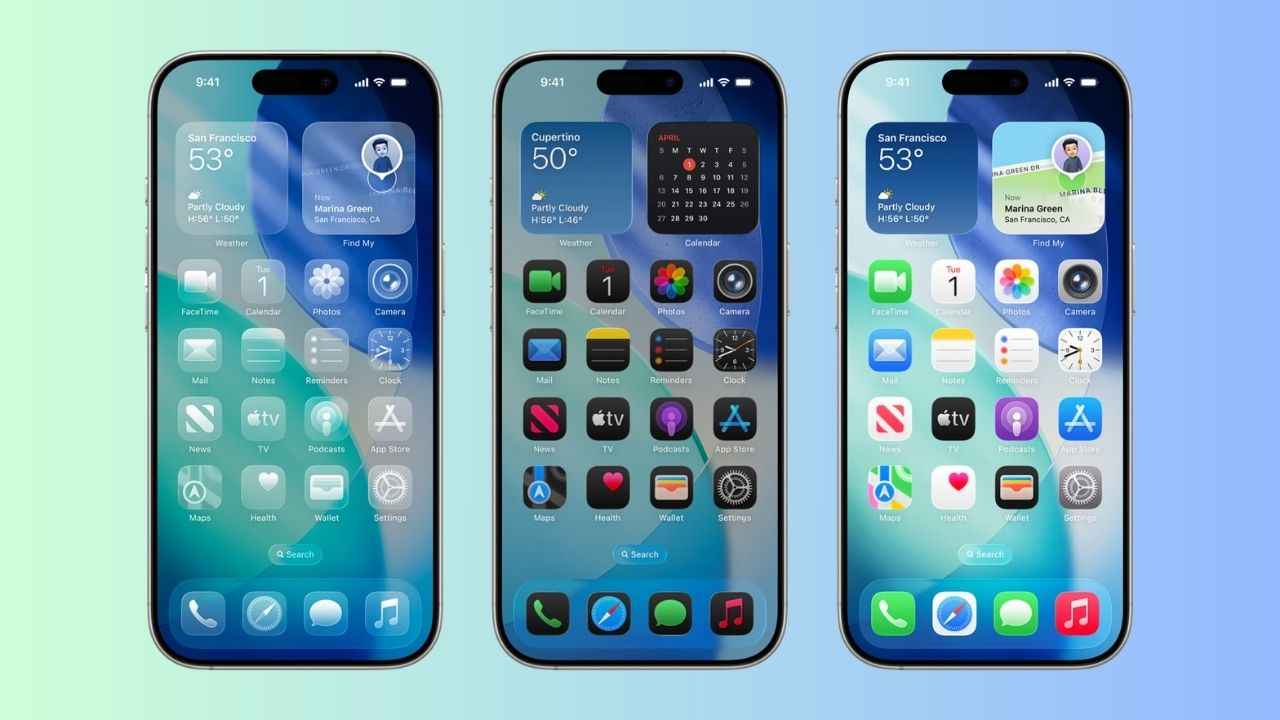
Apple has started rolling out the second beta for iOS 26, which was unveiled at WWDC 2025 earlier this year. Along with other features, the latest beta build has also fixed the control centre issue that the early beta testers had reported. While the liquid glass design gives the interface a modern look, users have shared that it has made the Control Center nearly unreadable. The liquid glass design element’s semi-transparency made it difficult to differentiate between the Control Center’s buttons and sliders from the icons and widgets on the iPhone’s Home Screen.
 Survey
However, with the new beta release, Apple has adjusted the background blur by making it darker to enhance the control centre visibility and readability. Many users have shared the same on X (formerly Twitter). Notably, the iOS 26 stable release will likely arrive with the upcoming iPhone 17 series in September.


Here’s everything you need to know about the iOS 26 beta update
iOS 26 beta new features
iOS 26 new beta has added a new type of alert badge to the Messages app. Now, texts from unknown senders use a blue badge. Similarly, the Safari web browser has received a layout change as well and the tab view has been changed. Additionally, Apple has brought back the new stock iPhone wallpapers. It also brought fixes to a Lock Screen issue where certain widgets were overlapping with the text displayed by Focus Mode. New ringtones and Apple Music widgets have also been added.
Also read: Did Apple just confirm iPhone 17 Air? iOS 26 beta hints at possible launch
iOS 26 beta: How to download
iPhone users can sign in with their Apple ID through the free Apple Beta Software Program and install the iOS 26 developer beta. Once enrolled, you can go to Settings > General > Software Update > Beta Updates on your iPhone and select the developer beta option. Now, install over-the-air updates. But before you proceed to download the iOS 26 beta, back up your iPhone or else you might lose your data.
iOS 26: Supported device
Apple will extend its iOS 26 for iPhone 17 series, iPhone 16 series, iPhone 15 series, iPhone 14 series, iPhone 13 series, iPhone 12 series and the iPhone SE (2nd generation and newer).
 Follow Us
Himani Jha
Himani Jha is a tech news writer at Digit. Passionate about smartphones and consumer technology, she has contributed to leading publications such as Times Network, Gadgets 360, and Hindustan Times Tech for the past five years. When not immersed in gadgets, she enjoys exploring the vibrant culinary scene, discovering new cafes and restaurants, and indulging in her love for fine literature and timeless music. View Full Profile


