

Google Pay users in India can now try clothes virtually and explore apparel products, but there is a catch
 Follow Us
Google Pay is testing a new 'Discover' tab that lets select users explore fashion and apparel products.
Users can virtually try selected clothes by uploading a photo and find similar products using Google Lens.
The feature is limited to select users and requires a personal Google account with Web and App Activity and Search Personalisation enabled.


Google Pay is a popular UPI app used across the country by a large number of Indians. In an attempt to enhance the user experience, the search giant introduces new features and updates for the platform. Following this practice, the company is now introducing a “Discover” tab in Google Pay that allows users to explore fashion and lifestyle products within the payments app. However, the feature is currently rolling out to only a limited set of users in India. In the testing phase, select users will get access to a range of product listings that they can discover, including visualising how a product will look on them and exploring similar styles.
 Survey
Google said this experience will be powered by the over 60 billion product catalogue of Shopping Graph, alongside technologies of YouTube videos, visual search, and virtual try-on. Powered by Google AI, the pilot phase is aimed at taking feedback from users.
Also Read: You can now use Gemini to create and edit PDFs, presentations and other documents, here is how
Google Pay gets virtual try-on and fashion content exploration
Google urges Google Pay users to update to the latest version to see if the feature is rolling out for them. Within the ‘Discover’ tab, a curated feed will consolidate fashion and apparel products based on a user’s preferences. This will also include relevant YouTube videos based on “consented Google activities”.
Moreover, users can “see how select clothing items look and drape on you before making a decision by using product-level virtual try-on from individual listings” before making the buying decision. In the future, the tech giant says users will also have the choice to try pre-generated daily looks and get outfit suggestions. To further customise the experience, users will get the capability to upload an image or scan a product in real-time to explore similar products from the internet library.
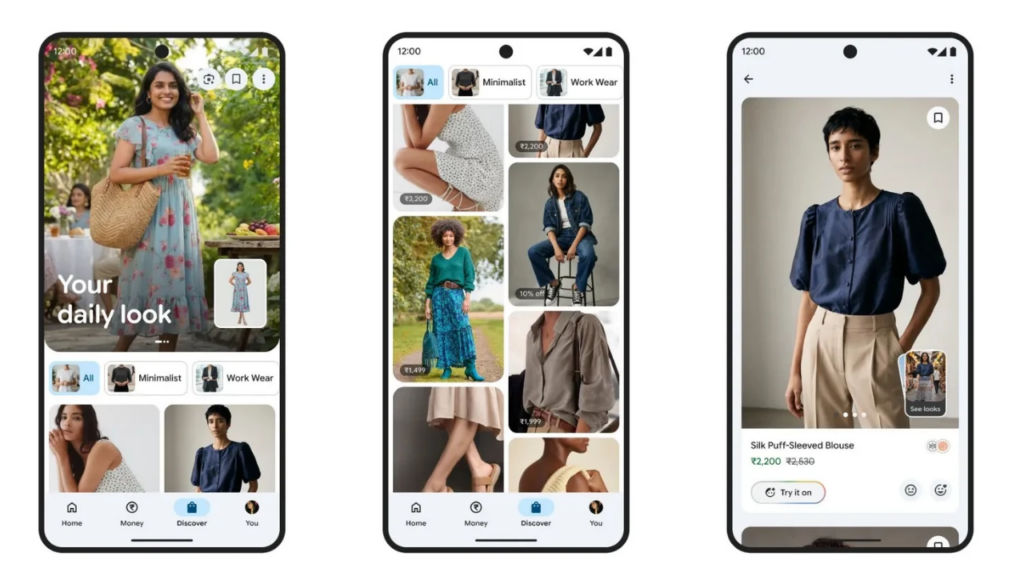
To shop these products, users will be redirected to the seller’s website to complete the purchase. Users must be signed in with a personal Google account and enable Web and App Activity and Search Personalisation to try the features, Google noted. If you see the “Discover” tab in the bottom bar, here is how you can use the feature.
Also Read: Find eSIM setup complicated? Google Gemini may soon do it for you, here is how
How to use the ‘Try-on You’ and ‘Lens’ in Google Pay?
Step 1: Tap the “Discover” button in Google Pay
Step 2: Select an item from the list of products being showcased in the feed
Step 3: From here, you can explore the colour, size and other details
Step 4: To try the product virtually, choose the “Try on you” feature and upload a photo
You can also tap the Google Lens icon to check out other similar items. Eligible Google Pay users can ‘Save’ a product for later or their generated look (through the Try-On feature) to the ‘Saved Items’ page. Users can also update their image for better results, share feedback to improve the feed and also ‘Report’ issues with the suggested products or videos.


