
ChatGPT Prism: What is it, top features, how it works and step-by-step guide to use it
 Follow Us
Prism integrates GPT-5.2 directly into scientific documents for in-context writing, editing and reasoning.
The platform supports unlimited projects and real-time collaboration, with no seat limits for personal users.
Prism is free with a ChatGPT account and will expand soon to Business, Enterprise and Education plans.
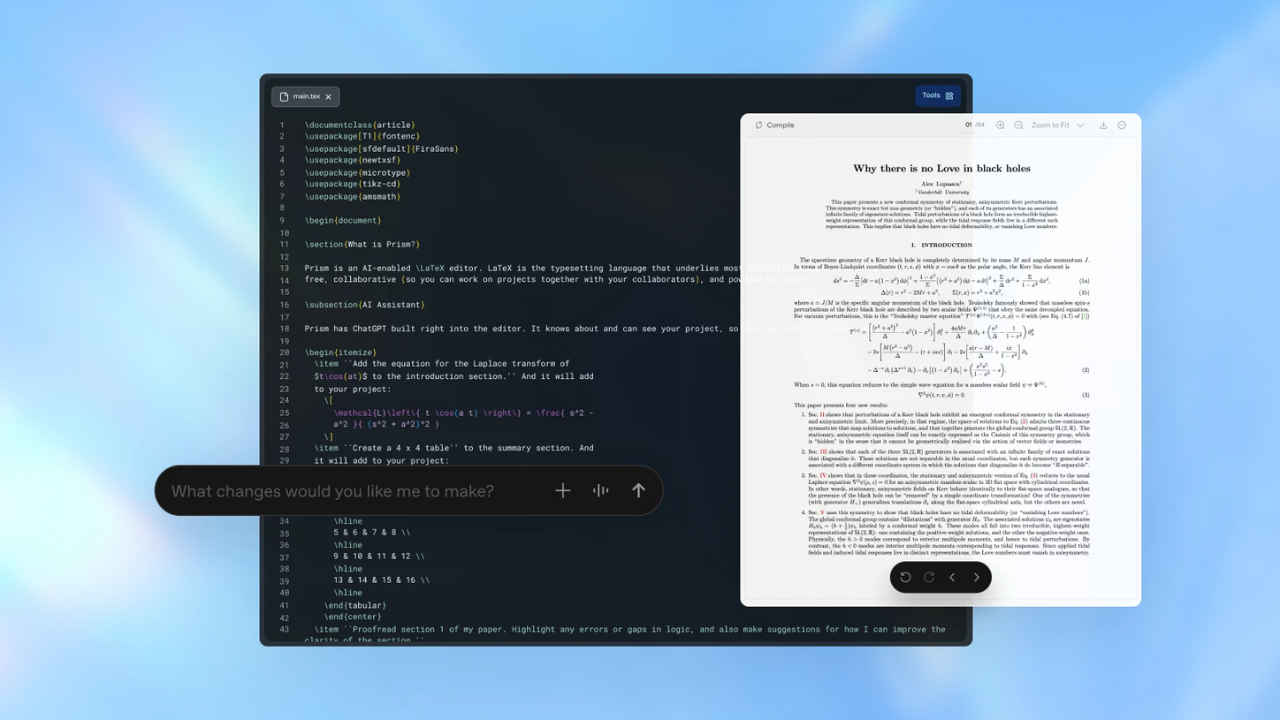

OpenAI has introduced Prism, an all-new AI-powered workspace designed for simplifying how scientists write, collaborate and publish research. Built specifically for scientific workflows, Prism integrates GPT-5.2 directly into a cloud-based, LaTeX-native environment, aiming to reduce the fragmentation that researchers face while juggling multiple tools. It is available for free to users with a personal ChatGPT account.
 Survey
The Prism allows unlimited projects and collaborators, with broader availability for Business, Enterprise, and Education users coming soon. Here’s everything, including the top features and how it works.
ChatGPT Prism: Top features
Prism combines scientific writing and AI reasoning in a single workspace. The researchers can draft and revise papers with full contextual awareness of equations, references and figures. The platform supports real-time collaboration, literature discovery, equation handling and even converts handwritten diagrams into LaTeX. OpenAI also offers voice-based editing for quick and hands-free changes.
Also read: Sam Altman takes a swipe at Mark Zuckerberg in internal OpenAI message to employees
How ChatGPT Prism works
GPT-5.2 is embedded directly into the document workflow, allowing researchers to chat, edit, and reason within the manuscript itself. Instead of switching between tools, users interact with AI in context, making revisions or exploring ideas without breaking focus. Here’s a complete step-by-step guide to using it.
- Log in to Prism using your personal ChatGPT account by visiting prism.openai.com
- Create a new project by selecting “New Project” and choosing either a blank LaTeX file or uploading existing .tex documents
- Add collaborators by clicking the invite option to work with co-authors in real time with shared AI assistance.
- Interact with the AI through the sidebar to review equations, verify data consistency, or refine sections of the manuscript.
- Export the final output as a publication-ready PDF along with the complete LaTeX source files.


