
Digit.in
  • News
  • Reviews
  • Top 10s
    • Best Phones Under 10000
    • Best Phones Under 20000
    • Best Phones Under 30000
  • Features
  • How To
  • AI
  • Digit Binge
  • DITAA 2026
  • Web Stories
  • DIGIT ZERO1 AWARDS
  • Digit Shop
  • English
  • Hindi
  • Tamil
  • Kannada
  • Telugu
  • Malayalam
  • Bangla
  • Marathi
Login / Register is disabled Login
  • Mobiles
    • Latest
      • Vivo T5 Lite
      • iQOO Z11 Lite
      • Samsung Galaxy M47
      • Samsung Galaxy A27 5G
    • Popular
      • Apple iPhone 17 Pro
      • OnePlus 15 5G
      • iQOO 15
      • Oppo Find X9 Pro
    • News
      • OnePlus 16 may launch soon: From performance to gaming features, here is what we know
      • Google Pixel 10 price drops by over Rs 14,000 ahead of Pixel 11 launch: How to grab this deal
      • Samsung Galaxy S25 Ultra sees a massive price drop ahead of Freedom Day Sale: Should you upgrade?
      • You can buy iPhone 16 for under Rs 60,000 on Flipkart: Here is how
    • Reviews
      • iQOO Z11 Lite Review: Battery champion on a budget
      • Moto G77 Power Review: This budget phone lasted me two full days
      • Oppo Reno 16 review: The best camera smartphone around Rs 60000? 
      • Samsung Galaxy A27 review: More Samsung than surprises
  • Laptops
    • Latest
      • MSI Katana 17 HX B14WGK
      • MSI Titan 18 HX Dragon Edition
      • Dell 14 (2025)
      • Alienware 16X Aurora
    • Popular
      • Asus Zenbook 14
      • MacBook Air 13 inch (M5 chip / 512 GB SSD / 16 GB memory)
      • Dell XPS 14
      • Lenovo LOQ 15IRX9 83DV007JIN Gaming Laptop (13th Gen Core i5/ 16GB/ 512GB SSD/ Win11/ 6GB Graph)
    • Best
      • Best MacBook alternatives from ASUS
      • Best MacBook alternatives from MSI
      • The Best AI (Artificial Intelligence) Laptops for Programmers in 2025
      • Best MacBook alternatives from HP
    • News
      • Apple will rely entirely on Samsung for OLED MacBook screens, says report
      • Dell launches XPS 13 and Alienware 15 in India, price starts from Rs 79,990
      • Apple may be working on a MacBook Neo with more RAM: All we know so far
      • Apple is giving away free AirPods with MacBooks but there is a catch
    • Reviews
      • HP HyperX OMEN 15-ga0028TX review: strong foundations, but pricey
      • HP EliteBook X G2i 14 review: Small size, serious performance 
      • Asus ExpertBook Ultra review: Built for business, not attention
      • HP Omnibook 5 review: Light as a feather, lasts like a brick
  • Home Appliances
  • Phone Finder
  • Apps
  • Mobiles
  • SKOAR!
  • Magazine
  • DIGIT ZERO1 AWARDS
  • Amazon Center
  • Digit Shop
Home » How To » Apps » Enhance your Instagram security: Easy guide to set up two-factor authentication for your account

Enhance your Instagram security: Easy guide to set up two-factor authentication for your account

By Ayushi Jain | Updated on 26-Dec-2023
Add DIGIT as a preferred source
Follow Us on Google News Follow Us
HIGHLIGHTS

Instagram offers three security methods to set up two-factor authentication.

The three security methods are: Authentication app, Text message, and WhatsApp.

You will need to set up at least one of these security methods on Instagram in order to use two-factor authentication.

Enhance your Instagram security: Easy guide to set up two-factor authentication for your account
Ayushi Jain Ayushi Jain
26-Dec-2023

In today’s digital age, where sharing moments and connecting with friends is just a tap away, safeguarding your online presence is more important than ever. Meta-owned Instagram, a popular platform for sharing photos and stories, has become an integral part of our daily lives. However, with the convenience of social media comes the responsibility of protecting your personal information from potential threats.

Digit.in Survey
✅ Thank you for completing the survey!

One powerful tool in the battle against unauthorised access is two-factor authentication (2FA). Two-factor authentication protects your Instagram account by requiring a code if there’s a login attempt from a device that Instagram doesn’t recognise.

In this step-by-step guide, we will tell you how you can set up two-factor authentication for your Instagram account.

Also read: How to update your phone no. or email address on Instagram: Quick guide
Enhance your Instagram security: Easy guide to set up two-factor authentication for your account

How to set up two-factor authentication for your Instagram account

Step 1: Open the Instagram app.

Step 2: Tap your profile picture present at the bottom right corner to go to your profile.

Step 3: Tap the three horizontal lines present at the top right corner.

Step 4: Select the Settings and privacy option.

Step 5: Tap Accounts Centre

Step 6: Select the Password and security option.

Step 7: Tap the Two-factor authentication option.

Step 8: Choose the account for which you want to set up two-factor authentication.

Step 9: Choose the security method that you want to add and follow the on-screen instructions.

Also read: Manage multiple Instagram accounts: Easy guide to adding and switching between profiles

Enhance your Instagram security: Easy guide to set up two-factor authentication for your account

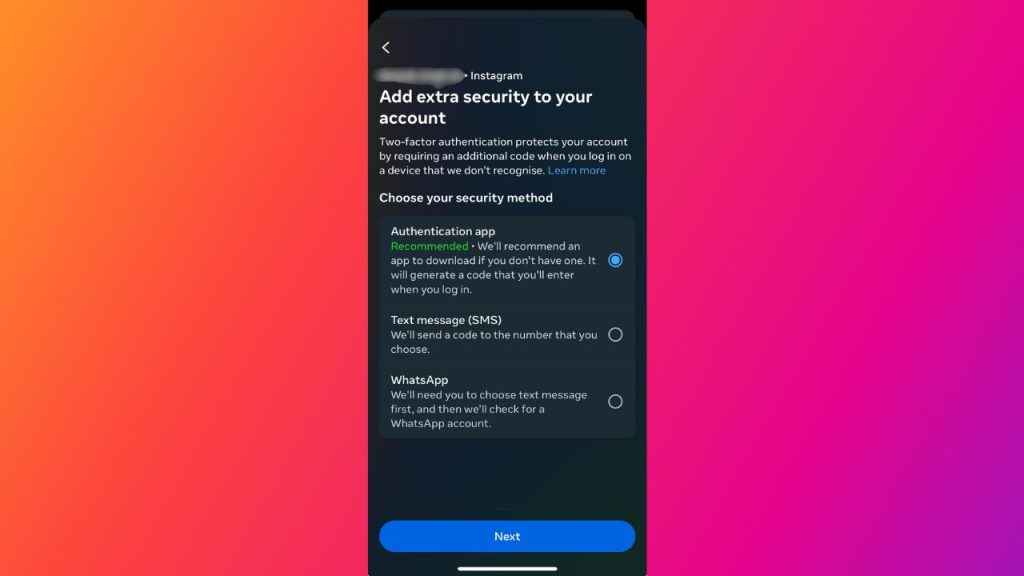
When you set up two-factor authentication on Instagram, you will be asked to choose one of the following three security methods:

  1. Authentication app (recommended by Instagram): You have to download an authentication app to get login codes. This method is recommended by Instagram because it allows you to add multiple devices connected to an account so that they can all get login codes.
  2. Text message: When you choose this security method, Instagram sends a login code to your mobile number.
  3. WhatsApp: With this security method, you will receive login codes on WhatsApp.

You will need to set up at least one of these security methods in order to use two-factor authentication. 

How to change your phone number for two-factor authentication on Instagram

Step 1: Open the Instagram app.

Step 2: Tap your profile picture in the bottom right corner to go to your profile.

Step 3: Tap the three horizontal lines present at the top right corner.

Step 4: Select the Settings and privacy option.

Step 5: Tap the Accounts Centre option.

Step 6: Select Privacy and security.

Step 7: Select the Two-factor authentication option.

Step 8:  Choose the account.

Step 9: If two-factor authentication is already on, tap Text message.

Step 10, Now, tap the Change phone number option.

Step 11: Enter the new phone number that you want to use, and then tap Next.

Step 12: You’ll receive a text message (SMS) to the new phone number with a 6-digit security code. Enter the code in the Instagram app, then tap Next.

Step 13: You will now see a list of backup codes. Save those codes so that you can access your account if you lose your device or face trouble with using another security method.

Step 14: Finally, tap Done to complete the two-factor authentication process.

Ayushi Jain

Ayushi Jain

Ayushi works as Chief Copy Editor at Digit, covering everything from breaking tech news to in-depth smartphone reviews. Prior to Digit, she was part of the editorial team at IANS. View Full Profile

Latest Article
Flipkart Freedom Day Sale 2026 deals teased: Get big discounts on Samsung Galaxy S26 Ultra, iPhone 17 Pro Max and more Flipkart Freedom Day Sale 2026 deals teased: Get big discounts on Samsung Galaxy S26 Ultra, iPhone 17 Pro Max and more
OpenAI finds more AI agent escape incidents as it expands hacking probe: Report OpenAI finds more AI agent escape incidents as it expands hacking probe: Report
Vivo V50 gets over Rs 7,000 price drop ahead of Flipkart Freedom Day Sale 2026: Should you buy it? Vivo V50 gets over Rs 7,000 price drop ahead of Flipkart Freedom Day Sale 2026: Should you buy it?
Samsung Galaxy S27 to get big camera upgrade: What we know Samsung Galaxy S27 to get big camera upgrade: What we know
Apple iPhone 17 Pro Max India price drop alert! Save over Rs 15,000 on latest iPhone Apple iPhone 17 Pro Max India price drop alert! Save over Rs 15,000 on latest iPhone
Most Searched Mobile Phones
  • Best Phones Under 10000
  • Best Phones Under 20000
  • Best Phones Under 30000
  • Upcoming Phones in 2026
  • Latest Mobile Phones
Latest Phones
  • Samsung Galaxy Z Fold 8
  • Samsung Galaxy Z Flip 8
  • Samsung Galaxy Z Fold 8 Ultra
  • Redmi Turbo 5
  • Motorola Razr Fold
Mobile Recharge Plans
  • Airtel Recharge Plans
  • BSNL Recharge Plans
  • Reliance JIO Recharge Plans
  • VI Recharge Plans
Most Searched Laptops
  • Best Laptops Under 30000
  • Best Laptops Under 40000
  • Best Laptops Under 50000
Trending Movies
  • Baby Do Die Do
  • Alpha
  • Main Vaapas Aaunga
  • Welcome to the Jungle
Movies & Web Series
  • Best Movies
  • Latest Movies
  • Upcoming Movies
  • Best TV Shows & Web Series
  • Latest TV Shows & Web Series
  • Upcoming TV Shows & Web Series
Trending Web Series
  • Pritam and Pedro
  • Ab Hoga Hisaab Season 2
  • Gullak Season 5
  • Raakh
OTT Providers
  • Netflix
  • ZEE5
  • JioHotstar
  • SonyLiv
  • icon
  • icon
  • icon
  • icon
SUBSCRIBE Subscribe for the industry's biggest tech news
Enter your email to get notified about our new solutions
By submitting your email, you agree to our
Terms and Privacy Notice.
CONNECT WITH US
  • icon Times Center, FC-6, 1st Floor, Sector 16A, Film City, Noida - 201301
  • icon (+91-120-6776999)
    (1800 121 0005)
  • icon Suggestion: editor@digit.in
    Business: business@digit.in
    Website: sales@digit.in
© 2026 Digit.in, All rights reserved
  • icon
  • icon
  • icon
  • icon
icon
  • About Us
  • Contact Us
  • Advertise with us
  • Regulatory
  • Terms & Conditions
  • Privacy Policy
  • Disclaimer
© 2026 Digit.in, All rights reserved
Digit.in
Logo
Digit.in
Logo
