
Microsoft’s Copilot AI can now see your entire desktop screen and here’s why you should be worried
 Follow Us
Copilot Vision now lets users share their full desktop or app windows for real-time assistance.
Microsoft says the feature requires user consent and works like video call screen sharing.
Privacy experts warn of potential risks if sensitive on-screen data is accessed unintentionally.
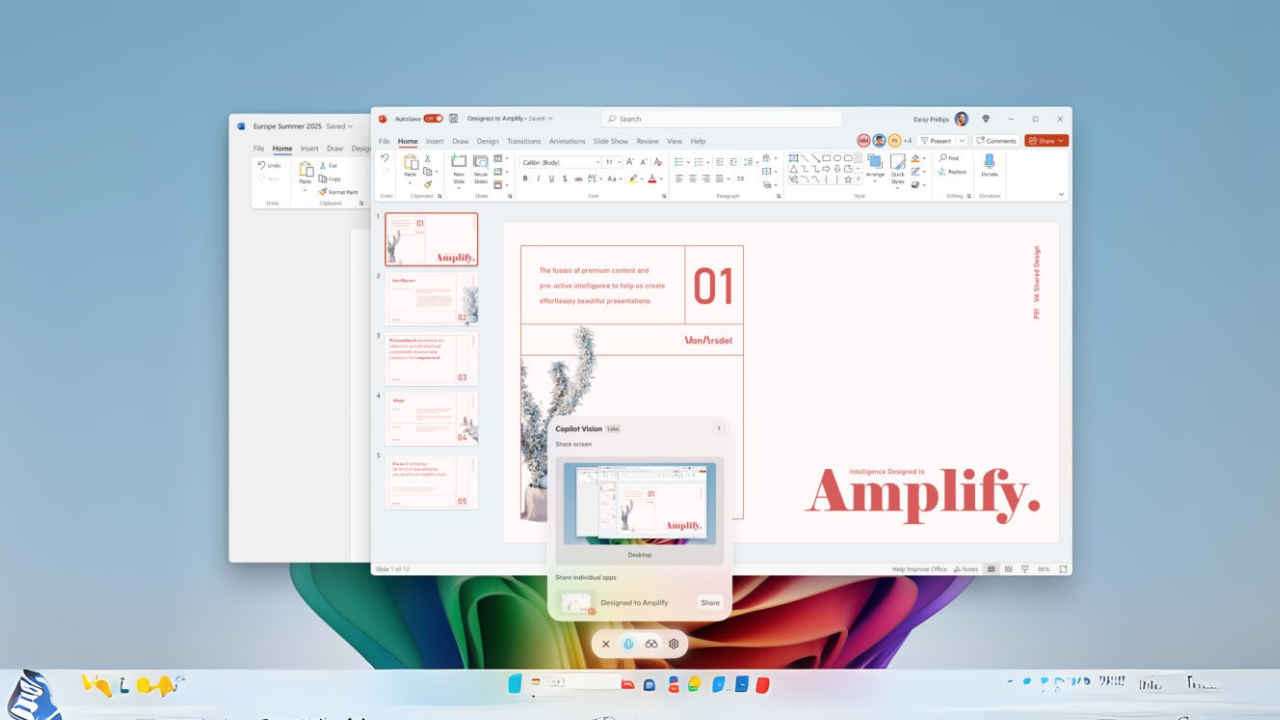

Microsoft is now rolling out a big update to its Copilot app for Windows, bringing an expanded feature through Copilot Vision. The new update is available via Microsoft Store for version 1.25071.125 and above and allows the users to share their entire desktop or specific windows with Copilot, enabling the real time visual assistance directly on the screen.
 Survey
With this new Desktop Share feature, the Copilot will now see and offer contextual help, insights, and voice-guided support. It can be anything from editing a resume, working on a creative project, or navigating a new video game. It can analyse the content and offer improvement tips, and answer questions based on what’s visible on the screen.
If you want to activate the feature, you will have to click the glasses icon in the composer and select the desktop or app window they wish to share. Sharing can be stopped at any time by clicking Stop or X.
Along with this, Microsoft has also announced that it is introducing the ability to enable Vision directly from a voice conversation. This means, that if users want to give Copilot more visual context while speaking, they can now simply activate screen sharing by selecting the glasses icon mid-conversation.
Also read: Using Meta AI? A bug may have exposed your conversations to other users
It is worth noting that the update is currently rolling out for the Windows Insider Channels and is currently limited to regions where Copilot Vision is enabled. The company also stated that not all Insiders will see the changes immediately, as the release is staged to ensure stability and performance. Additionally, it is using the preview phase to refine the experience via feedback from early testers.
Why you should be worried
Interestingly, Microsoft has clarified that, unlike the controversial Recall feature, which automatically records screen activity, Copilot Vision functions more like screen sharing during a video call, requires active user consent, and can be turned off at any time.
However, the feature raises privacy concerns among both users and security researchers. While intended to increase productivity, it also means that an AI assistant may have access to sensitive information displayed on your desktop, which at times can be scary. It can be your images, icons, folders, your wallpaper or anything.


