Offline lyrics available for downloaded songs (Premium only).
New lyric preview is present on the Now Playing screen.
Translations available for both Free and Premium users, provided translated lyrics exist for a particular track.
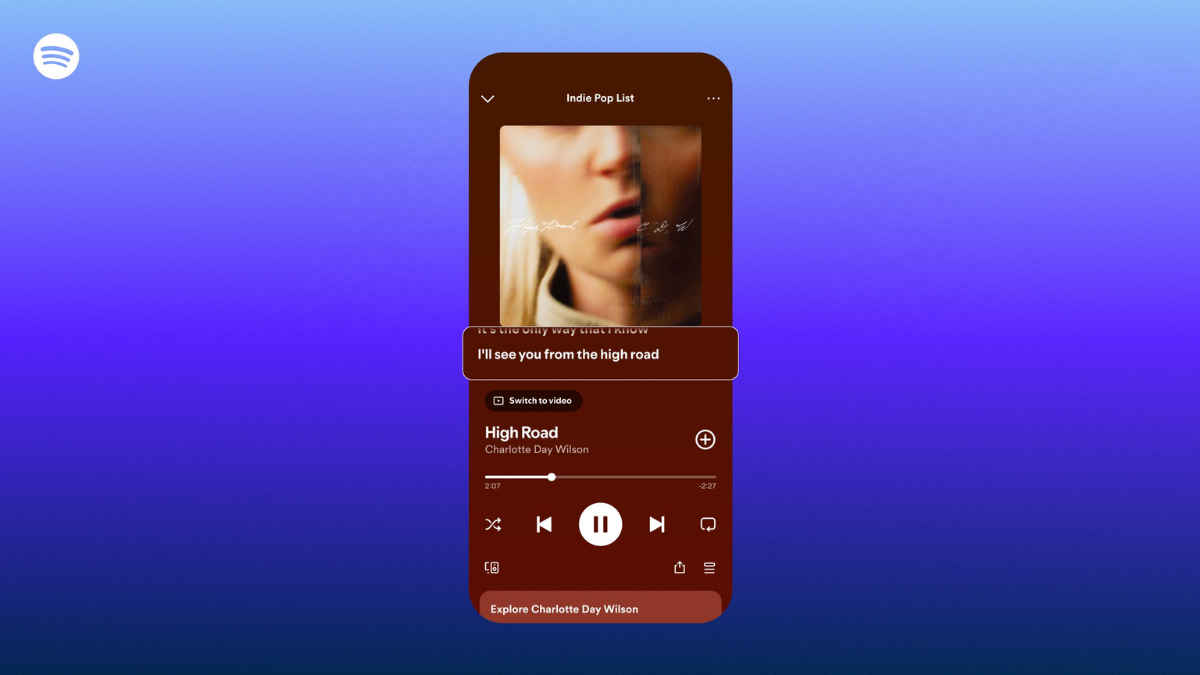
Spotify has announced three upgrades to its lyrics feature, aimed at improving how listeners understand and engage with songs across languages and listening environments. The updates include worldwide lyric translations, offline lyric availability for downloaded tracks, and a new lyric preview layout that places lyrics directly beneath album artwork. These should grow lyric engagement and help users better connect to the songs and their artists. Let’s now understand each of them one by one.
 Survey
Offline lyrics support: How it works
Spotify is also introducing offline lyric availability for downloaded tracks. Once users download songs for offline listening, lyrics will automatically download alongside them.


How to use
1. Download songs or playlists as usual.
2. Open downloaded tracks while offline.
3. Tap the lyrics section to view synced lyrics without internet access.
This feature is restricted to Premium subscribers and should be useful to commuters, travellers, and users in low-connectivity regions. Competitors currently provide offline music playback, but offline lyric access remains limited across most streaming platforms. By bundling lyrics into offline playback, Spotify is expanding the usability of one of its most frequently used features.
Also Read: Leaked Samsung Galaxy Buds 4 and Buds 4 Pro renders show redesigned earbuds and case
Lyric preview layout
Spotify is redesigning the Now Playing interface to display lyric previews beneath album artwork or Canvas clips while songs play. The company says early testing suggests the layout improves lyric engagement and encourages users to revisit songs.
How it appears:
1. Play a supported track on mobile or tablet.
2. Lyrics automatically appear beneath album art.
3. Tap the preview to expand full lyrics.
4. To disable previews, tap the three-dot menu and select ‘Lyrics Off.’
The preview layout is rolling out globally for Free and Premium users on iOS and Android. This UI change aligns Spotify more closely with Apple Music’s karaoke-style lyric emphasis while maintaining Spotify’s existing share-to-social tools, which allow users to post lyric snippets directly from the Now Playing screen.
Lyric translations: How to use
Spotify is expanding lyric translations worldwide after initially rolling out the feature across select markets. You can see translated lyrics directly beneath original song lyrics, making it easier to understand songs in foreign languages.
Here’s what you have to do:
1. Open any song with lyrics available. For instance, play Bella Ciao from the Netflix show Money Heist.
2. Tap the lyrics card in the Now Playing screen.
3. Tap the translate icon to view lyrics in your device’s default language.
4. Switch back to original lyrics anytime using the same icon.
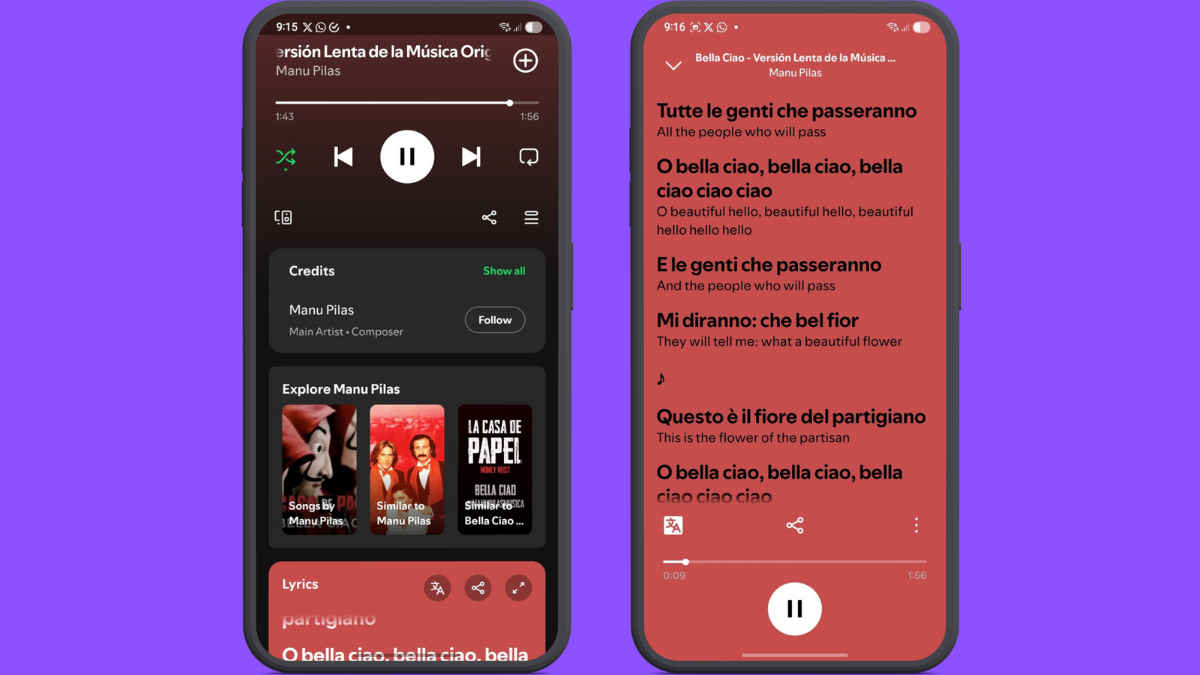
This feature works automatically based on system language settings. It is available for both Free and Premium users, provided translated lyrics exist for a particular track. If the particular track is downloaded, you can access the translations offline, too.
From a competitive standpoint, Apple Music already supports real-time lyric translations in several languages. Meanwhile, YouTube Music offers lyrics, but translation support remains limited and inconsistent. Spotify’s global rollout signals an effort to close that gap and improve accessibility for multilingual audiences.
Spotify states that the features are rolling out globally in phases. Since the rollout is server-side, availability may vary across users and regions. Stay tuned for more such updates.
Keep reading Digit.in.
 Follow Us
G. S. Vasan
G.S. Vasan is the chief copy editor at Digit, where he leads coverage of TVs and audio. His work spans reviews, news, features, and maintaining key content pages. Before joining Digit, he worked with publications like Smartprix and 91mobiles, bringing over six years of experience in tech journalism. His articles reflect both his expertise and passion for technology. View Full Profile


