
OpenAI releases ChatGPT’s group chats feature globally: Here’s how it works
 Follow Us
OpenAI has announced that it is rolling out the group chats feature to all logged-in ChatGPT users.
With the group chats feature, you can bring friends, family or coworkers into a shared space.
Responses in group chats are powered by GPT-5.1 Auto.
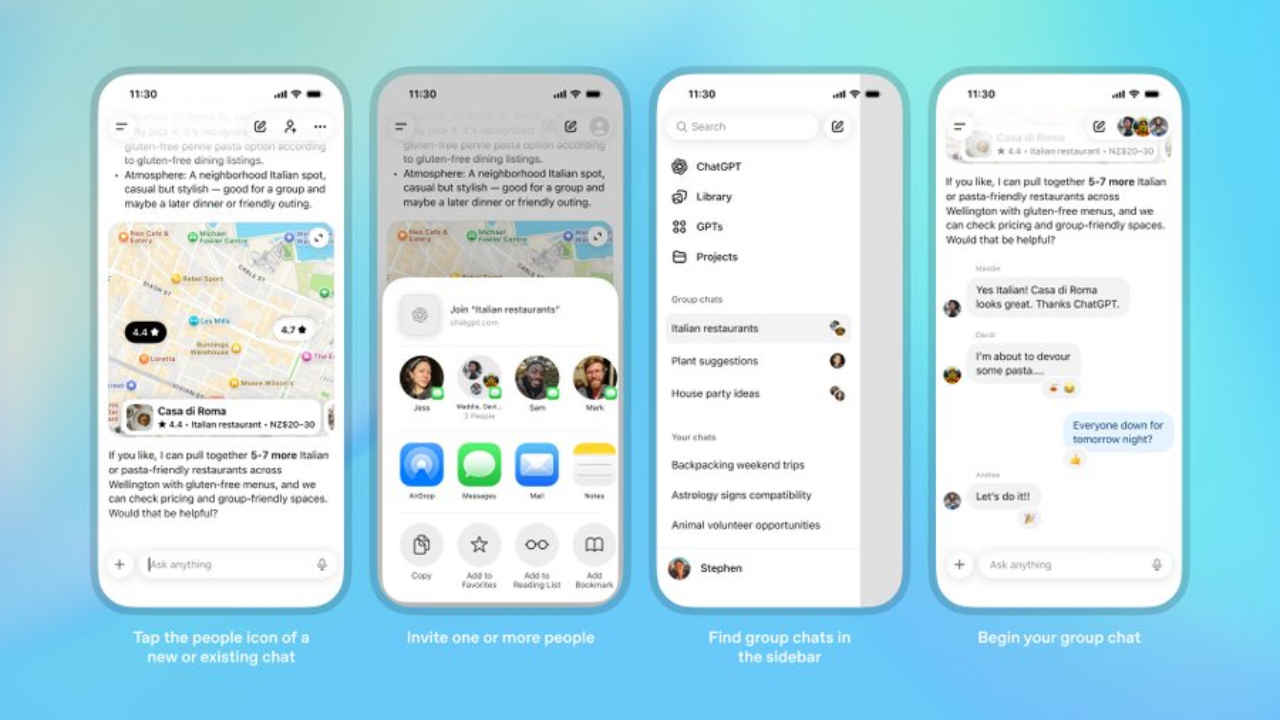

OpenAI began testing a new feature, called group chats, in ChatGPT last week. Now, the company has announced that it is rolling out its group chats feature to all logged-in ChatGPT users across Free, Go, Plus, and Pro plans worldwide. With the group chats feature, you can bring friends, family or coworkers into a shared space to plan, make decisions or work through ideas together.
 Survey
If you are organising a weekend trip, you can create a group chat with your friends so everyone can discuss ideas while ChatGPT helps compare destinations, build an itinerary, and create a packing list. For home projects, such as designing a backyard garden or choosing art for a new apartment, you and your partner or roommates can share preferences and styles while ChatGPT suggests designs and options.
Starting a group chat is simple. You tap the people icon in the top right corner of any new or existing chat. When someone is added to an existing chat, ChatGPT creates a copy as a new group chat so the original one remains private and unchanged.
Also read: Google’s Quick Share now works with Apple’s AirDrop, but there’s a catch
You can invite up to twenty people by sharing a link. When you join or create your first group chat, you are asked to set up a short profile with your name, username, and photo so others know who is participating. Each group chat can also have its own custom instructions that affect how ChatGPT responds, including tone and level of detail.
In group chats, ChatGPT works much like it does in regular conversations, but it has been taught new social behaviours. It follows the flow of the discussion and decides when to respond or stay quiet based on the context. If you want a reply, you can mention “ChatGPT” in your message.
Also read: How to AirDrop files from iPhone to Android
Responses in group chats are powered by GPT-5.1 Auto, which chooses the best model based on the prompt and the plan of the person ChatGPT is responding to. Rate limits apply only when ChatGPT responds, and those responses count toward the limit of the person it is replying to, not the whole group.
Your personal ChatGPT memory is not used in group chats, and ChatGPT does not create new memories from them. You must accept an invitation to join a group chat, everyone can see who is in the conversation. Group members can remove other participants, except for the group creator, who can only be removed by choosing to leave the group.


