
Inside Google’s Nano Banana: Gemini’s new AI image editor
 Follow Us
Google’s Nano Banana image AI struggles with faces but excels at creative edits
Gemini 2.5 Flash Image brings multi-image fusion and powerful editing tools
Why Google’s Nano Banana is a leap for AI editing, but not for portraits

When Sundar Pichai dropped three banana emojis on X in late August, few guessed it was a teaser for Google’s newest image-editing breakthrough. The post signaled the launch of Gemini 2.5 Flash Image, a powerful AI model for the Gemini app – quickly nicknamed “Nano Banana.”
 Survey
The playful codename belies the seriousness of the update. Nano Banana supercharges Gemini’s ability to edit images: it can swap backgrounds, blend multiple photos, transform styles, or even generate surreal compositions with remarkable coherence. Unlike earlier models, it excels at keeping objects, poses, and general likenesses intact across multiple edits. But there’s one area where it stumbles – faces.
Unlike Gemini’s “Reimagine” feature, which is designed to preserve identity in subtle tweaks, Nano Banana often alters facial features more than users expect. That makes it a game-changing tool for creative editing, but a less dependable one for those hoping to maintain portrait accuracy.
Also read: How Grok, ChatGPT, Claude, Perplexity, and Gemini handle your data for AI training

How Nano Banana works
Nano Banana is built on Gemini’s multimodal backbone, trained not just to render photorealistic images but also to interpret instructions with context. Ask it to put your dog in a pirate costume, blend your photo with a landscape, or turn a pencil sketch into a polished illustration, and it executes with striking stability.
The model allows for three major workflows: text-to-image, image + text-to-image, and multi-image fusion. This means you can generate visuals from scratch, enhance an uploaded photo with text prompts, or merge several images into one cohesive output. Its strength lies in editing with continuity, clothing textures, lighting conditions, and object relationships tend to remain stable across transformations.
But when it comes to human likeness, Nano Banana shows its limits. Multiple edits often lead to subtle but noticeable face changes: different jawlines, eye shapes, or even an entirely new expression. For casual or creative work, this can feel like variety. For someone hoping to see their own face preserved through outfit swaps or background changes, it’s a drawback.
Developer access and pricing
Nano Banana isn’t just for casual users of the Gemini app. Developers can tap into it today via the Gemini API, Google AI Studio, and Vertex AI. The pricing comes in at about $30 per 1 million output tokens, which works out to roughly $0.039 per image.
Also read: Google Gemini’s Reimagine feature: 5 wild image edits that push AI boundaries
To encourage experimentation, Google has rolled out template apps inside AI Studio. One demo focuses on multi-image fusion (drag, drop, and blend), while another explores stylistic consistency across sets of images. These tools lower the entry barrier for developers looking to build creative applications without writing heavy code.
Guardrails and limitations
As with its other generative models, Google has baked in guardrails. Every output carries both a visible watermark and an invisible SynthID digital watermark, signaling that it’s AI-generated. While the visible mark can be cropped or overlooked, the invisible one is harder to remove, but detection tools for it are still rolling out gradually.
These measures highlight the tension around Nano Banana’s release. On one hand, it’s a playful, powerful creative assistant. On the other, its ability to generate realistic edits – sometimes with altered identities – feeds into ongoing debates about authenticity, misinformation, and deepfake misuse.
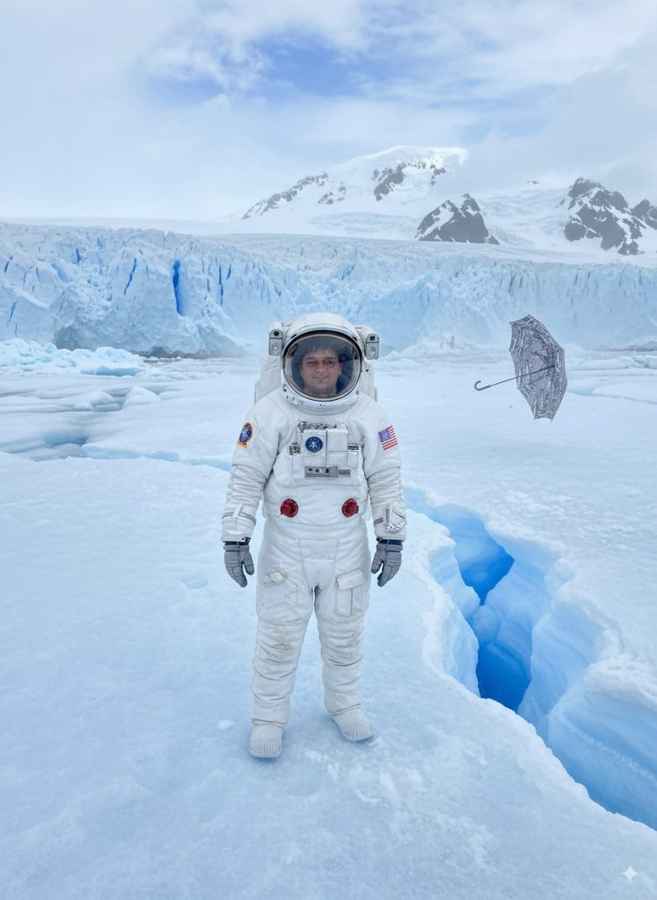
For all the hype, Nano Banana isn’t flawless. Beyond its face consistency issue, users have flagged a few quirks. Cropping into specific aspect ratios is oddly missing for such an advanced tool, leaving creators to rely on third-party editors. Resolution also lags compared to some rivals, with no built-in upscaling option yet.
Still, for stylized editing, be it swapping outfits, shifting lighting, or fusing multiple concepts, it shines. The model is better thought of as a creative transformer rather than a portrait preserver. If you want your selfie in different hairstyles with your face intact, Reimagine is still your friend. If you want to turn yourself into a neon-lit comic hero or merge three landscapes into one, Nano Banana is the better bet.
A Step Forward?
Nano Banana is a milestone in Google’s march toward multimodal AI creativity. But it’s not perfect. For all its polish in objects, styles, and compositions, its inability to lock down facial identity remains a noticeable flaw.
For creators and developers, the message is clear: Nano Banana expands what’s possible, but it’s not yet the all-purpose image editor many hoped for. It’s an exciting step, but one that leaves room for refinement.
Also read: What is Wan 2.2: Free AI video generation tool going viral right now


