Google’s Gemini 2.5 lets AI control computers through web interfaces
Gemini 2.5 Computer Use model enables intelligent browser-based automation tasks
Google DeepMind’s Gemini agent can click, scroll, and fill forms
Google’s latest Gemini 2.5 update has quietly introduced something that could reshape how artificial intelligence interacts with the web: the Computer Use model. Unlike traditional chatbots that merely generate text or code, this new capability allows Gemini to literally use a computer, clicking buttons, filling forms, scrolling through websites, and performing actions on-screen much like a human user would.
 Survey
It’s Google’s boldest step yet toward an era of agentic AI – intelligent assistants that can act on behalf of users, not just answer their questions.


Also read: OpenAI’s AgentKit explained: Anyone can make AI Agents with ease
A new kind of “AI user”
The Gemini 2.5 Computer Use model is designed to bridge a long-standing gap between language models and the real world: the ability to interact directly with user interfaces.
Traditionally, AI systems have relied on APIs to fetch information or perform tasks. But APIs aren’t available for everything – especially the messy, visual world of websites and apps. Gemini’s new model solves that by giving the AI eyes and hands in the digital sense. It can “see” what’s on a screen through screenshots and then decide how to act: clicking buttons, typing into fields, or scrolling to find relevant sections.
This means a developer can instruct Gemini to do something like “Log into this dashboard, download the latest report, and email it to me,” and the model can navigate the web interface to accomplish it step by step.
How it works: The agent loop
At the heart of Gemini’s Computer Use model is an iterative agent loop, a continuous process of perception, reasoning, and action.
- Observe: The model receives a screenshot and contextual information about the current screen.
- Decide: It analyzes the interface, determines the next logical step (like clicking a login button), and produces a function call describing that action.
- Act: A client-side automation layer executes that action on the real interface.
- Repeat: A new screenshot is captured, and the loop continues until the goal is met.
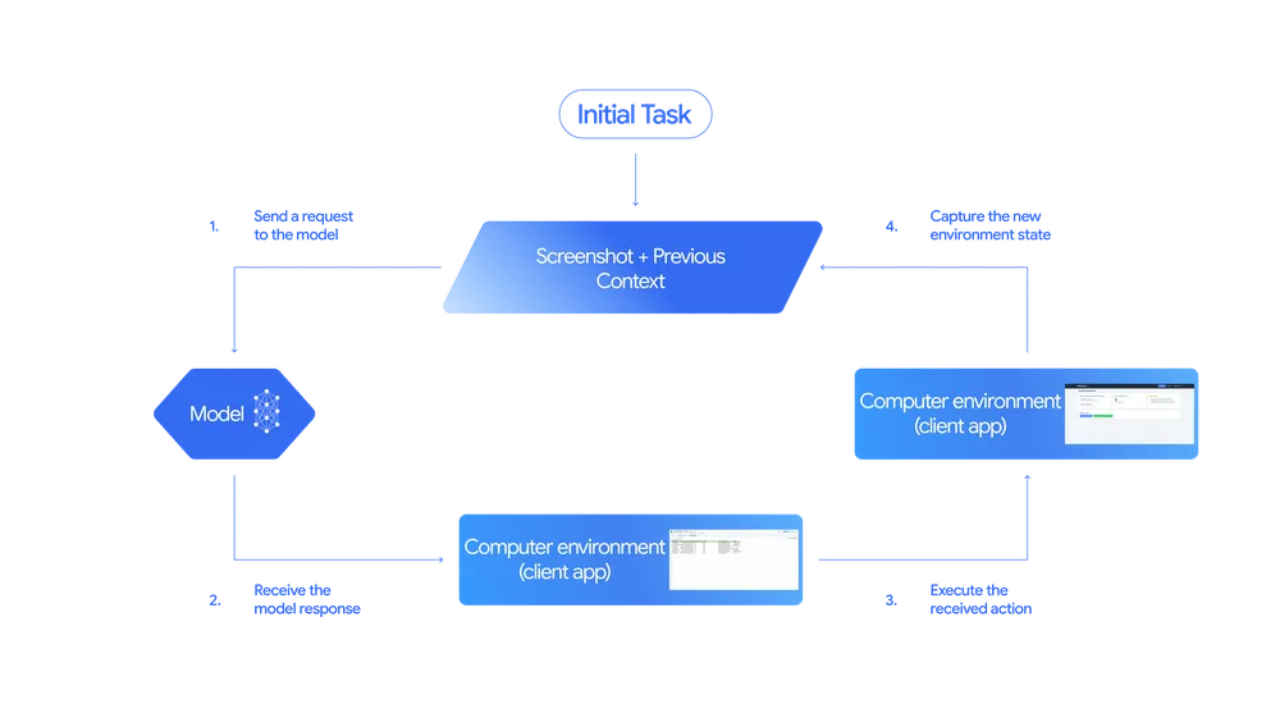
This system mimics how humans interact with computers, looking, thinking, and acting, only at machine speed and with higher consistency. Developers can even set safety constraints, preventing the AI from performing sensitive actions like confirming payments or sharing data without explicit approval.
What it can do
Google’s early demonstrations showcase Gemini 2.5 handling a range of real-world tasks. It can fill out online forms, navigate dashboards, rearrange elements in web apps, and even work across multiple tabs or sites to complete multi-step workflows.
For instance, it could pull contact details from a website, paste them into a CRM tool, and then schedule a meeting in Google Calendar, all autonomously. This capability opens up a new frontier for business automation, testing web apps, data entry, and personal productivity.
Unlike traditional automation tools that depend on rigid scripts or APIs, Gemini’s approach is flexible and adaptive. It “understands” visual layouts, making it far more resilient to changes in a site’s design or structure.
Safety first
A model that can control a computer naturally raises safety concerns. Google acknowledges this and has implemented multiple guardrails. Every proposed action is checked by a safety service before execution, filtering out anything that could be harmful, malicious, or risky.
Certain actions, such as making financial transactions or sending data, require explicit user confirmation. Developers can also define “forbidden actions” to ensure the model stays within safe boundaries.
Moreover, Google recommends that all experiments with the Computer Use model take place in sandboxed environments, minimizing any risk of unintended side effects.
Currently, Gemini’s Computer Use model is available only in preview through the Gemini API, accessible via Google AI Studio and Vertex AI. It primarily focuses on browser-based control for now, though extensions to mobile and desktop environments are reportedly in development.
According to Google DeepMind, early internal testing shows Gemini 2.5 outperforming other web automation agents on popular benchmarks like Online-Mind2Web and WebVoyager. These results suggest the system can complete UI-driven tasks faster and more accurately than previous models.
The bigger picture: A new age of digital agency
Gemini’s new capability fits into a growing trend across the AI landscape, agentic models that can perform actions autonomously. OpenAI has hinted at similar goals through its ChatGPT Agents and App Actions, while Anthropic’s Claude and Meta’s research teams are exploring their own versions of computer-use systems.
What sets Gemini apart is Google’s integration across its ecosystem. Imagine a Gemini-powered agent that can seamlessly move between Gmail, Docs, and Drive, managing workflows end to end. That’s the vision this technology inches toward.
From passive chatbot to active collaborator
With the Computer Use model, Gemini 2.5 marks a shift from passive intelligence to active capability. Instead of simply responding to prompts, it can take initiative, following complex instructions through multi-step UI interactions.
In the near future, AI agents may become more like true digital colleagues, able to log into systems, analyze data, and execute tasks while keeping humans in the loop for high-level guidance.
For now, Google’s Gemini 2.5 Computer Use is still experimental, but it represents a pivotal leap: an AI that doesn’t just talk about the web – it uses it.
Also read: From Canva to Coursera: Why so many apps are rushing into ChatGPT’s new app ecosystem
 Follow Us
Vyom Ramani
A journalist with a soft spot for tech, games, and things that go beep. While waiting for a delayed metro or rebooting his brain, you’ll find him solving Rubik’s Cubes, bingeing F1, or hunting for the next great snack. View Full Profile


