
macOS Tahoe 26: Five big features that really matter
 Follow Us
macOS Tahoe 26 introduces Apple’s Liquid Glass design.
One of the best updates is how the Mac works better with the iPhone.
Spotlight has also been upgraded in a big way.
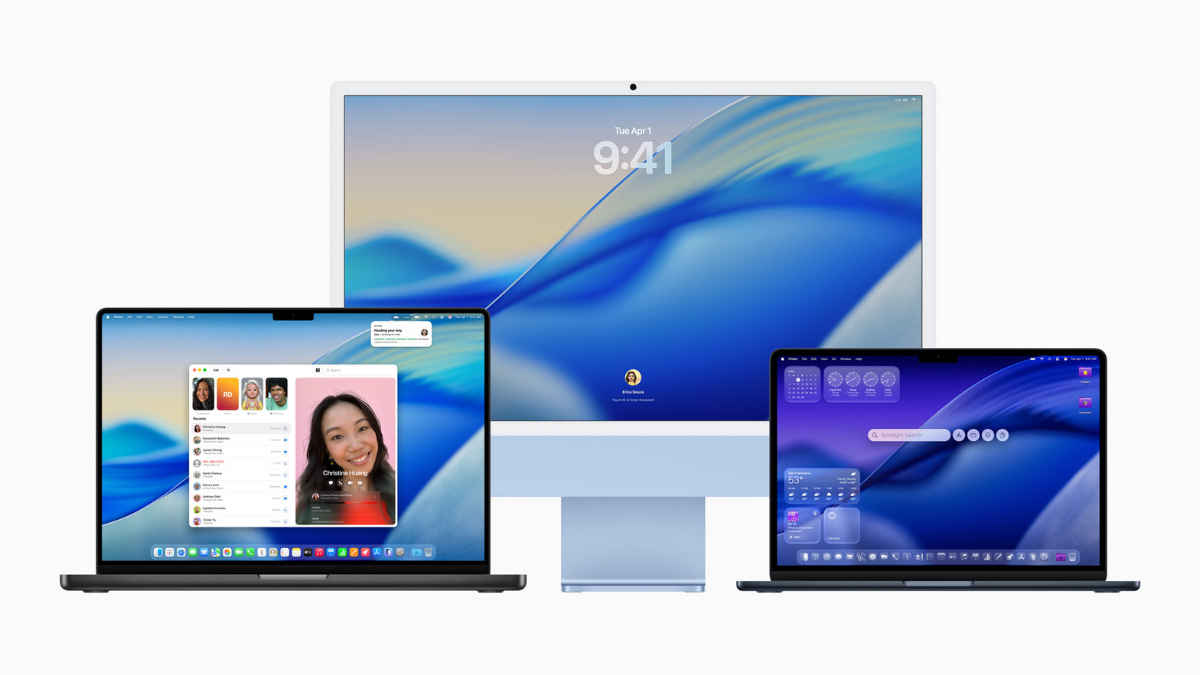

Apple has started rolling out macOS Tahoe 26, the latest version of its desktop software. And while Mac updates often bring a mix of small design tweaks and behind-the-scenes improvements, Tahoe feels like a release that actually makes a difference in everyday use. It focuses on four big themes: personalisation, working better across devices, smarter tools, and little touches that polish the overall experience. For Mac users like me, this means there’s not just a refreshed Dock or a shiny toolbar; there are changes that help you work faster, stay connected more easily, and even get a bit more creative. Tahoe also puts more effort into making the Mac work smoothly with iPhones and iPads, so the whole Apple ecosystem feels less like a collection of separate devices and more like one continuous system. Below are five features that stand out, and why they’re worth paying attention to.
 Survey
Also read: Four iPhones, one choice: Which iPhone 17 model is the right pick for you
Liquid Glass and personalisation
macOS Tahoe 26 introduces Apple’s Liquid Glass design, a translucent effect used in sidebars, toolbars, the dock and everywhere in the UI. It looks softer and more modern, and the fully transparent menu bar adds to the sense of space on screen. But beyond looks, it helps reduce clutter, making the workspace feel lighter. Apple has also expanded personalisation options, so you can tint system colours, set custom folders and icon colours, and even add symbols or emojis to folders. Small changes, yes, but they make the Mac feel less generic and more tailored to you. That said, some of these tweaks might feel more cosmetic than functional. So, if you weren’t craving a new look, you may not find this a game-changer.
Continuity between iPhone and Mac
One of the best updates is how macOS Tahoe 26 makes the Mac work better with the iPhone. The new Phone app on Mac brings in call history, contacts, voicemails, and even features like Call Screening and Hold Assist that were previously iPhone-only. On top of that, Live Activities, things like flight updates, ride status or sports scores, now show up in the Mac’s menu bar, syncing with your iPhone when needed. It’s the sort of change that cuts down on constant device switching and keeps key info close by. Of course, this only benefits you if you’re already deep in the Apple ecosystem; those using Android or Windows devices won’t get much out of it.
Spotlight reimagined
Spotlight has been upgraded in a big way. You can now do more than just find files. It lets you act on results directly. That could mean sending an email, starting a note, or playing a podcast, all without leaving the search window. Results are more relevant too, pulling from apps, messages, files, and events in one place. If you’re unsure what exactly you’re looking for, Spotlight lets you browse organised views of apps, clipboard content, or documents. New ‘quick keys’ make it even faster to run common actions. Put simply, it’s a tool that helps you get things done without breaking your flow. The only question is whether people will actually retrain themselves to use it more often, as many Mac users still default to opening apps manually out of habit.
Apple Intelligence upgrades
Apple’s push into intelligence features carries on with macOS Tahoe 26. Live Translation now works in Messages, FaceTime and phone calls, making it easier to communicate across languages in real time. Creative tools have also been given a boost. Genmoji and Image Playground let you create or customise emojis and graphics, with more control over style and detail. Shortcuts have been expanded too, with smarter automation, new triggers, and options for running tasks either on device or securely in the cloud. These tools aren’t flashy for the sake of it; they’re designed to save time and make the Mac feel more capable in everyday situations. But Apple Intelligence hasn’t exactly had a flawless track record so far. But it’s still early days, and some users will be sceptical until these features prove consistently reliable.
Gaming, apps and accessibility
macOS Tahoe 26 rounds things out with a set of smaller but practical updates. A new Apple Games app gives you a central place to find and launch games, while Game Overlay lets you adjust settings or chat with friends without leaving your session. Graphics performance gets a lift thanks to Metal 4, with features like denoising and frame interpolation. System apps have also been improved. Safari has a cleaner look, Messages now supports polls and custom backgrounds, and Notes gains Markdown import/export along with audio recording and transcription. Accessibility has been expanded too, with better support for vision, reading and braille displays. These updates are useful, but it’s worth noting that Macs still aren’t seen as gaming machines in the way Windows PCs are. The gaming library remains limited compared to what you’d get elsewhere, so while the improvements are welcome, they’re unlikely to suddenly make the Mac a go-to gaming platform.
What really makes macOS Tahoe 26 special
macOS Tahoe 26 isn’t about one killer feature; it’s the combination of design, intelligence and cross-device improvements that make the update worthwhile. The design tweaks add clarity without being distracting. The iPhone continuity features mean less friction if you live in Apple’s ecosystem. Spotlight and Apple Intelligence upgrades turn basic tasks into smoother, faster ones. And the gaming, app and accessibility updates show Apple hasn’t ignored smaller but meaningful areas.
Not everything will be available everywhere right away. Some features need newer hardware, and Apple Intelligence in particular won’t run on every Mac. It’s also fair to say that some of these changes are more evolutionary than revolutionary. But overall, macOS Tahoe 26 feels like a release aimed at making Macs easier, more personal, and a bit smarter in daily use, without pretending it reinvents the wheel.
Also read: Apple M4 MacBook Air price drop alert! Get Rs 20,000 off on this platform


