
After Claude, Gemini users can officially import memory from other chatbots, here is how
 Follow Us
Anthropic recently introduced a feature that allows users to easily switch from other AI platforms to Claude.
Now, Google has launched a similar memory import feature for Gemini.
The feature allows users to bring their memories, preferences, and chat history from other AI apps directly to Gemini.
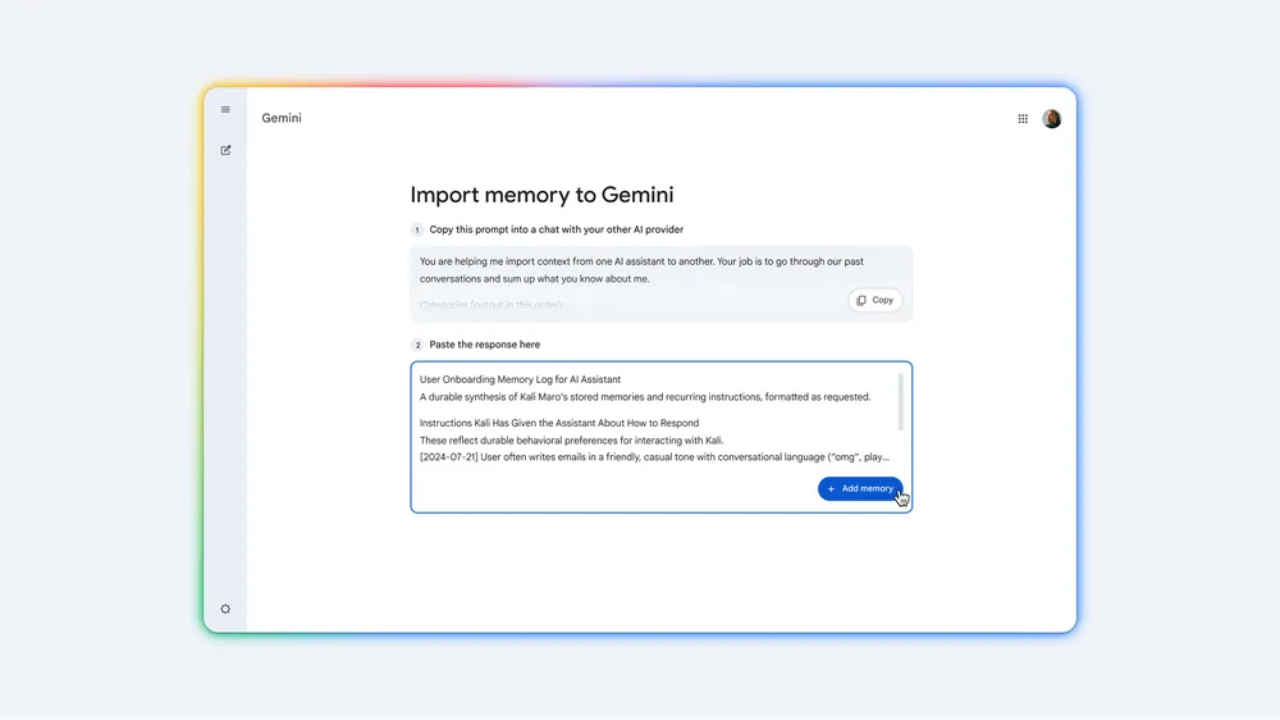

Earlier this month, Anthropic introduced a feature that allows users to easily switch from other AI platforms to Claude. Now, Google has launched a similar memory import feature for Gemini. The feature allows users to bring their memories, preferences, and chat history from other AI apps directly to Gemini. This will help Gemini to understand key information about users, such as their interests, personal context and other details they previously shared with another chatbot. ‘Once you import these memories, Gemini will understand the same key facts you’ve shared with other apps, like your interests, your sibling’s name, or where you grew up,’ the tech giant said. Here’s how to use the new memory import feature.
 Survey
Also read: Apple Siri may include rival AI chatbots in future: What it means for users
How to bring memories from other AI chatbots to Gemini
- Step 1: Open Gemini and head to Settings.
- Step 2: You will see a new ‘Import memory to Gemini’ option, tap it.
- Step 3: Copy the provided prompt.
- Step 4: Paste the copied prompt into a chat with your other AI provider.
- Step 5: Once your other app generates a summary of your preferences, just copy that response and paste it back into Gemini.
- Step 6: Tap Add memory, and it’s done. Gemini will instantly analyse the information and save those details to your Gemini context, which can be used in your next chat.
Also read: Google introduces Gemini 3.1 Flash Live AI model: Check features and availability
In addition to memory import, Google is allowing users to upload a ZIP file containing their chat history exported from other AI platforms. Once uploaded, those conversations will appear inside Gemini, allowing users to search through them and continue past discussions within the app.
Also read: Google releases Lyria 3 Pro AI model with longer music generation: How to access


