

YouTube adds Gemini AI Ask button so you can question any video instantly, here’s how
 Follow Us
YouTube adds an Ask button powered by Gemini AI to answer video-related questions instantly.
The feature lets users summarise videos, clarify topics and explore related content within YouTube.
The feature is rolling out to select users in English across India, the US, Canada, and New Zealand.
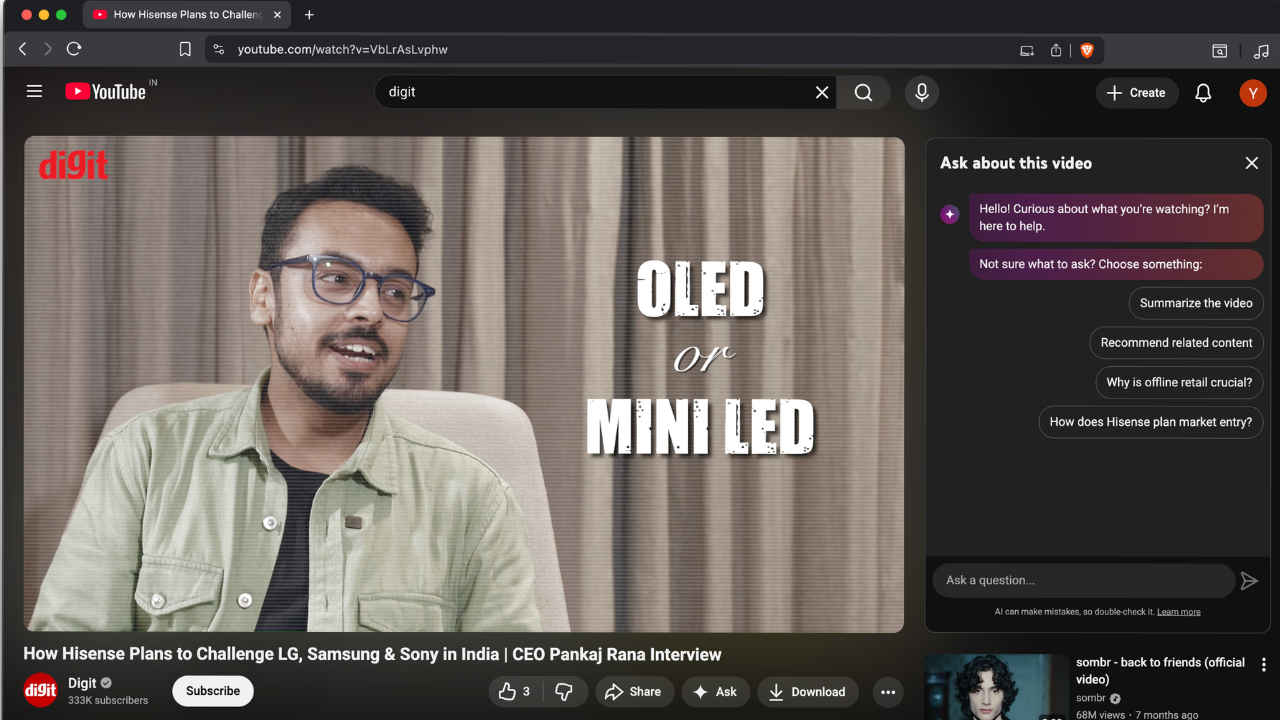

YouTube has rolled out the Ask button, a new way to help viewers come away with a better understanding of the videos they watch. Using Google’s Gemini for AI in the backend, the feature allows users to ask questions relevant to any video and instantly get answers without having to leave the platform. For example, if someone is watching the review of the latest OnePlus or Samsung phone, they can simply ask, “Is this phone good for gaming?” or “How’s the camera in low light?” and receive a concise, easy-to-understand answer in seconds. The Ask feature also summarises videos, explains complex concepts, and suggests related content. Here’s everything about the features, functionality and availability of the YouTube Ask button.
 Survey
YouTube Ask button features and functionality
The “Ask” button can be found just below the video player, between the Share and Download options, and is available on Android, iPhone, and Windows devices. When tapped, a small chat window opens where viewers can type their own questions or pick from suggested prompts. The answers come from Gemini AI, which uses large language models to generate responses. However, YouTube also adds a small note reminding users that AI can make mistakes and that it’s best to double-check the answers.
YouTube Ask button availability
Currently, the Ask feature is being tested with select users in countries including India, the US, Canada, and New Zealand. It is available in English and can be used by anyone over 18 years old, whether they have a YouTube Premium subscription or not.
This new addition is part of YouTube’s larger effort to make watching videos more interactive and informative. The platform has been adding several new tools recently. Last month, YouTube introduced a likeness detection feature to help people spot when their image is being misused. The company has also launched a special section for teenagers that focuses on mental health and wellbeing. Moreover, from November 17, YouTube will begin enforcing stricter age rules for gaming videos that show graphic violence.
With the Ask button, YouTube hopes to make it easier for viewers to learn directly from videos, clear their doubts instantly, and enjoy a more engaging experience on the platform. It’s another sign that YouTube is slowly blending artificial intelligence into everyday viewing to make information more accessible to everyone.


