
How to create editable PowerPoint presentations using ChatGPT
 Follow Us
ChatGPT can create editable PowerPoint presentations from simple prompts.
Users can customise slide content, design, tone and number of slides.
AI-generated presentations save time and help organise information.

Are you short on time and looking for quick ways to create a presentation? You’re in luck, as ChatGPT now lets you generate editable slides. Not only can this save you time but the AI tool can also help you organise information, write content and make every slide look good. The AI tool can help you generate a presentable PPT from scratch even when you share a simple idea with it. However, if you can provide the tool with information, then it can also build up on that and can give you the editable presentation. Follow along with the article to learn the step-by-step process on how to generate an editable presentation using ChatGPT.
 Survey
How to create a presentation using AI
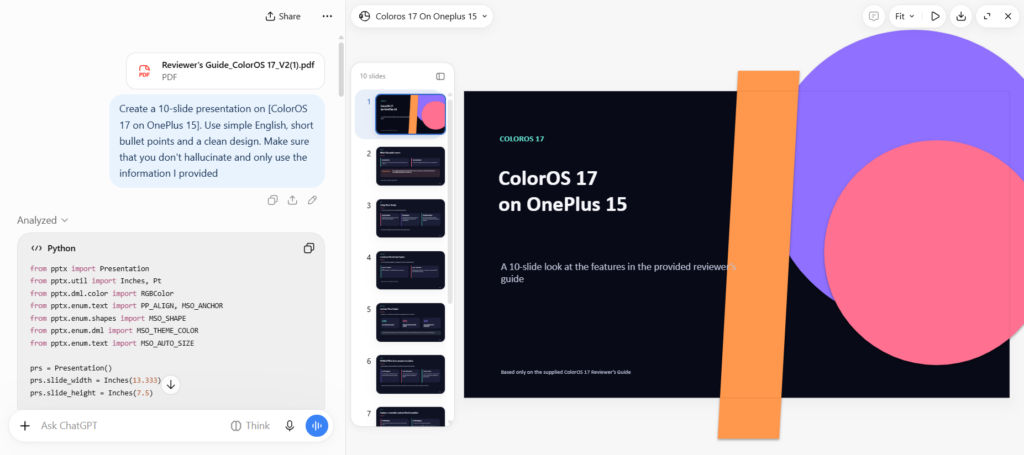
Follow the simple steps outline below to create a presentation using AI:
Step 1: Log into your device and open ChatGPT, and ensure that you are logged in. In the chat box, tell the AI tool what the topic of your presentation is and what you wish to accomplish.
Step 2: After giving a clear prompt to the AI tool regarding the presentation you have, the app will now look into how many slides you will require. You could also give further instructions to the AI tool regarding the required number of slides as well as the design, tone, and other crucial points in the slides.
Step 3: It is also possible to upload the source material for the AI tool such that it can generate the slides based on the information provided by you.
Step 4: ChatGPT will now take some time to generate the editable presentation. After that, go through the slides; you could also make changes to the design of the slides if you do not like it.
Step 5: Finally, after making all the necessary changes, you could download the presentation.
Also read: Xiaomi Pad 8 available with over Rs 10,000 discount on Amazon, here is how to grab this deal
Prompt:
Here is an example of how you can prompt ChatGPT:
‘Create a 10-slide presentation on [topic]. Use simple English, short bullet points and a clean design. Make sure that you don’t hallucinate and only use the information I provided.’
Benefits
Making presentations through ChatGPT will not only save you time but also help in organizing your thoughts. In addition to that, ChatGPT can assist you in coming up with slide titles, simplifying complicated subjects, and providing a good flow of information.
What’s more interesting is that you can also modify the information provided by ChatGPT without having to start all over again. The editable slides allow you to modify the presentation according to your needs before sharing it with other people.


