Digit.in
  • News
  • Reviews
  • Top 10s
    • Best Phones Under 10000
    • Best Phones Under 20000
    • Best Phones Under 30000
  • Features
  • How To
  • AI
  • Digit Binge
  • Mobile Recharge Plans
  • Web Stories
  • DIGIT ZERO1 AWARDS
  • Digit Shop
  • English
  • Hindi
  • Tamil
  • Kannada
  • Telugu
  • Malayalam
  • Bangla
  • Marathi
Login / Register is disabled Login
  • Mobiles
    • Latest
      • realme P4R 5G
      • Motorola Edge 70 Pro+
      • Xiaomi 17T
      • Oppo F33 Pro
    • Popular
      • Apple iPhone 17 Pro
      • OnePlus 15 5G
      • iQOO 15
      • Oppo Find X9 Pro
    • News
      • Nothing Phone 4b in works? Company hints at new lineup, here is what we know
      • Apple iPhone 17 Pro Max and 17 Pro available with massive price cut on this platform
      • Apple Ultra lineup may grow to include iPhone, MacBook and AirPods in 2026-27
      • Samsung Galaxy Z Flip 8 may launch next month: Date, India price, camera, battery and all other leaks
    • Reviews
      • Xiaomi 17 Ultra long-term review: This is what ultra should mean
      • Realme P4R review: The most practical phone under Rs 20000?
      • Oppo F33 Pro review: Big on style, mixed on substance
      • Xiaomi 17T Review: The return of fan-favourite formula
  • Laptops
    • Latest
      • Asus Expertbook Ultra (2026)
      • IdeaPad Slim 5 Gen 10 (AMD Ryzen 5 7535HS, Windows 11 Home)
      • ThinkPad X13 Gen 5 (Intel Core Ultra 7, 16 GB RAM, 1TB SSD, Win 11 Pro)
      • Lenovo Ideapad Slim 3 Gen 8 (AMD R7, 512 GB SSD)
    • Popular
      • Asus Zenbook 14
      • MacBook Air 13 inch (M5 chip / 512 GB SSD / 16 GB memory)
      • Dell XPS 14 Laptop (2026)
      • Lenovo LOQ 15IRX9 83DV007JIN Gaming Laptop (13th Gen Core i5/ 16GB/ 512GB SSD/ Win11/ 6GB Graph)
    • Best
      • Best MacBook alternatives from ASUS
      • Best MacBook alternatives from MSI
      • The Best AI (Artificial Intelligence) Laptops for Programmers in 2025
      • Best MacBook alternatives from HP
    • News
      • Apple Ultra lineup may grow to include iPhone, MacBook and AirPods in 2026-27
      • MacBook Neo can be yours for under Rs 40,000: Here is how to get it
      • Computex 2026: Microsoft Surface Laptop Ultra launched, check specs and features
      • Asus ROG Zephyrus Duo to launch in India soon? Here is what we know
    • Reviews
      • Asus ExpertBook Ultra review: Built for business, not attention
      • HP Omnibook 5 review: Light as a feather, lasts like a brick
      • Lenovo IdeaPad Slim 3i Gen 11 review: Debuting with Intel Pather Lake
      • Lenovo LOQ 15IRX10 review: The end of the budget gaming laptop?
  • Home Appliances
  • Phone Finder
  • Apps
  • Mobiles
  • SKOAR!
  • Magazine
  • DIGIT ZERO1 AWARDS
  • Amazon Center
  • Digit Shop
Home » How To » Apps » Securing your privacy: Quick guide to make your Instagram account private

Securing your privacy: Quick guide to make your Instagram account private

By Ayushi Jain | Updated on 04-Jan-2024
Add DIGIT as a preferred source
Follow Us on Google News Follow Us
HIGHLIGHTS

Making your Instagram account private means that only approved followers can see your content.

If you are under 16 when you sign up for an Instagram account, you’ll have the option to choose between a public or private account, but Private is selected by default.

Business profiles can’t make their accounts private.

Securing your privacy: Quick guide to make your Instagram account private
Ayushi Jain Ayushi Jain
04-Jan-2024

In today’s digital world, social networking platforms like Instagram have become our online diaries, allowing us to share our lives with friends, family and even strangers. However, while sharing your life moments is fun, it’s also important to safeguard your privacy. One way to do this is by making your Instagram account private. 

Digit.in Survey
✅ Thank you for completing the survey!

Making your Instagram account private means that only approved followers can see your posts and stories. This can add a layer of protection, keeping your photos, videos and personal information safe from prying eyes.

In this article, we’ll tell you how you can make your Instagram account private, making sure that you have the power to choose who can follow you and see your content. 

Also read: Enhance your Instagram security: Easy guide to set up two-factor authentication for your account

Securing your privacy: Quick guide to make your Instagram account private

How to make your Instagram account private

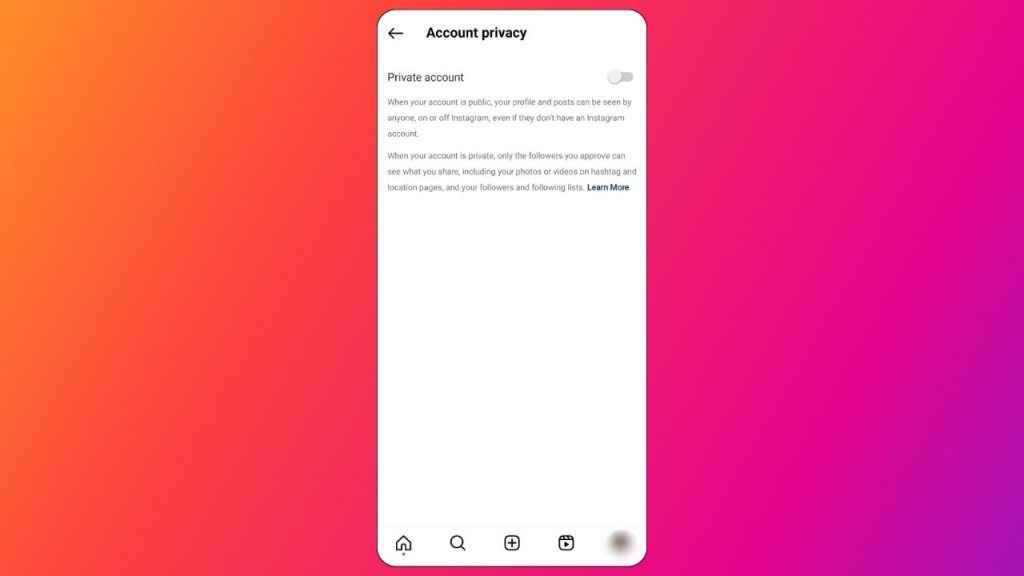
If you are under 16 when you sign up for an Instagram account, you’ll have the option to choose between a public or private account, but Private is selected by default. However, if you’re above 16 years old, your Instagram account is set to public by default, and you have the freedom to switch to a private account whenever you prefer.

How to make your Instagram account private from mobile app

Step 1: Open the Instagram app on your Android device or iPhone.

Step 2: Tap your profile picture in the bottom right corner to go to your profile.

Step 3: Tap the three horizontal lines present at the top right corner.

Step 4: Select the Settings and privacy option.

Step 5: Below Who can see your content, tap the Account privacy option.

Step 6: Now, tap the toggle next to Private account to make your account private.

Step 7: Tap Switch to private to confirm.

Also read: How to share your Instagram posts, stories & reels with only close friends: Easy guide

Securing your privacy: Quick guide to make your Instagram account private

How to make your Instagram account private from computer

Step 1: Open Instagram on any web browser. Or click here.

Step 2: Login into your Instagram account.

Step 3: Click the More option present in the bottom left corner.

Step 4: Click the Settings option.

Step 5: Now, click Who can see your content.

Step 6: Click the toggle next to Private account to make your account private.

Step 7: Click Switch to private to confirm.

Remember that business profiles can’t make their accounts private. If you want to make your business account private, you first have to switch back to a personal account.

Ayushi Jain

Ayushi Jain

Ayushi works as Chief Copy Editor at Digit, covering everything from breaking tech news to in-depth smartphone reviews. Prior to Digit, she was part of the editorial team at IANS. View Full Profile

Latest Article
Kunal Shah to be new WhatsApp CEO, confirms Meta Kunal Shah to be new WhatsApp CEO, confirms Meta
X down: Thousands report issues as Elon Musk’s social media platform suffers major outage X down: Thousands report issues as Elon Musk’s social media platform suffers major outage
The East Palace: OTT release date, platform, storyline, cast and more The East Palace: OTT release date, platform, storyline, cast and more
Samsung Galaxy Z Fold 8 Ultra India launch next month: 5 things to expect from upcoming foldable Samsung Galaxy Z Fold 8 Ultra India launch next month: 5 things to expect from upcoming foldable
Cocktail 2 OTT release timeline, streaming platform and other details we know Cocktail 2 OTT release timeline, streaming platform and other details we know
Most Searched Mobile Phones
  • Best Phones Under 10000
  • Best Phones Under 20000
  • Best Phones Under 30000
  • Upcoming Phones in 2026
  • Latest Mobile Phones
Latest Phones
  • Motorola Edge 70 Pro+
  • Xiaomi 17T
  • Oppo F33 Pro
  • Oppo Find X9 Ultra
  • Motorola Razr Fold
Mobile Recharge Plans
  • Airtel Recharge Plans
  • BSNL Recharge Plans
  • Reliance JIO Recharge Plans
  • VI Recharge Plans
Most Searched Laptops
  • Best Laptops Under 30000
  • Best Laptops Under 40000
  • Best Laptops Under 50000
Trending Movies
  • Bharat Bhhagya Viddhaata
  • Governor
  • Main Vaapas Aaunga
  • Welcome to the Jungle
Movies & Web Series
  • Best Movies
  • Latest Movies
  • Upcoming Movies
  • Best TV Shows & Web Series
  • Latest TV Shows & Web Series
  • Upcoming TV Shows & Web Series
Trending Web Series
  • Thukra Ke Mera Pyaar Season 2
  • Made In India: A Titan Story
  • Gullak Season 5
  • Raakh
OTT Providers
  • Netflix
  • ZEE5
  • JioHotstar
  • SonyLiv
  • icon
  • icon
  • icon
  • icon
SUBSCRIBE Subscribe for the industry's biggest tech news
Enter your email to get notified about our new solutions
By submitting your email, you agree to our
Terms and Privacy Notice.
CONNECT WITH US
  • icon Times Center, FC-6, 1st Floor, Sector 16A, Film City, Noida - 201301
  • icon (+91-120-6776999)
    (1800 121 0005)
  • icon Suggestion: editor@digit.in
    Business: business@digit.in
    Website: sales@digit.in
© 2026 Digit.in, All rights reserved
  • icon
  • icon
  • icon
  • icon
icon
  • About Us
  • Contact Us
  • Advertise with us
  • Regulatory
  • Terms & Conditions
  • Privacy Policy
  • Disclaimer
© 2026 Digit.in, All rights reserved
Digit.in
Logo
Digit.in
Logo