OpenAI announces ChatGPT Agent, an autonomous AI tool designed to perform real-world digital tasks independently.
ChatGPT Agent navigates websites to auto-fill forms, submit entries, and handle routine online tasks.
Generate structured Excel sheets using simple prompts with built-in logic, charts, and formatting assistance.
In the rapidly evolving world of AI, OpenAI has launched ChatGPT Agent — a versatile tool that’s can transform our everyday tasks. ChatGPT Agent is an autonomous assistant capable of generating presentations, creating Excel files, filling online forms, and much more. Think of it as a digital sidekick that is part researcher, coder and office assistant all rolled into one. Here’s a deep dive into what ChatGPT Agent can do, how it works, and why it’s making waves.
 Survey
Also read: OpenAI unveils ChatGPT Agent, AI that can work like real assistant


A gamechanger for digital tasks
At its core, ChatGPT Agent, built on the foundation of ChatGPT, leverages a virtual browser and advanced language models to execute complex tasks autonomously. Launched as part of OpenAI’s push to make AI more actionable, it’s designed to streamline workflows for professionals, students, and anyone looking to save time. Its predecessor excelled at answering questions but ChatGPT Agent can do way more than just that – like navigate websites, write code, or generate files – making it a practical tool for real-world applications.
One of its standout features is generating presentations. Need a slide deck for a business pitch? With a simple prompt like “Create a 10-slide presentation on renewable energy trends,” ChatGPT Agent can produce a PowerPoint-compatible outline, complete with text, suggested visuals, and even VBA code to automate slide creation. Users can download the output or tweak it further, saving hours of manual work.
Also read: Microsoft’s new AI agent for Windows PC: What all can it do?
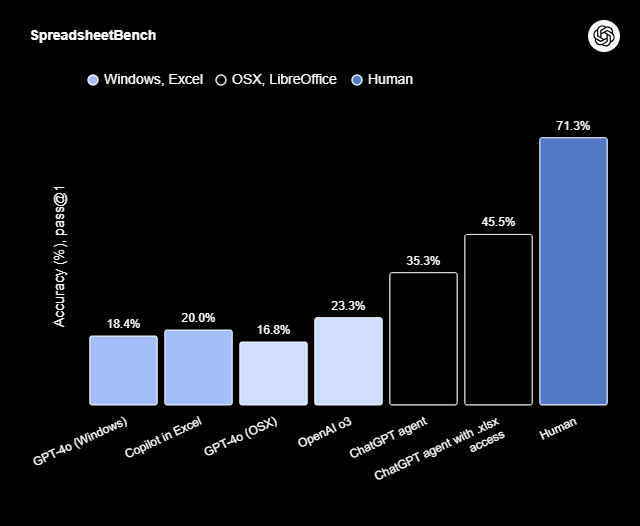
Similarly, Excel file creation is a breeze. ChatGPT Agent can generate spreadsheets with data, formulas, and charts based on user instructions. For example, asking for a “Q1 2025 sales report with a trendline chart” results in a downloadable CSV or XLSX file with organized data and visualizations. It can handle tasks like calculating averages, removing duplicates, or formatting datasets, though complex macros may require manual refinement.
What else can it do?
Another powerful capability is filling online forms. Using its virtual browser, ChatGPT Agent can navigate websites, input data into fields, and submit forms. This is a game-changer for repetitive tasks like survey submissions or event registrations, where users can specify details like asking it to fill out a conference registration form with your name and email, and let the Agent handle the rest.
ChatGPT Agent’s versatility extends far beyond these core functions. It can browse the web to research topics, summarize articles, or gather data for reports, much like a human assistant. Its code execution feature allows it to run Python or VBA scripts, enabling tasks like data analysis or automation within Excel. For instance, it can process a dataset to predict sales trends or generate scripts to streamline workflows.
The Agent also excels at summarizing content, from emails to lengthy reports, distilling key points in seconds. It can manage calendars by scheduling events in web-based apps and even call public APIs to fetch real-time data, like weather updates or stock prices. Through integrations like Zapier, it automates workflows, connecting apps to transfer data or trigger actions.
Also read: Meet Asimov: Reflection’s AI agent to help write the best software code for anyone
 Follow Us
Vyom Ramani
A journalist with a soft spot for tech, games, and things that go beep. While waiting for a delayed metro or rebooting his brain, you’ll find him solving Rubik’s Cubes, bingeing F1, or hunting for the next great snack. View Full Profile


