
Play audio from your Intel Edison Board via Bluetooth using Advanced Audio Distribution Profile
 Follow Us

Requirements
 Survey
- A Bluetooth* audio device, like a headset or speaker that can play sounds.
- Connect your Intel® Edison board to a Wi-Fi* network, see Step 3: Get your Board Online.
- SCP using a host computer connected to the same network (to copy music files over).
- Establish a terminal to your board either Via Serial port or SSH.
Setup
Make your Bluetooth* audio device discoverable.
Type the following in the terminal to your board.
1 rfkill unblock bluetooth
2 bluetoothctl
Scan for devices.
1 scan on
Find your device and pair to it (replace the MAC address with the MAC address of your device)
1 pair 00:25:DB:05:72:F2
On some devices you may need to connect as wel
1 connect 00:25:DB:05:72:F2
Quit the bluetoothctl
1 quit
Verify that your A2DP device (the LG* headset in this case) is recognized in pulse audio as a sink device and that its sink name starts with bluez_sink.
1 pactl list sinks
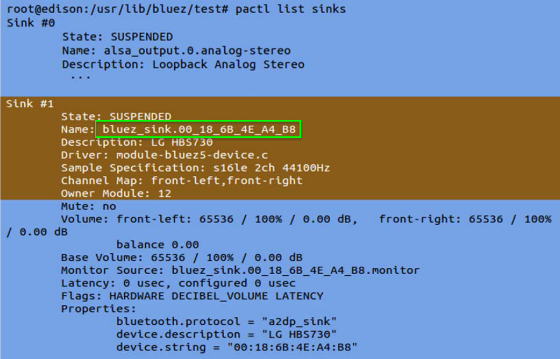
Configure the default sink to use pulse audio server with the following command, replacing with the details of your device.
1 pactl set-default-sink bluez_sink.00_25_DB_05_72_F2
Copy an audio file (*.wav) to the Intel® Edison device using scp, and play the audio file using mplayer.
1 mplayer Intel_bong.wav
You may run into issues playing .mp3, stay tuned for updates.
Troubleshooting
If you're getting
1 Failed to pair: org.bluez.Error.AlreadyExists
then check which devices you are paired with
1 paired-devices
then remove the device you are paired to (replace the MAC address with the MAC address of your device)
1 remove 78:24:AF:13:58:B9
For other useful commands inside bluetoothctl
1 help
For more such intel IoT resources and tools from Intel, please visit the Intel® Developer Zone
Source: https://software.intel.com/en-us/articles/play-audio-from-your-intel-edison-via-bluetooth-using-advanced-audio-distribution-profile


