
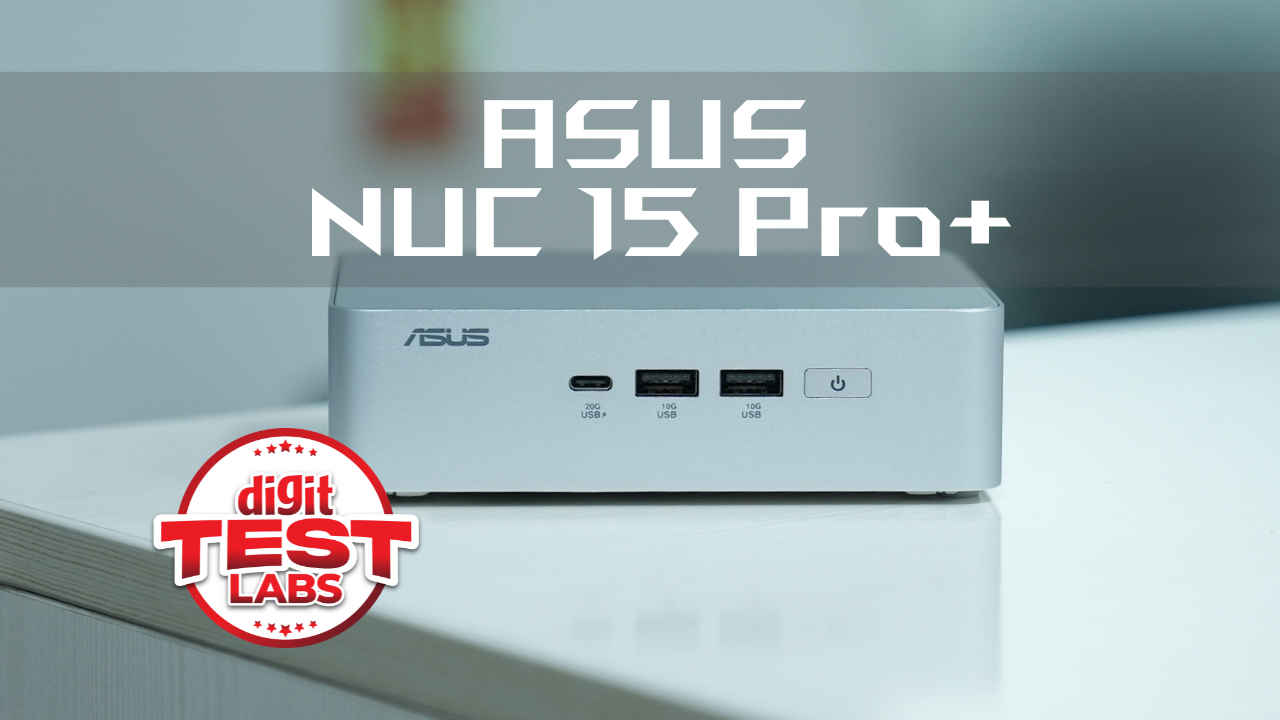
The ASUS NUC 15 Pro+ embodies the idea that big things come in small packages. With a robust Intel Core Ultra 9 CPU, a surprisingly capable Arc GPU, ultra-fast Wi-Fi 7, and a compact, VESA-mountable chassis, this mini-PC delivers on nearly every front.
It isn’t just a technical showpiece either. Thoughtful design choices such as the toolless upgrades, intelligent cooling, proximity sensing via Wi-Fi, and wide display support, etc., make this a practical, everyday workhorse. It’s ideal for tech-savvy professionals, remote workers, and even developers looking to run AI workloads locally.
The pricing will determine its fate to some extent, but if ASUS keeps it near the ₹1.4-1.5 lakh mark, the NUC 15 Pro+ becomes a compelling alternative to bulky desktops and underpowered laptops. It also carves out a unique spot between consumer ultrabooks and enterprise thin clients, powerful, elegant, and built for the hybrid future. If you’re looking to consolidate performance, flexibility, and style into a palm-sized package, the ASUS NUC 15 Pro+ is more than ready.
The ASUS NUC 15 Pro+ is a marked evolution in the journey of the mini-PC and is a great example of what happens when premium design meets cutting-edge performance in a compact footprint. ASUS, taking over Intel’s NUC (Next Unit of Computing) legacy, has carved a niche for power users and professionals looking for desktop-level capabilities in a form factor no larger than a thick paperback.
At the heart of the NUC 15 Pro+ lies the new Intel Core Ultra 9 285H processor, which combines P-cores, E-cores, and a low-power cluster for efficient multitasking. This processor also brings Intel’s latest AI compute unit into play with up to 99 TOPS (Int8), making this mini-PC capable of handling AI-assisted workloads locally. Whether you’re a developer running local LLMs, a designer managing multiple 4K displays, or an executive who appreciates performance wrapped in style, the NUC 15 Pro+ aims to deliver.
With Wi-Fi 7, Thunderbolt 4, support for quad 4K displays, and a premium aluminium chassis, the NUC 15 Pro+ is clearly engineered for minimalists, creatives, and enterprise users alike. Basically, it’s for people who value space, silence, and speed without compromise.
ASUS NUC 15 Pro+ Specifications
| Component | Details |
| Processor | Intel Core Ultra 9 285H (6P + 8E + 2LP cores, 16 threads, 65W cTDP) |
| Graphics | Integrated Intel Arc GPU 140T, 128 unified cores |
| Memory | 32GB DDR5-6400 (2x16GB Micron CSO-DIMM), up to 48GB supported |
| Storage | 1TB Micron 3500 PCIe Gen 4 NVMe SSD (7000 MB/s read, 6900 MB/s write); support for 2nd SSD |
| Networking | Intel Wi-Fi 7 BE201, Bluetooth 5.4, 2.5G LAN |
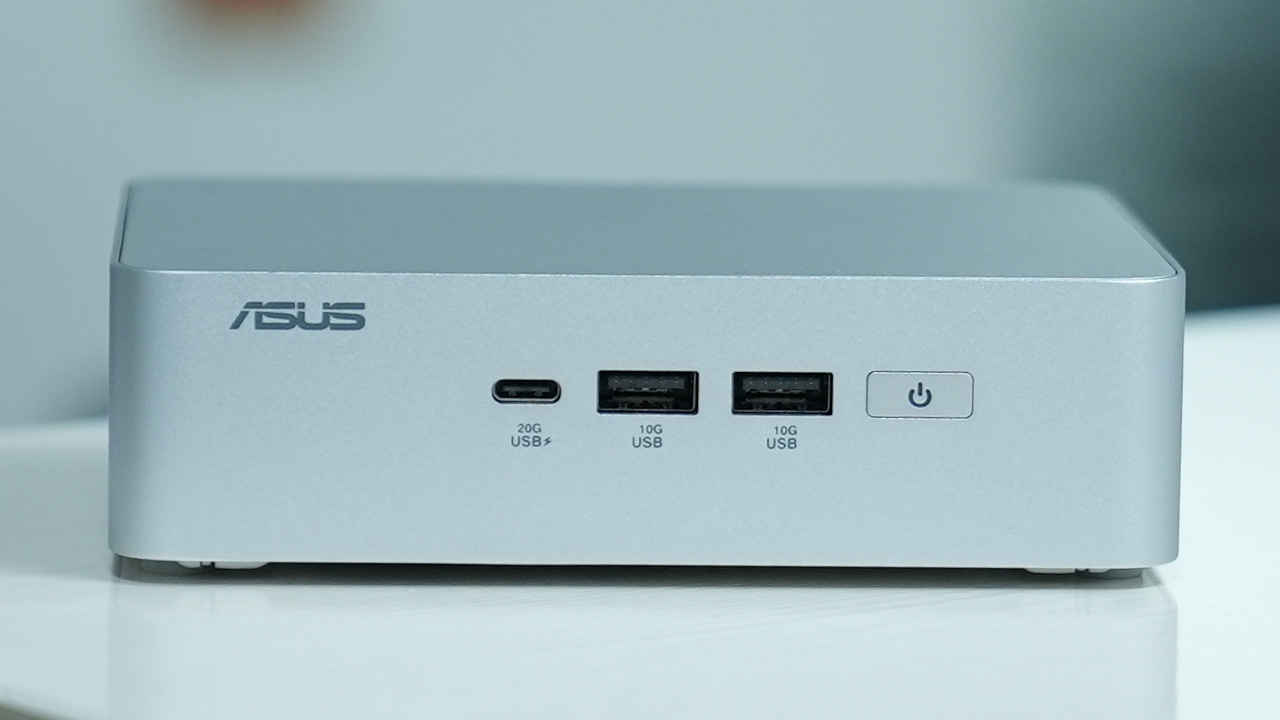
| Ports (Front) | 1x USB 3.2 Gen2x2 Type-C, 2x USB 3.2 Gen2 Type-A |
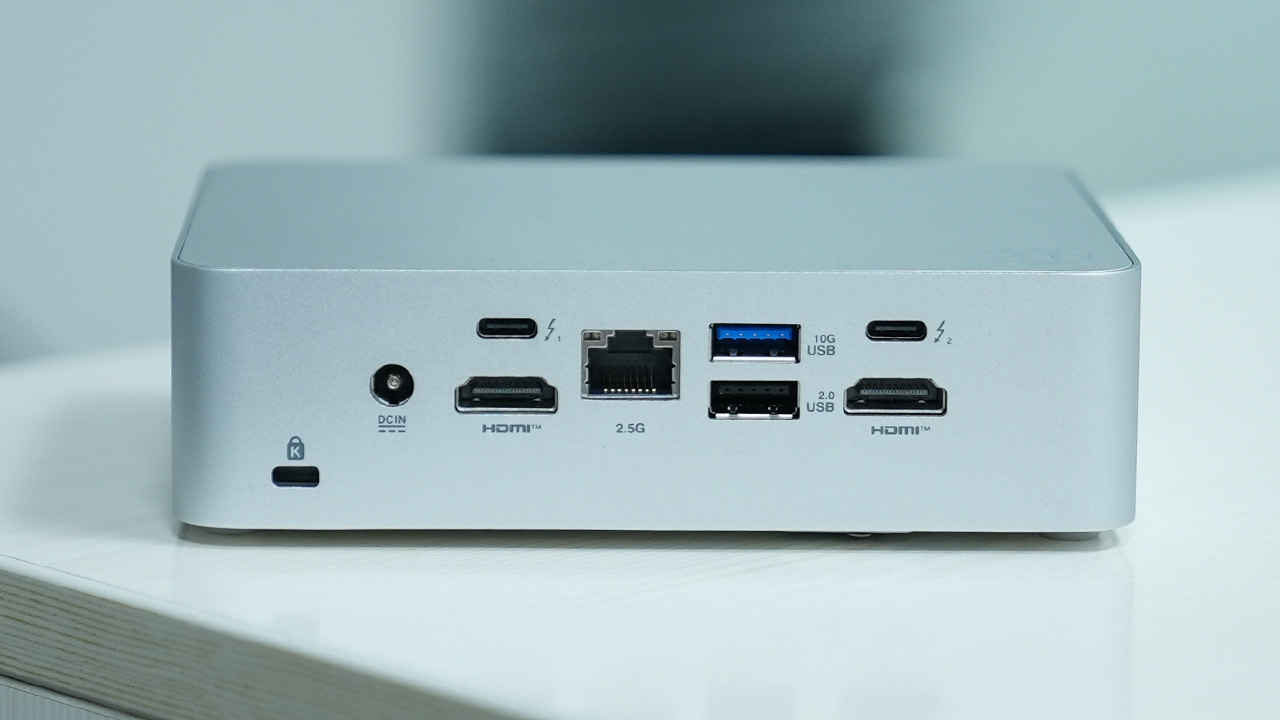
| Ports (Rear) | 2x HDMI 2.1, 2x Thunderbolt 4 (DP 2.1 & USB4), 1x USB 3.2 Gen2 Type-A, 1x USB 2.0, 1x RJ45 LAN, DC-in, Kensington lock |
| Dimensions | 144 x 112 x 42 mm |
| Weight | 600 g |
| Power Adapter | 150 W, 19.5 V DC |
Build quality
ASUS has done a commendable job crafting a unit that feels every bit as solid as it performs. The 0.7-litre chassis is made of aluminium, giving the NUC 15 Pro+ both aesthetic appeal and thermal stability. It weighs just 600 grams, yet the build feels reassuringly dense and durable. Adding to that, it’s been MIL-STD 810H certified, so it’s tougher than its size would suggest.
Maintenance and upgrades are incredibly user-friendly. A single screw releases a latch, letting you access the internals via a bottom-opening flap. Memory modules are toolless, and even the SSD slots are thoughtfully laid out, one requires a screw, while the other doesn’t. This streamlined approach to servicing makes it an excellent long-term investment, particularly for IT admins and tinkerers.
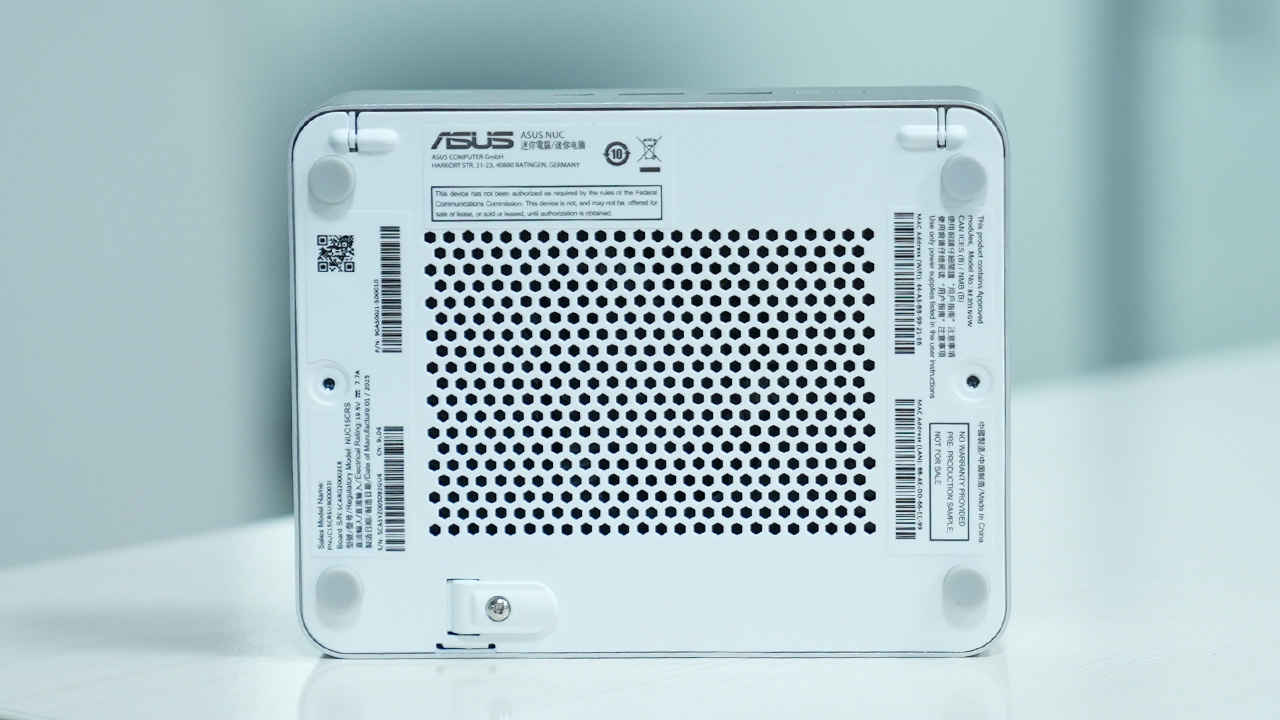
Cooling is where ASUS flexes its engineering prowess. Shrouds flanking the fan assembly direct airflow precisely across cooling fins, managing the 65 W TDP of the Ultra 9 CPU with whisper-quiet grace. Vents on either side aid airflow, and in practice, the system remains almost silent during typical office tasks and only mildly audible under sustained loads.
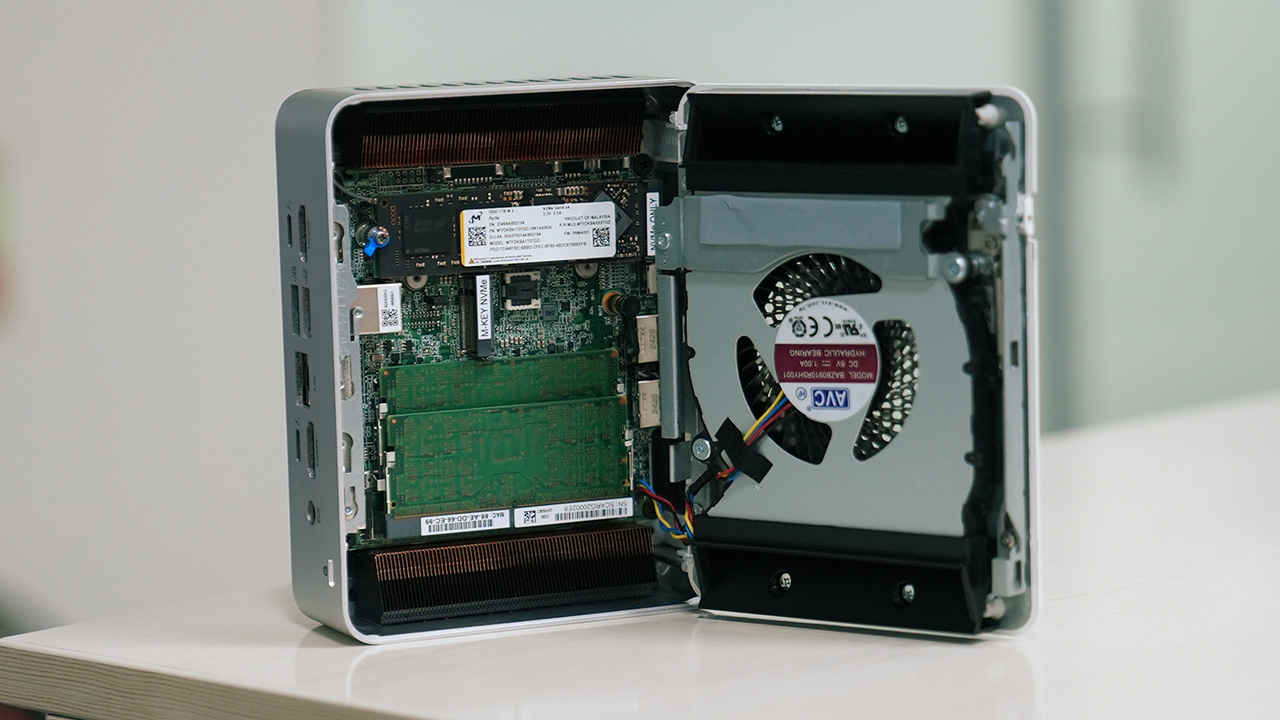
The included VESA mounting bracket means it can hide behind a monitor or blend seamlessly into a home or office setup making it ideal for digital signage, kiosks, or clean desk setups.
Features
The NUC 15 Pro+ is a multi-role workhorse, packed with thoughtful features for a wide range of users. AI-ready compute is the headline feature. With up to 99 TOPS, the integrated NPU (Neural Processing Unit) enables you to run local LLMs like LLAMA 2, Mistral 7B, or even Phi 3.5 with respectable speeds. For developers, data scientists, or researchers working in sensitive environments, this means fast inference without relying on cloud compute.
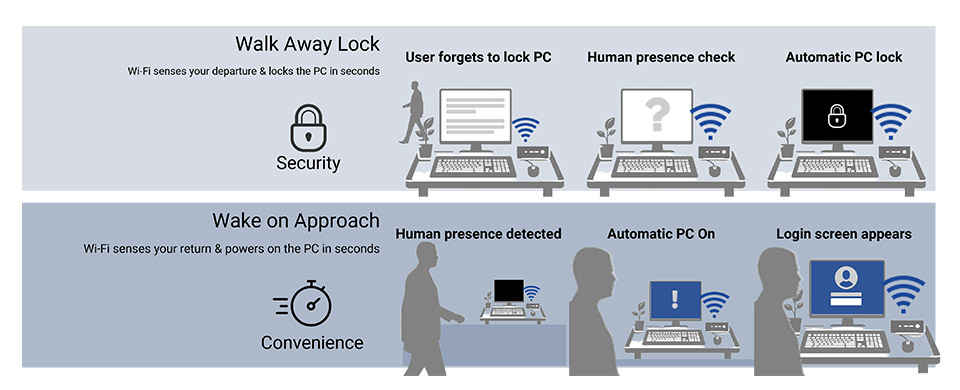
Intel Wi-Fi 7 offers blazing wireless speeds and stability, a noticeable upgrade if your router supports the latest standard. More interestingly, Wi-Fi Proximity Sensing brings presence-based PC locking and unlocking, a feature that’s usually limited to laptops with Windows Hello and webcams, thus, making it a surprisingly handy security feature for a headless desktop.
You also get enterprise-ready vPro technologies, quad 4K display support (2x HDMI 2.1 + 2x Thunderbolt 4 with DisplayPort 2.1), and a CEC Power Sync feature that can shut down all connected displays simultaneously which is perfect for media centre builds.
Other nice-to-haves include 3 months of Adobe Creative Cloud, and excellent expandability for both storage and memory. This machine will keep up with not just your current needs but scale well into more demanding workflows.
Performance
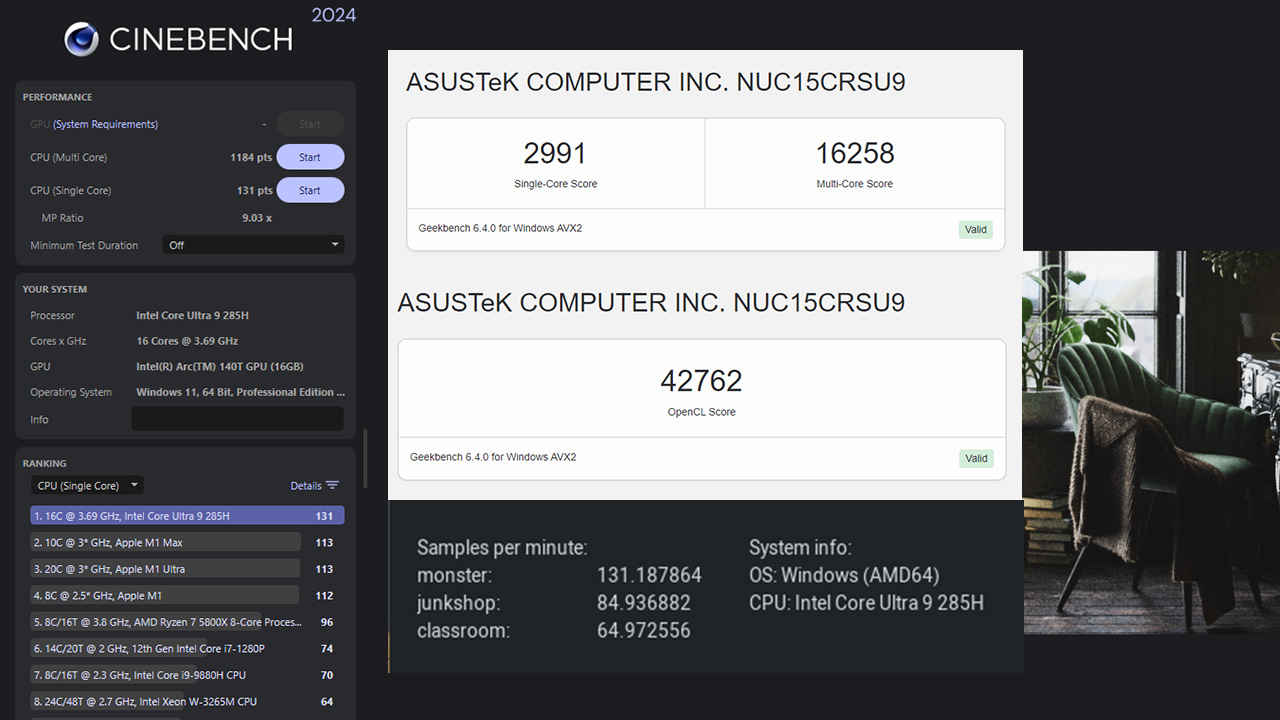
Despite its diminutive form factor, the ASUS NUC 15 Pro+ delivers commendable performance across both general and specialist workloads, powered by the Intel Core Ultra 9 285H processor. This chip, featuring six performance cores, eight efficient cores, and two low-power cores for a total of sixteen threads, runs at a 65 W configurable TDP and is well-balanced for both responsiveness and sustained multitasking. In Geekbench 6.4.0, the NUC registered a single-core score of 2,991 and a multi-core score of 16,258, signalling strong general-purpose processing power. Cinebench 2024 further supports these results with a single-thread score of 131 points and a multi-thread score of 1,184, which is in line with high-end ultrabooks and compact workstations.
On the graphics front, the integrated Intel Arc GPU 140T proves itself capable beyond mere desktop use. It’s made up of 128 unified cores and, while it won’t match a discrete GPU in raw power, it delivers solid numbers for its class. In 3DMark Time Spy, the unit scored 4,508 points, while Fire Strike produced a score of 8,312. Lighter graphical loads such as Night Raid showed strong results, with a score of 37,518. The system achieved 8.74 frames per second in the DirectX Raytracing feature test, and the Solar Bay benchmark returned a score of 15,306. Even the latest Steel Nomad test, designed to stretch integrated GPUs, yielded a respectable score of 850. These results reflect a level of graphical competence sufficient for casual gaming, media rendering, and GPU-accelerated workloads.
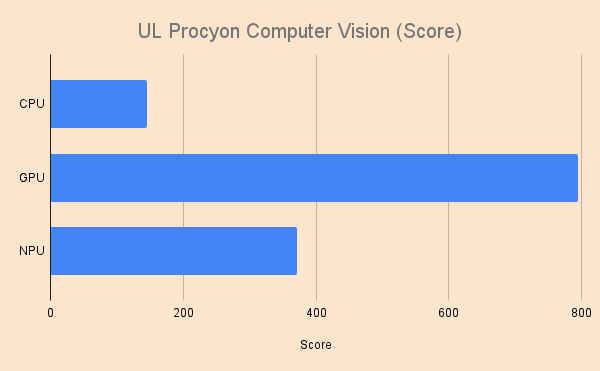
On the AI front, the onboard NPU should be sufficient for real-world AI applications. Running models locally using OpenVINO, the ASUS NUC 15 Pro+ scored 145 in UL Procyon with the CPU as the inference device, 795 when using the iGPU as the inference device and 372 when using the NPU. Clearly, the iGPU is pulling more weight than the NPU which indicates that the NPU has a long way to go. Running something like Ollama requires using additional packages such as IPEX-LLM which allows you to use the iGPU. The 99 TOPS that’s advertised with the 285H is when you use the CPU, GPU and the NPU at the same time which no local-LLM app supports at the moment. So it’s mostly a marketing statistic rather than giving you a practical use case.
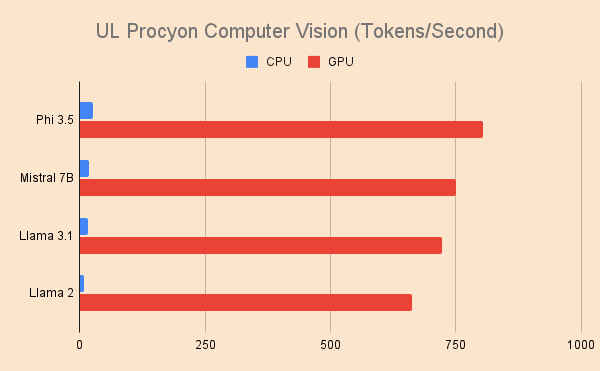
When testing large language models on the CPU, Phi 3.5 achieved an average throughput of 27 tokens per second. Mistral 7B followed with 18 tokens per second, LLAMA 3.1 delivered 17 tokens per second, and even the older LLAMA 2 maintained 9 tokens per second. Switching to the GPU, we got 803 tokens per second for Phi 3.5, 750 tokens per second on Mistral 7B, 722 on Llama 3.1 and 662 on Llama 2. This level of local inferencing capability positions the device as a capable tool for folks wanting to tinker with AI at the edge.
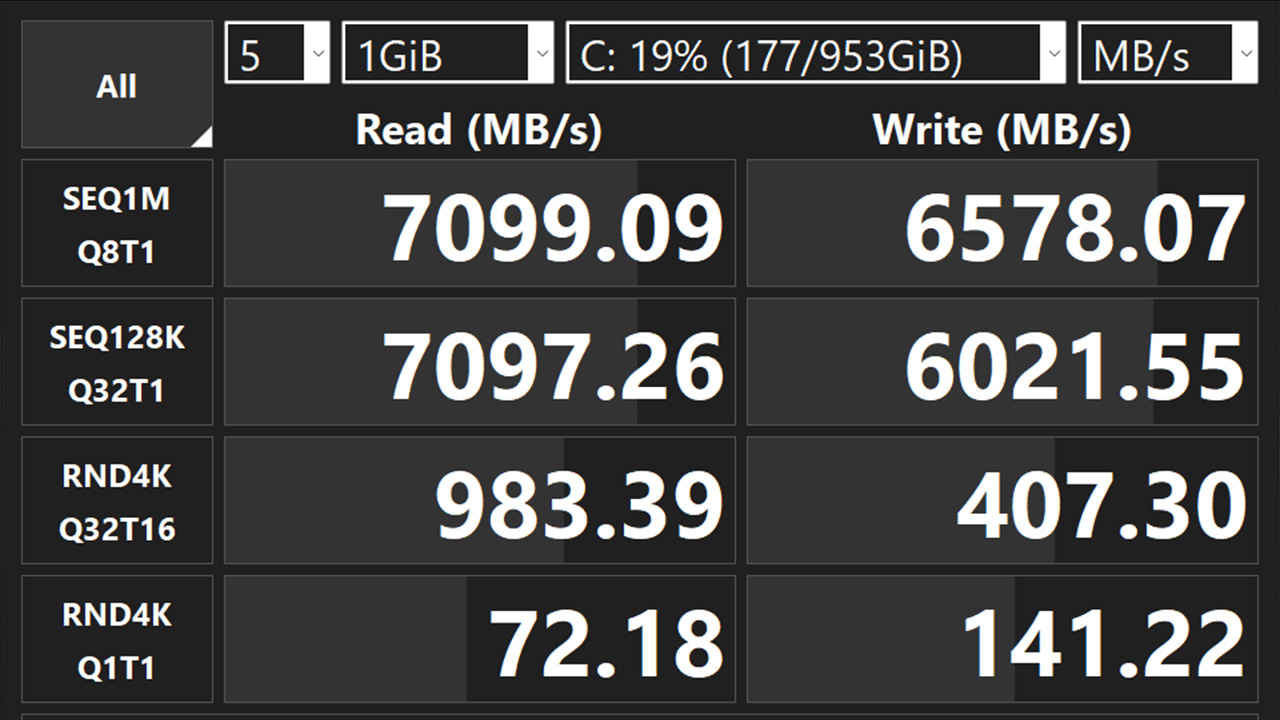
Memory performance is quite good. During synthetic testing, read and write speeds topped out at around 90,524 MB/s and 84,670 MB/s respectively, with latency measured at 105.5 nanoseconds. While some memory benchmarks failed to complete consistently, real-world performance remained unaffected and smooth in multitasking scenarios. On the storage front, the 1TB Micron 3500 PCIe Gen 4 SSD posted sequential read speeds of 7,099 MB/s and write speeds of 6,578 MB/s. These figures contribute to a snappy experience when launching applications, transferring large files, or booting into Windows.
Productivity applications also perform well on this machine. In Blender’s rendering benchmark, the NUC 15 Pro+ handled the ‘Monster’ scene at 131.19 samples per minute, ‘Junkshop’ at 84.94 samples per minute, and ‘Classroom’ at 64.97 samples per minute. These results suggest that even creators and designers can comfortably use the NUC for 3D previews and moderate rendering tasks. Archival and compression performance was also solid, with WinRAR tests producing 18,436 KB/s and 7-Zip running between 102 and 110 GIPS depending on workload complexity.
One thing that stood out was that the unit did heat up quite a bit when under persistent loads suggesting that better cooling would be required for folks engaging in heavy content creation workloads.
Taken together, these results highlight the ASUS NUC 15 Pro+ as a remarkably competent compact desktop. Whether you’re focused on productivity, moderate content creation, or AI-assisted tasks, the performance on offer here is impressively versatile for the size and power envelope.
Value for money
At the time of writing, ASUS hasn’t announced official Indian pricing. However, a reasonable estimate can be drawn based on the previous-gen ASUS NUC 14 Pro+, which retailed at around ₹92,990 (barebones, without RAM, SSD, or OS). Factoring in the included hardware:
- 32GB DDR5 RAM: ₹8,000
- 1TB Gen 4 SSD: ₹7,300
- Windows 11 license: ₹10,000 (approx)
A fully-loaded price near ₹1,40,000–₹1,50,000 seems likely. That may appear steep, but put in context, it’s fair. For comparison, the ASUS Zenbook 14 with the same Ultra 9 285H chip, 32 GB RAM and 1 TB SSD costs around ₹1,25,990. That’s a laptop, more versatile in some ways, but lacking in enterprise features like vPro, custom mounting, or modular upgradability.
Then there’s Apple’s Mac Mini with M4, which starts at ₹99,000. It’s tempting for creative pros, but if you’re working in a Windows-based ecosystem or need AI acceleration that runs best on Intel’s OpenVINO stack, the NUC makes more sense. Content creators wanting GPU grunt may prefer external GPU docks or explore options like the ASUS NUC 15 Performance or ZOTAC Magnus One.
Overall, for enterprise users, developers, and those who value minimalism without compromise, the NUC 15 Pro+ strikes a sensible balance between price, performance, and portability.
Verdict
The ASUS NUC 15 Pro+ embodies the idea that big things come in small packages. With a robust Intel Core Ultra 9 CPU, a surprisingly capable Arc GPU, ultra-fast Wi-Fi 7, and a compact, VESA-mountable chassis, this mini-PC delivers on nearly every front.
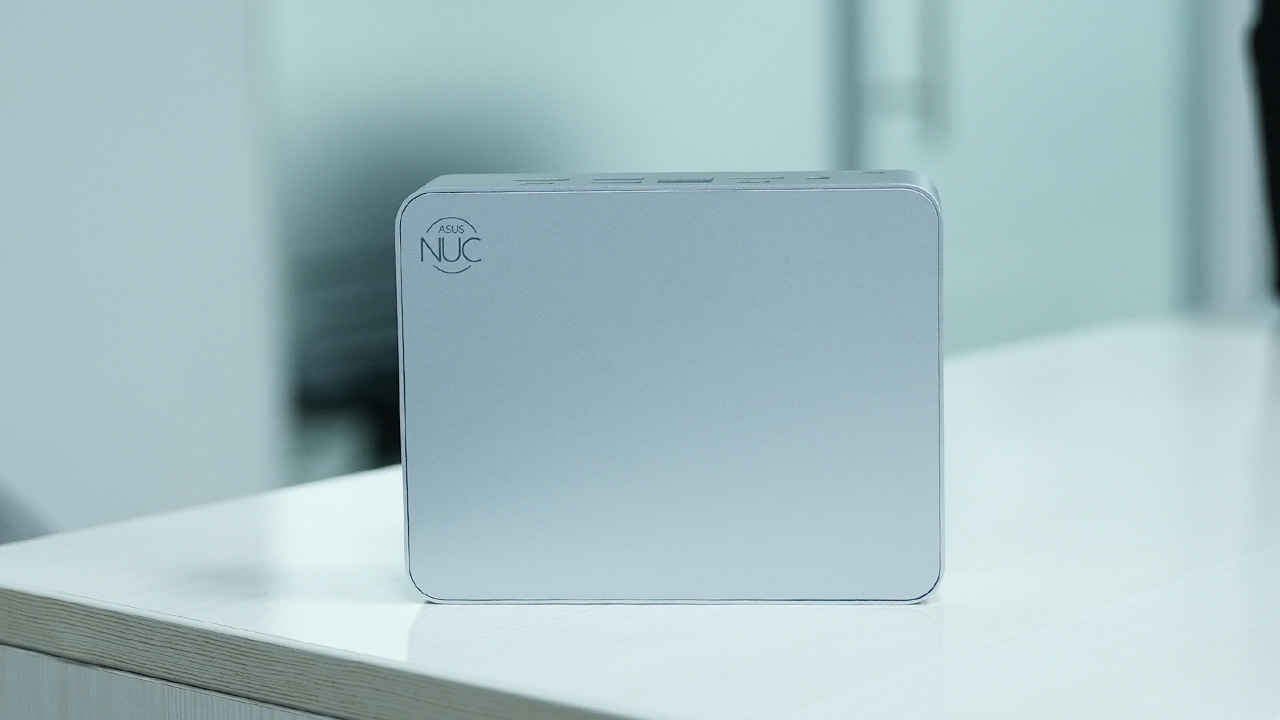
It isn’t just a technical showpiece either. Thoughtful design choices such as the toolless upgrades, intelligent cooling, proximity sensing via Wi-Fi, and wide display support, etc., make this a practical, everyday workhorse. It’s ideal for tech-savvy professionals, remote workers, and even developers looking to run AI workloads locally.
The pricing will determine its fate to some extent, but if ASUS keeps it near the ₹1.4-1.5 lakh mark, the NUC 15 Pro+ becomes a compelling alternative to bulky desktops and underpowered laptops. It also carves out a unique spot between consumer ultrabooks and enterprise thin clients, powerful, elegant, and built for the hybrid future. If you’re looking to consolidate performance, flexibility, and style into a palm-sized package, the ASUS NUC 15 Pro+ is more than ready.
ASUS NUC 15 Pro+ Key Specs, Price and Launch Date
| Release Date: | |
| Market Status: |
 Follow Us
Mithun Mohandas
Mithun Mohandas is an Indian technology journalist with 14 years of experience covering consumer technology. He is currently employed at Digit in the capacity of a Managing Editor. Mithun has a background in Computer Engineering and was an active member of the IEEE during his college days. He has a penchant for digging deep into unravelling what makes a device tick. If there's a transistor in it, Mithun's probably going to rip it apart till he finds it. At Digit, he covers processors, graphics cards, storage media, displays and networking devices aside from anything developer related. As an avid PC gamer, he prefers RTS and FPS titles, and can be quite competitive in a race to the finish line. He only gets consoles for the exclusives. He can be seen playing Valorant, World of Tanks, HITMAN and the occasional Age of Empires or being the voice behind hundreds of Digit videos. View Full Profile


