
Want better ChatGPT results? Try these handy trick prompts for everyday tasks
 Follow Us
Use simple trick prompts to get more useful ChatGPT responses.
Find prompts for images, productivity, videos, and content creation.
Customise these shortcuts to save time and get better results.


Whether you need help with homework, want to make an image or YouTube thumbnail, need a script for your next reel, or just want to explore an idea, ChatGPT has become a useful tool for many of us. However, the AI tool can do much more than just create content as you can use it to research topics, come up with ideas, understand difficult concepts, learn new skills, and much more. While ChatGPT can do all of these tasks with a simple request, the results may not match your expectations. So, instead of repeatedly explaining what you need, you can use the simple trick prompts provided below that can help make ChatGPT more effective and help you get better results.
 Survey
How to use ChatGPT trick prompts
Before I give you the prompts, let me tell you how to use them. Head to ChatGPT and type the prompt or the shortcut slug. Alternatively, you can also copy and paste the prompts from below.
Alter the prompts based on your preference. Make sure to insert the personalised content within the prompts since they are generalised prompts. Also note that you can either use the slug or the prompt separately or can combine them to get the result.
You may not like the output given by the AI tool in the first go itself, so you can modify the prompts or even instruct the AI tool on what exactly you require. Here are the prompts you can try to get good ChatGPT results.
Also read: OnePlus 13 price drops by Rs 11,118 on Flipkart: How to get this deal
1. Image generation and creative ChatGPT prompts
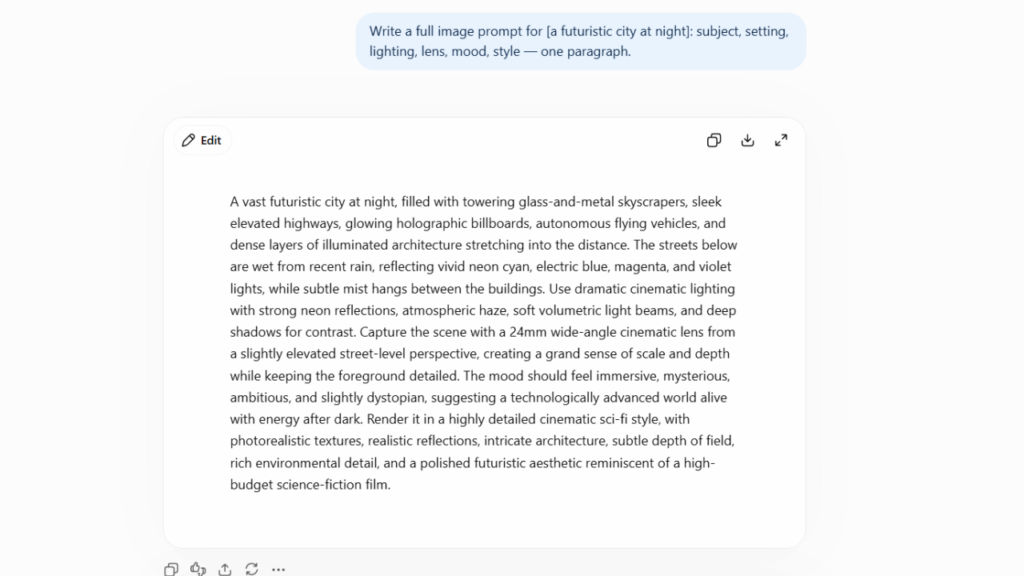
| Slug | Main prompt |
| /imgbrief [subject] | Write a full image prompt for [subject]: subject, setting, lighting, lens, mood, style — one paragraph. |
| /portraitprompt [person type] | Prompt a portrait of [person type]: 85mm look, shallow depth, catchlights, honest expression |
| /moodboard [brand] | Describe a 9-image moodboard for [brand]: subjects, palette, texture, and the feeling each image adds. |
| /aerialshot [location] | Prompt a top-down drone view of [location]: patterns, geometry, one human scale anchor. |
| /carouselart [topic] | Describe a consistent visual system for an 8-slide carousel on [topic]: grid, type scale, accent use. |
| /lifestyleshot | Prompt in real life at [setting] — candid, natural light, believable hands. |
| /productshot | Prompt a clean studio shot of : seamless background, soft key light, subtle reflection |

2. Productivity and workflow prompts for ChatGPT
| Slug | Main prompt |
| /today3 [task list] | From [task list], pick the 3 tasks that actually move things, and tell me what to ignore guilt-free. |
| /braindump [messy notes] | Sort [messy notes] into: do now, schedule, delegate, delete. One question back if unclear. |
| /timebox [task list + hours] | Fit [task list] into [hours]: timeboxes, buffers, and the task that gets cut if things slip. |
| /checklist [task] | Turn [task] into a reusable checklist with pre-flight, in-flight, and post-flight sections. |
| /eodshutdown [open items] | Run an end-of-day shutdown for [open items]: capture, park, plan tomorrow’s first task, close loops. |
Also read: Googlebook is finally getting its big reveal next month: Everything you need to know
3. Video and scripting prompts
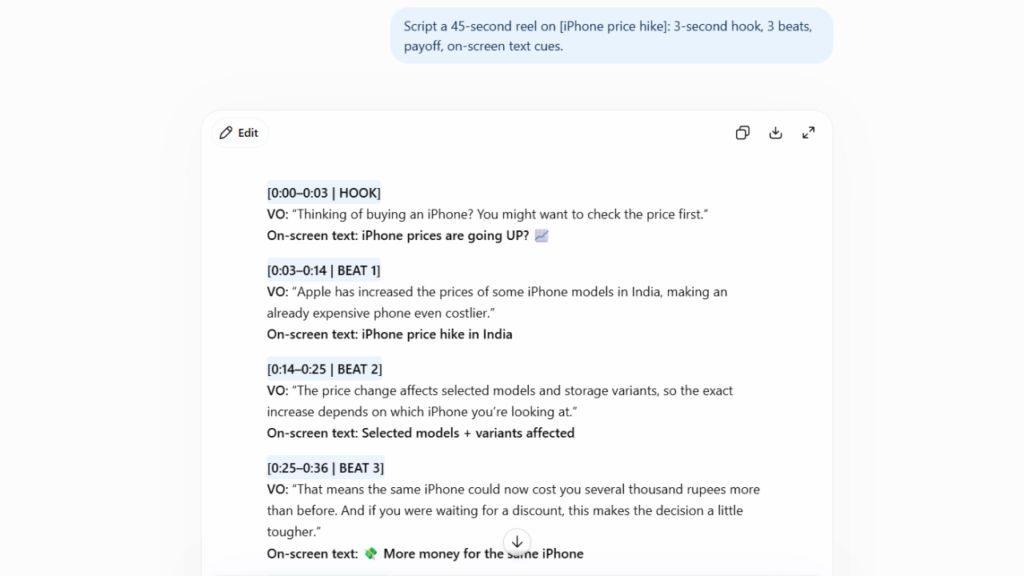
| Slug | Main prompt |
| /reel45 [topic] | Script a 45-second reel on [topic]: 3-second hook, 3 beats, payoff, on-screen text cues. |
| /storyboard [concept] | Storyboard [concept] in 8 frames: shot, action, text overlay, and audio note per frame. |
| /title12 | Write 12 YouTube titles for : mix curiosity, numbers, stakes. Under 55 characters. |
| /thumbtext | Give me 8 thumbnail text options for — 3 words max, readable at postage-stamp size. |
| /podcastqs [guest + topic] | Write 12 interview questions for [guest] on [topic] — no question they’ve answered 100 times. |
4. Content, marketing and audience growth prompts
| Slug | Main prompt |
| /hooks [topic] | Write 15 scroll-stopping hooks for [topic]: 5 curiosity, 5 contrarian, 5 outcome-driven. |
| /calendar30 [niche] | Build a 30-day content calendar for [niche]: format, hook, and CTA for each day. |
| /serialize [big topic] | Turn [big topic] into a 5-part series that makes people follow to catch the next part. |
| /storypost [lesson] | Turn [lesson] into a first-person story post: setup, stumble, shift, takeaway. Under 150 words. |
| /commentmagnet [topic] | Give me 7 post endings on [topic] engineered to start arguments-in-a-good-way in the comments. |


