
 E-Magazine
How to download your LinkedIn connections data, including names, emails and job details
Download your LinkedIn data before December 20.
LinkedIn will remove emails, company names and job titles from connection exports.
Request your data archive early, as it can take up to 48 hours.
Your LinkedIn connections are more than just names on a list. They include valuable professional contacts, work histories and details that can come in handy when you need them. But LinkedIn is changing what you can access through your Connections file. According to a note on LinkedIn, the platform will no longer allow you to download email addresses, current companies and job titles while downloading the profile data on the platform starting December 20. Do note that the archive can take up to 48 hours, so you need to request early. Here is how to download your LinkedIn data before it gets limited.
How to download your LinkedIn data
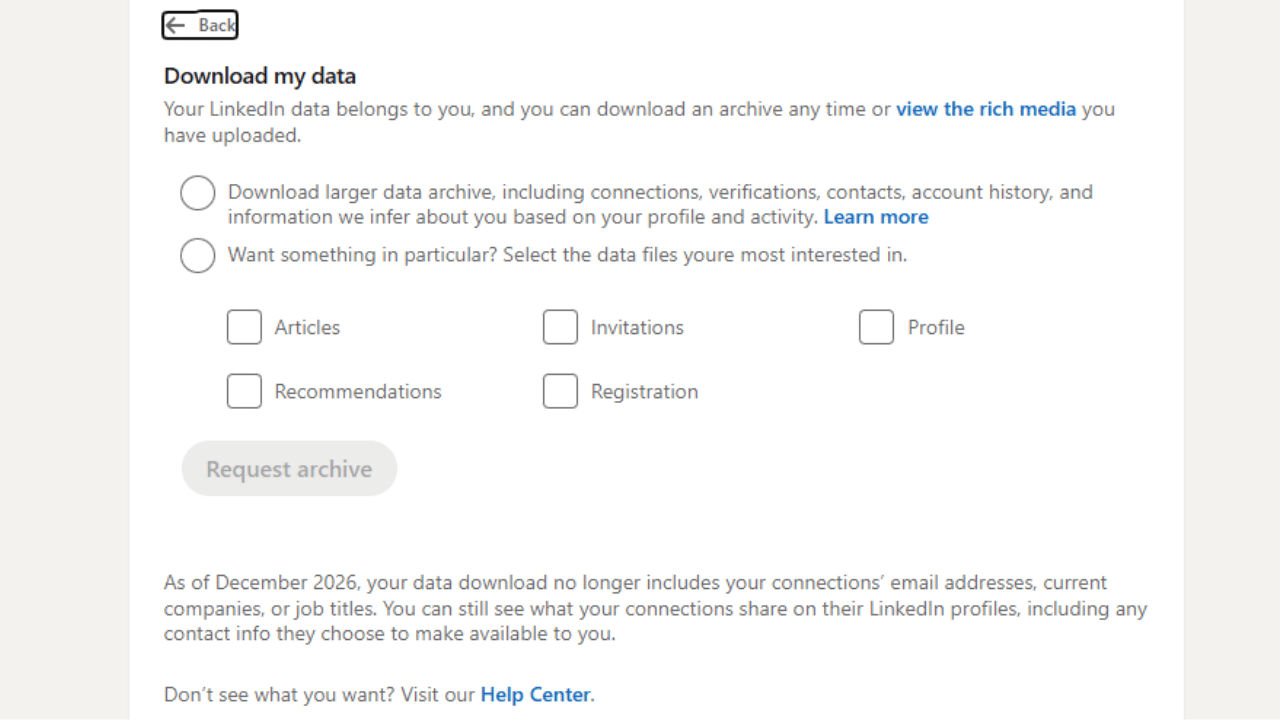
If you want to download your data, then let me tell you that it's easy to do; it's just to follow the easy steps listed below:
1. Open a web browser and head to LinkedIn's official website.
2. On the top right corner of the screen, click on your profile photo.
3. Choose the Settings & Privacy from the available options.
4. On the left navbar, select Data privacy and now choose Download your data.
5. You can now select the details you wish to download, and once done, simply press the Request Archive button.
What can you download
Depending on your account activity, you can export:
- Profile and credentials: It includes your basic profile details like work experience, education, skills, certifications, recommendations, and verification records.
- Network and contacts: This includes your connections, imported contacts, and invitations.
- Activity and content: You can download your posts, articles, messages, events, organisations, learning history and other job-related records.
- Account, search and inferences: LinkedIn allows you to download your registration history, login activity, search history, ad-related information and traits LinkedIn infers from your profile and activity.
- Page Analytics: If you run a page on LinkedIn, then you can also download an XLS report on content, visitors, followers, and competitors from your LinkedIn Page admin view. However, do note that LinkedIn does not include other members' personal data, People You May Know, or Who's Viewed Your Profile in data downloads.
Note: From December 20, 2026, connection exports will not include email addresses, companies or job titles.

Bhaskar Sharma Bhaskar is a Senior Copy Editor at Digit India who keeps a close watch on everything shaping the world of technology from smartphones and home appliances to AI, government tech initiatives, digital safety, and the latest industry developments. Whether it's breaking news, in-depth features, hands-on reviews, practical how-to guides, or exclusive scoops, he translates complex tech into stories that are easy to understand and worth reading. His work has been featured in iGeeksBlog, GuidingTech, and other leading publications. Before joining Digit India, he served as an assistant editor at TechBloat. A B.Tech graduate and full-time tech journalist, he is driven by just one goal, which is to help readers stay informed, stay secure, and stay ahead in an ever-changing digital world.
View full profile