
 E-Magazine
ASUS UGen300 USB AI Accelerator review: Speed up your AI projects
Powerful edge AI performance with 40 TOPS computing capability.
Versatile support for image classification, object detection and LLMs.
Efficient, low-power AI inference with cloud-independent processing.
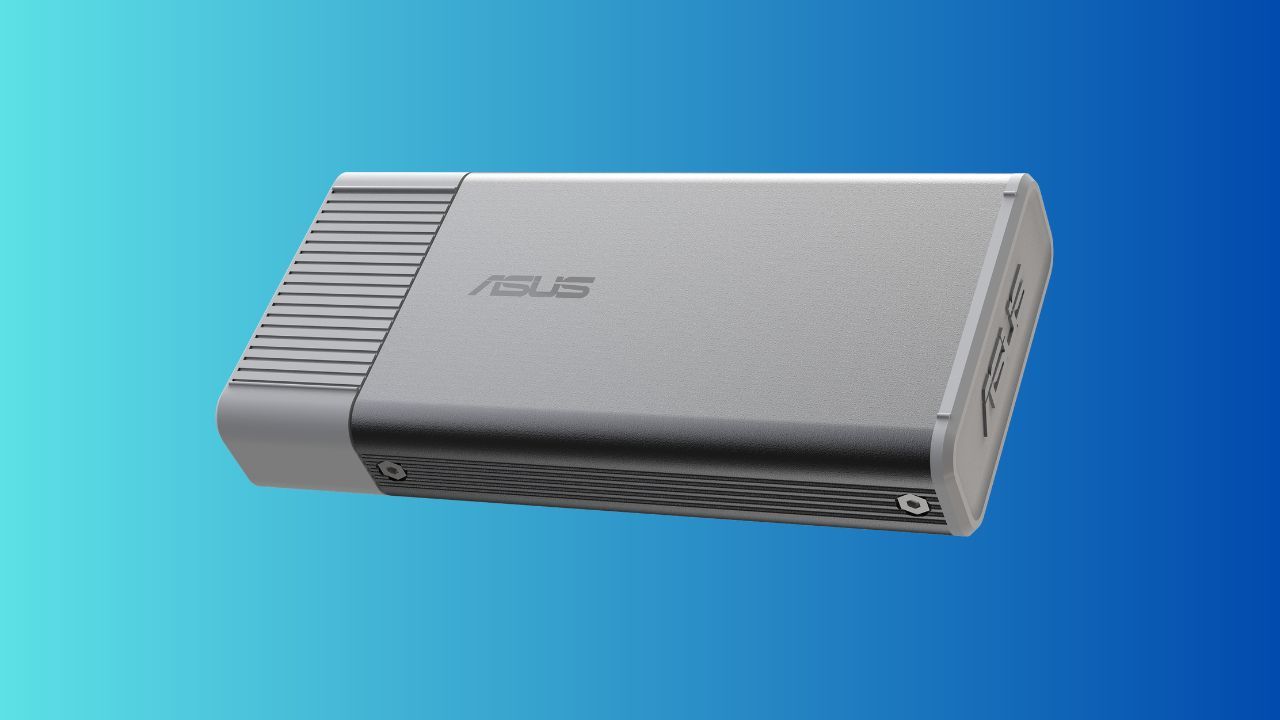
USB makes adding storage, networking and peripherals straightforward. Adding an AI processor is a more involved proposition. The ASUS UGen300 puts dedicated inference hardware outside the PC, but its usefulness depends on the software that connects an application to that hardware. Most PCs these days pack an NPU with about 50 TOPS but if you wanted to run another application within a 40 TOPS envelope, then instead of getting another laptop or an expensive external GPU dock, you now have a simple USB Type-C device to just do that. For developers working on local image analysis, that opens up a convenient way to experiment with a dedicated processor while retaining an existing machine.
Specifications and design
| Specification | ASUS UGen300 USB AI Accelerator |
|---|---|
| Processor | Hailo-10H |
| Rated AI throughput | 40 TOPS at INT4; 20 TOPS at INT8 |
| Dedicated memory | 8GB LPDDR4, 4266 MT/s |
| Interface | USB 3.1 Gen 2 Type-C, 10Gbps |
| Dimensions | 105 × 50 × 18mm |
| Weight | 150g |
| Typical rated consumption | 2.5W |
| Listed host architectures | x86 and Arm |
| Listed operating systems | Windows, Linux and Android |
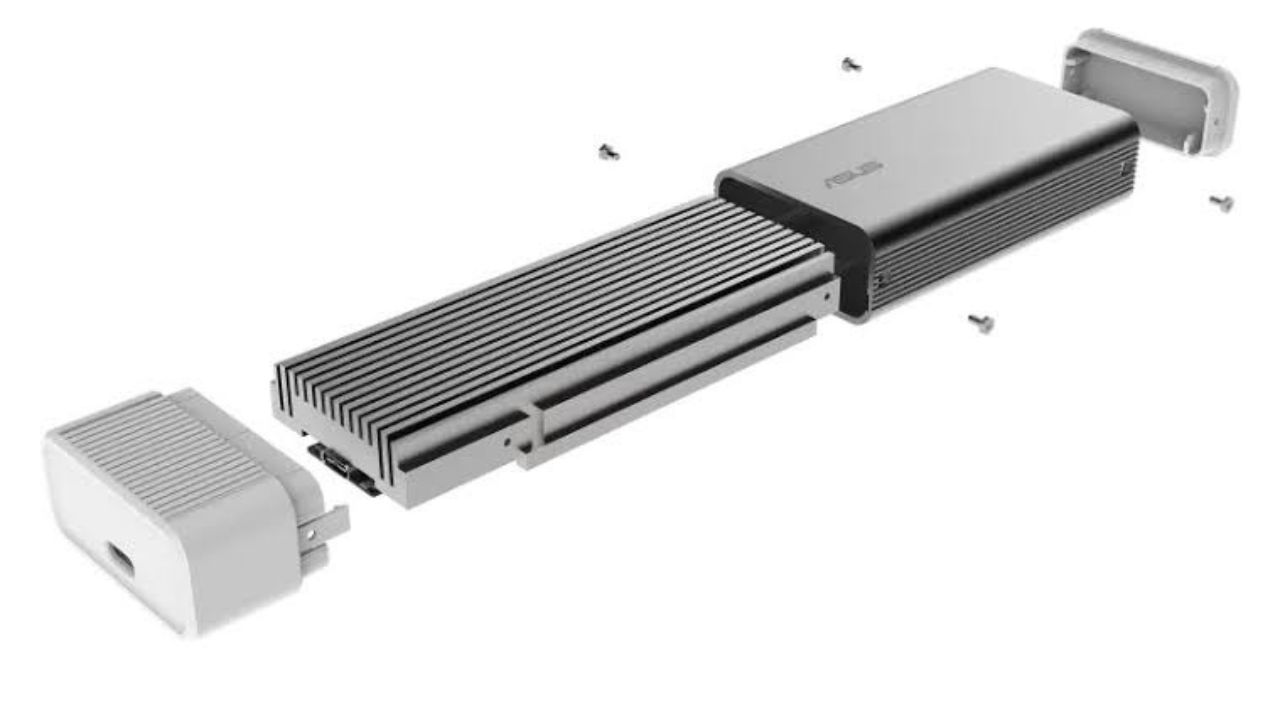
The external form factor is the UGen300’s most obvious advantage. With a weight of 150g and a compact footprint, the UGen 300 is an easy thing to move between compatible systems. Unlike an internal accelerator, it does not require opening a chassis or finding a spare expansion slot. The dedicated 8GB memory provides a separate pool for supported model execution. The host still handles application logic, image decoding and other parts of the pipeline, but the accelerator brings its own compute and memory resources to the task. The 40 TOPS figure applies to INT4, while the INT8 rating is 20 TOPS.
Windows setup
While we did mess around with the ASUS UGen300 on Linux but since this is one of the few devices which works well with Windows, we’re going to showcase how we went about it in Windows 11. The Windows setup began with a firmware update. The Hailo runtime called HailoRT detected the USB device but rejected its firmware, returning HAILO_INVALID_FIRMWARE(23). That’s completely normal and we used the firmware update tool that ships with the drivers to update the firmware on the device. You might come across problems while updating the firmware as the device might not automatically reconnect after a firmware update and you’ll have to unplug and plug it back in to get the OS recognise it. You can also use the command hailo_usb_loader fw-update via command line to push the firmware update.
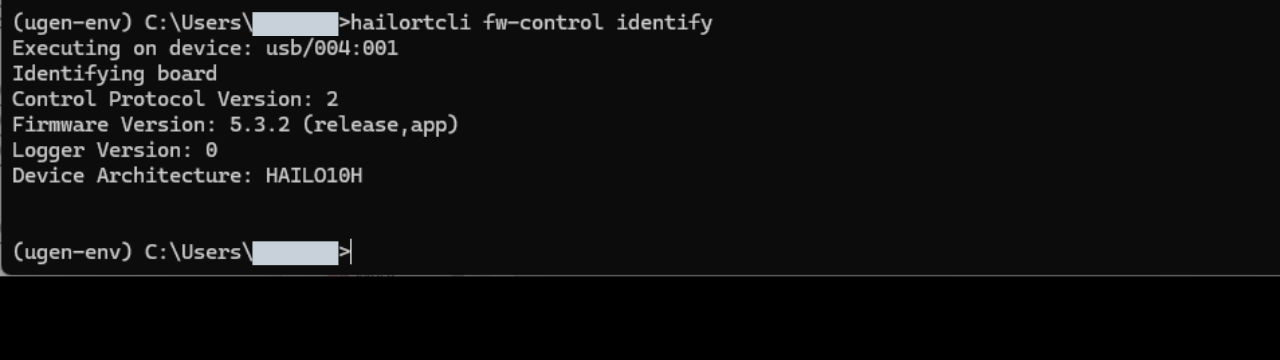
The process ultimately reached a working state. The graphical updater confirmed firmware version 5.3.2, and the command-line identification subsequently reported the same version and a HAILO10H device at a USB address.
It’s not that you’ll always have to update the firmware. If you can get your hands on an older runtime and have the compatible dependencies, then you can make do with them. We decided to opt for a more up to date stack.
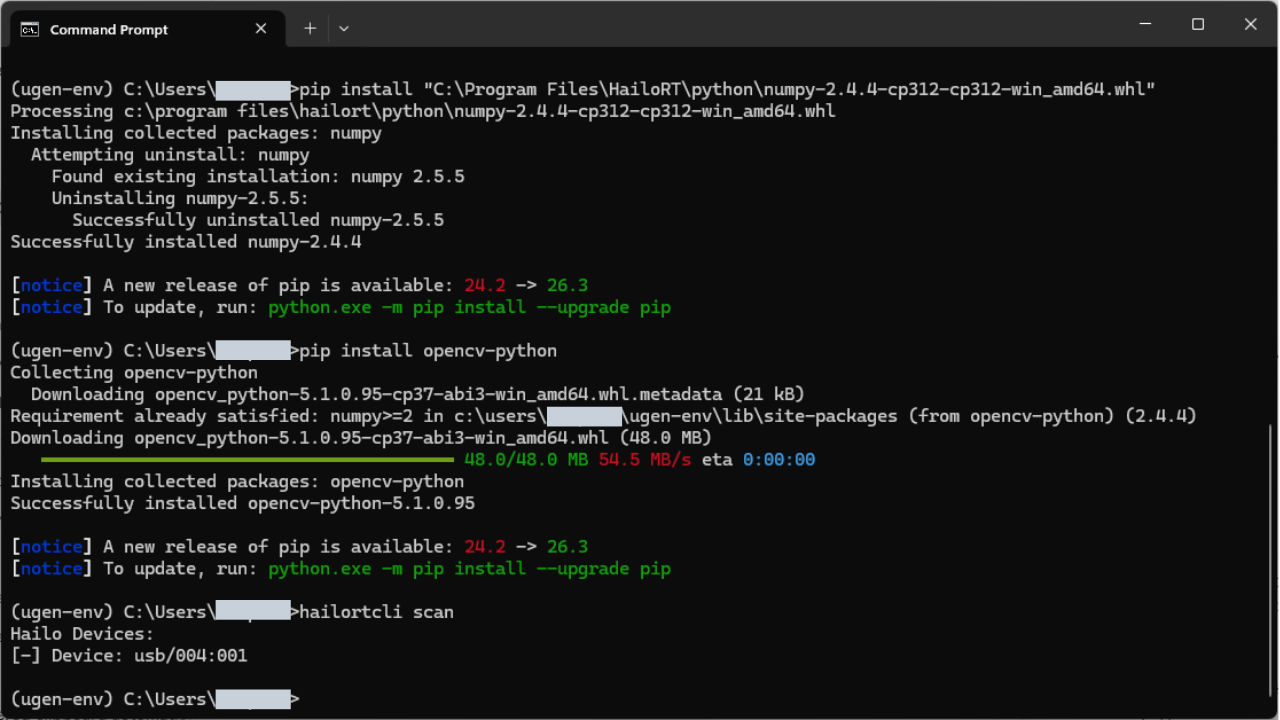
We decided to test the unit out with a simple image classification program that we wrote. The classification script was written in Python for version 3.12 and we ran it in a dedicated virtual environment. Thankfully, the Hailo repository had a compatible version of NumPy already listed so it was easier for us to simply use the NumPy 2.4.4 version from the wheel supplied under the HailoRT installation, replacing an existing NumPy 2.5.5 installation. OpenCV 5.1.0.95 was then installed for image handling.
Once those components were in place, you can simply use hailortcli scan to find the accelerator. This is a workable development route, but it involves more preparation than installing a typical consumer peripheral.
Performance
The UGen300 recorded 331.71 FPS in the HailoRT benchmark using the ResNet-50 HEF. This gives us an idea of how fast we can stream data to the device for inference. For folks putting this on an assembly line, this is the critical metric that allows them to work out how fast a particular model is for the suited work.
| Test or measurement | Recorded result |
|---|---|
| Benchmark | hailortcli benchmark |
| Network | resnet_v1_50 |
| Input shape | 224 × 224 × 3 |
| Output | 1,000 class scores |
| Reported throughput | 331.71 FPS |
| Mean reported device temperature | 50.54°C |
| Minimum reported device temperature | 48.44°C |
| Maximum reported device temperature | 51.23°C |
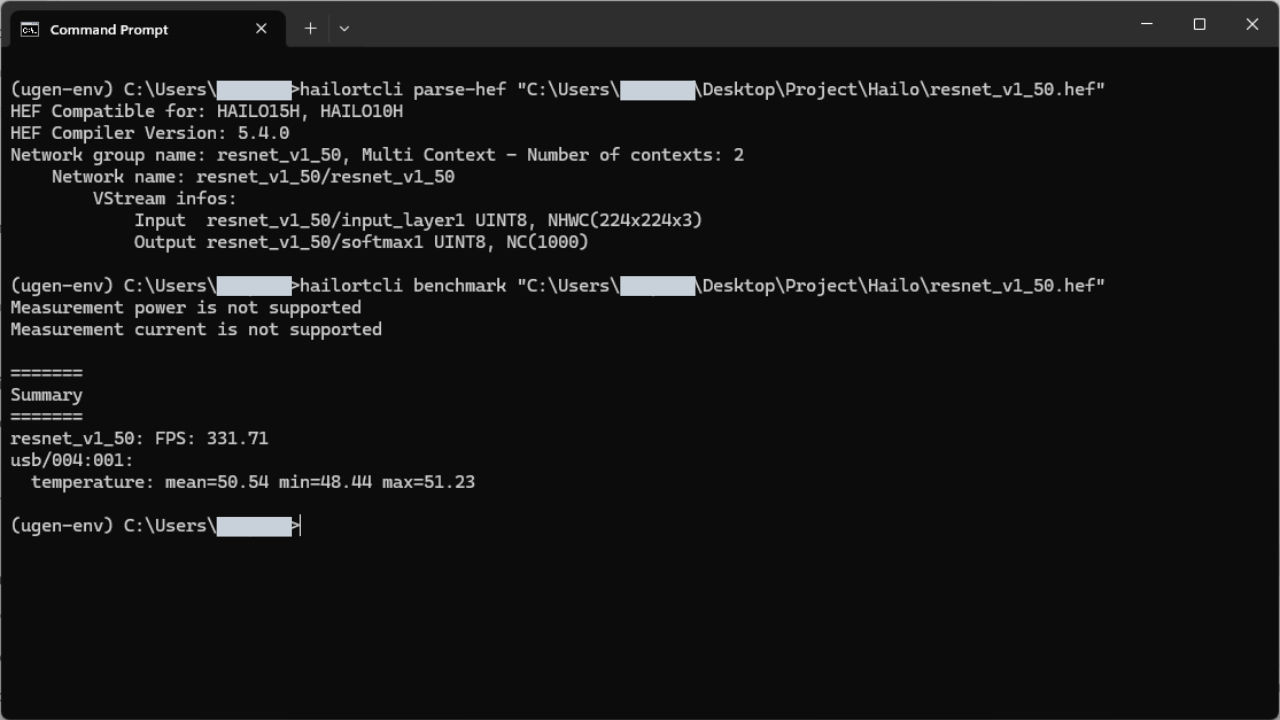
HailoRT reported 331.71 FPS and device temperatures between 48.44°C and 51.23°C during the benchmark. The result measures throughput in HailoRT’s benchmark. A complete photo-classification application also opens the file, decodes it, prepares the input, transfers data and formats the answer. Those steps determine how quickly a collection of photographs is processed from start to finish. The benchmark therefore establishes the network’s throughput in that test, rather than a measured photo-library sorting rate. It’ll vary on the basis of how complex your image set happens to be.
For temperatures, we measured a maximum of 51.23°C during the benchmark and the casing was warm throughout usage. Thankfully, the metal chassis acts like a heatsink for the UGen 300. Power and current telemetry were unavailable in this run. We would have to put an inline measurement device to see if ASUS’s 2.5W claim remains true throughout the inference run.
Classifying photographs with Python
Our script takes one or more image paths, runs each image through ResNet-50 and prints the five highest-scoring ImageNet labels. OpenCV handles image decoding and preparation on the host. The script converts BGR images to RGB, scales the shorter side to approximately 256 pixels for the 224-pixel model input, and takes a central 224 × 224 crop. That crop becomes a contiguous UINT8 array for inference.
HailoRT creates and configures the inference model. For each photograph, the application binds the prepared image and output buffer, executes the model and sorts the returned scores. The model is configured once per invocation, so multiple photographs can be processed without recreating it for each file.
The ImageNet label list is downloaded if it is absent locally. Inference itself uses the connected accelerator; the script contains no remote inference service or CPU model fallback. Once the labels are cached, this implementation has no explicit network request in its image-processing path.
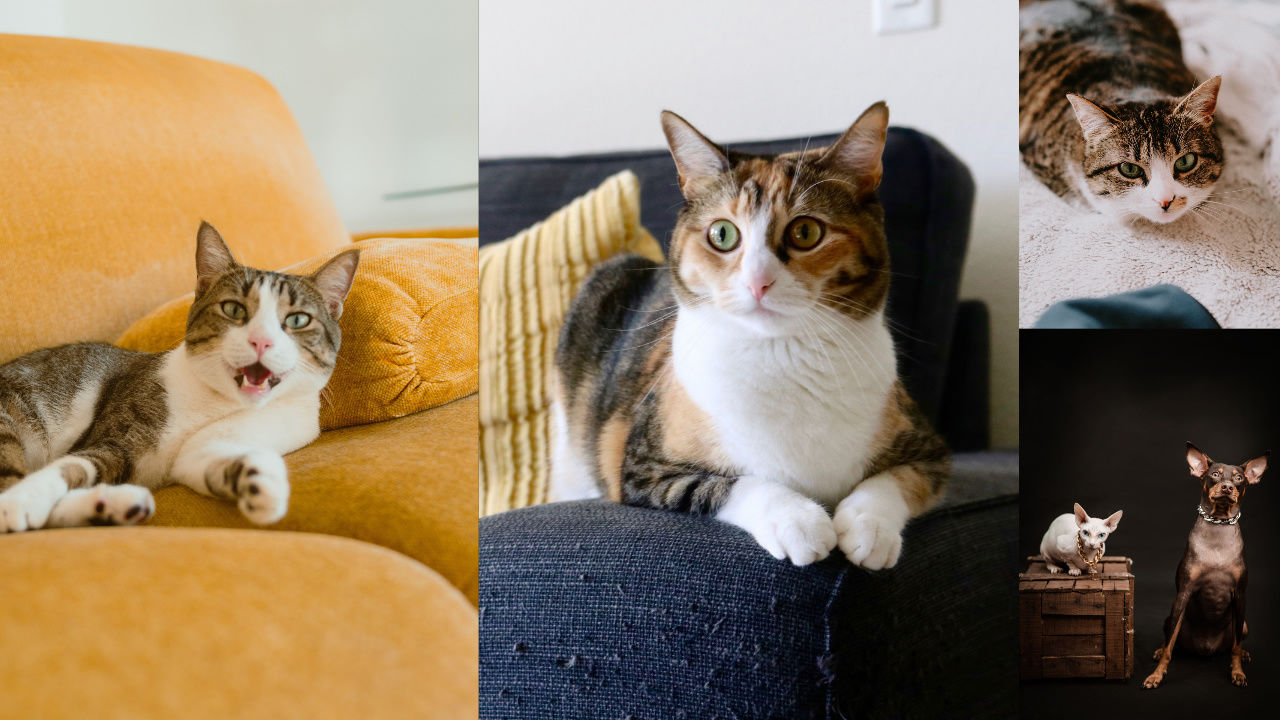
The project was run on four photographs: three cat images and one image containing both a cat and a dog.
| Input | Highest-scoring label | Score | Second label | Score | Third label | Score |
|---|---|---|---|---|---|---|
| cat2.jpg | tabby | 62.0% | Egyptian cat | 17.3% | tiger cat | 7.8% |
| cat3.jpg | tabby | 52.5% | tiger cat | 17.3% | sock | 3.9% |
| cat4.jpg | tabby | 45.1% | tiger cat | 38.4% | Egyptian cat | 12.5% |
| cat-dog.jpg | Chihuahua | 69.4% | kelpie | 19.6% | toy terrier | 3.9% |
Do note, that these percentages are model output scores, not a measured accuracy percentage or a verified breed identification.
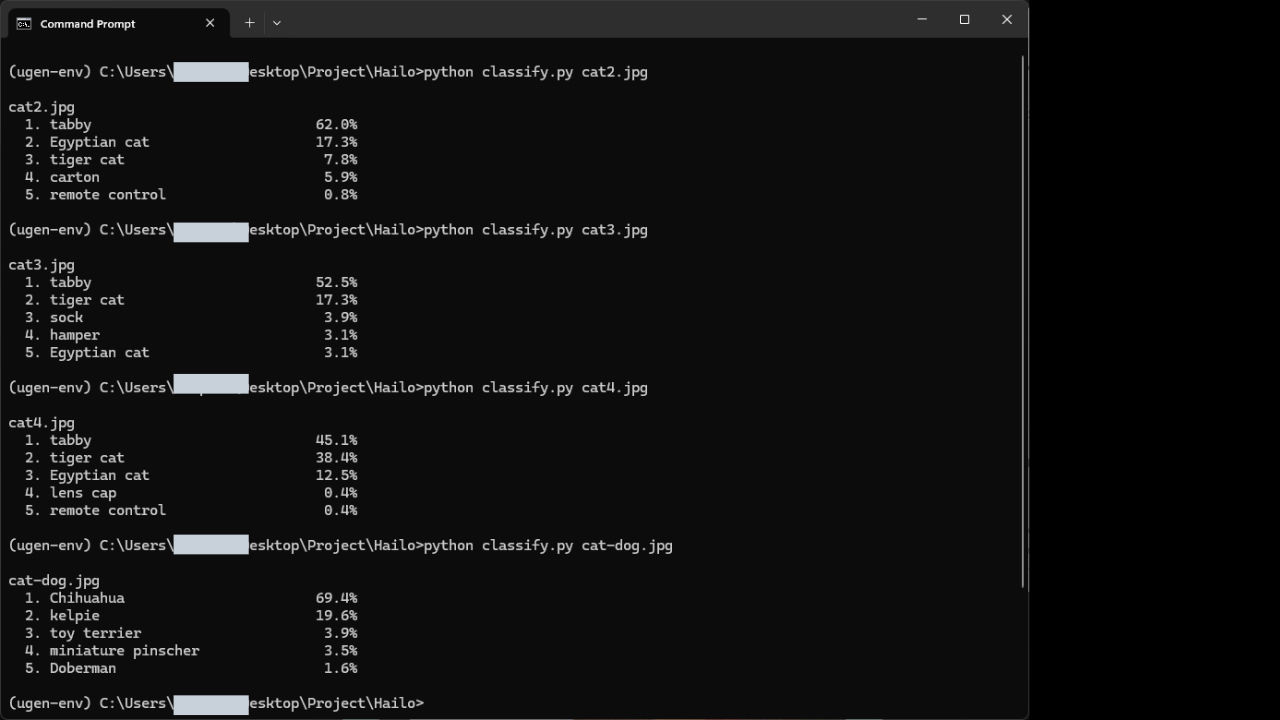
All three cat photographs returned a cat-related label in first place. Their differing score distributions show why the leading score needs to be further fine-tuned. A 45.1% tabby result does not mean the remaining probability represents an absence of a cat: tiger cat and Egyptian cat account for substantial scores in the same output.
Some lower-ranked alternatives were less useful. The first photograph also returned carton at 5.9% and remote control at 0.8%. The second included sock at 3.9% and hamper at 3.1%. Those labels illustrate the limits of treating every top-five suggestion.
The mixed-subject image was thrown into the mix to see how the script handled it. It clearly contains a cat and a dog, but the classifier’s top five results were all dog labels even though we wanted to identify just the cat. Chihuahua led at 69.4%, followed by kelpie at 19.6%, toy terrier at 3.9%, miniature pinscher at 3.5% and Doberman at 1.6%. This just means that we need to tweak the script a little further.
The application produces one ranked class distribution for the prepared crop. It does not locate and label each animal separately. Its central crop also changes the visual information presented to the network, which comes to the fore when subjects occupy different parts of the original photograph. This is why a lot of classifiers tend to setup bounding boxes first and then run the classifier only on the bounding box rather than the entire image.
A whole-image classifier is suitable for choosing a broad category for an image. Counting animals, identifying every object or locating a particular subject calls for a detector, a multi-label pipeline or another model designed for that task.
Running the classification project
The implementation uses classify.py, the compiled resnet_v1_50.hef model, HailoRT’s Python bindings, NumPy and OpenCV. The script’s HEF_PATH must point to the local compiled model. Its label list is stored as imagenet_classes.txt in the working directory.
The multi-file command uses the same model configuration across the file loop. It processes images sequentially; it does not implement asynchronous inference or a multi-image inference batch.
The inference path is as follows:
with VDevice(VDevice.create_params()) as vdevice:
    model = vdevice.create_infer_model(HEF_PATH)
    model.input().set_format_type(FormatType.UINT8)
    model.output().set_format_type(FormatType.FLOAT32)
    in_h, in_w, _ = model.input().shape
    with model.configure() as configured:
        for path in images:
            frame = preprocess(path, in_h, in_w)
            bindings = configured.create_bindings()
            bindings.input().set_buffer(frame)
            output = np.empty(model.output().shape, dtype=np.float32)
            bindings.output().set_buffer(output)
            configured.run([bindings], 10000)
            probs = output.flatten()
            top = np.argsort(probs)[::-1][:TOP_K]
The full script includes label loading, preprocessing and formatted output. Its clear division between host preparation and accelerator execution makes it a useful starting point for a small local vision application.
Where does the ASUS UGen 300 fit in?
There’s no dearth of application scenarios for the ASUS UGen300. It can be used for a wide range of AI-driven applications, including image classification, real-time object detection, instance segmentation, facial recognition, pose estimation, gesture recognition, human activity recognition, and anomaly detection. At the end of the day, it’s an AI accelerator and you can slap it into anything that has a need for inferencing.
In industrial environments, it can support automated quality inspection, defect detection, predictive maintenance, equipment monitoring, and inventory tracking. In retail, applications include customer counting, product recognition, shelf monitoring, and queue analysis. In healthcare, it can assist with medical image analysis and patient activity monitoring. Smart surveillance applications include intrusion detection, traffic monitoring, vehicle classification, and real-time event detection. It can also support natural language processing, text generation, document summarisation, optical character recognition (OCR), speech recognition, voice-to-text conversion, and vision-language processing.
In robotics and automation, it enables visual perception, object tracking, and gesture-based control. Additionally, it can be used for edge AI development, local LLM inference, image enhancement, super-resolution, and real-time AI-powered decision-making without continuous cloud connectivity.
Verdict
The ASUS UGen300 makes a strong case as a portable development accelerator for a defined local AI workload. With 40 TOPS at INT4, this thing can be used for a wide assortment of applications. This should be treated as a development tool since there’s a bit of effort needed to get things going.
For developers, educators and enthusiasts building around supported Hailo models, the UGen300 is a practical way to add dedicated inference hardware to an existing system. For a general PC owner seeking an automatic speed boost across AI applications you will have to look at beefing up your NPU or GPU. For the ASUS UGen 300, its appeal lies in building turnkey projects while offering portability.

Mithun Mohandas is an Indian technology journalist with 14 years of experience covering consumer technology. He is currently employed at Digit in the capacity of a Managing Editor. Mithun has a background in Computer Engineering and was an active member of the IEEE during his college days. He has a penchant for digging deep into unravelling what makes a device tick. If there's a transistor in it, Mithun's probably going to rip it apart till he finds it. At Digit, he covers processors, graphics cards, storage media, displays and networking devices aside from anything developer related. As an avid PC gamer, he prefers RTS and FPS titles, and can be quite competitive in a race to the finish line. He only gets consoles for the exclusives. He can be seen playing Valorant, World of Tanks, HITMAN and the occasional Age of Empires or being the voice behind hundreds of Digit videos.
View full profile