WhatsApp's Search by Date feature is already on iOS, Mac desktop and WhatsApp Web, and is currently rolling out on Android devices.
This feature allows you to quickly navigate through your chat history by selecting a specific date.
It definitely helps you to save time.
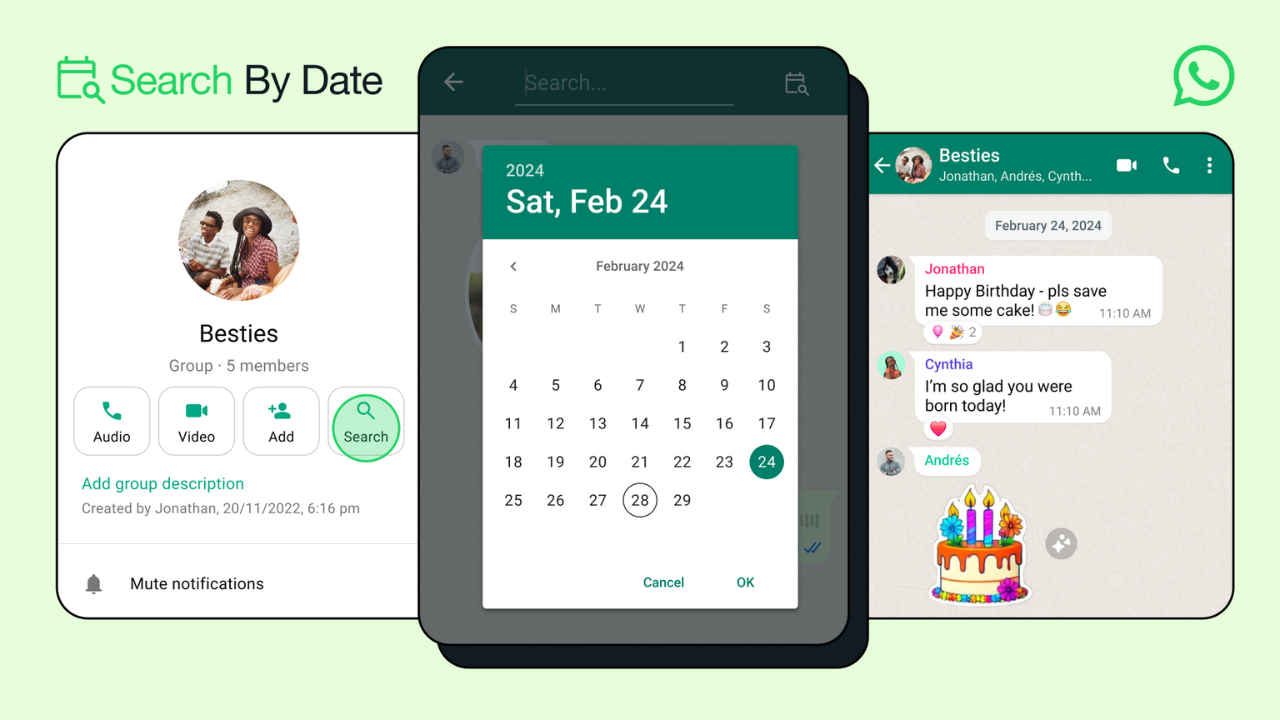
Do you ever find yourself scrolling endlessly through your WhatsApp chats, trying to find a specific message from a while ago? It can be like searching for a needle in a haystack! But fear not, because WhatsApp has a handy feature called “Search by Date.”
 Survey
WhatsApp’s Search by Date feature is already on iOS, Mac desktop and WhatsApp Web, and is currently rolling out on Android devices.


In this article, we’ll show you how to use the Search by Date feature to locate WhatsApp messages quickly and efficiently, saving you time and frustration.
Also read: How to send or receive money using WhatsApp: Step-by-step guide for Android & iOS
How to use Search by Date feature on WhatsApp
Android
Step 1: Open the WhatsApp app on your Android device.
Step 2: Open an individual chat or a group.
Step 3: Tap the name of the person or the group name present at the top.
Step 4: Tap Search.
Step 5: Tap the Calendar icon present at the top right corner.
Step 6: Select the date and tap OK.
Also read: How to find a specific message on WhatsApp: Quick guide

iOS
Step 1: Open the WhatsApp app on your iPhone.
Step 2: Open an individual chat or a group.
Step 3: Tap the name of the person or the group name present at the top.
Step 4: Tap Search.
Step 5: Tap the Calendar icon.
Step 6: Set the date and tap Jump to date.
In my opinion, the Search by Date feature offers several benefits. It allows you to quickly navigate through your chat history by selecting a specific date, making it easier to find past messages or information without scrolling through numerous conversations.
This feature definitely saves time by allowing you to pinpoint messages from a particular date without the need for manual scrolling or keyword searching.
 Follow Us
Ayushi Jain
Tech news writer by day, BGMI player by night. Combining my passion for tech and gaming to bring you the latest in both worlds. View Full Profile


