Learn to create viral hand-drawn posters using Google Gemini without any drawing skills.
Simple upload-and-prompt steps let you turn photos into trendy doodle-style portraits.
Use ready-made creative prompts to generate personalised, high-quality 4K poster designs.
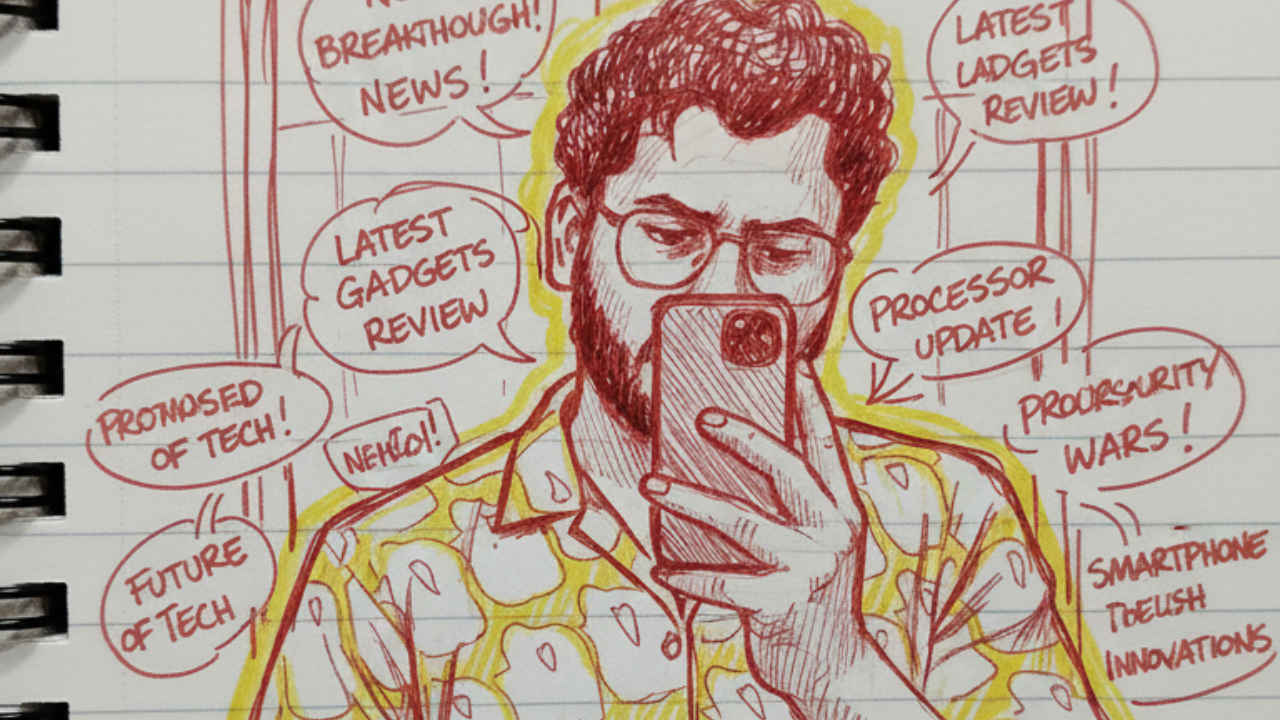
If you’re somewhat like me and spend time scrolling on Instagram, you must have stumbled upon those stylish hand made posters that are suddenly everywhere. They look so real that they may send you into a self-introspection of why you missed all your art classes. But let me tell you that no, your friends have not become skilled artists overnight; those posters are actually created with the help of AI. With Google Gemini Nano banana, you can create a clean and eye-catching hand portrait in just a few minutes.
 Survey
Today we are surrounded by smart tools that make creative work simple, and these trending hand posters are a good example of how easy it has become to try something new. The best part is that you do not need special drawing talent or fancy equipment to make your own. Follow along with the article to learn how to do it.


How to create a hand-drawn poster using Gemini
Follow the easy steps below to make hand-drawn poster using Gemini:
- Open Gemini on your phone or on the web.
- Sign in with your Google account. If you’re new, sign up first.
- Press the + icon and choose Upload files. Now, upload the image you want Gemini to use as the base for your portrait.
- Next, tap Tools and select Create images.
- In the text box section, type a creative description of the poster you want to create. Alternatively, you can also copy and use one of the prompts I provided at the end of the article.
- Once done, double-check everything and hit Enter to start the process.
Congratulations! You’ve successfully created the viral hand-drawn poster for your social media. Download the image and feel free to share it over social media platforms. Moreover, you can repeat the process and tweet the prompt as per your requirements to get more personalised hand-drawn posters.
Sample prompts you can try
Here are some of the prompts you can try to create the viral hand made posters using the Google Gemini Nanao banana:
How to create viral hand made posters using Google Gemini
If you’re somewhat like me and spend time scrolling on Instagram, you must have stumbled upon those stylish hand posters that are suddenly everywhere. They look so real that they may send you into a self-introspection of why you missed all your art classes. But let me tell you that no, your friends have not become skilled artists overnight; those posters are actually created with the help of AI.
Today we are surrounded by smart tools that make creative work simple, and these trending hand posters are a good example of how easy it has become to try something new. The best part is that you do not need special drawing talent or fancy equipment to make your own. With Google Gemini Nano, you can create a clean and eye-catching hand portrait in just a few minutes. Follow along with the article to learn how to do it.
Also read: Realme 16 Pro series India launch soon: Price, camera, performance and all other leaks
How to create a hand-drawn poster using Gemini
Follow the easy steps below to make hand-drawn poster using Gemini:
- Open Gemini on your phone or on the web.
- Sign in with your Google account. If you’re new, sign up first.
- Press the + icon and choose Upload files. Now, upload the image you want Gemini to use as the base for your portrait.
- Next, tap Tools and select Create images.
- In the text box section, type a creative description of the poster you want to create. Alternatively, you can also copy and use one of the prompts I provided at the end of the article.
- Once done, double-check everything and hit Enter to start the process.
Congratulations! You’ve successfully created the viral hand-drawn poster for your social media. Download the image and feel free to share it over social media platforms. Moreover, you can repeat the process and tweet the prompt as per your requirements to get more personalised hand-drawn posters.
Sample prompts you can try
Here are some of the prompts you can try to create the viral hand made posters using the Google Gemini Nanao banana:
Prompt 1:
Generate a hand-drawn portrait illustration in red and yellow pen on notebook paper, inspired by doodle art and comic annotations. Keep a full likeness of the subject, expressive lines, spontaneous gestures, bold outline glow, and handwritten notes around. realistic pen stroke texture, 4K resolution. Don’t change the face cut.
Prompt 2:
Create a hand-drawn portrait sketch in blue and orange gel pen on ruled notebook paper, inspired by doodle art and dynamic comic scribbles. Preserve full likeness of the subject with expressive strokes, bold contour glow, energetic pen marks, and scattered handwritten annotations. Maintain realistic pen-stroke texture, 4K resolution, and don’t alter the subject’s face shape.
Prompt 3:
Create a notebook-style portrait illustration using red, black, and yellow pen strokes, blending doodle aesthetics with playful comic-margin notes. Keep the subject’s exact facial structure while adding spontaneous shading, energetic linework, glowing outlines, and hand-written comments surrounding the portrait. High-detail pen rendering, 4K quality.
Also read: OpenAI flags rising cyber threats as AI models get more powerful
Prompt 4:
Produce a vibrant pen-drawn portrait made with layered red and blue inks on lined paper, mixing doodle sketch energy with comic-panel annotations. Retain full facial likeness, emphasize emotional line flow, textured scribbles, bold edge glow, and margin notes. Hyper-detailed pen texture, 4K resolution, do not modify face cut.
Prompt 5:
Illustrate a portrait in dual-tone marker and pen (yellow + black) on notebook paper, inspired by expressive doodles and annotated comic sketches. Keep the original face proportions perfectly intact. Use loose gesture strokes, bold glowing outlines, textured shading, and handwritten side notes. Render in realistic pen detail, 4K.
Prompt 6:
Generate a stylized hand-drawn portrait in red and purple ink on rough notebook paper, merging doodle spontaneity with comic-style captions. Maintain complete likeness of the subject’s face cut while adding dynamic lines, glowing bold outlines, textured pen shading, and scattered handwritten annotations. Ultra-sharp 4K rendering.
Prompt 7:
Create a lively doodle-inspired portrait sketch in multicolor pen (red, yellow, blue) on diary paper. Preserve the subject’s exact facial structure with expressive stroke flow, energetic edges, glowing outline effects, and notebook-style handwritten notes around. Detailed pen-stroke realism, 4K resolution.
 Follow Us
Bhaskar Sharma
Bhaskar is a senior copy editor at Digit India, where he simplifies complex tech topics across iOS, Android, macOS, Windows, and emerging consumer tech. His work has appeared in iGeeksBlog, GuidingTech, and other publications, and he previously served as an assistant editor at TechBloat and TechReloaded. A B.Tech graduate and full-time tech writer, he is known for clear, practical guides and explainers. View Full Profile


