ChatGPT's Study Mode uses questions and quizzes to help students think deeper, not just copy answers
OpenAI’s new Study Mode turns ChatGPT into a personalized tutor
Students can now upload problems, get hints, and practice smarter using ChatGPT

OpenAI’s new “Study Mode” for ChatGPT, launched on July 29, 2025, marks a major shift in how generative AI interacts with students. Instead of simply providing fast answers, the tool now encourages deeper engagement by asking questions, offering hints, and guiding users through the learning process step by step.
 Survey
With this update, ChatGPT moves from being a quick fix for homework to becoming a personalized tutor that nudges students toward real understanding. It’s a deliberate move, and one that comes amid growing concerns about how students are using AI too often, simply to cut corners. Here’s how it works, and why it might matter more than you think.


Also read: OpenAI adds study mode to ChatGPT: How it works, features and other details
ChatGPT study mode: Not just answers
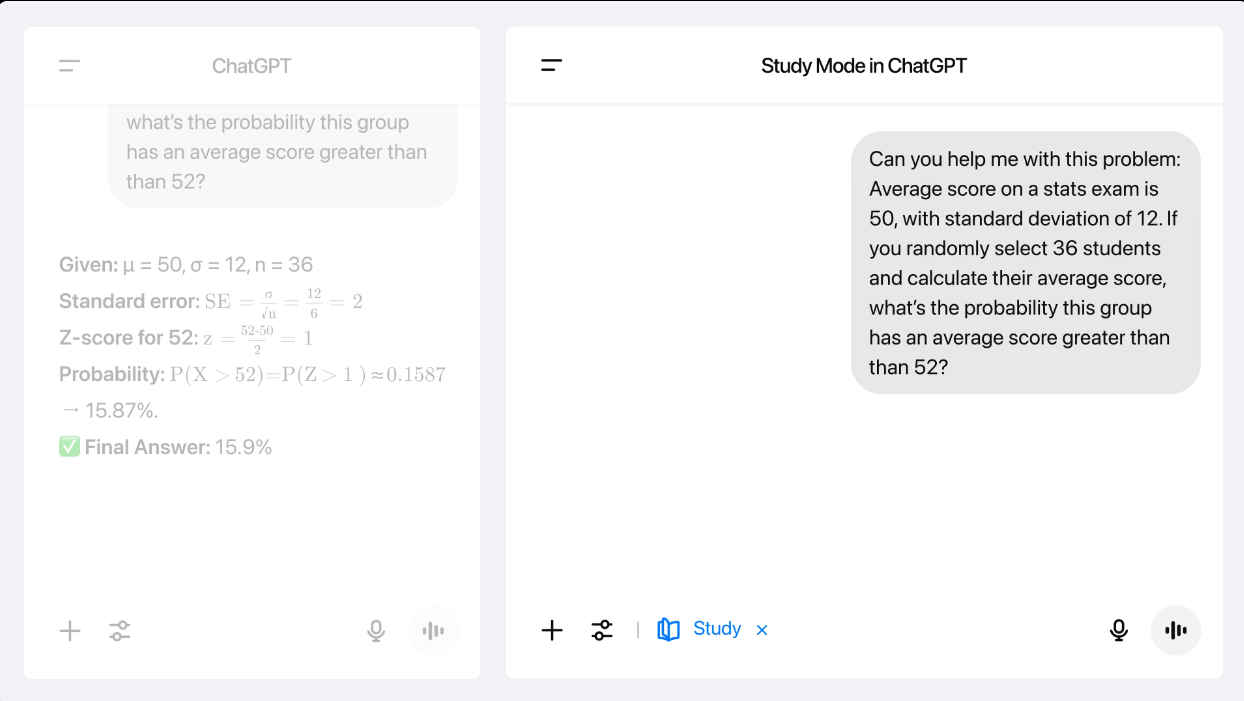
Study Mode changes the tone and tempo of ChatGPT responses. When enabled, the chatbot avoids direct answers at first. Instead, it uses a Socratic approach: asking leading questions, encouraging reflection, and offering feedback based on how the student responds.
Whether you’re tackling a math problem, analyzing a poem, or preparing for a science exam, Study Mode aims to slow you down constructively.
You might upload a scanned worksheet or paste in a question from your textbook. Instead of immediately solving it, ChatGPT might say: “Let’s think this through together. What’s the first thing you notice about the equation?” Or for a literature question: “What do you think the author is suggesting in this passage? Can you find any key phrases?” The idea is to build habits of thinking, not just harvesting information.
Personalization through memory and skill adaptation
Study Mode leverages ChatGPT’s memory feature (available to Plus and Pro users) to adapt responses based on your learning style, previous questions, and recurring challenges. If it notices you struggle with geometry proofs but breeze through algebra, it might ramp up the challenge in one area while offering lighter support elsewhere.
Also read: ChatGPT 5 coming in August: Just how good is it?
It also offers quizzes, summary prompts, and structured sections that build on prior interactions. This turns ChatGPT into more than a chatbot, it becomes a dynamic study companion that tracks progress across time.
Importantly, Study Mode is available even to free users. It’s turned on by default in the new educational interface and can be toggled off, though educators might want to encourage keeping it on.
OpenAI says Study Mode was developed with input from teachers, curriculum designers, and researchers, including experts from Stanford and over 40 other institutions. The result is a tool that understands pedagogical balance: not just explaining the “what,” but guiding toward the “why” and “how.”
That’s a significant improvement over how students have often used ChatGPT until now. Studies – including one from MIT – suggest that while AI boosts productivity, it can also promote “metacognitive laziness” if used passively. Study Mode aims to counter that.
ChatGPT study mode: More than a feature
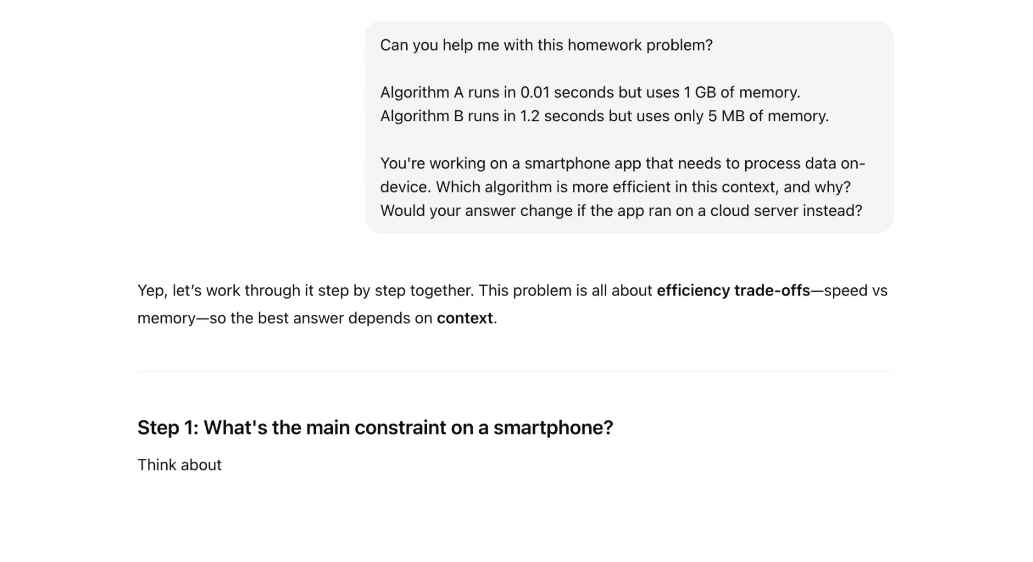
Of course, no system is foolproof. Study Mode can be turned off with a single toggle, returning ChatGPT to its default, answer-giving behavior. There’s also the ongoing issue of AI hallucinations, cases where ChatGPT confidently gives false or misleading information. While the new mode doesn’t eliminate these risks, it reduces the likelihood of blind copying by engaging the user in the process.
Critics argue that it’s still too easy to treat ChatGPT as a shortcut rather than a tool. And in an educational system still struggling with how to assess students fairly in the AI age, that tension remains unresolved.
The launch of Study Mode reflects a growing trend in AI: tools are beginning to take responsibility for how they’re used. Just as Google’s AI Mode now offers persistent “Canvas” workspaces and live video search to support students (instead of just indexing the web), OpenAI is trying to push users toward more meaningful engagement.
This isn’t just an update, it’s a statement. Study Mode tells students: We’re not here to do your homework. We’re here to help you understand it. So, how can students use it effectively?
Keep Study Mode on, resist the temptation to switch back to direct answers. The long-term gain is worth it. Use it early in your study process, don’t wait till the night before the exam. Use it to understand, not just revise. Ask it to quiz you, Study Mode supports short quizzes and can tailor them based on past struggles. The multimodal capabilities (for Pro users) let you paste in handwritten work, graphs, or photos and you can ask for “explain like I’m five” answers if something doesn’t make sense.
Study Mode is not a silver bullet, and it won’t fix the structural challenges of AI in education. But it is a step in the right direction toward AI that teaches, rather than just tells.
If students use it wisely, Study Mode could become one of the most powerful learning tools of their academic lives. Not because it knows everything, but because it helps you know more.
Also read: Beyond Azure, OpenAI embraces Google Cloud: AI frenemies forever?
 Follow Us
Vyom Ramani
A journalist with a soft spot for tech, games, and things that go beep. While waiting for a delayed metro or rebooting his brain, you’ll find him solving Rubik’s Cubes, bingeing F1, or hunting for the next great snack. View Full Profile


