
Gaming Peripherals 101: How to choose the correct display
 Follow Us

You know that feeling when you’re in the zone? Your character is moving with flawless precision, every shot lands true, and the world on your screen feels so real you could reach out and touch it. That’s the power of the right display, and it’s the unsung hero of every elite gaming setup. While a powerful graphics card and a lightning-fast processor get all the glory, the monitor is what actually shows you the game, turning data into the pixels that you see and react to. For a gamer, choosing a display isn’t just about picking a screen – it’s about selecting a window into a virtual world, one that can mean the difference between victory and defeat.
 Survey
Refresh rate
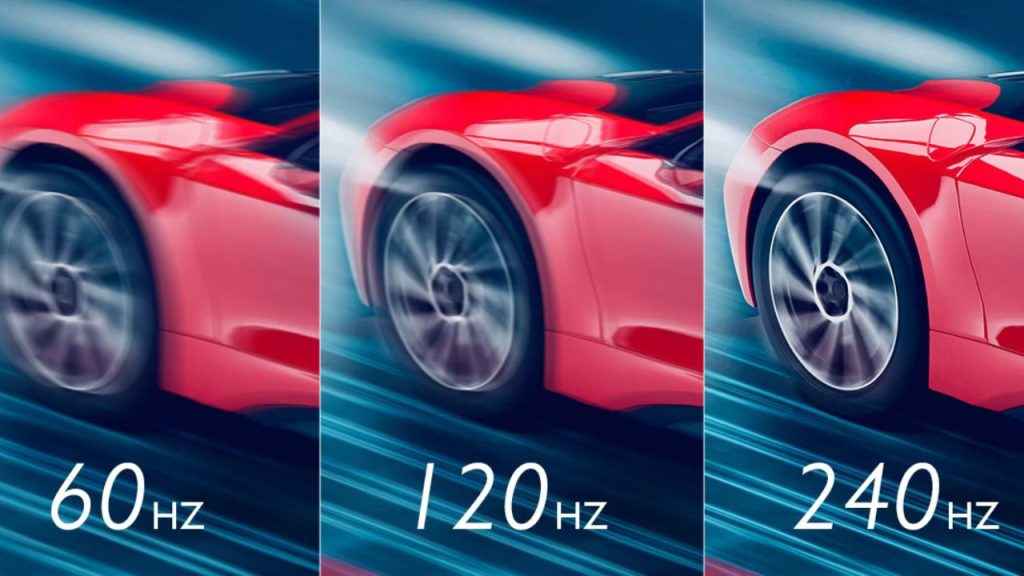
Imagine you’re playing a fast-paced shooter. A standard office monitor with a 60 Hz refresh rate will refresh the image 60 times a second. That sounds fast, but in the heat of battle, it’s often not enough. You might see a blur as you turn, or a stuttering enemy that makes it impossible to land a critical shot.
Now, picture that same scenario on a 144 Hz monitor. The screen is refreshing more than twice as often, displaying a much smoother, more fluid picture. This isn’t just a visual upgrade; it’s a competitive advantage. You can track targets with greater precision and react to threats a fraction of a second faster. For esports professionals and serious enthusiasts, stepping up to 240 Hz or even higher is a given, as it provides an even clearer and more responsive experience. It’s about seeing what your opponents can’t.
Resolution and panel type
While speed is critical for competitive play, the visual experience of a game is just as important for many players. This is where resolution and panel type come in.
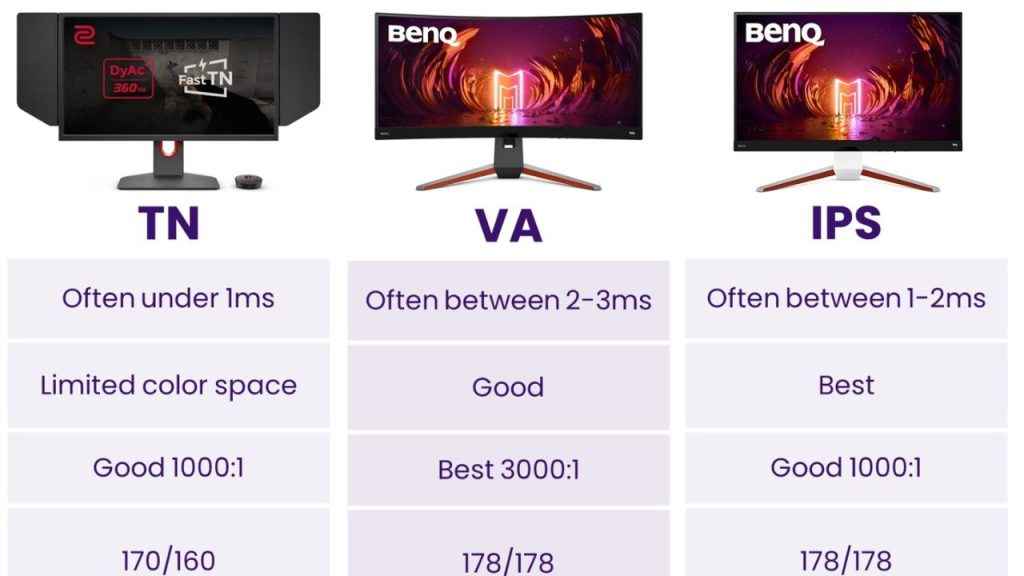
- Resolution determines the sharpness and detail of the image. A Full HD (1080p) display is the standard and is perfect for gamers who prioritize high frame rates on a budget. For those who want more detail without requiring a top-of-the-line PC, 1440p (Quad HD) is the sweet spot, offering a noticeable visual boost. And if you have the hardware to support it, a 4K (Ultra HD) monitor provides a stunningly crisp, cinematic experience.
- The panel type is the technology that creates the image itself. Twisted Nematic (TN) panels were long the king of speed, but sacrificed color and viewing angles. Today, In-Plane Switching (IPS) panels have largely caught up in speed while offering far superior color accuracy and wider viewing angles, making them a popular choice for all-around performance. For the ultimate visual experience, OLED (Organic Light-Emitting Diode) displays offer perfect blacks and vibrant colors, though they come at a premium price and have the potential for burn-in.
Response time and adaptive sync
Beyond the main specifications, two features act as the silent protectors of your gameplay. Response time, measured in milliseconds (ms), is how fast a pixel can change color. A low response time, typically 1 ms or less, is crucial for preventing the distracting “ghosting” effect where fast-moving objects leave a trail.
Finally, adaptive sync technology is like the glue holding your monitor and graphics card together. When your GPU and monitor are out of sync, you get screen tearing – a jagged, horizontal line that breaks the image. Technologies like NVIDIA G-Sync and AMD FreeSync synchronize the monitor’s refresh rate with your GPU’s frame rate, eliminating tearing and stuttering for a flawlessly smooth performance.
Ultimately, the perfect display is a personal choice. It’s a balance between speed, visual quality, and your budget. Whether you’re an aspiring esports pro who needs every competitive edge or a casual player who wants to get lost in a beautifully rendered open world, understanding these core principles will help you find the monitor that’s perfect for you.


