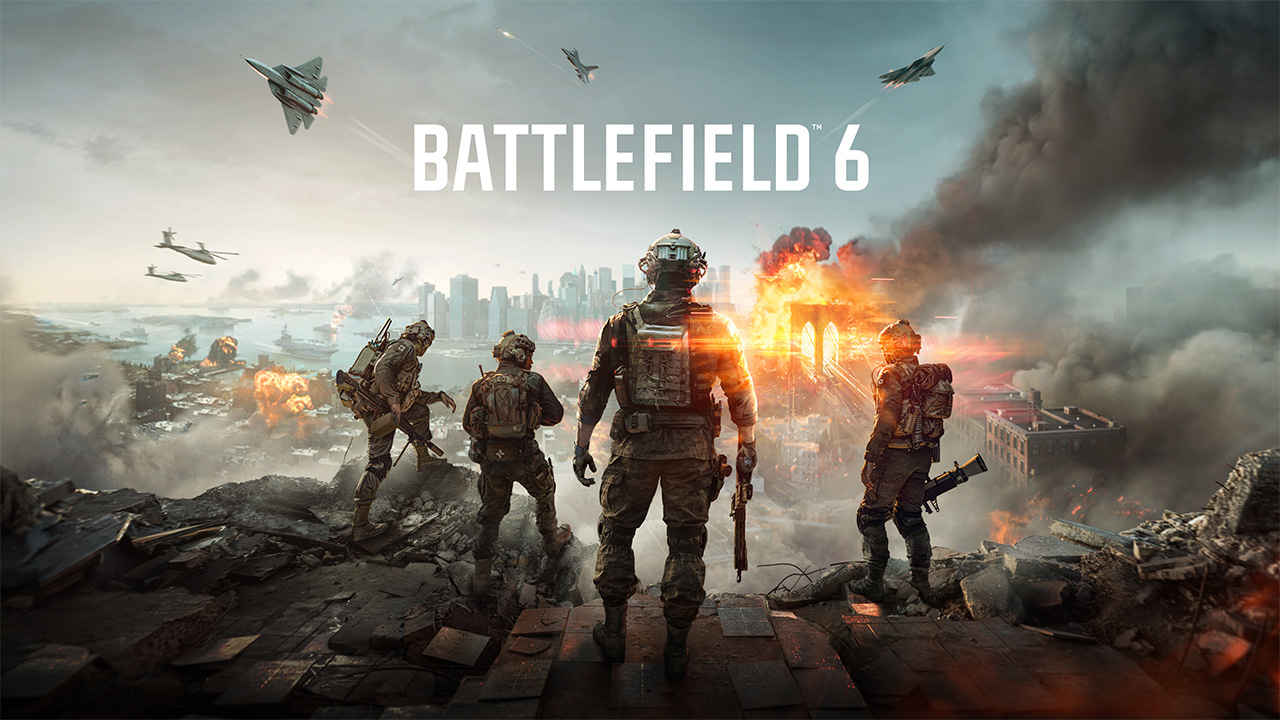
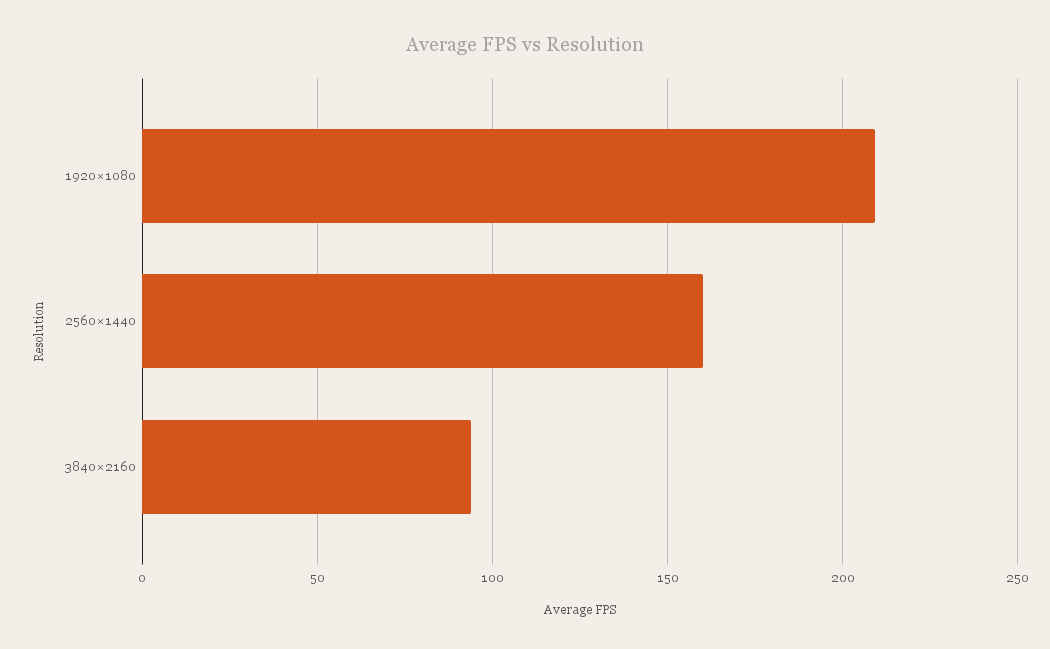
After the stumble of Battlefield 2042, Battlefield 6 feels like a proper course correction. It restores the series’ large-scale chaos while adding a surprisingly focused single-player campaign that plays to Frostbite’s strengths. We ran the game on using multiple graphics performance and settings on the NVIDIA GeForce RTX 5090 across three native resolutions, 1920×1080, 2560×1440 and 3840×2160, and it includes runs at 4K with frame generation set to two different strengths. We also track VRAM consumption with the HD Texture Pack installed, since memory behaviour has become a real-world limiter for many players. So if you’re looking to buy Battlefield 6 or even build a new PC just for Battlefield 6, then read on.
 Survey
It’s NATO vs Pax Armata
Set in the near future, Battlefield 6 centres on Dagger 1-3, an elite team of U.S. Marine Raiders battling Pax Armata, a private military force bent on reshaping global power as NATO wobbles. The squad is led by assault specialist and Master Sergeant Hayden “Haz” Carter, with engineer Gunnery Sergeant Dylan Murphy, sniper Staff Sergeant Simone “Gecko” Espina, and support specialist Staff Sergeant Cliff Lopez rounding out the core fireteam. They are guided by Melissa Mills, a CIA liaison with ties to their missions, and frequently crossed by Lucas Hemlock, a shadowy Agency operator with a heavily redacted past. The campaign’s dramatic spine is Carter’s fraught history with Alexander Kincaid, an ex-SAS operative who once fought alongside him and now serves as Pax Armata’s field commander and primary antagonist. The result is a tightly scripted, globe-trotting conflict that mixes special operations grit with shifting allegiances and political fallout.


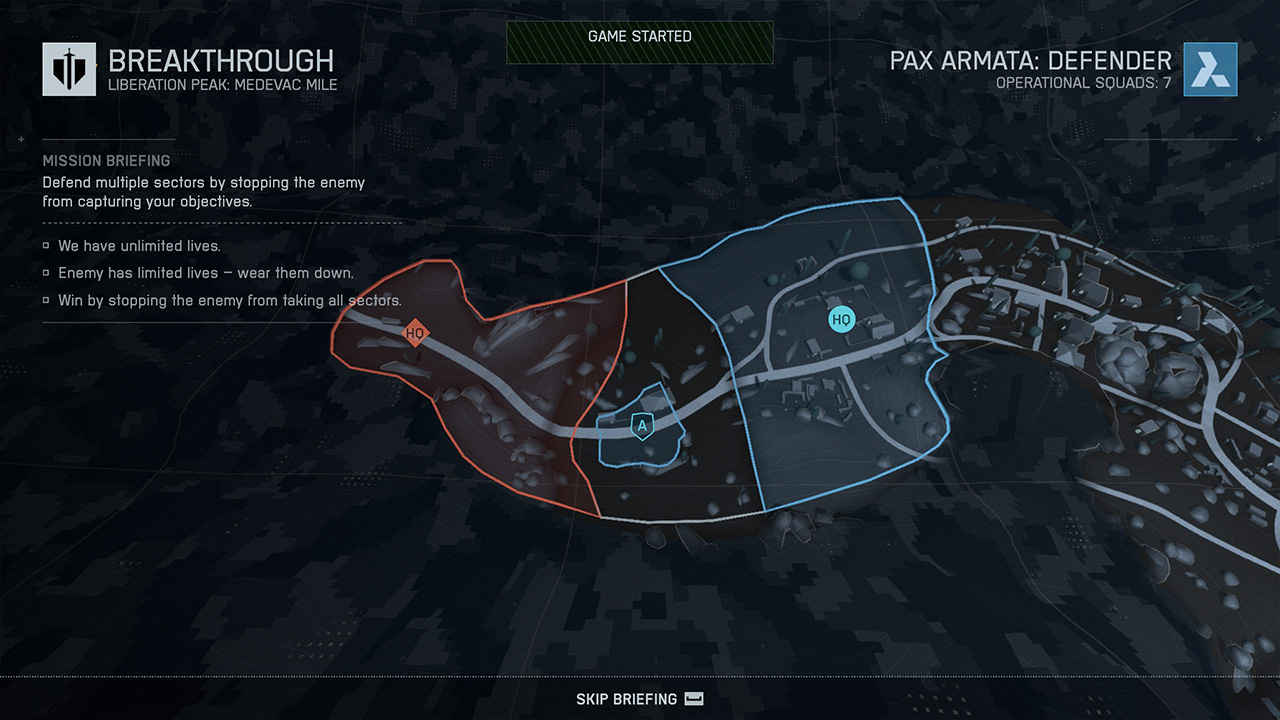
From a benchmarking perspective, the single-player campaign serves as a reliable, repeatable stress test. It is highly cinematic, curated in a way that lets DICE time destruction, smoke volumes and light shafts to the beat of the mission. That predictability is valuable when you want consistent frame pacing across multiple settings sweeps. The trade-off is that some character work, especially facial animation, can appear stiffer than modern Unreal Engine 5 showcases. In motion, during set-piece firefights, it largely does not distract.
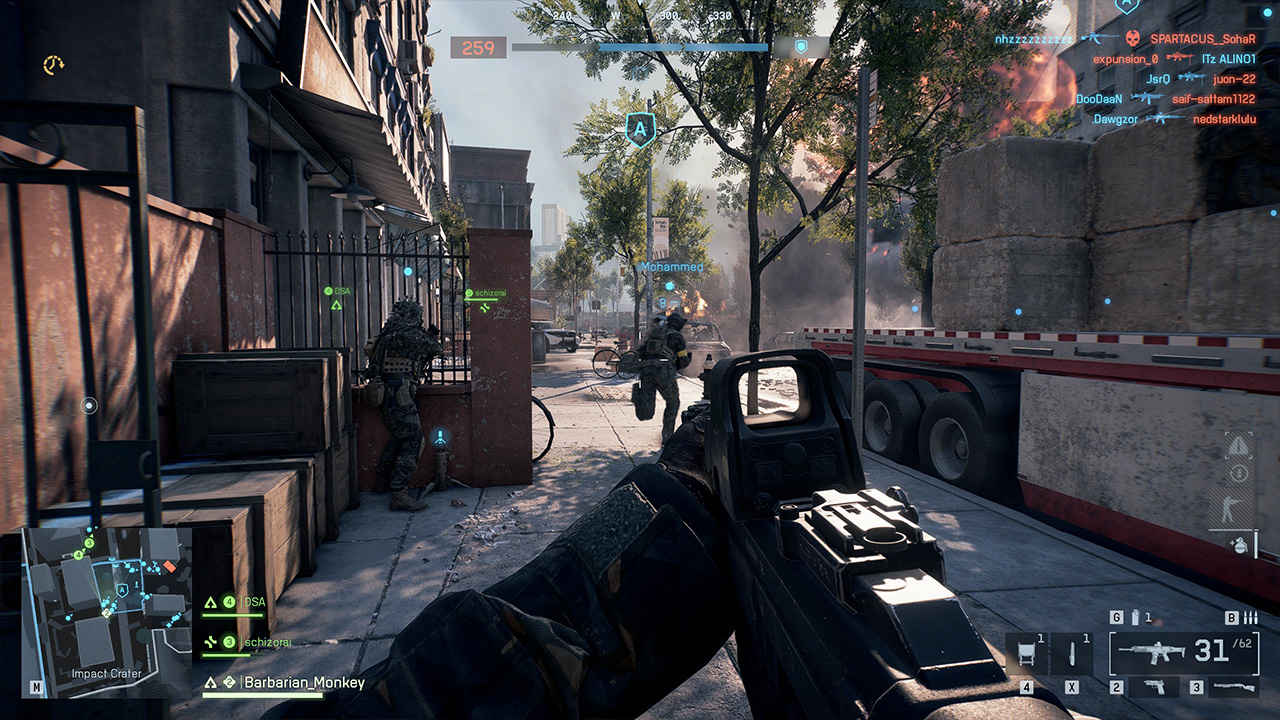
Multiplayer is where the spectacle cranks up and where frame time spikes are most revealing. Dynamic weather, heavy vehicle effects and rapid shifts in visibility are the norm. Battlefield 6’s reworked class system and smarter map funnels keep the render budget in check more often than in 2042, which helps frame times remain tighter during urban sieges and open-field armour pushes. In short, the game remains a great showcase for modern GPUs without tipping into gratuitous, performance-killing flourishes.
Graphics engine and settings
Battlefield 6 runs on Frostbite, which is good news for raw throughput and asset streaming. Compared to many Unreal Engine 5 releases, it sacrifices some micro-detail in geometry and the occasional material nuance to achieve higher native frame rates on the same hardware. The lighting pipeline is used cleverly in the campaign, where the team can predict the camera position, and the resulting mood is often superb. Texture quality can be inconsistent, even with the HD Texture Pack installed, but those moments are sporadic rather than systemic.
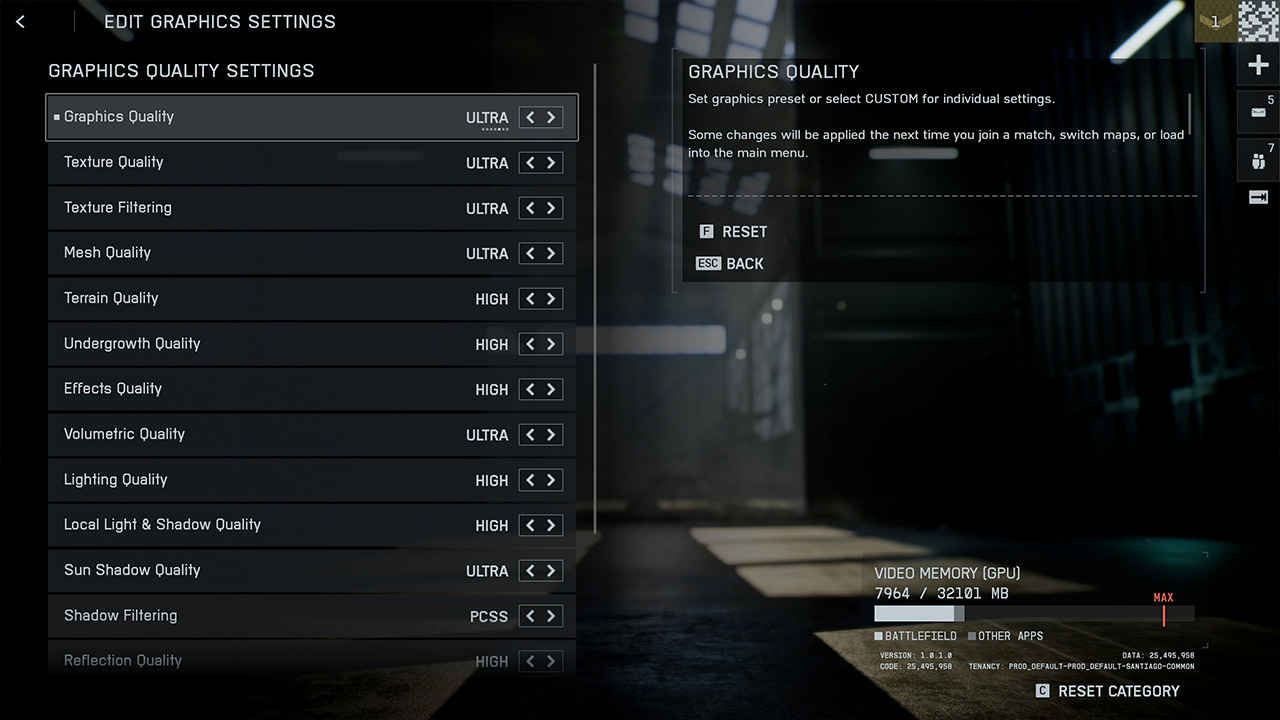
DICE has shipped a generous set of settings, split across the main graphics menu, Graphics Quality Settings, and Advanced. The preset ladder runs from Low, Medium, High and Ultra to Overkill. There is also a confusing Performance Preset option, whose Auto modes toggle V-Sync and override some toggles in the background. Treat that as something to ignore once you start making manual changes, since any edits push the profile to Custom.
Anti-aliasing and upscaling are refreshingly open. You can choose TAA or native-resolution AA like DLAA, FSR Native AA and XeSS Native AA, or switch to one of the three upscalers: DLSS, FSR or XeSS. Frame generation is also present for all three camps, but it is vendor-bound. On GeForce you get DLSS Frame Generation, on Radeon you get FSR FG, on Arc you get XeSS FG. You cannot mix DLSS upscaling with FSR FG. Image stability is strong across the board, with no glaring ghosting or temporal break-up in typical play.
Here’s a biggie – there is no hardware accelerated ray tracing! And the studio has said not to expect it post-launch. At USD 400 million, Battlefield 6 is one of the most expensive games to have ever been made and Battlefield 2042 sales fell short of EA’s estimates. So they’ve decided to make the game as accessible as possible even to those with mid and entry-level graphics cards. Hence, the lack of hardware accelerated ray-tracing. In multiplayer, that omission is easy to accept. In single-player, some shadowing quibbles and screen-space reflection limitations poke through. The art direction does a good job masking those gaps, but anyone coming straight from a path-traced showpiece will notice.
Advanced includes resolution scale, a frame rate limiter up to 240, dynamic resolution scaling with minimum floor and NVIDIA Reflex. Reflex is enabled with boost by default, and you should leave it on unless you are chasing absolute top-end clock behaviour for a synthetic run. Motion blur, chromatic aberration, vignette and film grain can all be disabled, which keeps the image clean and reduces transient blur that upscalers sometimes struggle with.
Performance and stability
On the RTX 5090, Battlefield 6 delivers the kind of headroom you expect from a cutting-edge part paired with a fast X3D CPU. Frame times are tight, with short-lived excursions during the biggest destruction moments and weather transitions, but no chronic hitching. Frame generation at 4K was tested at two strengths on our sample build. If you are targeting a 120 Hz or 144 Hz 4K panel on an RTX 5090, FG is the lever that gets you there while keeping Overkill visuals largely intact. If your priority is competitive input response, consider disabling FG for small-team modes, keep Reflex on, and aim for very high native or upscaled frame rates instead.
Shader stutter is essentially absent. The game compiles shaders in a short pre-menu pass after a fresh install or driver change, roughly a minute, and then runs smoothly. Streaming traversal stutter appears briefly during campaign movement between heavily staged zones, even from a PCIe 5.0 NVMe, but the twitch is small and isolated. We did not encounter these micro-stutters in multiplayer, presumably because of the way maps are segmented and prefetched in that mode.
VRAM behaviour is worth spelling out with numbers. With the HD Texture Pack:
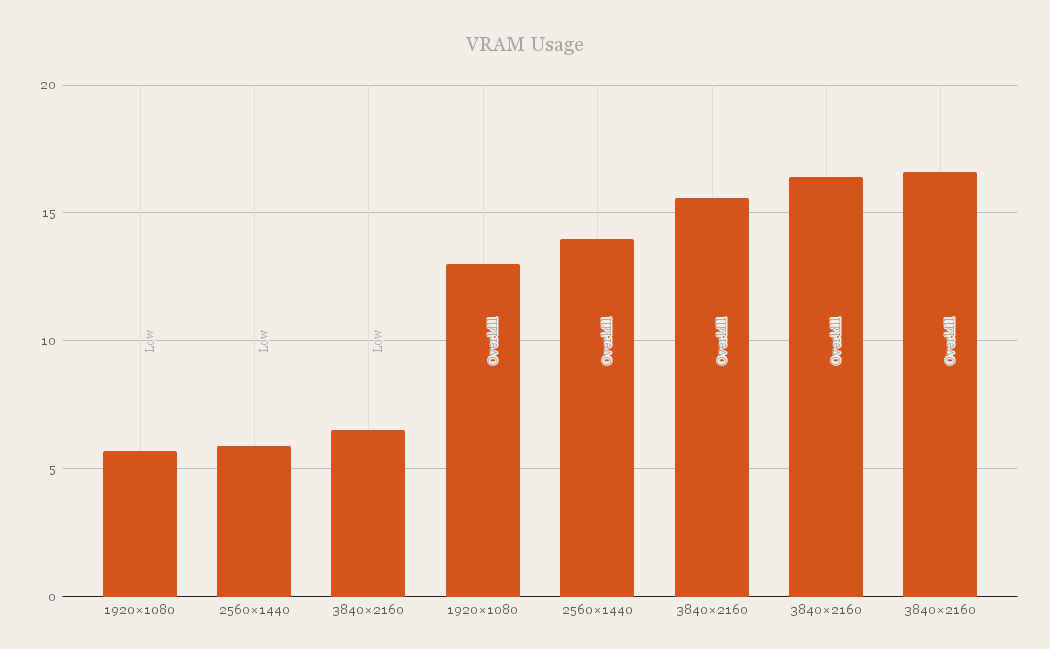
This pattern mirrors what we saw in recent Frostbite titles. The engine occupies what it can, then trims lazily. Importantly, our testing did not show a significant performance penalty at 4K when running on 8 GB versus 16 GB in short, repeated sequences, but we would not recommend that configuration for long multiplayer sessions with the HD textures. If you are on an 8 GB card, stick to High or Medium and consider disabling the HD pack.
The settings curve is player-friendly. Dropping from Overkill to Ultra or High nets a sizeable uplift, roughly half again compared to Low, without gutting image quality. The differences between the top three profiles are subtle, and in motion, especially in multiplayer, hard to spot. If you are trying to get a legacy GPU over a frame rate line, start by switching to High, keep SSGI on Low, choose PCF shadows, and leave sharpness near 50. Then use DLSS, or FSR in Quality mode before touching resolution scale. Dynamic resolution with a minimum floor is useful on CPUs that see occasional spikes in heavy servers, since it can shave a little GPU time rather than spiking the frame time graph.
As for stability, Battlefield 6 behaved well. No crashes during the test window, no persistent memory leaks, and no input latency oddities with Reflex enabled. We used current game-ready drivers from NVIDIA.
Hardware recommendations
Although our measurements focus on the RTX 5090, we can draw some lines for other GPUs using the scaling we observed and Frostbite’s historical behaviour. At 1080p with maximum settings, 60 fps without upscaling is comfortable on a GeForce RTX 3060 Ti, RTX 4060 Ti or RTX 5060 class card, and on the Radeon side an RX 7700 XT or the next-gen RX 9060 XT tier should be fine. If you own one of those and are targeting 120 Hz, enable DLSS or FSR in their Quality or Balanced modes to lift frame rates while retaining clarity.
At 1440p native, Battlefield 6 asks for more shader and memory bandwidth, so a GeForce RTX 4070 or 5070, or a Radeon RX 7800 XT or next-gen RX 9070, is a sensible baseline for 60 fps at the top preset. Again, the upscalers provide the headroom to chase 100 to 120 Hz on these cards without significant artefacts.
At 4K native, Frostbite’s balance shifts. Without frame generation you want an RTX 5090, RTX 5080 or RTX 4090 for a consistent 60 fps at max settings. DLSS or FSR will make 4K viable on a wider range of high-end cards, and DLSS Frame Generation on Ada Lovelace and Blackwell GPUs is particularly useful if you are chasing very high refresh rates on modern 4K panels. Owners of GeForce 30-series cards cannot use DLSS FG, and the game does not allow FSR FG on those GPUs, so those users should rely on pure upscaling and some selective settings trims.
Finally, a practical note on memory. With the HD Texture Pack installed, Battlefield 6 eagerly fills available VRAM. Do not panic if your overlay shows a number that seems extravagant. The engine is caching aggressively rather than hitting a hard requirement at every moment. That said, for 4K textures and long multiplayer sessions on high-population maps, 12 GB is the comfort floor, and 16 GB gives breathing room.
Battlefield 6 – For the masses
Battlefield 6 is not a technical revolution, but it is a well-tuned showcase of what Frostbite still does best, fast raster performance, clean temporal reconstruction and large-scale chaos that does not tear your frame time graph to shreds. On an RTX 5090, it is a brute force experience at 1080p and 1440p and a confident 94 fps at 4K native with the dials pegged, with frame generation available to chase very high refresh at 4K without silly compromises. The absence of ray tracing is a miss for the single-player purists, and some textures fail the pixel-peep test, yet the overall visual presentation is pleasing and often cinematic when the designers steer you through curated sequences.
For players on more modest hardware, the story is positive. Battlefield 6 scales sensibly, and the upscalers are well implemented across vendors. A 3060 Ti or 4060 Ti class card can enjoy 1080p at max settings without help and still step up to 120 Hz with Quality upscaling. A 4070 or 5070, or 7800 XT class card, is a happy 1440p machine. At 4K, native 60 fps belongs to the top shelf, with DLSS or FSR delivering the rest of the market a credible path to crisp image quality and smooth animation.
If you are building a settings plan, start with High, enable SSGI Low, pick PCF shadows, keep sharpness around 50, and use the upscaler in Quality. Add frame generation on supported GPUs when you are chasing very high refresh rates, but flip it off for your most competitive modes if you are sensitive to the way FG changes input feel. Keep the HD Texture Pack if you have 12 GB or more of VRAM, but do not be afraid to remove it on an 8 GB card, since Frostbite’s default textures hold up well in motion.
Battlefield 6, finally, feels like Battlefield again. It is not the prettiest shooter on the market in stills, yet in motion, on a busy server, it is exactly the kind of performant spectacle that keeps you playing.
 Follow Us
Mithun Mohandas
Mithun Mohandas is an Indian technology journalist with 14 years of experience covering consumer technology. He is currently employed at Digit in the capacity of a Managing Editor. Mithun has a background in Computer Engineering and was an active member of the IEEE during his college days. He has a penchant for digging deep into unravelling what makes a device tick. If there's a transistor in it, Mithun's probably going to rip it apart till he finds it. At Digit, he covers processors, graphics cards, storage media, displays and networking devices aside from anything developer related. As an avid PC gamer, he prefers RTS and FPS titles, and can be quite competitive in a race to the finish line. He only gets consoles for the exclusives. He can be seen playing Valorant, World of Tanks, HITMAN and the occasional Age of Empires or being the voice behind hundreds of Digit videos. View Full Profile


