Master gaming headset EQ, mic tuning, and surround sound for competitive advantage
Perfect immersive gaming audio by customizing headset frequencies, profiles, and advanced features
Unlock headset software tools like Synapse, G HUB, and Sonar for personalization
You’ve done the research, read the reviews, and finally invested in a top-tier gaming headset. The unboxing is complete, the plastic is off, and the headset is on your head. But the journey to perfect audio doesn’t end there. In fact, for many gamers, the real work and the real fun begins with customizing the headset to fit their unique hearing, their favorite games, and their personal playstyle.
 Survey
Modern gaming headsets are less “plug-and-play” and more “plug-and-perfect.” The key to unlocking their full potential lies in the powerful, often-overlooked software that comes with them. This is where you can move beyond generic presets and fine-tune your audio for a truly personalized and competitive advantage.


Also read: Gaming peripherals 101: How to pick gear that matches your playstyle
The power of the equalizer (EQ)
The single most impactful tool at your disposal is the equalizer. An EQ allows you to adjust the balance of different audio frequencies, from the deep rumbles of bass to the sharp highs of treble. For gamers, this isn’t just about making music sound good; it’s about gaining an edge.
Understanding the Frequency Spectrum:
- Low Frequencies (Bass): Think explosions, engine rumbles, and the satisfying thud of a grenade landing. While great for immersion, too much bass can “muddy” the sound and drown out critical audio cues.
- Mid-Range Frequencies: This is the sweet spot for competitive play. Footsteps, reloads, and the distinct sound of a weapon being readied all live in this range. Boosting these frequencies can make them more prominent, allowing you to pinpoint an enemy’s location with unnerving accuracy.
- High Frequencies (Treble): These are the sharp, crisp sounds: breaking glass, distant gunshots, and the whisper of a character’s voice. A slight boost here can improve clarity and help you hear subtle environmental details.
Building Your Custom EQ Profile
Also read: Top 5 Gaming Headsets under ₹10,000 in August 2025
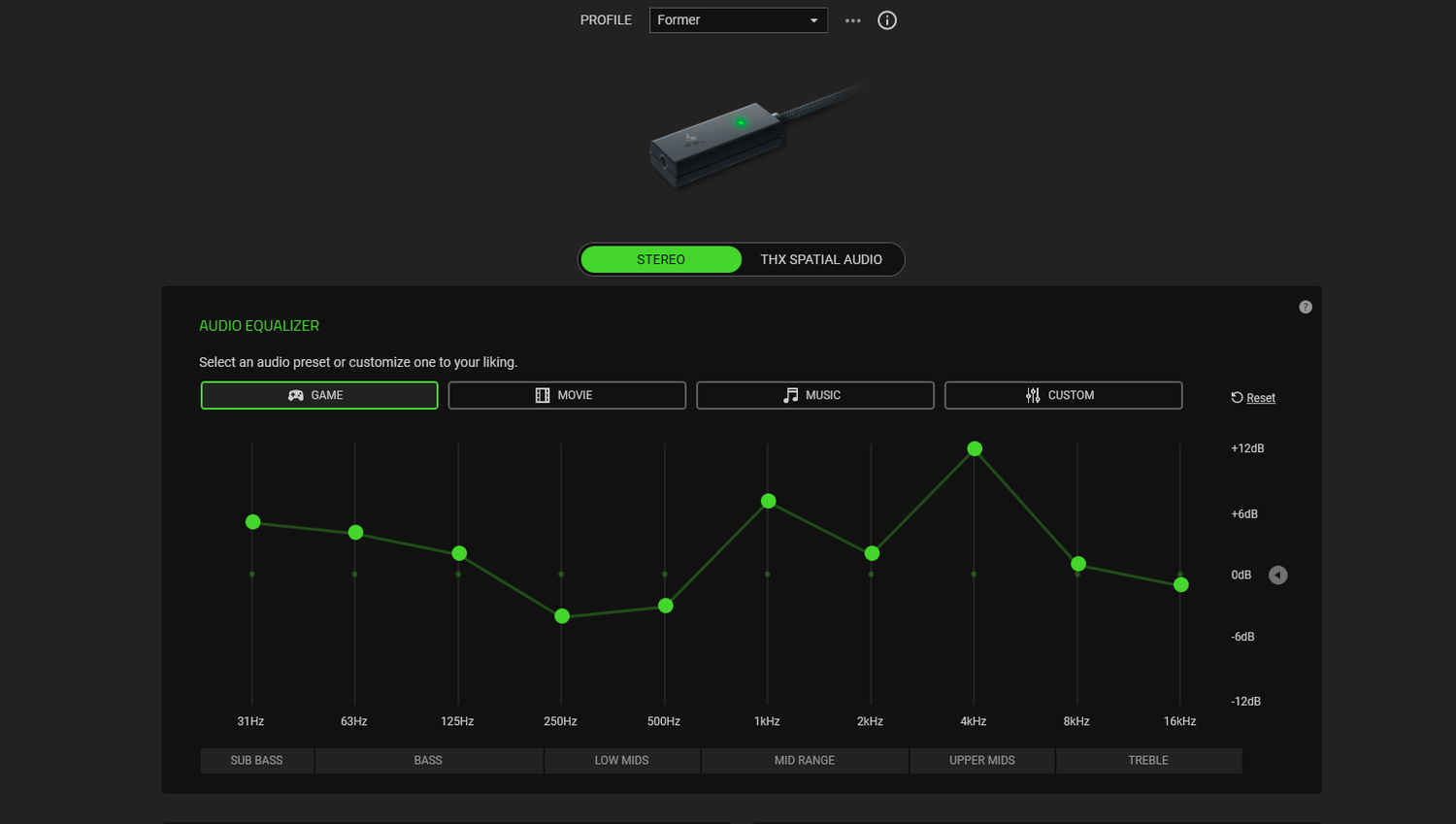
Most gaming headset software (like SteelSeries Sonar, Razer Synapse, or Logitech G HUB) offers a graphical equalizer. You can start with a genre-specific preset – many applications offer profiles for FPS, RPG, and MOBA games – then tweak from there.
- For Competitive Play (e.g., Valorant, CS:GO): Start with an FPS preset. Then, slightly boost the mid-range and high frequencies (often between 2 kHz and 4 kHz). This will make footsteps, reloads, and other positional cues stand out. At the same time, consider slightly lowering the lower-end frequencies to prevent explosions and other loud effects from overpowering the soundscape.
- For Immersive Single-Player Games (e.g., The Witcher 3, God of War): Start with an RPG or cinematic preset. Boost the low-end frequencies to give explosions and ambient music more impact. You can also play with the mid-range and high-end to ensure character dialogue and environmental sounds are clear and detailed. The goal here is to create a rich, enveloping soundscape that pulls you deeper into the game’s world.
Remember, every ear and every game is different. Experimentation is key. Don’t be afraid to create and save multiple profiles, one for your favorite shooter, one for a role-playing game, and even one for listening to music.
Beyond the EQ: Advanced customization tips
While the EQ is your most powerful tool, modern gaming headset software offers a suite of other features to perfect your audio experience:
- Microphone Tuning: Your teammates don’t care about a cinematic soundstage; they care about hearing you clearly. Most software offers advanced mic features like:
- Noise Gate/Noise Suppression: This is a crucial feature that cuts out background noise. You can adjust the sensitivity to ensure it only picks up your voice and not the click of your mechanical keyboard or the hum of your PC fans.
- Mic Sidetone (or Mic Monitoring): This feature feeds your own voice back into your headset, so you can hear how loud you’re being. It’s a simple yet effective way to prevent you from yelling without realizing it.
- Virtual Surround Sound Calibration: If your headset supports virtual surround sound (e.g., 7.1), the software will often allow you to adjust the positioning of the “virtual” speakers. You can move them closer or further away to fine-tune the spatial awareness, helping you better pinpoint the direction of sounds in games. Some software even lets you customize this for different games.
- Game-Specific Profiles and Auto-Switching: Many advanced gaming headset applications can detect what game you’re playing and automatically switch to the corresponding audio profile. This means you can go from an intense CS:GO match with a tuned competitive profile to a relaxing Cyberpunk 2077 session with a rich, immersive profile without lifting a finger.
- Physical and Aesthetic Customization: The personalization doesn’t stop with sound. Some manufacturers now offer interchangeable earcup plates, letting you customize your headset’s look with different colors, themes, or 3D-printed designs. This adds a layer of personal expression to your setup, making your headset truly your own.
A gaming headset is more than just a piece of hardware; it’s a finely-tuned instrument. By diving into the software and customizing the audio settings to your liking, you’re not just enhancing the sound – you’re optimizing your performance, deepening your immersion, and perfecting your place in the game.
Also read: PlayStation’s next State of Play will be all about the new James Bond game: All we know
 Follow Us
Vyom Ramani
A journalist with a soft spot for tech, games, and things that go beep. While waiting for a delayed metro or rebooting his brain, you’ll find him solving Rubik’s Cubes, bingeing F1, or hunting for the next great snack. View Full Profile


