
Mafia: The Old Country is Hangar 13’s most cinematic take on the series, a prequel steeped in early twentieth century Sicily that favours character work and tightly directed missions over sandbox sprawl. Built on Unreal Engine 5, it leans on Nanite for dense geometry, Lumen for real-time global illumination, and Epic’s MetaHuman pipeline for nuanced faces. Upscaling is a first-class citizen, with Unreal TSR, NVIDIA DLSS, AMD FSR, and Intel XeSS on the menu, plus frame generation on both AMD and NVIDIA hardware.
 Survey
Here’s a look at the visuals and performance on an AMD Radeon RX 9070. We captured like-for-like screenshots for each upscaling profile, measured average FPS, 1 percent lows, and full-frame latency, then sanity-checked stability over extended sessions. The goal is simple: identify the settings that preserve the game’s strong art direction without wasting performance headroom.


Gameplay
The Old Country follows the classic rags-to-rackets arc with confidence. You begin as Enzo, a mine worker with his eyes on Empire Bay, and end up sworn into the Torrisi family after a swift sequence of reversals. The structure prefers clarity to bloat, so chapters flow through cutscenes, short traversal segments on horse and in car, and brisk engagements that mix stealth, knives, and period firearms. Cover shootouts carry a scrappy urgency thanks to punchy audio and swift time-to-kill. Knife duels are more mechanical, with readable parries and counters that feel a touch stiff, though they do not outstay their welcome.
The world design is focused. San Celeste’s alleys, the surrounding countryside, and set-piece interiors read as crafted stages for the story rather than a checklist-driven playground. That creative choice pays off visually, since you spend more time in authored spaces that flatter the engine’s strengths, and less time chasing icons. With that context set, let us talk pixels.
Graphics engine and settings
Unreal Engine 5 is deployed for visual impact more than tech spectacle. Nanite lifts detail on masonry, cobblestone streets, tiled roofs, and hillside rock faces. Lumen provides natural bounce lighting, believable interior pools of shadow, and convincing time-of-day swings without a showy cost in performance. Character work shines in cutscenes, where skin shading, hair simulation, and clothing settle convincingly. Outside cinematics, character animation fidelity and shading are more modest, but remain cohesive.
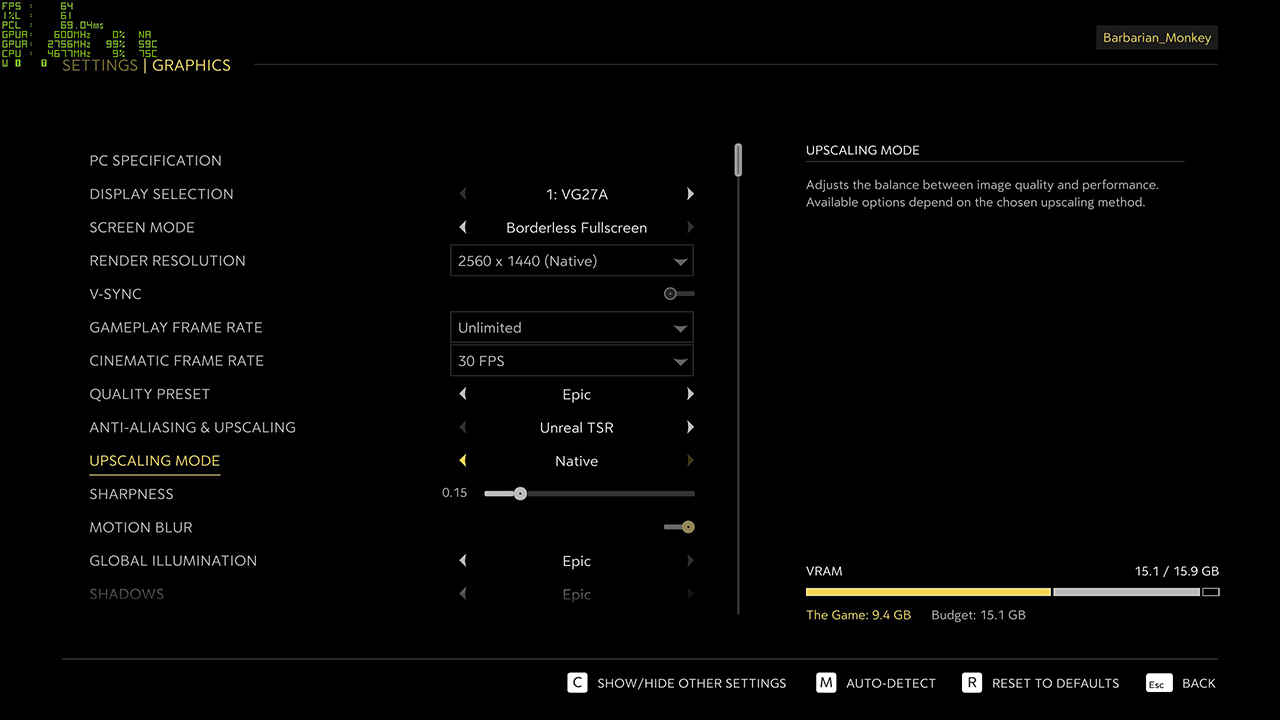
The settings menu is serviceable, with some quirks you should know about. There is no exclusive fullscreen, only windowed and borderless, although V-Sync can be disabled cleanly and the game plays nicely with VRR. The global quality presets, from Low through Epic, alter not just geometric and shadow budgets but also upscaling mode. That behaviour can be confusing, since frame-rate swings may come from both detail changes and render-resolution changes at once. If you plan to tune carefully, lock your chosen upscaler first, then work through the quality toggles.
Anti-aliasing and upscaling gives you Unreal TSR, DLSS, FSR, and XeSS. There is no classic TAA entry, although TSR is close in spirit. The Upscaling Mode control offers Native, Quality, Balanced, and Performance styles across the vendors, and DLAA is present for DLSS users. Sharpness defaults to 0.15 on FSR and can be nudged up if you choose the more aggressive scaling modes. Motion blur can be disabled for gameplay, but cinematics retain it. Cutscene frame-rate can be set to 30, 60, or unlimited. The FPS cap ranges from 30 to 144, or unlimited.
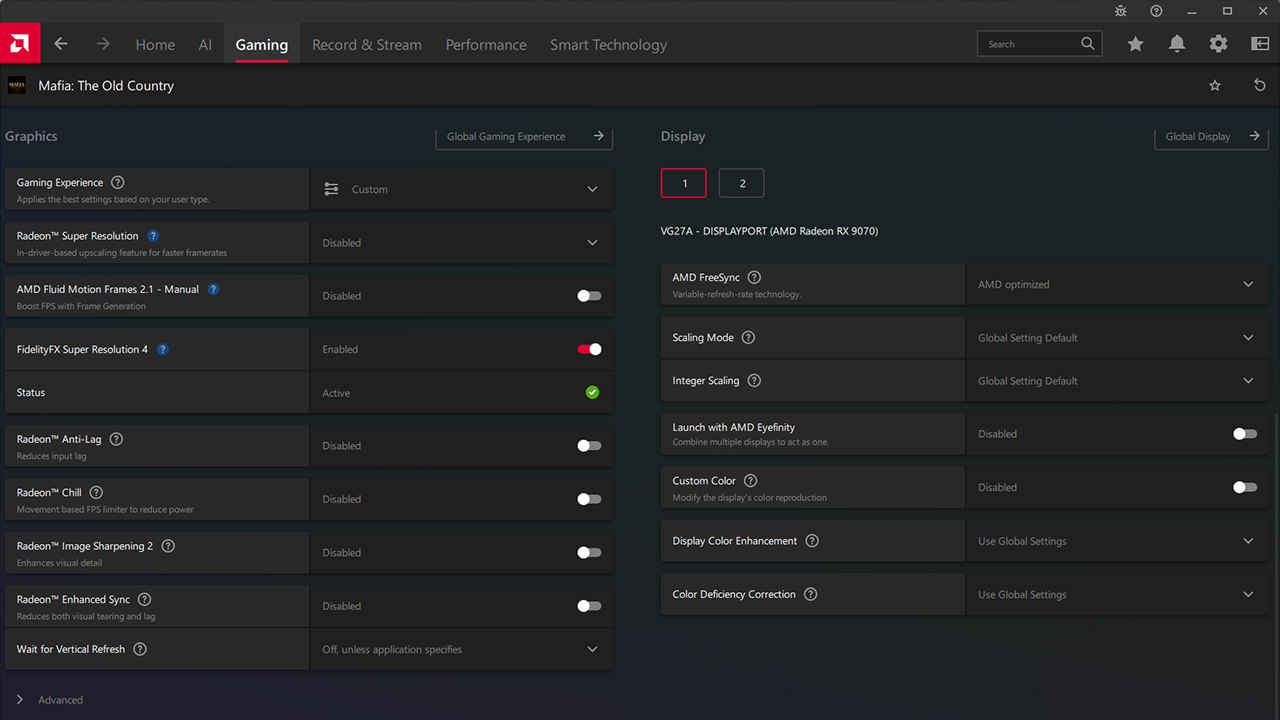
Shader compilation is front-loaded. On a first run or after a driver change, expect about three minutes of compiling before the main menu. The upside is a stutter-free experience in play. Asset streaming is generally tidy at higher settings, although you can provoke foliage and texture pop-in on lower presets when sprinting or riding quickly. If that bothers you, keep View Distance and Virtual Shadow Maps at the higher end while trimming elsewhere.
VRAM usage sits around 8 GB at lower resolutions and close to 10 GB at max settings in 4K. That is friendly to 8 GB cards when paired with upscaling, and very comfortable on an RX 9070.
Performance and stability
We tested six profiles on the RX 9070: Unreal TSR, FSR Native, FSR Quality, FSR Balanced, FSR Performance, and FSR Performance High. Each run was captured across a repeatable combat and traversal sequence, then averaged. Latency is full-frame render latency, not click-to-photon, so treat it as a comparative guide.
What the numbers say
FSR Quality is the clear sweet spot for this GPU. Versus Unreal TSR, average frame-rate rises by about 50 percent, while 1 percent lows jump by roughly 32 percent, and latency drops by about 35 percent. The result feels both faster and steadier than TSR, with better input response and fewer perceptible dips during busy moments.
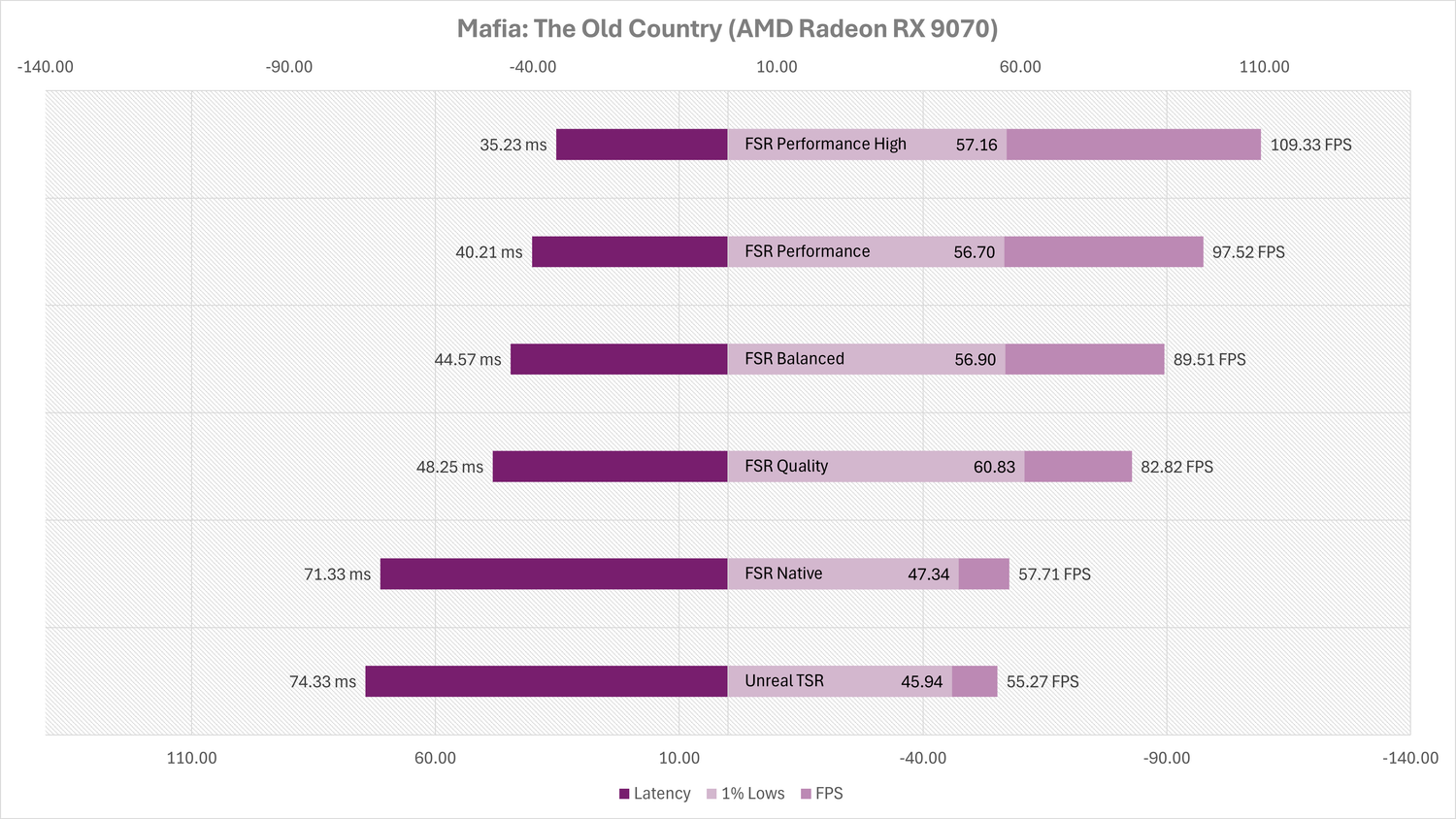
FSR Balanced drives a larger uplift in averages, about 62 percent over TSR, but its 1 percent lows land around 24 percent above TSR and slightly below FSR Quality. On the RX 9070 that trade-off means a snappier frame-time graph most of the time, with occasional dips that you will still feel during heavy foliage firefights or weather effects.
FSR Performance and FSR Performance High chase sheer throughput. Performance delivers about 76 percent higher averages than TSR, with 1 percent lows around 23 percent above TSR. Performance High nearly doubles the frame rate, up by about 98 percent, and trims latency by roughly 53 percent compared to TSR. The consistency story is not as strong as FSR Quality, since the 1 percent lows do not scale at the same rate as averages, but if you are targeting a high refresh ceiling, these modes provide plenty of headroom.
FSR Native is present mostly for completeness. It gives a small bump over TSR, roughly 4 percent in averages and 3 percent in lows, with a very modest latency improvement. Image quality is excellent, so it can suit capture work or a locked 60 frame target if you are happy to accept a lower ceiling.
Image quality impressions
Our matched screenshots and camera-matched motion sweeps highlight the classic reconstruction trade-offs. Unreal TSR is stable and clean in static views, with fine vegetation looking natural. It struggles a bit with specular shimmer on wet cobbles and distant roof tiles, and you can occasionally spot ghosting behind thin geometry.
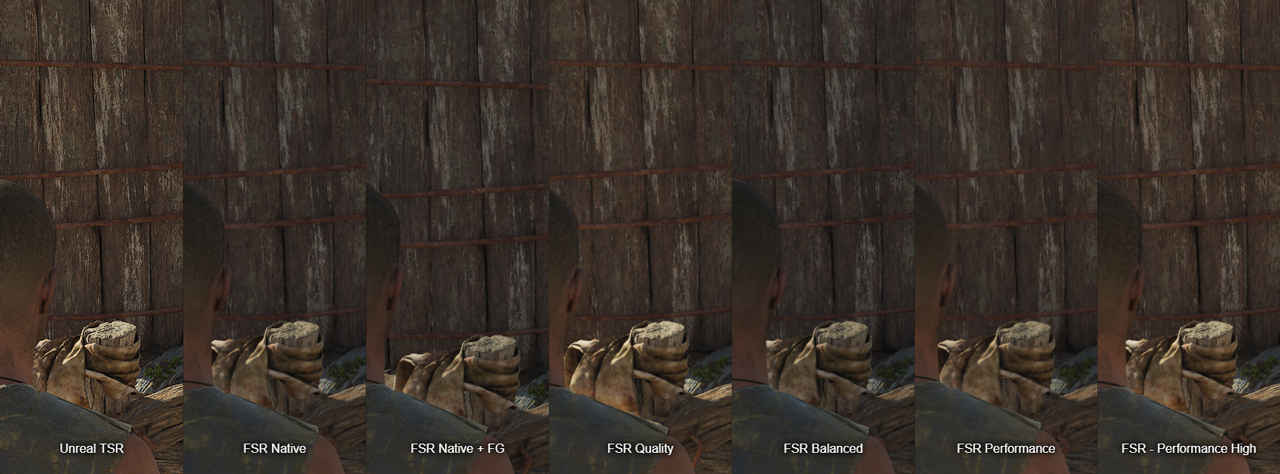
FSR Native preserves micro-detail well and, unsurprisingly, looks closest to TSR on a paused frame. FSR Quality holds up impressively in motion, with minimal ringing on high-contrast edges and a good grip on sub-pixel detail like wrought-iron balcony rails, olive tree leaves, and stitched seams on jackets. Thin wires and fence meshes retain shape without obvious crawl.
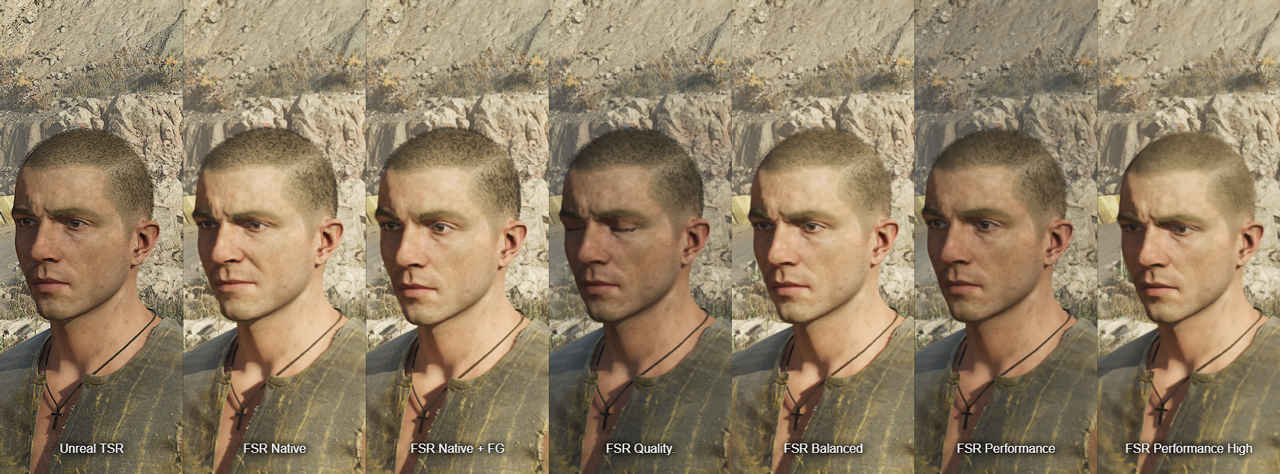
FSR Balanced introduces more visible temporal instability in foliage and rooftop tiles during fast pans, and text signage softens a touch on oblique angles. FSR Performance and Performance High increase those artefacts. You will notice edge haloing around silhouettes and more aggressive smoothing on distant geometry. The flipside is the responsiveness and camera fluidity you gain, especially if you are driving with lots of camera motion.
A practical mitigation for the more aggressive modes is to increase Sharpness slightly above the 0.15 default. On our sample scenes, 0.25 to 0.3 restored perceived crispness on masonry and textile textures without over-sharpening faces. If you are sensitive to ringing, favour FSR Quality and leave sharpness alone.
Stability and frame pacing
With shaders precompiled, frame pacing is solid. We did not encounter traversal hitching on the RX 9070 during multi-hour sessions. There is some asset pop-in on lower presets while sprinting through heavy vegetation; keeping View Distance high cuts most of it. We recorded no crashes.
Motion blur off improves clarity in gameplay, and cutscenes keep their filmic blur regardless, which suits the tone. If you dislike motion blur strongly, you can set cutscenes to 60 rather than unlimited to keep blur exposure consistent. Borderless mode behaved well with VRR, and V-Sync off presented cleanly.
Frame generation, briefly
AMD and NVIDIA frame generation are supported, and they can raise perceived fluidity significantly. Our numbers above exclude FG to keep input latency and 1 percent lows comparable across profiles. As usual, FG does not reduce end-to-end input latency, so treat it as a way to smooth camera motion rather than a replacement for native performance. On RX 9070, pairing FSR Quality with AMD frame generation felt like an excellent compromise: strong visuals, high apparent refresh, and predictable input response.
Recommended paths on RX 9070
If you value visual consistency, use FSR Quality, leave Sharpness at default, and keep View Distance high. If you need higher averages for a high refresh monitor, move to FSR Balanced and consider a very small Sharpness increase. If you are targeting triple-digit FPS, FSR Performance High will get you there, but accept the softer distant detail and occasional reconstruction shimmer, particularly on foliage and speculars.
Finally, lock your upscaler before touching the global quality preset. The game loves to change your scaling mode when you switch presets, which makes apples-to-apples testing tricky and can confuse results.
Mafia: The Old Country – Feels like a Mafia Game
The Old Country is a handsome, restrained slice of Mafia, and on an RX 9070 it is easy to tune for both beauty and speed. Unreal TSR remains a fine baseline, but AMD FSR transforms the experience on this card. FSR Quality gives the best balance, lifting averages by about half while also improving lows and cutting latency meaningfully. Balanced and the two Performance tiers add throughput for high refresh play, with the expected cost to fine detail and temporal stability. The engine’s shader precompilation keeps hitching at bay, VRAM usage stays sensible, and a few targeted settings choices clean up pop-in without hammering performance.
For story-first players, lock in FSR Quality, keep motion blur off in gameplay, and enjoy the craft that Hangar 13 has poured into Sicily’s villages and hills. For frame-rate chasers, Performance High plus a touch of sharpening will deliver the numbers. Either way, the RX 9070 handles The Old Country with poise, and the upscaler options give you room to tailor the experience to taste.
 Follow Us
Mithun Mohandas
Mithun Mohandas is an Indian technology journalist with 14 years of experience covering consumer technology. He is currently employed at Digit in the capacity of a Managing Editor. Mithun has a background in Computer Engineering and was an active member of the IEEE during his college days. He has a penchant for digging deep into unravelling what makes a device tick. If there's a transistor in it, Mithun's probably going to rip it apart till he finds it. At Digit, he covers processors, graphics cards, storage media, displays and networking devices aside from anything developer related. As an avid PC gamer, he prefers RTS and FPS titles, and can be quite competitive in a race to the finish line. He only gets consoles for the exclusives. He can be seen playing Valorant, World of Tanks, HITMAN and the occasional Age of Empires or being the voice behind hundreds of Digit videos. View Full Profile


