Users can now change chat bubbles and backgrounds with pre-set or custom themes.
30 new wallpaper options are available, along with the ability to upload custom images.
The update is rolling out globally and will be available to all users in the coming weeks.
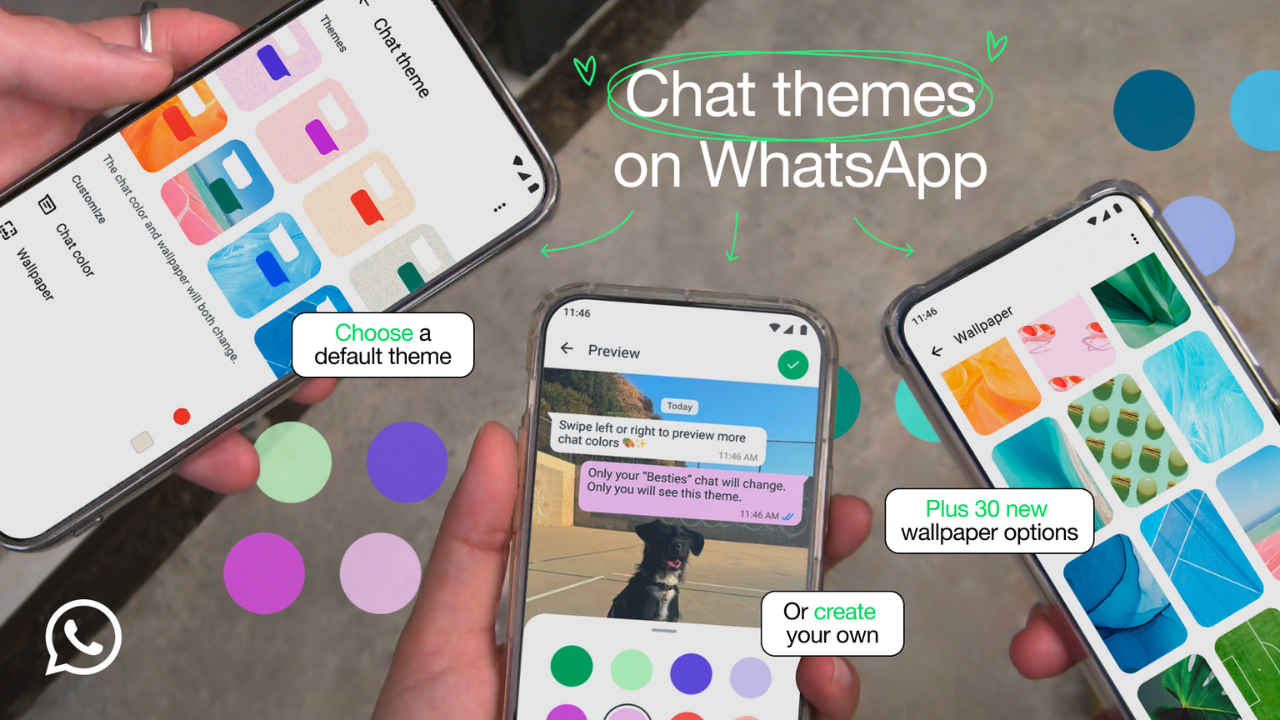
WhatsApp has introduced several new features that improve the user experience in the last few months. With the latest update, Meta’s instant messaging platform is offering new chat themes, allowing users to customise their chats with colorful bubbles and new wallpapers. Users will now have access to pre-set themes and the ability to mix and match colours based on their preferred styles, thanks to the new update.
 Survey
The users can now change the chat bubbles and backgrounds to their favourite colour. The company is now offering multiple pre-set themes that adjust both the background and bubble colors. Additionally, users can create their own unique combinations to make their chat boxes look better.


The company is also offering 30 new wallpaper options that have been added to make chats even more vibrant. Users will still have the option to upload the custom backgrounds from their camera roll for a fully personalised experience.
Also read: Bengaluru software engineer loses Rs 1.2cr in courier scam: Here’s what happened
Customisation options
Users can apply the same theme to all their chats or set different themes for individual conversations. Themes are visible only to the user, ensuring privacy while keeping chats visually appealing. Users can also change the theme of their WhatsApp channels for a consistent look across their interactions.
How to change chat themes
In order to apply a default chat theme, the users will have to move Settings then Chats, and select Default chat theme.
To customise the individual chat, the iOS users can tap the chat name at the top the screen, while the Android users can choose the three-dot menu and then tap on the theme.
WhatsApp has started rolling out the new chat themes along with new wallpapers globally. If you have not got the new features, you may get it in the coming weeks. Meanwhile, all the users are advised to keep their WhatsApp application up to date.
 Follow Us
Ashish Singh
Ashish Singh is the Chief Copy Editor at Digit. He's been wrangling tech jargon since 2020 (Times Internet, Jagran English '22). When not policing commas, he's likely fueling his gadget habit with coffee, strategising his next virtual race, or plotting a road trip to test the latest in-car tech. He speaks fluent Geek. View Full Profile


