Google's first multimodal model maps text, images, and video into one space.
The model processes up to six images and 120 seconds of video.
The model aims to simplify complex AI pipelines for RAG and semantic search.
Google has officially unveiled its first-ever multimodal embedding model, the Gemini Embedding 2. While AI started with being limited to text-only, with the help of Gemini Embedding 2, Google is planning to map text, images, videos, audio and documents into a single space. With the model, Google wants to simplify complex pipelines and enhance a wide variety of multimodal downstream tasks as it supports retrieval-augmented generation (RAG) and semantic search, from sentiment analysis to data clustering. Here’s a detailed look at how this new embedding model works and how you can use it.
Also Read: OpenAI to soon integrate Sora AI video tool into ChatGPT: Report
Gemini Embedding 2: How does it work?
First up, speaking of how the model works, Google explained that this new model is based on Gemini. As per them, it leverages its best-in-class multimodal understanding capabilities to create high-quality embeddings across various media.
These media include text-based media that support a context of up to 8192 input tokens. In terms of images, the model is capable of processing up to 6 images per request, supporting both the popular PNG and JPEG formats.
Videos are where things get interesting, as the model supports up to 120 seconds of video input in both MP4 and MOV formats. The model can natively input and embed audio data without needing intermediate text transcriptions, and even directly embed PDFs that are up to 6 pages.
The best part is that this model has been built such that it can process more than one medium at a time. This model can pass multiple media, like image + text, in a single request. As per Google, this would allow the model to work between different media types, unlocking a better understanding of real-world data.
Improvements over previous models
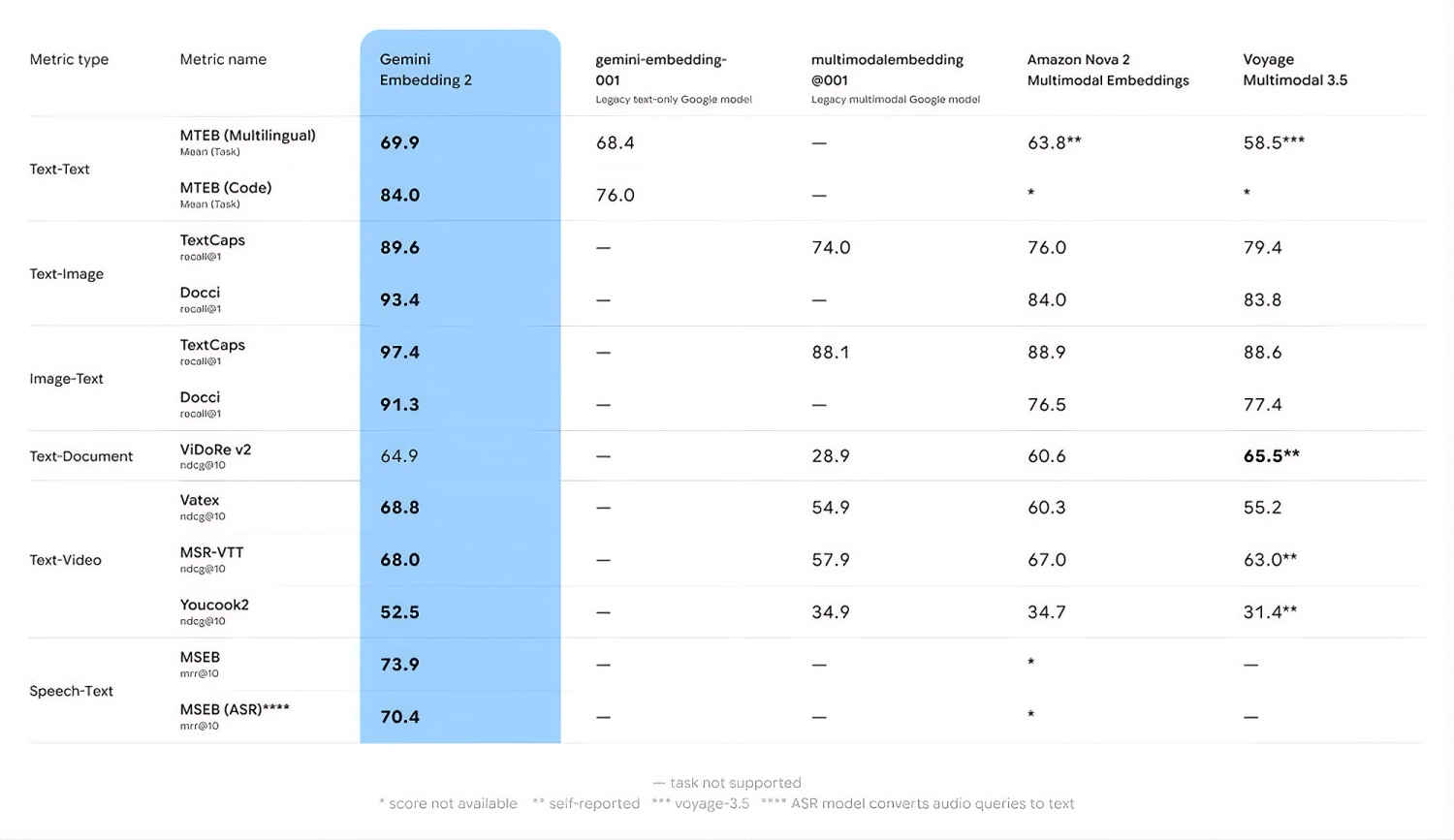
Google also shared the performance difference over the various multimodal models available in the space. As per them, with Gemini Embedding 2, Google is not only improving from their legacy models, but they are also establishing a new performance standard when compared to the other models.
They shared this table, detailing the performance improvements compared to the other models below:
Using Google’s new Gemini Embedding 2 multimodal embedding model is pretty simple, too. You can just head on over to either the Gemini API or the Vertex API platform and check it out from there. On their official blogpost, Google has released the code required to access the model.
Also Read: Pentagon turns to Google Gemini AI assistants after Anthropic dispute