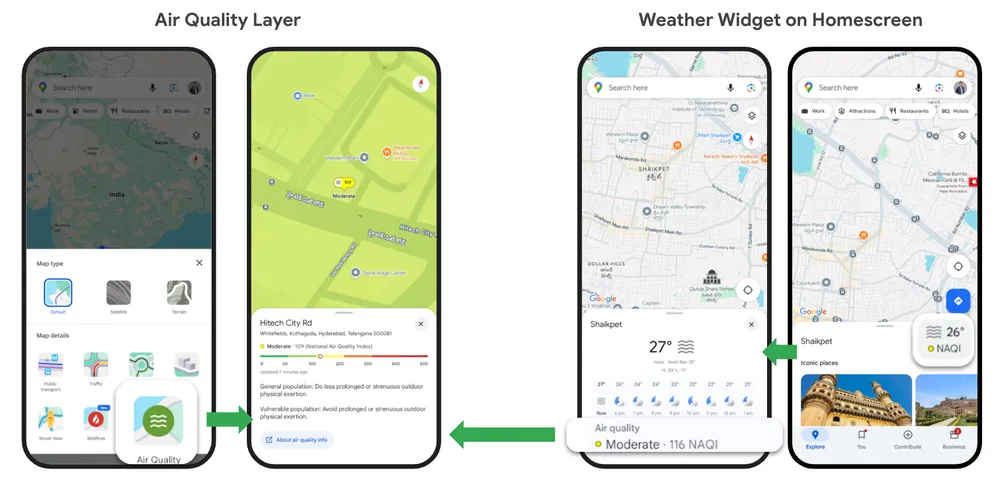
Air quality across Indian cities like Noida, Delhi, Gurugram and more is deteriorating on a day to day basis. This makes it essential to regularly check the Air Quality Index (AQI) in your area so you can take timely steps to protect your health and that of your loved ones. Instead of relying on scattered reports or guessing based on the weather, you can now quickly and easily check how clean or polluted the air is in your location and nearby areas. Google with its Maps app now lets you track the real time Air Quality Index AQI for your area.
This feature becomes highly helpful as it can let people plan outdoor activities, commute smarter, and take precautions on high pollution days. With clear visuals and frequent updates, Google Maps turns air quality data into something simple and useful for everyday decisions, all within an app you already trust and use.
Also read: Apple iPhone Air price drops by Rs 11,000 on Amazon: Check deal details here
Google, in its blog post, stated that the Air View+ in Google Maps provides real-time, local air quality information through a shared ecosystem of partners. It works with sustainability startups, researchers, climate groups, companies, city authorities, and citizens. Climate tech firms Aurassure and Respirer Living Sciences helped set up air quality sensors in cities that did not have proper monitoring systems before.
The sensors are placed at fixed locations across more than 150 Indian cities, such as government offices and commercial buildings. They measure pollutants like PM2.5, PM10, CO₂, NO₂, ozone, and VOCs every minute, along with temperature and humidity. With support from IITs, pollution boards, and climate groups, the data is checked and analysed using Google AI to help citizens and city planners make better decisions.
Follow the simple steps below to check real-time air quality information for your area on Google Maps:
Note: The air quality data updates every few minutes to show the latest information.
Google said that the air quality levels are calculated using measurements from nearby air quality monitoring stations. Since air quality can vary between locations and the nearest station may not exactly represent conditions at your specific spot, the tech giant provides a map-based view that reportedly helps present a clearer picture of AQI levels around you.
Also read: iOS 26 bug turns Android photos red on iPhones, users report strange image glitch
The company also said that the air quality readings can differ significantly over short distances, and data reporting may be delayed by up to 12 hours, especially during rapidly changing conditions. Additionally, not all stations measure every pollutant, which can lead to differences between reported AQI and actual air quality. Variations may also occur due to how AQI values are averaged over time, particularly at the start or end of high pollution events.