If you spend any time online, you know the em dash has seen a resurgence like no other punctuation mark. Sometimes in the middle of the sentence, sometimes in the end, mostly everywhere. For a couple of years now, ChatGPT’s love affair with that long horizontal line made even the most careful prompts sound suspicious to the human ear. At long last, OpenAI has finally made it easy to rein that in.
CEO Sam Altman called it a “small-but-happy win,” which is both accurate and a little funny given how much grief that character has caused writers, students, PR teams, and anyone trying to pass the Turing vibe check in email.
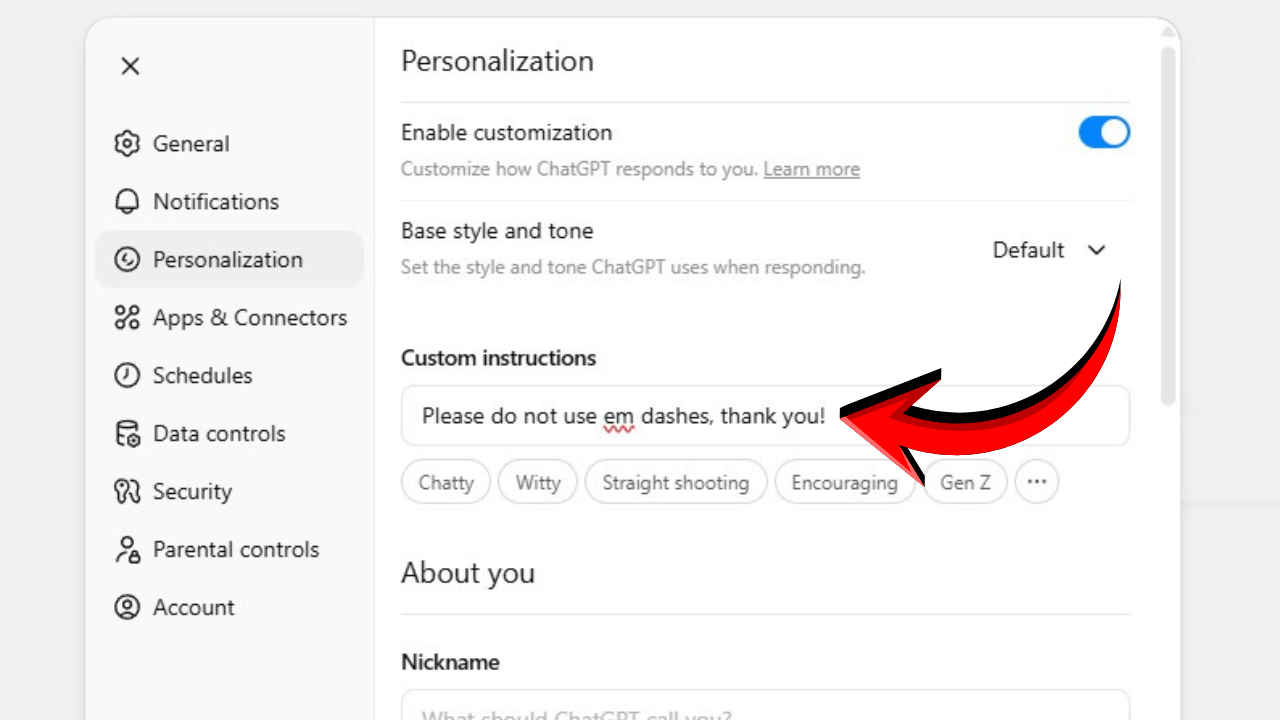
Here is what changed, basically. If you tell ChatGPT to avoid em dashes in your Custom Instructions, it now listens with a lot more consistency. Multiple outlets corroborated the update, which arrived on November 15 and landed with the kind of outsized joy usually reserved for “undo send” buttons and dark mode. Taken together with memory and other personalization hooks, it signals that OpenAI is putting more weight behind user-level style control in ChatGPT rather than one-size-fits-all prose.
The jury’s still out on why AI models use em dashes excessively. However, em dashes became a tell in the same way certain stock phrases did to spot AI-written text. People learned to spot the machine not by what it knew, but by where it paused and pivoted.
This ChatGPT fix does not rewrite the history of AI style, though it does remove a persistent speed bump for those of us who want to sound like ourselves.
These steps mirror OpenAI’s current guidance on Custom Instructions for web and desktop.
Also read: OpenAI officially starts testing group chats in ChatGPT: Here’s how this feature works
If you work across devices, repeat the same idea on mobile under Settings > Customize ChatGPT. The preference lives with your account, so it will carry forward, although starting a fresh thread is still a good hygiene tip.
OpenAI has not unpacked the technical reason behind the overuse of the venerable em dash, which is fair. The likeliest culprits are the training mix and reinforcement patterns that favoured dramatic pauses in general-purpose writing. Ultimately, what matters is that users now have a practical off switch.
As for the em dash itself, it is not canceled. It is just back where it belongs – used sparingly, when the rhythm truly calls for it, and not because your chatbot cannot help itself.
Also read: What’s new in GPT-5.1: All differences compared to GPT-5 explained