Have you ever wondered why your expensive gaming laptop stutters during online matches whilst your colleague’s more modest machine runs smoothly? Or perhaps you’ve noticed how your video conferences break up when others remain crystal clear? The culprit might not be your internet package, but rather the often-overlooked Wi-Fi card nestled inside your laptop. When manufacturers tout “Wi-Fi 6” or “802.11ax support”, they’re telling only a fraction of the story. Hidden beneath these marketing labels lie profound differences in technology that can dramatically impact your daily computing experience.
Bandwidth and latency, whilst often confused, represent two fundamentally different aspects of network performance. Bandwidth measures the maximum amount of data your connection can handle (typically in Mbps or Gbps), akin to the width of a motorway. Latency, on the other hand, refers to the delay in data transmission, measured in milliseconds, essentially how quickly data travels from point A to point B.
A common misconception is that high bandwidth automatically ensures low latency. However, these metrics operate independently of one another. You might have a 1 Gbps connection (enormous bandwidth), yet still experience frustrating lag during video calls if your latency is poor.
The consequences of high latency are far-reaching: slow response times, reduced throughput, increased buffering during streaming, and a generally poor user experience. For time-sensitive applications like online gaming, where milliseconds can determine victory or defeat, high latency can be particularly devastating.
The significant divergence in Wi-Fi card performance begins at the silicon level. Let’s examine two leading solutions: Intel’s Wi-Fi 6 AX200 and Qualcomm’s FastConnect series.
Intel’s AX200 module supports 2×2 Wi-Fi 6 technology, incorporating features like uplink and downlink OFDMA (Orthogonal Frequency-Division Multiple Access) and 1024QAM modulation. These technologies enable theoretical data rates up to 2.4 Gbps and improved network capacity compared to previous generations. This module’s implementation of 802.11ax standards facilitates smoother streaming, fewer dropped connections, and better performance in congested environments.
Also read: Intel Is Racing Ahead Of Apple In Wi-Fi 7 Race
Contrastingly, Qualcomm’s FastConnect platforms, such as the newer FastConnect 7700, take a different approach to performance optimisation. Beyond raw speed, Qualcomm places significant emphasis on power efficiency and latency management. It accomplishes this through sophisticated traffic prioritisation systems that favour time-sensitive data packets over less critical ones.
The FastConnect 7700, whilst positioned as a “mainstream” solution compared to the top-tier FastConnect 7900, retains most premium features including Multi-Link Operation (MLO) support and 320 MHz channel capabilities – features that substantially improve performance in real-world conditions.
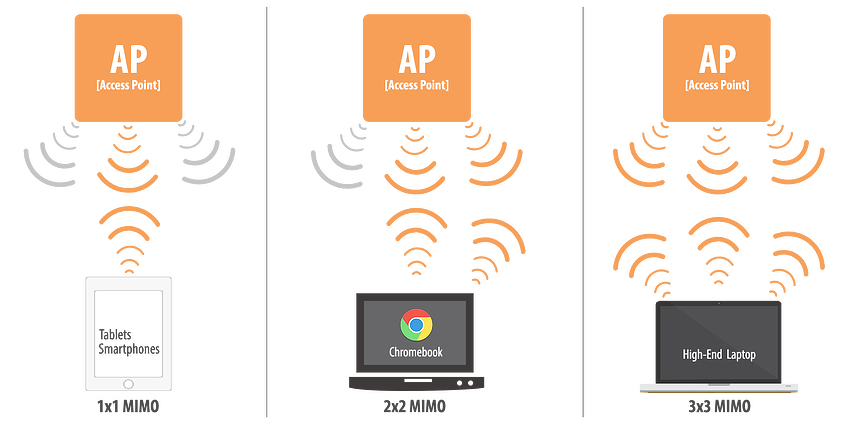
Perhaps the most overlooked aspect of Wi-Fi card design is the antenna configuration, typically represented in a format such as “2×2:2” or “3×3:3”. This notation reveals crucial information about a card’s capabilities.
The first number represents transmit antennas, the second indicates receive antennas, and the third (after the colon) shows how many spatial streams the card supports. These spatial streams are foundational to MIMO (Multiple Input, Multiple Output) technology, which transmits multiple copies of data signals through physically distinct paths.
The practical impact is substantial. With modern Wi-Fi 6 standards, a 2×2:2 access point on 5GHz radio can achieve approximately 1.2Gbps throughput, whilst a 3×3:3 configuration reaches around 1.8Gbps. This difference isn’t merely theoretical, but it translates directly to improved performance, particularly in environments with multiple connected devices.
Beyond raw throughput, additional antennas improve signal reliability through spatial diversity. Because antennas are physically separated, each receives a slightly different copy of the signal. If one antenna encounters interference, others might receive cleaner data, enhancing overall connection stability.
Even the most sophisticated Wi-Fi hardware can be hamstrung by outdated or buggy software. Driver-related issues account for a significant percentage of Wi-Fi performance complaints, with several common culprits:
Outdated drivers frequently lack compatibility with newer Wi-Fi standards or contain unresolved bugs that cause connection drops, slowdowns, or conflicts with recent operating system updates. These older drivers might miss critical performance optimisations or security patches that could otherwise enhance your experience.
Even the latest drivers sometimes contain bugs that create connectivity and stability issues. In such cases, rolling back to a previous driver version might actually improve performance – a counterintuitive solution that highlights the complex relationship between hardware and software.
Driver conflicts with other system components, particularly Bluetooth, which often shares chipset resources with Wi-Fi, can create mysterious performance issues. These conflicts might manifest as Wi-Fi problems appearing immediately after installing specific software or after major system updates.
These technical differences manifest differently depending on how you use your laptop:
For gaming, latency is paramount. Online games, particularly first-person shooters and competitive titles, demand rapid data transmission. Even minor latency spikes can cause missed shots or delayed reactions. Wi-Fi cards with advanced latency management features and stable drivers can provide a meaningful competitive advantage.
Also read: Best Gaming Laptops in India
When using Wi-Fi extenders for gaming, the situation becomes even more complex. Whilst extenders might work adequately for turn-based or slow-paced games, they often introduce additional latency that makes fast-paced online games frustrating or unplayable.
For video Conferencing, bandwidth requirements vary considerably based on resolution and participant count. For individual HD video calls, you’ll need approximately 1.2 Mbps for 720p and 3.8 Mbps for 1080p resolution. Group calls demand even more: 2.6 Mbps for 720p HD and 3.8 Mbps for 1080p HD.
Also read: Best Business Laptops in India
However, a stable connection matters as much as raw bandwidth. Wi-Fi cards with better antenna configurations and packet-handling capabilities deliver smoother video and audio, with fewer freezes or quality drops during critical meetings.
Activities like large file transfers, cloud backup operations, or working with remote databases benefit from both high bandwidth and low latency. Wi-Fi cards with advanced QoS (Quality of Service) features can intelligently prioritise these operations whilst maintaining responsiveness for other applications.
The importance of your laptop’s Wi-Fi card depends largely on your specific needs and environment. If you’re primarily browsing websites, checking email, or watching Netflix in an area with strong Wi-Fi coverage, even a basic Wi-Fi card will likely serve you adequately.
However, if you fall into certain categories, these differences become increasingly significant. Competitive gamers should definitely consider Wi-Fi card specifications, as should professionals who rely heavily on video conferencing or those working with large datasets across networks. Remote workers connecting from areas with suboptimal Wi-Fi coverage will also benefit from more capable wireless hardware.
When purchasing a new laptop, manufacturers rarely emphasise Wi-Fi card specifications in marketing materials. You’ll typically need to dig into technical specifications to discover whether you’re getting an Intel, Qualcomm, MediaTek, or other solution, and even then, the particular model number might be buried in fine print.
If possible, research the specific Wi-Fi card model before purchase. For gaming laptops, prioritise solutions known for low latency. For productivity machines used in challenging environments, look for models with better antenna configurations. And regardless of your usage pattern, ensure the manufacturer provides regular driver updates to maintain performance and security.
The Wi-Fi card in your laptop might seem like a minor component, but its impact on your daily computing experience can be profound. By understanding the technical differences beyond simple “Wi-Fi 6” or “Wi-Fi 6E” labels, you can make more informed decisions that better align with your specific needs and usage patterns.