In the crowded world of note-taking apps, Zoho Notebook manages to stand out – and not just because it’s a free product backed by the Zoho suite. It ditches the dull, blank-page look of many competitors in favor of a vibrant, tactile, card-based approach.
After diving into its core features, particularly the AI assistance and “Noteboard,” here’s my take on whether this app deserves a permanent spot on your desktop and phone.
Also read: Zoho Scanner app: OCR and multi-language support tested
Zoho Notebook’s biggest draw is that it feels like you’re actually using a digital journal, not a sterile database. Everything is a Note Card, from text to sketches to audio, and you can organize these cards into digital Notebooks with custom covers.
Here are the standout pros I observed:
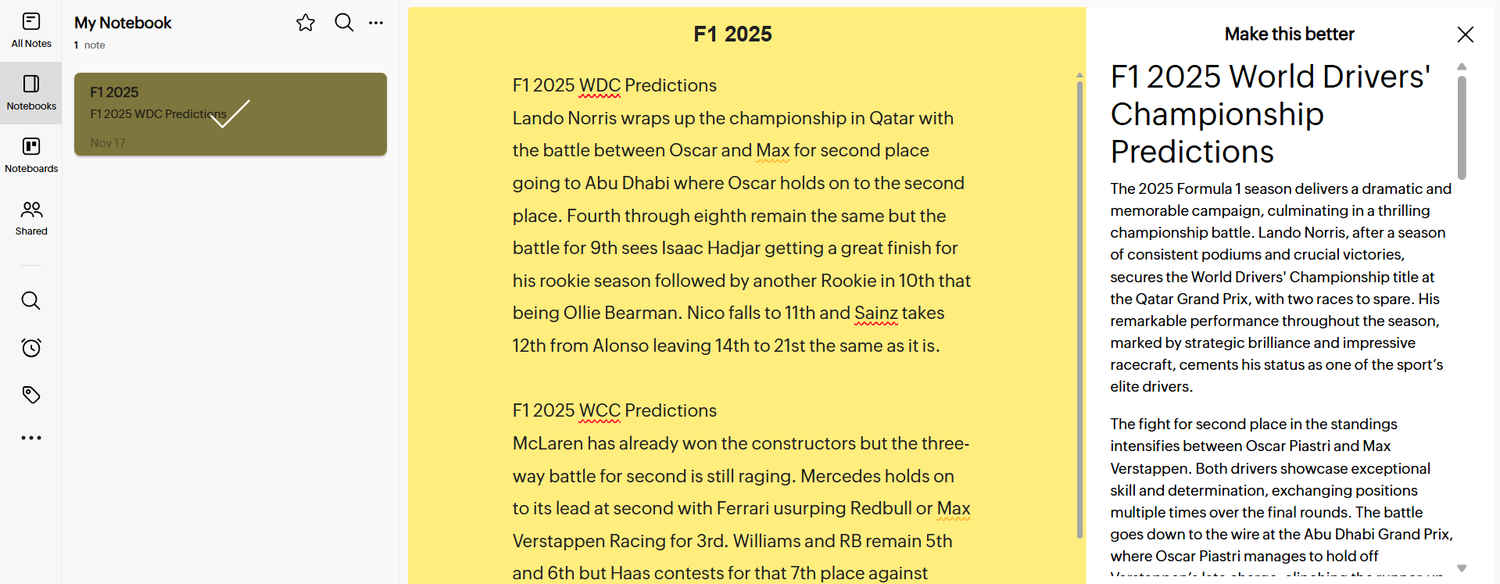
This is arguably the killer feature that elevates the app beyond basic note-taking. As you saw with the F1 prediction example, the AI (powered by Zoho’s Zia) doesn’t just correct spelling; it actively refines your writing.
If you jot down a quick, messy thought, clicking “Make this better” instantly transforms it into a polished, formally written paragraph. For students drafting essays, professionals writing quick reports, or anyone needing to move from brainstorm to final draft quickly, this is a massive productivity boost. It’s like having an instant editor built into every note.
The ability to accurately scan and search within your non-typed content is a huge win. Since the OCR works well for handwritten notes (as well as scanned documents and images), it means you truly capture everything, from scribbled lecture notes to quick paper receipts, and can trust that you’ll find them later using the search bar. This fundamentally makes your analog notes just as valuable as your digital ones.
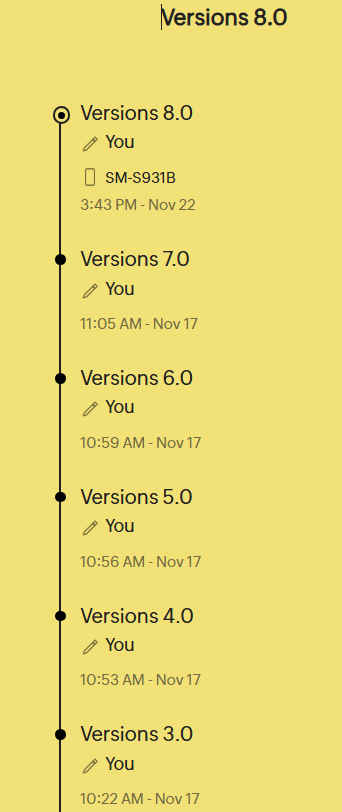
This feature is excellent for serious note-takers and collaborators. Zoho Notebook records a history of every change, allowing you to instantly roll back to a previous version if needed. Crucially, the system not only logs the time and the user, but also the device used for the edit (e.g., “SM-S931B”), giving you a clear, auditable trail of how and when your note evolved across your desktop and mobile devices. This is a level of detail usually reserved for high-end document suites.
The Noteboard isn’t just a place to dump notes; it’s a dynamic dashboard you can tailor to your daily needs. As the customization options show, you can create sections for exactly what you need:
This customizable hub makes the app feel highly personal and efficient, giving you a one-stop visual center for your most critical information.
Zoho has done a great job ensuring the user experience is consistent across mobile, web, and desktop. The design is clean, intuitive, and highly functional on smaller screens. The fact that it includes dedicated Note Cards for Sketches, Recordings, and Files means you can capture any type of information instantly, wherever you are.
Zoho Notebook utilizes a freemium model. The Essential (Free) plan is surprisingly generous, but the Pro/Business plans unlock advanced features critical for professional use and heavy multimedia storage.
The AI features are powerful accelerators for writing and organization.
Also read: Yann LeCun leaving Meta: AI expert’s next project is extremely ambitious
| Category | AI Feature | Description |
| Refinement | Improve grammar | Standard correction for spelling and syntax. |
| Style | Make this better / Simplify language / Change tone | Rewrites text for clarity, conciseness, or a different voice. |
| Generation | Write a note / Write code / Create template | Creates content based on a user prompt. |
| Structure | Create checklist / Create table / Generate Mind map | Converts prompts or existing text into actionable or visual formats. |
| Research/Utility | Translate / Ask anything | Handles translation and general conversational AI queries. |
| Organization | Generate tags | Automatically suggests keywords for improved searchability. |
The difference largely comes down to storage, collaboration depth, and access to premium features.
| Feature Area | Essential (Free) | Pro / Business (Paid) |
| Storage | Limited (typically 2GB) | Massive increase (100 GB). |
| Collaboration | Read-only sharing for notebooks and notes. | Full Write Access for collaborators; enhanced permission management. |
| Version History | Access to a limited number of prior versions (e.g., 10 versions). | Access to significantly more versions (e.g., up to 100-1000 versions). |
| Transcription | Often limited or unavailable. | AI Transcription of audio/voice notes (e.g., 100 mins/user/month). |
| File Size Limit | Smaller file upload limits (e.g., 100MB). | Increased file upload size (e.g., 1GB per file). |
| Support | Community forums and email support. | Priority support via call and chat. |
While Zoho Notebook shines with its visual flair and innovative AI, there are a few areas where it might frustrate users who need deep, organizational power or flawless performance.
For all its beauty, Zoho Notebook’s text editor is intentionally simple. You’ll find all the basics – bold, italics, bullet points – but if you’re coming from an app like Notion or OneNote, you might feel constrained. It generally lacks the ability to fine-tune font sizes, use complex tables, or move elements around the page with the pixel-perfect precision needed for deeply structured knowledge bases. It’s built for capturing ideas beautifully, not for structuring a company wiki.
While the OCR and Version History are strong, the overall speed and accuracy of the primary search function need to be tested thoroughly with a large library. In a long-term review, performance can sometimes lag once a note library grows huge, which can be a workflow killer for power users.
As a free app from a massive corporate suite (Zoho One), the product’s true power is unlocked when integrated with other Zoho tools (like Zoho Mail or Zoho Docs). This can be a huge pro for existing Zoho users, but a con for non-Zoho users who might find it less seamless to connect with their existing Google or Microsoft cloud tools.
Zoho Notebook is an outstanding free offering. If you value a beautiful, intuitive interface and quick note-taking flexibility over complex document structure, this is an excellent choice.
I would recommend the Zoho Notebook for:
If you need a tool to manage a complex company database with thousands of interconnected pages, you might find the formatting constraints too limiting. But for almost everyone else looking for a polished, powerful, and truly free notebook, Zoho is a clear winner.
Also read: GPT-5.1 Codex Max explained: OpenAI’s most powerful coding model yet