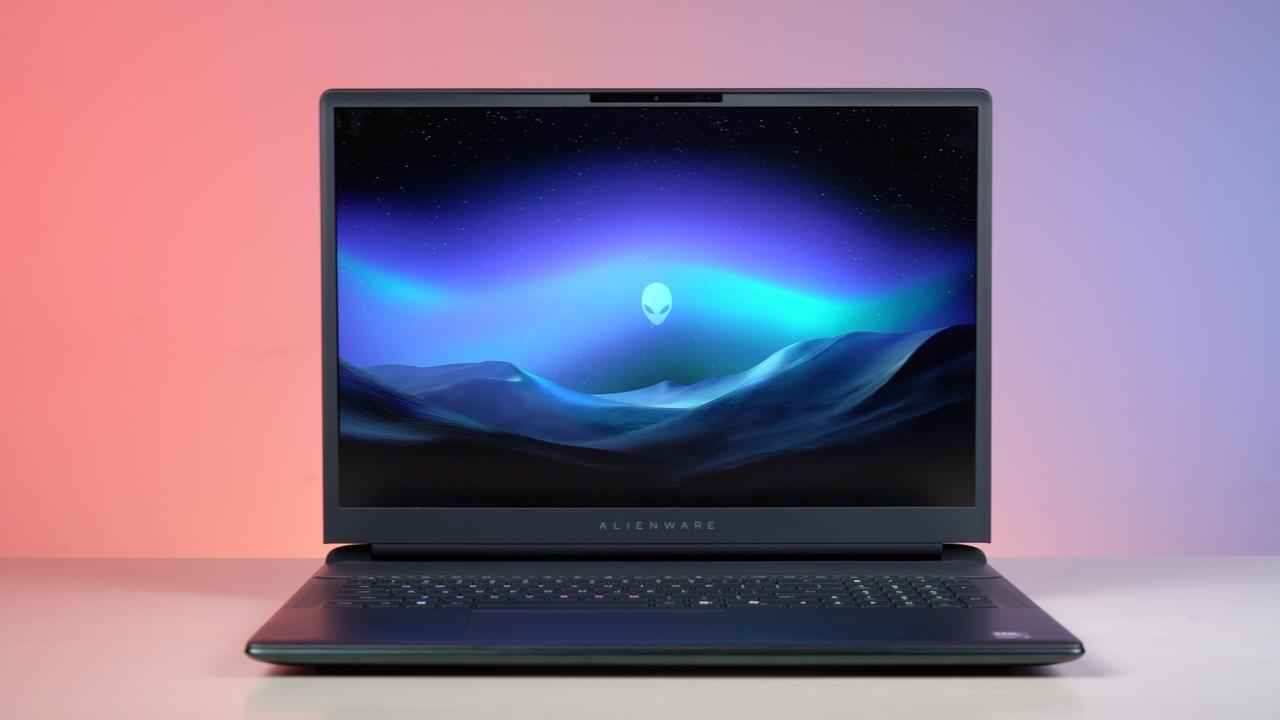
Ask a gamer about their idea of perfection and the answer would be this: A rich Steam library, ambient lighting, good audio levels and a large display for immersive gameplay. And the Alienware 18 Area-51, launched earlier this year, checks all these boxes. This is a complete gaming rig for anyone looking for a portable gaming setup without any compromises. However, it also comes with a hefty price tag.
I have been testing the Alienware 18 Area-51 for both work and play for two weeks and have enjoyed the experience so far. With Nvidia’s RTX 5090 laptop GPU and Intel Core Ultra 9 processor, the laptop offers a truly premium experience for anyone looking for a new gaming beast. But its price, at Rs 4,95,390, might grab eyeballs. The real question now is- what do you get at a price where a full gaming PC is also an option? Read on to find out.
When the Alienware got delivered to my home in a huge box, my family’s first, and perhaps the most honest, reaction was: Is this a TV? And I can’t blame them for thinking that. The laptop is unapologetically large and doesn’t even pretend to fit into the ‘slim and light’ fashion that seems to be most laptops’ USP these days.
At 4.3 kg (without its charger), the Alienware 18 Area-51 stands its ground as a gaming powerhouse, which is here to give you a desktop-level feel. This isn’t a laptop you’ll casually slide into a backpack. I tried carrying it to work for three days straight in my backpack along with my daily driver, a MacBook Air 15-inch, and let’s just say my back got an unintended workout. Even my car’s seatbelt sensor refused to acknowledge that this was a laptop and forced me to buckle it in like a passenger.
The 360 W charger also comes with a large 16-amp plug, which means you won’t be able to charge the laptop in a regular power socket. You will need a larger socket, which isn’t that easy to find. For me, this problem was solved by buying a converter multiplug for Rs 120 on Amazon.
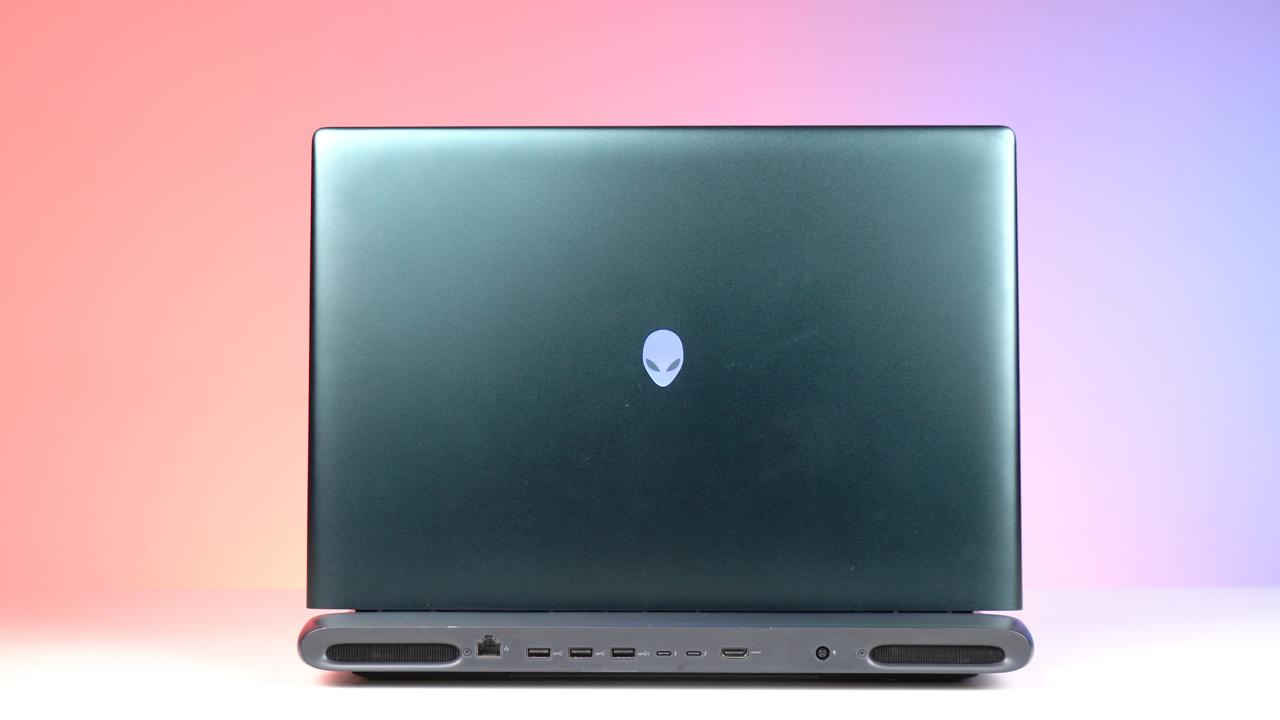
Coming to the design of the laptop, the teal colour is subtle yet distinctive. It moves away from the usual black and grey colour options, giving the machine a premium and sophisticated look. The dark colour also pairs well with the RGB accents, making the laptop feel both sleek and commanding without being overly flashy.
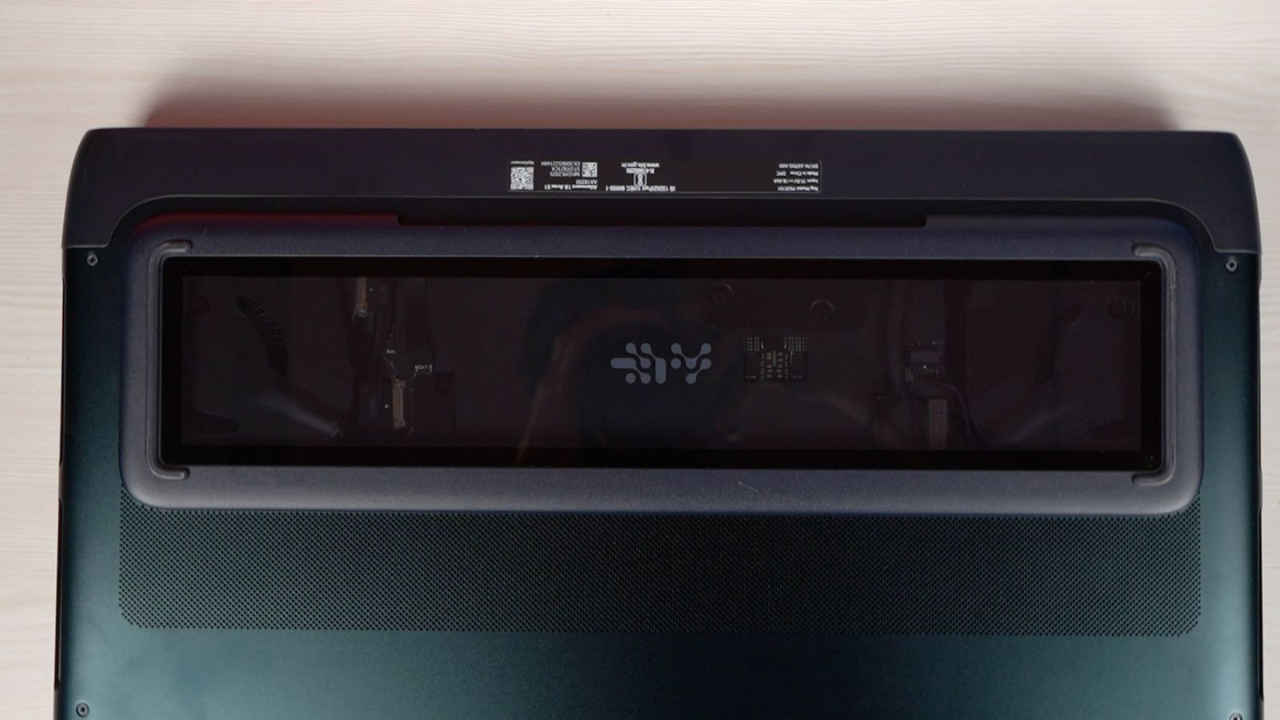
At the back, Alienware’s signature logo lights up on the lid, and a strip around the connectivity ports creates a smooth gradient effect. At the bottom of the laptop, there is a small section covered with glass that lets you in on the action inside and gives the whole laptop a futuristic touch. Even though I initially had my concerns about the glass, it seems pretty durable, and I didn’t notice any scratches forming on it. However, I also made sure to handle the laptop carefully.
For anyone looking for pure gamer aesthetics and a design that screams Sci-Fi, this is the machine that deserves a serious look. With that being said, I did notice some smudges and dust forming on the lid after just two weeks of usage, so it is recommended to clean this gaming rig regularly.
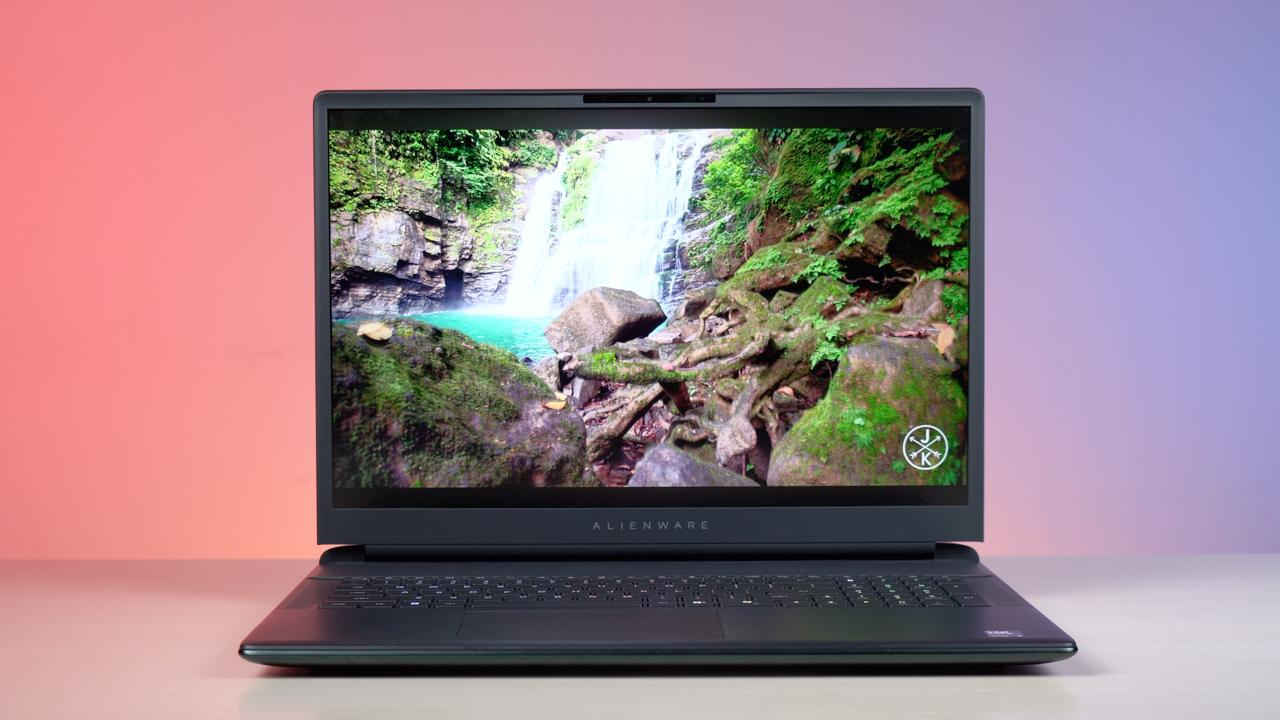
When it comes to gaming experience, the display quality matters a lot. After all, you would want to experience the game’s graphics in all their glory. And the 18-inch WQXGA display is one of the laptop’s highlights. With a 300Hz refresh rate and 500 nits brightness, the screen is sharp, fluid, and accurate. Colours pop without oversaturation, and at 130% sRGB, this is a panel you can use comfortably for both gaming and content creation.
During our testing, it was revealed that the display comes with a 99.4% DCI-P3 colour gamut. Further, the tests showed an average Delta E of 2.4, which means colour reproduction is precise enough even for professional editing. This is more than the likes of MSI TITAN GT77HX, Acer Predator PH315-55s and MSI Raider GE67HX 12UHS gaming laptops.
In a nutshell, I enjoyed playing some of my favourite games on this display. Be it cruising around the streets of Mexico in Forza Horizon 5 or peaking through the doors in fear while playing Silent Hill f, the experience was a delight. I could comfortably use the laptop in a well-lit office environment, as well as outdoors.
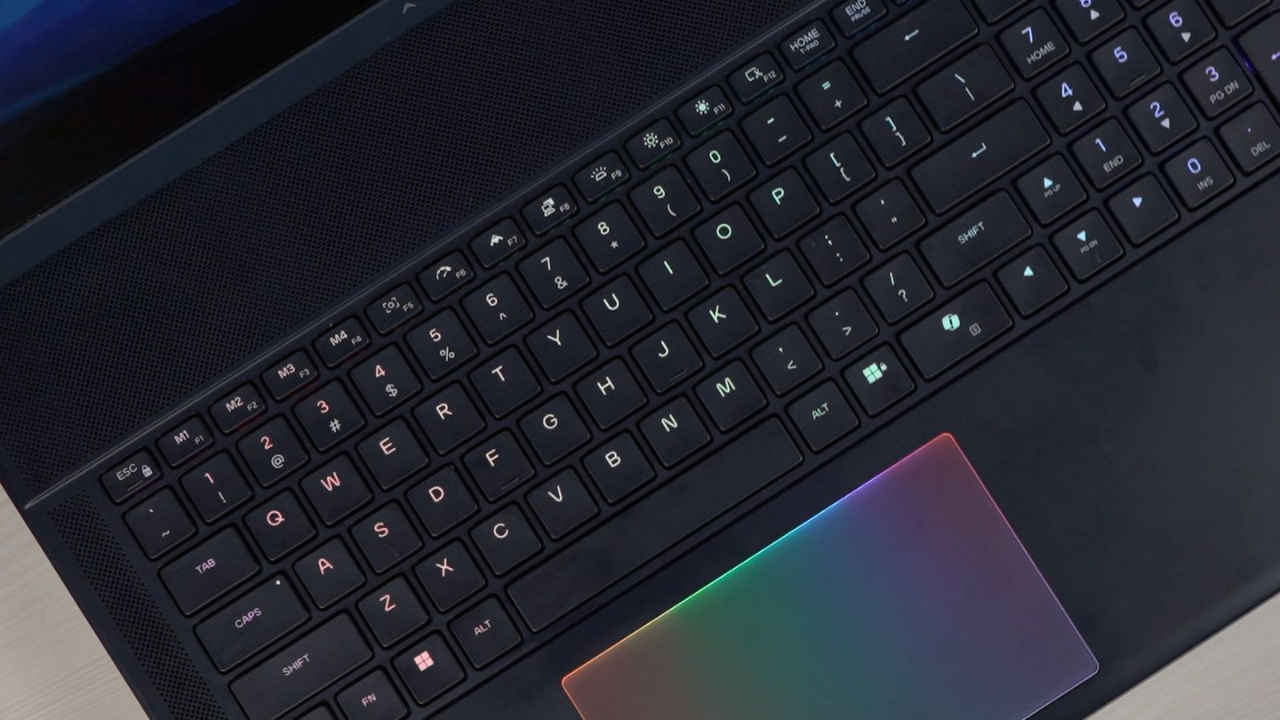
I am generally fond of mechanical keyboards and use one at my home setup. And on the Alienware 18 Area-51, the mechanical keyboard gives you a tactile experience that maximises comfort. The keys are responsive and satisfying to press, which makes long gaming or typing sessions a breeze. There is also a dedicated copilot key that springs the AI assistant to life the moment you press it. Then there are various useful keys to control screen brightness, toggle keyboard backlights, take screenshots, and shift the laptop into performance mode.
The keyboard backlighting, as with other Alienware models, is customisable via the Alienware Command Centre. Not just the keys, even the trackpad lights up when you touch it and enhances the appeal of the laptop. The trackpad isn’t too large either and supports multi-touch gestures. Now, you don’t really use the touchpad for gaming and keeping that in mind, the touchpad here does its job well. Alongside the touchpad is ample space to rest your arms. However, the chassis catches smudges quite easily, and I would recommend cleaning the laptop regularly to avoid those.
Moving on to the audio experience, no gaming rig is complete without one. Dell has that department covered with full marks. Alienware 18 Area-51 packs a solid audio setup with dual 2W woofers and dual 2W tweeters powered by Realtek amps, and it’s tuned with Dolby Atmos for extra depth.
The result is a loud, clear sound with decent bass for a laptop. Be it gunfire in first-person shooter games, eerie background score in horror games, or the sound of engines roaring in car-racing games, the audio doesn’t ever disappoint. I turned the volume up to 100 while sitting at my office desk and noticed my colleagues glancing towards my desk as they could hear the song I was playing on my laptop. With that being said, the speakers are obviously not a complete replacement for a dedicated headset, but as far as laptop speakers are concerned, this laptop matches the premium vibe.
Now, let’s address perhaps the most important aspect of the laptop: the gaming experience. Here’s how some demanding AAA titles fared on the laptop.
Doom: The Dark Ages: At Ultra Nightmare graphics settings in 2K resolution, frame rates hovered between 115-130 fps. Dropping to 1080p high with Nvidia DLSS enabled pushed averages to 450 fps, and medium settings reached 560 fps. Moreover, fast-paced combat never stuttered, making every firefight chaotic yet precise.
Dragon Age: The Veilguard: The epic fantasy adventure ran impressively on the Alienware 18 Area-51. At 1080p with high graphics settings and AMD frame gen on, the game delivered an average of 240 fps, and dropping to medium settings pushed it to 315 fps. When I changed the resolution to 2K and turned graphics settings to high, I got an average fps of 170. The lush environments, detailed character models, and dynamic spell effects looked stunning on the 18-inch display, making every battle and exploration session feel immersive. Combat was fluid, with no noticeable stutters, letting you focus on strategy and story without distractions.
Monster Hunter: Wilds: Hunting massive beasts felt super smooth on this laptop. At 1080p high graphics, the laptop managed an average of 180 fps, while medium settings climbed to 210 fps. Bumping the quality up to 2K resolution with the best graphic settings possible, the frame rates saw an average of 150 fps.
The large screen brought every monster to life, with crisp textures and vibrant landscapes enhancing the thrill of each encounter. Whether dodging attacks or coordinating team hunts, the performance stayed solid, letting the action feel seamless and responsive.
Horizon Forbidden West: Exploring the post-apocalyptic world of Horizon Forbidden West was also a visual treat. At 1080p with high graphics settings and AMD Frame Gen turned on, the laptop averaged 250 fps, and medium settings reached 315 fps. At 2K resolution and best graphic settings, I got around 170-200 fps.
The massive open world, from sprawling cities to verdant wilderness, appeared detailed and alive. Fast traversal, combat, and environmental effects all ran smoothly, making the gameplay as immersive as it was exhilarating on the large 18-inch panel.
Forza Horizon 5: High graphics at 1080p delivered 450 fps, climbing to 500 fps on medium. When I changed graphic settings to extreme and resolution to 2K, the laptop still managed 250 fps, and every vehicle in the game looked breathtaking. The world of Forza Horizon 5 came alive, and I enjoyed cruising through the open world. The 18-inch display made driving at top speed breathtaking, with a depth and perspective that felt almost real.
Silent Hill f: In the recently-released Konami game, medium 1080p settings with Nvidia DLSS turned on averaged 160 fps, while high graphics settings resulted in an average of 120 fps. Meanwhile, switching resolution to 2K and using the highest possible graphics setting resulted in a stable 85 fps. The fog-drenched environments, subtle shadows, and atmospheric audio came alive on the large screen, delivering a truly unsettling horror experience.
Valorant: For those who enjoy competitive titles and absolutely hate those FPS drops, the laptop is a hit. At 1080p resolution and high graphics settings, the Alienware Area-51 delivered an average of 540 fps in Valorant. On medium graphics settings, the game averaged 700 fps. Even when I bumped the resolution to 2K, frame rates hovered between 400 and 600 fps.
The Witcher 3: Wild Hunt: What’s better than exploring the world of The Witcher 3? Exploring it in 2K with Nvidia’s 5090 laptop GPU. On the Alienware 18 Area-51, the Witcher 3 averaged 130 fps with Ultra High graphics settings and 2K resolution. When I turned settings down to high graphics at 1080p, the game ran at 230 fps. Rich environments, sharp character models, and detailed effects kept the game immersive and visually stunning.
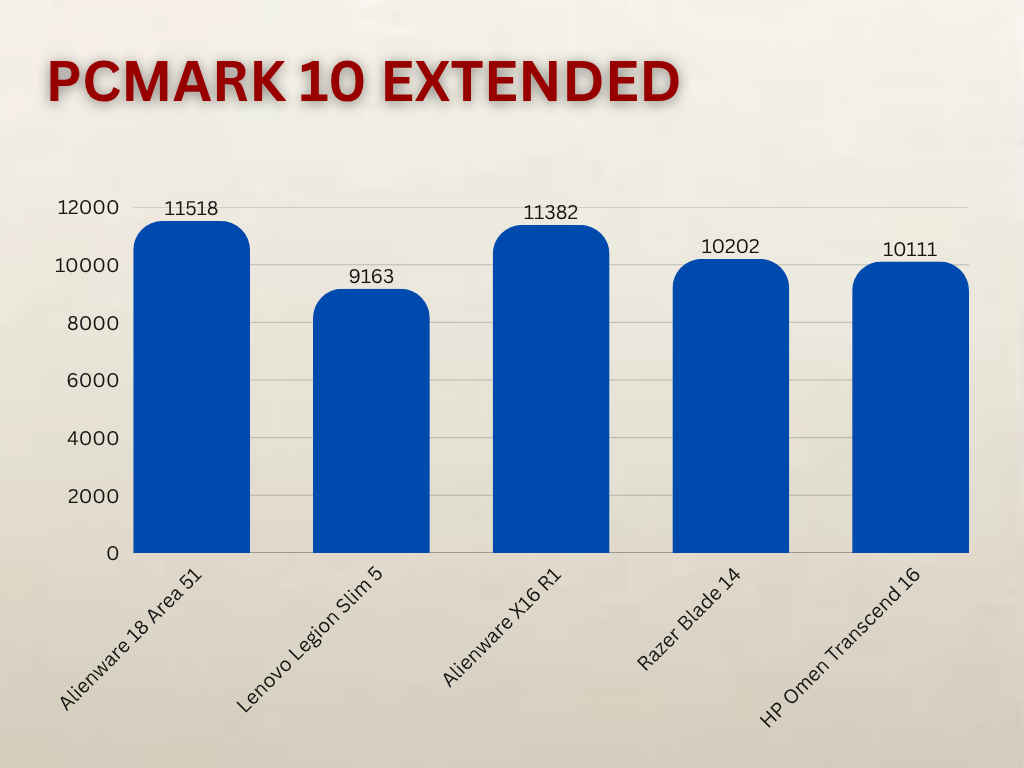
I also ran some benchmark tests on the Alienware 18 Area-51 laptop, and the results show just how powerful this machine is. In the PCMark 10 Extended benchmark test, the laptop scored 11,518 points overall, with standout numbers in digital content creation (14,812) and gaming (28,798).
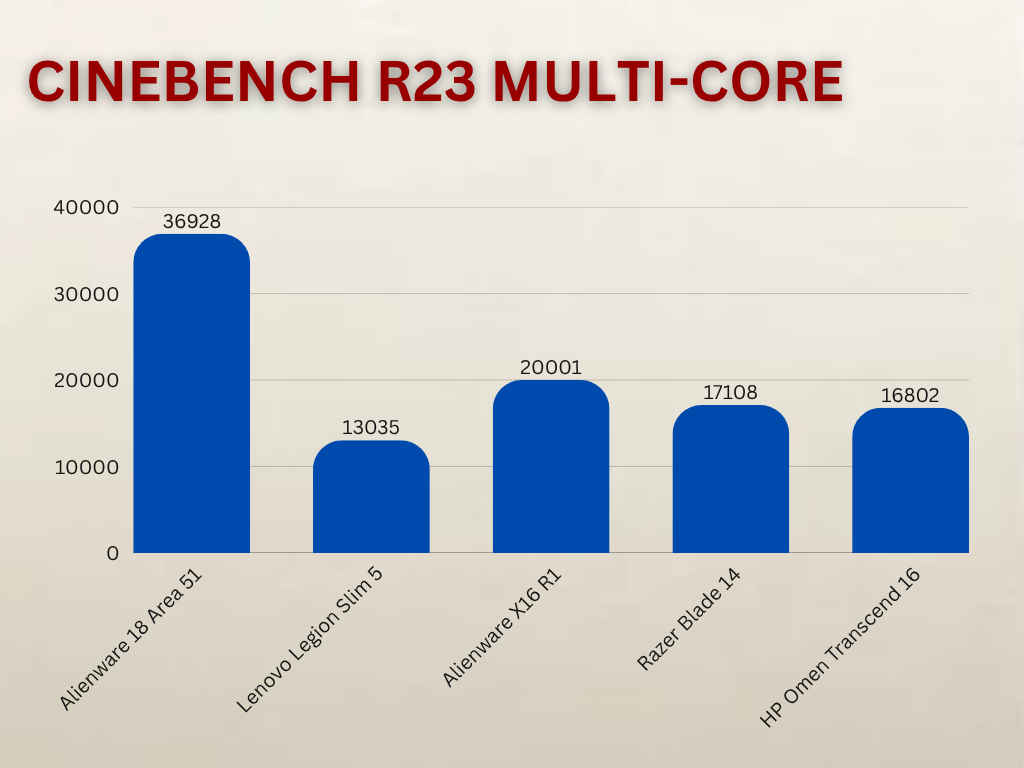
Cinebench R23 pushed a massive 36,928 in multi-thread and 2,235 in single-thread performance, while Geekbench 6 recorded 21,469 in the multi-core test. This is higher than the scores of various laptops with similar and even higher price tags like the Alienware X16 R1, MSI Titan GT77HX, Alienware X17 R2 and MSI Raider GE67HX 12UHS.
In the GPU benchmarks, the laptop scored 23,783 points in 3DMark TimeSpy and 12,379 points in TimeSpy Extreme. Meanwhile, in the FireStrike benchmark test, the laptop scored 39,674 points, while in the FireStrike Extreme test, the score was 28,280 points. Further, in the Port Royal DXR test, the laptop displayed a score of 16,553 points. Once again, this puts the laptop comfortably ahead of many laptops in the same, and higher, price segment.
These numbers put the RTX 5090 in a league of its own, ensuring it can handle anything thrown at it. Be it the latest ray-traced AAA titles or the all-time favourites sitting in your Steam library.
The laptop comes with a 2TB SSD, which has impressive speeds. The laptop’s 2TB NVMe SSD clocked sequential reads of over 14,000 MB/s and writes of 13,300 MB/s in the CrystalDiskMark benchmark. In the PC Mark full SSD drive benchmark test, the laptop scored 4,383 points, which is again higher than most devices. During my usage of the device, boot times and file transfers feel instantaneous.
Gaming laptops aren’t really the best when it comes to battery. And since the RTX 5090 laptop GPU requires immense power, it is no surprise that the Alienware 18 Area-51 lasts barely an hour on battery when it comes to a proper gaming session. When you are not gaming, you can expect to get around 2 hours of performance with basic tasks like Word, Excel, Chrome, etc. In our Polycron Battery test, the laptop showed an average battery life of 1 hour and 15 minutes.
The Command Center also lets you switch between Quiet, Balanced, and Performance profiles, which can help stretch battery life when you’re away from an outlet. I would recommend sticking to Power Saver or Quiet mode, and definitely toggling to the integrated GPU for lighter workloads. When I did that, I got to around 3 hours of battery life.
When it comes to thermals, the laptop outshines many others in the same range. The maximum CPU temperature that I noticed after running a stress test was 90°C. This puts the laptop at par with MSI Titan and shows that it runs cooler than the likes of Acer Predator PH315-55s and MSI Raider GE67HX 12UHS.
Talking about the surface temperatures, during the Unigine Valley Extreme Benchmark test, they hovered around 32.5°C in the WASD area and 34°C in the IJKL cluster. The touchpad remained super cool at 25°C.
The Alienware 18 Area-51, with Intel Core Ultra 9 processor and Nvidia’s 5090 laptop GPU, is a machine built for gamers who are looking for desktop-level performance in a portable form factor. Its stunning display, excellent audio, and best-in-class GPU power make it one of the most immersive portable gaming rigs you can buy right now. However, its heavy build and average battery life mean it’s not designed for daily commutes or café gaming sessions. If you have the budget and plan to keep it mostly on a desk, with the occasional trip to a friend’s place or a gaming event, this is one of the most powerful laptops you can own today.